Darknet: Save weights after each 100 iteration
Hi, AlexeyAB!
Is there a possibility for saving trained weights after each 100 iterations?
 AndreanoCuritello
All 7 comments
+1 for this question, is it possible to write weights file on each 100 iteration?
like it was before:
yolov3-custom_200.weights
yolov3-custom_300.weights
yolov3-custom_400.weights
etc.
thx
 dreambit
on 14 Jan 2019
dreambit
on 14 Jan 2019
@dreambit Hi,
Currently it saves weights
for each 1000 iterations it saves weights to separate files
yolov3-custom_2000.weights,yolov3-custom_3000.weights, ...for each 100 iterations it overwrites
yolov3-custom_last.weightsfile
+1 for this question, is it possible to write weights file on each 100 iteration?
Yes, change here 1000 to 100: https://github.com/AlexeyAB/darknet/blob/d9e559a245829830dec03c6d3b909857c6d7937f/src/detector.c#L281
 AlexeyAB
on 14 Jan 2019
AlexeyAB
on 14 Jan 2019
@AlexeyAB thanks, just great, I just hope that having more weights file will help to find the best one with highest mAP
dreambit
on 14 Jan 2019
@dreambit
Yes, may be.
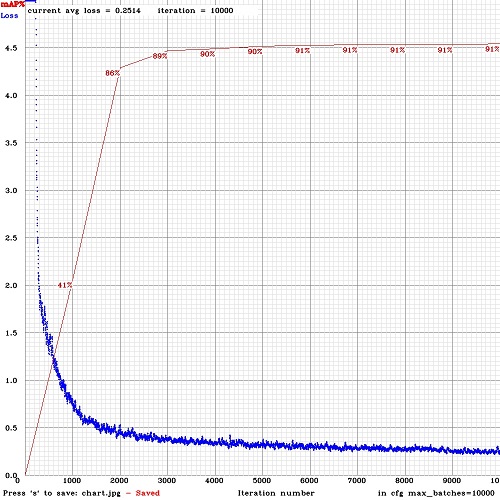
Also you can try to train the model with flag -map so you will see accuracy mAP during training for each 4 epochs (4 * images_in_train_txt / 64 iterations): https://github.com/AlexeyAB/darknet#when-should-i-stop-training
./darknet detector train data/obj.data yolo-obj.cfg darknet53.conv.74 -map
AlexeyAB
on 14 Jan 2019
@AlexeyAB, thx, does this option affect perfomace? i mean, is mAP calcultion cpu/gpu intensive? may it lead to total training time increase? if i run -map and -dont_show, will mAP value be printed to stdout?
dreambit
on 14 Jan 2019
@dreambit
does this option affect perfomace? i mean, is mAP calcultion cpu/gpu intensive? may it lead to total training time increase?
Yes, it increases training time, about ~25%.
As if you calculate mAP by using ./darknet detector map... for each 4 Epochs, so it uses GPU with batch=1 for mAP calculation. For training it still uses batch= that is specified in cfg.
In the last version of darknet:
if i run -map and -dont_show, will mAP value be printed to stdout?
You will see in the console for each iteration line: Last accuracy [email protected] = 12,25%
This line will appear after the first mAP calculation if you use flag -map
Also for each 100 iterations will be saved chart.png file with avg-Loss & mAP-chart.
Also you can try to train by using this command:
/darknet detector train cfg/coco.data yolov3.cfg darknet53.conv.74 -dont_show -mjpeg_port 8090 -map
So you can connect to the Darknet by using Chrome/Firefox using URL http://server-ip-address:8090 to see the avg-Loss & mAP-chart, if your remote server allows external connections to the port 8090.
But do not leave the Web-Browser tab-window connected for a long time, since it can consume a lot of internet traffic, because this is a image-jpeg-stream.
AlexeyAB
on 14 Jan 2019
I have 4 GPUs. Why does it save weights like this: 1008, 2016, 3024, 4032, 5040...?
 SteveBetter
on 18 Feb 2019
SteveBetter
on 18 Feb 2019
Related issues
 bit-scientist
·
3Comments
bit-scientist
·
3Comments
 Mididou
·
3Comments
Mididou
·
3Comments
 Yumin-Sun-00
·
3Comments
Yumin-Sun-00
·
3Comments
 qianyunw
·
3Comments
qianyunw
·
3Comments
 Jacky3213
·
3Comments
Jacky3213
·
3Comments
Most helpful comment
@dreambit
Yes, it increases training time, about ~25%.
As if you calculate mAP by using
./darknet detector map... for each 4 Epochs, so it uses GPU with batch=1 for mAP calculation. For training it still uses batch= that is specified in cfg.In the last version of darknet:
You will see in the console for each iteration line:
Last accuracy [email protected] = 12,25%This line will appear after the first mAP calculation if you use flag
-mapAlso for each 100 iterations will be saved
chart.pngfile with avg-Loss & mAP-chart.Also you can try to train by using this command:
/darknet detector train cfg/coco.data yolov3.cfg darknet53.conv.74 -dont_show -mjpeg_port 8090 -mapSo you can connect to the Darknet by using Chrome/Firefox using URL
http://server-ip-address:8090to see the avg-Loss & mAP-chart, if your remote server allows external connections to the port 8090.But do not leave the Web-Browser tab-window connected for a long time, since it can consume a lot of internet traffic, because this is a image-jpeg-stream.