Darknet: There is no `calc_anchors` option in the source code... or am I missing something?
I have built darknet on Ubuntu 18.04LTS and I am trying to train YOLOv3 on a custom data set.
My data set consists of 100K+ 295x295 JPEGS with their corresponding TXT files with the bounding box data in them, I used https://github.com/AlexeyAB/Yolo_mark to verify that my input data is good.
My obj.data has the following content:
classes = 142
train = ../data/darknet/train.txt
valid = ../data/darknet/valid.txt
names = ../data/darknet/obj.names
backup = ../data/darknet/backup
And when I run ./darknet detector calc_anchors obj.data -num_of_clusters 9 -width 320 - height 320 I get nothing, no error no output no thing.
Looking at detector.c lines 836-841, I also don't see a calc_anchors option either, what am I missing?
 Sauraus
All 33 comments
You should use exactly this repository: https://github.com/AlexeyAB/darknet
There is this code: https://github.com/AlexeyAB/darknet/blob/840aac5115600194b40bf4d060193e6512b2a426/src/detector.c#L1028-L1216
 AlexeyAB
on 11 Jan 2019
AlexeyAB
on 11 Jan 2019
Sorry that was a stupid mistake on my part.
The output of the anchor calc is however extremely interesting...
./darknet detector calc_anchors obj.data -num_of_clusters 9 -width 320 -height 320
num_of_clusters = 9, width = 320, height = 320
read labels from 119650 images
loaded image: 119650 box: 2393000
all loaded.
calculating k-means++ ...
avg IoU = 100.00 %
Saving anchors to the file: anchors.txt
anchors = 30, 30, 30, 30, 30, 30, 30, 30, 30, 30, 30, 30, 30, 30, 30, 30, 30, 30
Sauraus
on 11 Jan 2019
Can you show screenshot of cloud of points that is generated by using -show flag?
./darknet detector calc_anchors obj.data -num_of_clusters 9 -width 320 -height 320 -show
AlexeyAB
on 11 Jan 2019
-show doesn't do anything for me :(
Sauraus
on 11 Jan 2019
@Sauraus It seems you compiled Darknet without OpenCV, or run it without connected monitor.
calculating k-means++ ...
avg IoU = 100.00 %
Saving anchors to the file: anchors.txt
anchors = 30, 30, 30, 30, 30, 30, 30, 30, 30, 30, 30, 30, 30, 30, 30, 30, 30, 30
This result is very strange. It looks like your dataset is incorrect - all objects have the same size 30x30.
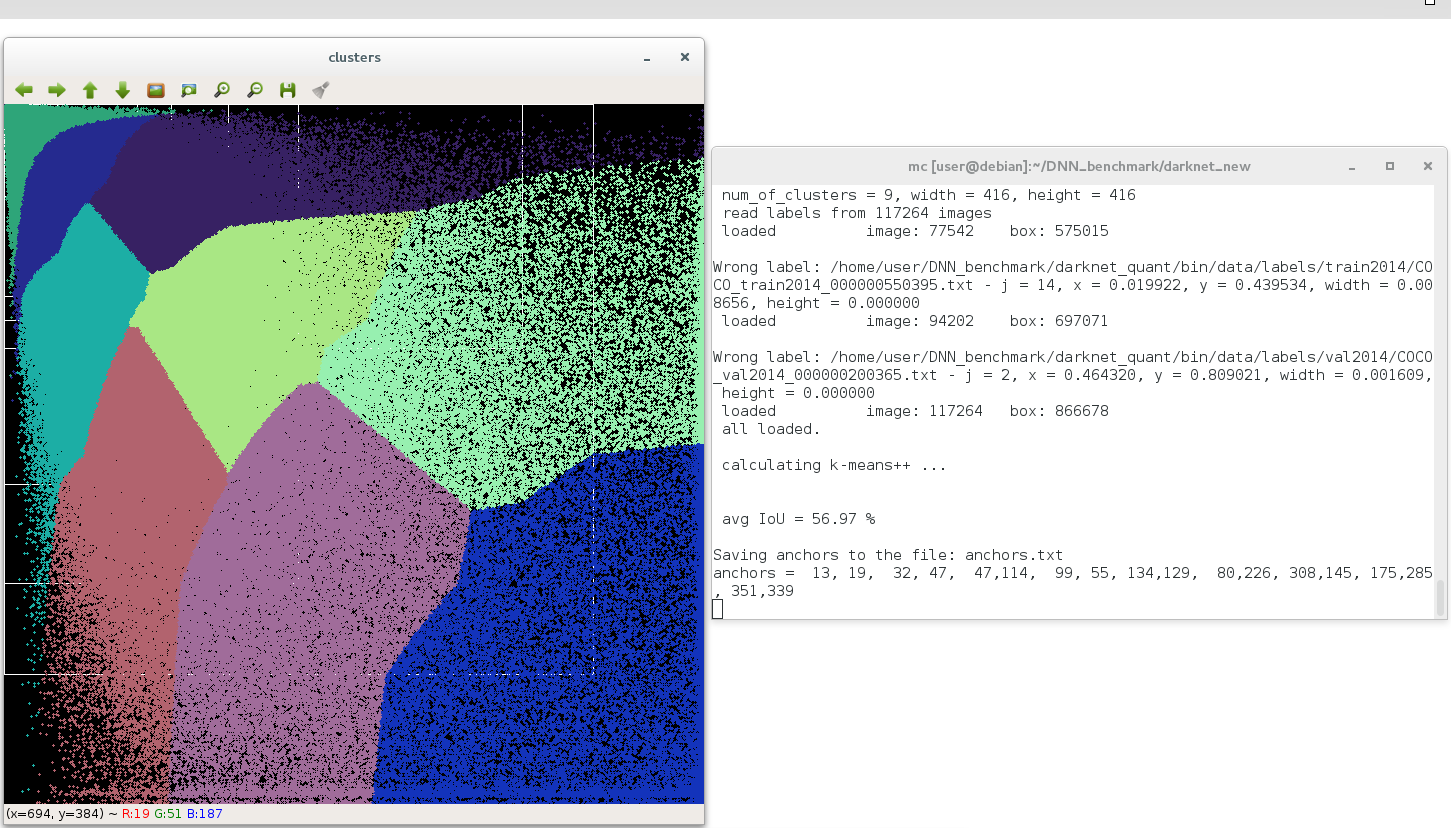
That result can I get by using MS COCO 2014 TrainVal dataset on Windows and Linux:
on Windows
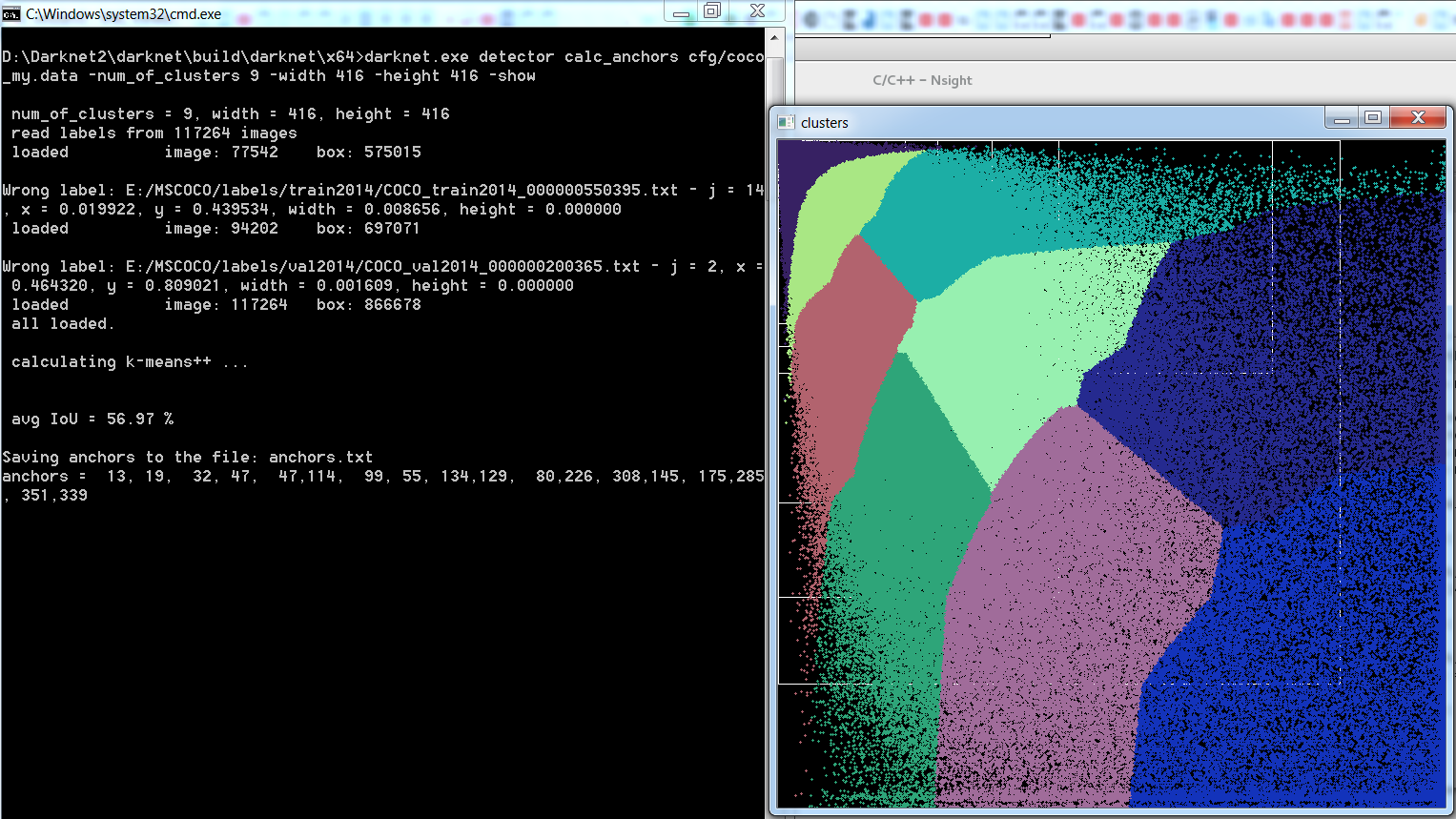
on Linux
AlexeyAB
on 11 Jan 2019
-showdoesn't do anything for me :(
Hi @AlexeyAB,
i have the same problem as @Sauraus. How can I tell, if OPENCV has been implemented correctly?
i thought that OPENCV is installed correctly, because without OPENCV I can't calculate k-means++, right?
what do you mean with 'run without connected monitor' ? :)
well I like your work ! but I'm still new in programming.
I am looking forward to your answer
Best Regards
Trung
 phamngocthanhtrung
on 16 Jan 2019
phamngocthanhtrung
on 16 Jan 2019
@phamngocthanhtrung
what do you mean with 'run without connected monitor' ? :)
For example, if you connected to the Amazon EC2 server by using SSH.
i thought that OPENCV is installed correctly, because without OPENCV I can't calculate k-means++, right?
Currently you can calculate k-means even without OpenCV.
To build Darknet with OpenCV, you should set OPENCV=1 in the Makefile and do 2 commands:
make clean
make
@phamngocthanhtrung
what do you mean with 'run without connected monitor' ? :)
For example, if you connected to the Amazon EC2 server by using SSH.
i thought that OPENCV is installed correctly, because without OPENCV I can't calculate k-means++, right?
Currently you can calculate k-means even without OpenCV.
To build Darknet with OpenCV, you should set OPENCV=1 in the
Makefileand do 2 commands:make clean makeThank you for your quick response. I will try it later on the laptop with linux.
Does this also apply to Windows? or do I have to pay attention to something else?
phamngocthanhtrung
on 16 Jan 2019
@phamngocthanhtrung
This is apply to Windows too: https://github.com/AlexeyAB/darknet/issues/2186#issuecomment-453672469
just see how to compile Darknet with OpenCV on Windows: https://github.com/AlexeyAB/darknet#how-to-compile-on-windows
AlexeyAB
on 16 Jan 2019
I don't have openCV installed that is correct, what I can say is that my train/test/val data set are all generated because my real-world analysis is going to be just that computer generated images.
And all my classes that I need to identify are the same shape & size, they only differ in their 'content' ie. they are unique images, but everything else the background and the number of these images will always be the same in the real-world.
I got darknet to compile and run, however after a iterations I get this output:
Tensor Cores are disabled until the first 3000 iterations are reached.
69: 1974.283936, 2061.566895 avg loss, 0.000000 rate, 2.235306 seconds, 4416 images
Loaded: 0.000244 seconds
Region 82 Avg IOU: -nan, Class: -nan, Obj: -nan, No Obj: 0.519467, .5R: -nan, .75R: -nan, count: 0
Region 94 Avg IOU: -nan, Class: -nan, Obj: -nan, No Obj: 0.500713, .5R: -nan, .75R: -nan, count: 0
Region 106 Avg IOU: 0.004620, Class: 0.476677, Obj: 0.309430, No Obj: 0.398685, .5R: 0.000000, .75R: 0.000000, count: 144
Region 82 Avg IOU: -nan, Class: -nan, Obj: -nan, No Obj: 0.519680, .5R: -nan, .75R: -nan, count: 0
Region 94 Avg IOU: -nan, Class: -nan, Obj: -nan, No Obj: 0.500634, .5R: -nan, .75R: -nan, count: 0
Region 106 Avg IOU: 0.003863, Class: 0.478298, Obj: 0.332962, No Obj: 0.397886, .5R: 0.000000, .75R: 0.000000, count: 146
Region 82 Avg IOU: -nan, Class: -nan, Obj: -nan, No Obj: 0.519427, .5R: -nan, .75R: -nan, count: 0
Region 94 Avg IOU: -nan, Class: -nan, Obj: -nan, No Obj: 0.500826, .5R: -nan, .75R: -nan, count: 0
Redarknet: ./src/cuda.c:36: check_error: Assertion `0' failed.
^C[1]+ Aborted (core dumped) nohup ./darknet detector train obj.data yolo-league.cfg darknet53.conv.74
Sauraus
on 16 Jan 2019
@Sauraus Hi,
Try to use the latest version of Darknet
Try to compile it with
GPU=1 CUDNN=0 CUDNN_HALF=0in the Makefile, does it help?What params do you use in the Makefile? GPU, CUDNN, CUDNN_HALF, ...
Can you rename
yolo-league.cfgtoyolo-league.cfg.txtand attach it to your message here?Can you show output of commands?
nvcc --version
So now I was able to get darknet to run for 209 iterations before it died, with the same ./src/cuda.c:36: check_error: Assertion0' failed.`
I am however also seeing this output which has me confused:
Tensor Cores are disabled until the first 3000 iterations are reached.
208: 71.500648, 97.187935 avg loss, 0.000002 rate, 2.098871 seconds, 13312 images
Loaded: 0.000049 seconds
Region 82 Avg IOU: -nan, Class: -nan, Obj: -nan, No Obj: 0.096551, .5R: -nan, .75R: -nan, count: 0
Region 94 Avg IOU: -nan, Class: -nan, Obj: -nan, No Obj: 0.045538, .5R: -nan, .75R: -nan, count: 0
Region 106 Avg IOU: 0.474561, Class: 0.138871, Obj: 0.009896, No Obj: 0.007448, .5R: 0.451389, .75R: 0.055556, count: 144
Region 82 Avg IOU: -nan, Class: -nan, Obj: -nan, No Obj: 0.096551, .5R: -nan, .75R: -nan, count: 0
Region 94 Avg IOU: -nan, Class: -nan, Obj: -nan, No Obj: 0.045430, .5R: -nan, .75R: -nan, count: 0
Region 106 Avg IOU: 0.511250, Class: 0.147416, Obj: 0.009705, No Obj: 0.007332, .5R: 0.470199, .75R: 0.132450, count: 151
Region 82 Avg IOU: -nan, Class: -nan, Obj: -nan, No Obj: 0.096501, .5R: -nan, .75R: -nan, count: 0
Region 94 Avg IOU: -nan, Class: -nan, Obj: -nan, No Obj: 0.045431, .5R: -nan, .75R: -nan, count: 0
Region 106 Avg IOU: 0.485158, Class: 0.135461, Obj: 0.008898, No Obj: 0.007293, .5R: 0.432432, .75R: 0.087838, count: 148
Region 82 Avg IOU: -nan, Class: -nan, Obj: -nan, No Obj: 0.097143, .5R: -nan, .75R: -nan, count: 0
Region 94 Avg IOU: -nan, Class: -nan, Obj: -nan, No Obj: 0.045619, .5R: -nan, .75R: -nan, count: 0
Region 106 Avg IOU: 0.487309, Class: 0.147245, Obj: 0.009130, No Obj: 0.007337, .5R: 0.424658, .75R: 0.068493, count: 146
Region 82 Avg IOU: -nan, Class: -nan, Obj: -nan, No Obj: 0.096993, .5R: -nan, .75R: -nan, count: 0
Region 94 Avg IOU: -nan, Class: -nan, Obj: -nan, No Obj: 0.045592, .5R: -nan, .75R: -nan, count: 0
Region 106 Avg IOU: 0.481131, Class: 0.156934, Obj: 0.009987, No Obj: 0.007284, .5R: 0.448529, .75R: 0.088235, count: 136
Region 82 Avg IOU: -nan, Class: -nan, Obj: -nan, No Obj: 0.096824, .5R: -nan, .75R: -nan, count: 0
Region 94 Avg IOU: -nan, Class: -nan, Obj: -nan, No Obj: 0.045734, .5R: -nan, .75R: -nan, count: 0
Region 106 Avg IOU: 0.500976, Class: 0.157465, Obj: 0.009814, No Obj: 0.007266, .5R: 0.519380, .75R: 0.124031, count: 129
Region 82 Avg IOU: -nan, Class: -nan, Obj: -nan, No Obj: 0.096824, .5R: -nan, .75R: -nan, count: 0
Region 94 Avg IOU: -nan, Class: -nan, Obj: -nan, No Obj: 0.045848, .5R: -nan, .75R: -nan, count: 0
Region 106 Avg IOU: 0.472346, Class: 0.144216, Obj: 0.009209, No Obj: 0.007502, .5R: 0.452055, .75R: 0.075342, count: 146
Region 82 Avg IOU: -nan, Class: -nan, Obj: -nan, No Obj: 0.096870, .5R: -nan, .75R: -nan, count: 0
Region 94 Avg IOU: -nan, Class: -nan, Obj: -nan, No Obj: 0.045286, .5R: -nan, .75R: -nan, count: 0
Region 106 Avg IOU: 0.468400, Class: 0.167314, Obj: 0.011280, No Obj: 0.007558, .5R: 0.451128, .75R: 0.052632, count: 133
Tensor Cores are disabled until the first 3000 iterations are reached.
209: 61.391472, 93.608292 avg loss, 0.000002 rate, 2.096462 seconds, 13376 images
Loaded: 0.000049 seconds
Region 82 Avg IOU: -nan, Class: -nan, Obj: -nan, No Obj: 0.094309, .5R: -nan, .75R: -nan, count: 0
Region 94 Avg IOU: -nan, Class: -nan, Obj: -nan, No Obj: 0.044396, .5R: -nan, .75R: -nan, count: 0
Region 106 Avg IOU: 0.458726, Class: 0.139304, Obj: 0.008789, No Obj: 0.007544, .5R: 0.419847, .75R: 0.061069, count: 131
Region 82 Avg IOU: -nan, Class: -nan, Obj: -nan, No Obj: 0.093839, .5R: -nan, .75R: -nan, count: 0
Region 94 Avg IOU: -nan, Class: -nan, Obj: -nan, No Obj: 0.043995, .5R: -nan, .75R: -nan, count: 0
Region 106 Avg IOU: 0.483940, Class: 0.140279, Obj: 0.011139, No Obj: 0.007370, .5R: 0.480263, .75R: 0.046053, count: 152
Region 82 Avg IOU: -nan, Class: -nan, Obj: -nan, No Obj: 0.093806, .5R: -nan, .75R: -nan, count: 0
Region 94 Avg IOU: -nan, Class: -nan, Obj: -nan, No Obj: 0.044278, .5R: -nan, .75R: -nan, count: 0
Region 106 Avg IOU: 0.483270, Class: 0.153977, Obj: 0.011726, No Obj: 0.007199, .5R: 0.482269, .75R: 0.078014, count: 141
Region 82 Avg IOU: -nan, Class: -nan, Obj: -nan, No Obj: 0.094319, .5R: -nan, .75R: -nan, count: 0
Region 94 Avg IOU: -nan, Class: -nan, Obj: -nan, No Obj: 0.044451, .5R: -nan, .75R: -nan, count: 0
Region 106 Avg IOU: 0.462228, Class: 0.155586, Obj: 0.011541, No Obj: 0.007202, .5R: 0.448276, .75R: 0.048276, count: 145
Region 82 Avg IOU: -nan,darknet: ./src/cuda.c:36: check_error: Assertion `0' failed.
I made a gist of the cfg file here: yolo-league.cfg
Makefile
GPU=1
CUDNN=1
CUDNN_HALF=1
OPENCV=0
AVX=0
OPENMP=1
LIBSO=0
ARCH= -gencode arch=compute_75,code=[sm_75,compute_75]
nvcc --version
nvcc --version
nvcc: NVIDIA (R) Cuda compiler driver
Copyright (c) 2005-2018 NVIDIA Corporation
Built on Sat_Aug_25_21:08:01_CDT_2018
Cuda compilation tools, release 10.0, V10.0.130
nvidia-smi
+-----------------------------------------------------------------------------+
| NVIDIA-SMI 410.79 Driver Version: 410.79 CUDA Version: 10.0 |
|-------------------------------+----------------------+----------------------+
| GPU Name Persistence-M| Bus-Id Disp.A | Volatile Uncorr. ECC |
| Fan Temp Perf Pwr:Usage/Cap| Memory-Usage | GPU-Util Compute M. |
|===============================+======================+======================|
| 0 GeForce RTX 208... Off | 00000000:08:00.0 Off | N/A |
| 43% 63C P2 161W / 260W | 5350MiB / 10989MiB | 70% Default |
+-------------------------------+----------------------+----------------------+
| 1 GeForce RTX 208... Off | 00000000:42:00.0 On | N/A |
| 0% 42C P8 1W / 260W | 375MiB / 10988MiB | 3% Default |
+-------------------------------+----------------------+----------------------+
+-----------------------------------------------------------------------------+
| Processes: GPU Memory |
| GPU PID Type Process name Usage |
|=============================================================================|
| 0 93378 C ./darknet 5339MiB |
| 1 68540 G /usr/lib/xorg/Xorg 167MiB |
| 1 77800 G /usr/bin/gnome-shell 195MiB |
+-----------------------------------------------------------------------------+
Sauraus
on 17 Jan 2019
You should set all 9 anchors:
anchors = 30, 30, 30, 30, 30, 30, 30, 30, 30, 30, 30, 30, 30, 30, 30, 30, 30, 30
instead of only 1 anchor: anchors = 30, 30
in your cfg-file for each of 3 [yolo] layers.
AlexeyAB
on 17 Jan 2019
ok so now it ran for 639 iterations before exiting on the same line of code.
Tensor Cores are disabled until the first 3000 iterations are reached.
638: 25.685345, 18.755125 avg loss, 0.000166 rate, 2.086259 seconds, 40832 images
Loaded: 0.000041 seconds
Region 82 Avg IOU: -nan, Class: -nan, Obj: -nan, No Obj: 0.000335, .5R: -nan, .75R: -nan, count: 0
Region 94 Avg IOU: -nan, Class: -nan, Obj: -nan, No Obj: 0.000168, .5R: -nan, .75R: -nan, count: 0
Region 106 Avg IOU: 0.420008, Class: 0.016057, Obj: 0.232136, No Obj: 0.000447, .5R: 0.065693, .75R: 0.000000, count: 137
Region 82 Avg IOU: -nan, Class: -nan, Obj: -nan, No Obj: 0.000337, .5R: -nan, .75R: -nan, count: 0
Region 94 Avg IOU: -nan, Class: -nan, Obj: -nan, No Obj: 0.000164, .5R: -nan, .75R: -nan, count: 0
Region 106 Avg IOU: 0.426090, Class: 0.018646, Obj: 0.179267, No Obj: 0.000423, .5R: 0.104895, .75R: 0.000000, count: 143
Region 82 Avg IOU: -nan, Class: -nan, Obj: -nan, No Obj: 0.000335, .5R: -nan, .75R: -nan, count: 0
Region 94 Avg IOU: -nan, Class: -nan, Obj: -nan, No Obj: 0.000168, .5R: -nan, .75R: -nan, count: 0
Region 106 Avg IOU: 0.409915, Class: 0.015052, Obj: 0.188954, No Obj: 0.000432, .5R: 0.062500, .75R: 0.000000, count: 144
Region 82 Avg IOU: -nan, Class: -nan, Obj: -nan, No Obj: 0.000358, .5R: -nan, .75R: -nan, count: 0
Region 94 Avg IOU: -nan, Class: -nan, Obj: -nan, No Obj: 0.000163, .5R: -nan, .75R: -nan, count: 0
Region 106 Avg IOU: 0.403522, Class: 0.022099, Obj: 0.161757, No Obj: 0.000401, .5R: 0.089655, .75R: 0.000000, count: 145
Region 82 Avg IOU: -nan, Class: -nan, Obj: -nan, No Obj: 0.000358, .5R: -nan, .75R: -nan, count: 0
Region 94 Avg IOU: -nan, Class: -nan, Obj: -nan, No Obj: 0.000168, .5R: -nan, .75R: -nan, count: 0
Region 106 Avg IOU: 0.409069, Class: 0.016195, Obj: 0.228483, No Obj: 0.000461, .5R: 0.058824, .75R: 0.000000, count: 136
Region 82 Avg IOU: -nan, Class: -nan, Obj: -nan, No Obj: 0.000348, .5R: -nan, .75R: -nan, count: 0
Region 94 Avg IOU: -nan, Class: -nan, Obj: -nan, No Obj: 0.000164, .5R: -nan, .75R: -nan, count: 0
Region 106 Avg IOU: 0.425899, Class: 0.015793, Obj: 0.230431, No Obj: 0.000475, .5R: 0.100000, .75R: 0.000000, count: 150
Region 82 Avg IOU: -nan, Class: -nan, Obj: -nan, No Obj: 0.000337, .5R: -nan, .75R: -nan, count: 0
Region 94 Avg IOU: -nan, Class: -nan, Obj: -nan, No Obj: 0.000165, .5R: -nan, .75R: -nan, count: 0
Region 106 Avg IOU: 0.429721, Class: 0.016063, Obj: 0.221116, No Obj: 0.000483, .5R: 0.111842, .75R: 0.000000, count: 152
Region 82 Avg IOU: -nan, Class: -nan, Obj: -nan, No Obj: 0.000343, .5R: -nan, .75R: -nan, count: 0
Region 94 Avg IOU: -nan, Class: -nan, Obj: -nan, No Obj: 0.000168, .5R: -nan, .75R: -nan, count: 0
Region 106 Avg IOU: 0.425825, Class: 0.015561, Obj: 0.233518, No Obj: 0.000443, .5R: 0.088889, .75R: 0.000000, count: 135
Tensor Cores are disabled until the first 3000 iterations are reached.
639: 26.341766, 19.513790 avg loss, 0.000167 rate, 2.084663 seconds, 40896 images
Loaded: 0.000039 seconds
Region 82 Avg IOU: -nan, Class: -nan, Obj: -nan, No Obj: 0.000327, .5R: -nan, .75R: -nan, count: 0
Region 94 Avg IOU: -nan, Class:darknet: ./src/cuda.c:36: check_error: Assertion `0' failed.
Sauraus
on 17 Jan 2019
And it gets even weirder... everything drops to 0.000000 at iteration 1003, I suspect it has to do with the fact that I have 142 classes which only have 1 image
Tensor Cores are disabled until the first 3000 iterations are reached.
1268: nan, nan avg loss, 0.007500 rate, 2.780617 seconds, 81152 images
Loaded: 0.000049 seconds
Region 82 Avg IOU: -nan, Class: -nan, Obj: -nan, No Obj: 0.000000, .5R: -nan, .75R: -nan, count: 0
Region 94 Avg IOU: -nan, Class: -nan, Obj: -nan, No Obj: 0.000000, .5R: -nan, .75R: -nan, count: 0
Region 106 Avg IOU: nan, Class: 0.000000, Obj: 0.000000, No Obj: 0.000000, .5R: 0.000000, .75R: 0.000000, count: 139
Region 82 Avg IOU: -nan, Class: -nan, Obj: -nan, No Obj: 0.000000, .5R: -nan, .75R: -nan, count: 0
Region 94 Avg IOU: -nan, Class: -nan, Obj: -nan, No Obj: 0.000000, .5R: -nan, .75R: -nan, count: 0
Region 106 Avg IOU: nan, Class: 0.000000, Obj: 0.000000, No Obj: 0.000000, .5R: 0.000000, .75R: 0.000000, count: 151
Region 82 Avg IOU: -nan, Class: -nan, Obj: -nan, No Obj: 0.000000, .5R: -nan, .75R: -nan, count: 0
Region 94 Avg IOU: -nan, Class: -nan, Obj: -nan, No Obj: 0.000000, .5R: -nan, .75R: -nan, count: 0
Region 106 Avg IOU: nan, Class: 0.000000, Obj: 0.000000, No Obj: 0.000000, .5R: 0.000000, .75R: 0.000000, count: 127
Region 82 Avg IOU: -nan, Class: -nan, Obj: -nan, No Obj: 0.000000, .5R: -nan, .75R: -nan, count: 0
Region 94 Avg IOU: -nan, Class: -nan, Obj: -nan, No Obj: 0.000000, .5R: -nan, .75R: -nan, count: 0
Region 106 Avg IOU: nan, Class: 0.000000, Obj: 0.000000, No Obj: 0.000000, .5R: 0.000000, .75R: 0.000000, count: 139
Region 82 Avg IOU: -nan, Class: -nan, Obj: -nan, No Obj: 0.000000, .5R: -nan, .75R: -nan, count: 0
Region 94 Avg IOU: -nan, Class: -nan, Obj: -nan, No Obj: 0.000000, .5R: -nan, .75R: -nan, count: 0
Region 106 Avg IOU: nan, Class: 0.000000, Obj: 0.000000, No Obj: 0.000000, .5R: 0.000000, .75R: 0.000000, count: 141
Region 82 Avg IOU: -nan, Class: -nan, Obj: -nan, No Obj: 0.000000, .5R: -nan, .75R: -nan, count: 0
Region 94 Avg IOU: -nan, Class: -nan, Obj: -nan, No Obj: 0.000000, .5R: -nan, .75R: -nan, count: 0
Region 106 Avg IOU: nan, Class: 0.000000, Obj: 0.000000, No Obj: 0.000000, .5R: 0.000000, .75R: 0.000000, count: 120
Region 82 Avg IOU: -nan, Class: -nan, Obj: -nan, No Obj: 0.000000, .5R: -nan, .75R: -nan, count: 0
Region 94 Avg IOU: -nan, Class: -nan, Obj: -nan, No Obj: 0.000000, .5R: -nan, .75R: -nan, count: 0
Region 106 Avg IOU: nan, Class: 0.000000, Obj: 0.000000, No Obj: 0.000000, .5R: 0.000000, .75R: 0.000000, count: 145
Region 82 Avg IOU: -nan, Class: -nan, Obj: -nan, No Obj: 0.000000, .5R: -nan, .75R: -nan, count: 0
Region 94 Avg IOU: -nan, Class: -nan, Obj: -nan, No Obj: 0.000000, .5R: -nan, .75R: -nan, count: 0
Region 106 Avg IOU: nan, Class: 0.000000, Obj: 0.000000, No Obj: 0.000000, .5R: 0.000000, .75R: 0.000000, count: 146
Tensor Cores are disabled until the first 3000 iterations are reached.
1269: nan, nan avg loss, 0.007500 rate, 2.778714 seconds, 81216 images
Loaded: 0.000068 seconds
Region 82 Avg IOU: -nan, Class: -nan, Obj: -nan, No Obj: 0.000000, .5R: -nan, .75R: -nan, count: 0
Region 94 Avg IOU: -nan, Class: -nan, Obj: -nan, No Obj: 0.000000, .5R: -nan, .75R: -nan, count: 0
Region 106 Avg IOU: nan, Cladarknet: ./src/cuda.c:36: check_error: Assertion `0' failed.
Aborted (core dumped) nohup ./darknet detector train obj.data yolo-league.cfg yolo-league_last.weights
Sauraus
on 17 Jan 2019
@AlexeyAB Thank you very much! I got it.
A last question. Where in the code can i zoom the visualization of -show?
phamngocthanhtrung
on 17 Jan 2019
@Sauraus
Try to train by using this cfg-file without any changes:
yolo-league.cfg.txt
AlexeyAB
on 17 Jan 2019
@phamngocthanhtrung
Where in the code can i zoom the visualization of -show?
There is no such option.
AlexeyAB
on 17 Jan 2019
So the modified config file definitely helped things not crash with out of memory errors, however the results are still weird... https://gist.github.com/Sauraus/6a70c1239e9ad0d43419940c5451e263
At 1000 iterations I stopped the process and added -gpus 0,1 to have it run on 2.
Sauraus
on 18 Jan 2019
@Sauraus
Try to train about 4000 iterations by using only 1 GPU.
And only then switch to 2 x GPU.
AlexeyAB
on 18 Jan 2019
@AlexeyAB tried that... and again got an OOM error, the weird thing is that I can restart it with the last weights file from the backup folder and it picks up where it left of.
 Tensor Cores are disabled until the first 3000 iterations are reached.
 1849: 25.617659, 29.124489 avg loss, 0.001000 rate, 0.809764 seconds, 118336 images
Loaded: 0.000035 seconds
Region 82 Avg IOU: 0.492085, Class: 0.017165, Obj: 0.911043, No Obj: 0.272832, .5R: 0.602740, .75R: 0.171233,  count: 146
Region 94 Avg IOU: 0.641488, Class: 0.008294, Obj: 0.892183, No Obj: 0.100419, .5R: 0.849315, .75R: 0.321918,  count: 146
Region 106 Avg IOU: 0.638922, Class: 0.586612, Obj: 0.575022, No Obj: 0.006249, .5R: 0.842466, .75R: 0.219178,  count: 146
Region 82 Avg IOU: 0.526562, Class: 0.021062, Obj: 0.939867, No Obj: 0.275359, .5R: 0.682540, .75R: 0.031746,  count: 126
Region 94 Avg IOU: 0.633654, Class: 0.010242, Obj: 0.924383, No Obj: 0.098425, .5R: 0.873016, .75R: 0.174603,  count: 126
Region 106 Avg IOU: 0.722407, Class: 0.619994, Obj: 0.553568, No Obj: 0.005514, .5R: 0.952381, .75R: 0.460317,  count: 126
Region 82 Avg IOU: 0.545689, Class: 0.017438, Obj: 0.934200, No Obj: 0.286826, .5R: 0.678322, .75R: 0.118881,  count: 143
Region 94 Avg IOU: 0.685733, Class: 0.009948, Obj: 0.920790, No Obj: 0.102145, .5R: 0.909091, .75R: 0.363636,  count: 143
Region 106 Avg IOU: 0.689811, Class: 0.674283, Obj: 0.646545, No Obj: 0.006364, .5R: 0.923077, .75R: 0.384615,  count: 143
Region 82 Avg IOU: 0.512700, Class: 0.020997, Obj: 0.923266, No Obj: 0.269232, .5R: 0.557143, .75R: 0.142857,  count: 140
Region 94 Avg IOU: 0.671385, Class: 0.009867, Obj: 0.911995, No Obj: 0.097066, .5R: 0.900000, .75R: 0.328571,  count: 140
Region 106 Avg IOU: 0.680840, Class: 0.657331, Obj: 0.637669, No Obj: 0.006047, .5R: 0.928571, .75R: 0.314286,  count: 140
Region 82 Avg IOU: 0.536101, Class: 0.023664, Obj: 0.919087, No Obj: 0.293787, .5R: 0.636943, .75R: 0.159236,  count: 157
Region 94 Avg IOU: 0.647947, Class: 0.010907, Obj: 0.916539, No Obj: 0.103835, .5R: 0.834395, .75R: 0.305732,  count: 157
Region 106 Avg IOU: 0.622758, Class: 0.568733, Obj: 0.592848, No Obj: 0.006373, .5R: 0.808917, .75R: 0.114650,  count: 157
Region 82 Avg IOU: 0.573422, Class: 0.023528, Obj: 0.918245, No Obj: 0.265541, .5R: 0.701493, .75R: 0.246269,  count: 134
Region 94 Avg IOU: 0.693383, Class: 0.009493, Obj: 0.903372, No Obj: 0.097750, .5R: 0.917910, .75R: 0.373134,  count: 134
Region 106 Avg IOU: 0.654191, Class: 0.645346, Obj: 0.619887, No Obj: 0.005842, .5R: 0.902985, .75R: 0.231343,  count: 134
Region 82 Avg IOU: 0.505660, Class: 0.016671, Obj: 0.951888, No Obj: 0.270240, .5R: 0.596899, .75R: 0.116279,  count: 129
Region 94 Avg IOU: 0.695925, Class: 0.008731, Obj: 0.921971, No Obj: 0.100364, .5R: 0.945736, .75R: 0.356589,  count: 129
Region 106 Avg IOU: 0.688647, Class: 0.634116, Obj: 0.611268, No Obj: 0.005923, .5R: 0.922481, .75R: 0.348837,  count: 129
Region 82 Avg IOU: 0.564322, Class: 0.021693, Obj: 0.946525, No Obj: 0.281659, .5R: 0.666667, .75R: 0.156028,  count: 141
Region 94 Avg IOU: 0.683836, Class: 0.011385, Obj: 0.918893, No Obj: 0.100344, .5R: 0.900709, .75R: 0.361702,  count: 141
Region 106 Avg IOU: 0.643111, Class: 0.662854, Obj: 0.631788, No Obj: 0.005991, .5R: 0.879433, .75R: 0.226950,  count: 141

 Tensor Cores are disabled until the first 3000 iterations are reached.
 1850: 26.265963, 28.838636 avg loss, 0.001000 rate, 0.808765 seconds, 118400 images
Resizing
448 x 448
 try to allocate workspace = 58104966 * sizeof(float), CUDA Error: out of memory
darknet: ./src/cuda.c:36: check_error: Assertion `0' failed.
Aborted (core dumped)
@Sauraus
Set subdivisions=16 in cfg-file
AlexeyAB
on 18 Jan 2019
@AlexeyAB do I restart the training from 0 after this change or do I load up the last weights file?
Also after restarting darknet with a single gpu this morning it continued crunching the numbers but then again got to a state where everything went to 0.0 or NaN.
 Tensor Cores are disabled until the first 3000 iterations are reached.
 2862: 3410034944.000000, 341249056.000000 avg loss, 0.001000 rate, 1.309551 seconds, 183168 images
Loaded: 0.000044 seconds
Region 82 Avg IOU: nan, Class: nan, Obj: nan, No Obj: nan, .5R: 0.000000, .75R: 0.000000,  count: 147
Region 94 Avg IOU: 0.000000, Class: 0.000000, Obj: 0.000000, No Obj: 0.000000, .5R: 0.000000, .75R: 0.000000,  count: 147
Region 106 Avg IOU: 0.000000, Class: 0.000000, Obj: 0.000000, No Obj: 0.000000, .5R: 0.000000, .75R: 0.000000,  count: 147
Region 82 Avg IOU: nan, Class: nan, Obj: nan, No Obj: nan, .5R: 0.000000, .75R: 0.000000,  count: 128
Region 94 Avg IOU: 0.000000, Class: 0.000000, Obj: 0.000000, No Obj: 0.000000, .5R: 0.000000, .75R: 0.000000,  count: 128
Region 106 Avg IOU: 0.000000, Class: 0.000000, Obj: 0.000000, No Obj: 0.000000, .5R: 0.000000, .75R: 0.000000,  count: 128
Region 82 Avg IOU: nan, Class: nan, Obj: nan, No Obj: nan, .5R: 0.000000, .75R: 0.000000,  count: 140
Region 94 Avg IOU: 0.000000, Class: 0.000000, Obj: 0.000000, No Obj: 0.000000, .5R: 0.000000, .75R: 0.000000,  count: 140
Region 106 Avg IOU: 0.000000, Class: 0.000000, Obj: 0.000000, No Obj: 0.000000, .5R: 0.000000, .75R: 0.000000,  count: 140
Region 82 Avg IOU: nan, Class: nan, Obj: nan, No Obj: nan, .5R: 0.000000, .75R: 0.000000,  count: 139
Region 94 Avg IOU: 0.000000, Class: 0.000000, Obj: 0.000000, No Obj: 0.000000, .5R: 0.000000, .75R: 0.000000,  count: 139
Region 106 Avg IOU: 0.000000, Class: 0.000000, Obj: 0.000000, No Obj: 0.000000, .5R: 0.000000, .75R: 0.000000,  count: 139
Region 82 Avg IOU: nan, Class: nan, Obj: nan, No Obj: nan, .5R: 0.000000, .75R: 0.000000,  count: 131
Region 94 Avg IOU: 0.000000, Class: 0.000000, Obj: 0.000000, No Obj: 0.000000, .5R: 0.000000, .75R: 0.000000,  count: 131
Region 106 Avg IOU: 0.000000, Class: 0.000000, Obj: 0.000000, No Obj: 0.000000, .5R: 0.000000, .75R: 0.000000,  count: 131
Region 82 Avg IOU: nan, Class: nan, Obj: nan, No Obj: nan, .5R: 0.000000, .75R: 0.000000,  count: 138
Region 94 Avg IOU: 0.000000, Class: 0.000000, Obj: 0.000000, No Obj: 0.000000, .5R: 0.000000, .75R: 0.000000,  count: 138
Region 106 Avg IOU: 0.000000, Class: 0.000000, Obj: 0.000000, No Obj: 0.000000, .5R: 0.000000, .75R: 0.000000,  count: 138
Region 82 Avg IOU: nan, Class: nan, Obj: nan, No Obj: nan, .5R: 0.000000, .75R: 0.000000,  count: 137
Region 94 Avg IOU: 0.000000, Class: 0.000000, Obj: 0.000000, No Obj: 0.000000, .5R: 0.000000, .75R: 0.000000,  count: 137
Region 106 Avg IOU: 0.000000, Class: 0.000000, Obj: 0.000000, No Obj: 0.000000, .5R: 0.000000, .75R: 0.000000,  count: 137
Region 82 Avg IOU: nan, Class: nan, Obj: nan, No Obj: nan, .5R: 0.000000, .75R: 0.000000,  count: 144
Region 94 Avg IOU: 0.000000, Class: 0.000000, Obj: 0.000000, No Obj: 0.000000, .5R: 0.000000, .75R: 0.000000,  count: 144
Region 106 Avg IOU: 0.000000, Class: 0.000000, Obj: 0.000000, No Obj: 0.000000, .5R: 0.000000, .75R: 0.000000,  count: 144
running now with the last save weights file 2800 and subdivisions=16 and its past iteration 2862 now.
Sauraus
on 18 Jan 2019
@Sauraus
do I restart the training from 0 after this change or do I load up the last weights file?
You can continue training.
2862: 3410034944.000000, 341249056.000000 avg loss, 0.001000 rate, 1.309551 seconds, 183168 images
Loaded: 0.000044 seconds
This is very high loss. This is very strange.
- Try to check your
bad.listandbad_label.listif they exist - How many objects maximum are in one training image?
- Are all object labeled on your images? All objects must be marked on each image without exception.
- Try to compile Darknet with
CUDNN_HALF=0(but it should affect only after 3000 iterations) - If it doesn't help, try to train by using
CUDNN=0- if it helps, then check that you use exactly cuDNN for CUDA 10.0 (not cuDNN for CUDA 9.0)
Or try to train yolov3-tiny.cfg
AlexeyAB
on 18 Jan 2019
@Sauraus
do I restart the training from 0 after this change or do I load up the last weights file?
You can continue training.
ok
2862: 3410034944.000000, 341249056.000000 avg loss, 0.001000 rate, 1.309551 seconds, 183168 images
Loaded: 0.000044 secondsThis is very high loss. This is very strange.
That high loss is what I get when the values hit 0.0 / NaN but when I restart training they go away, and with the change tosubsections=16I am now on iteration4420with much better results.
- Try to check your
bad.listandbad_label.listif they exist
No such files to be found.
- How many objects maximum are in one training image?
All training images were generated and are 295x295, with 20 training images to be identified on each, the validation data set only has 10 training images on it as that reflects real life more accurately. The training images were created with more images on them such as to increase the overlap of these.
- Are all object labeled on your images? All objects must be marked on each image without exception.
Every single training image is labelled as they are generated.
- Try to compile Darknet with
CUDNN_HALF=0(but it should affect only after 3000 iterations)
I am way past that on a single GPU and things are still looking good with the loss at 29 and avg loss 25.
- If it doesn't help, try to train by using
CUDNN=0- if it helps, then check that you use exactly cuDNN for CUDA 10.0 (not cuDNN for CUDA 9.0)
Only CUDA 10.0 is installed on the system.
Or try to train yolov3-tiny.cfg
I've thought about that as well, but I wouldn't be able to explain why. 😆
BTW. Can you elaborate on why the changes to subdivisions and why wait till 4000 iterations before trying multi-gpu? Both appear to be working, but I am curious to understand why.
Sauraus
on 18 Jan 2019
@Sauraus
I am way past that on a single GPU and things are still looking good with the loss at 29 and avg loss 25.
So just continue training.
Memory usage = mini_batch_size = batch / subdivisions
So the higher subdivisions - the small mini_batch and smaller memory usage.The first 1000 - 4000 iterations are unstable for training with:
- with multi-gpu
- or with Float-16bit
- or with high learning_rate
- or with very high batch
Only CUDA 10.0 is installed on the system.
Just to know, there are 3 different cuDNN 7.4.1: https://developer.nvidia.com/rdp/cudnn-archive
- Download cuDNN v7.4.1 (Nov 8, 2018), for CUDA 10.0
- Download cuDNN v7.4.1 (Nov 8, 2018), for CUDA 9.2
- Download cuDNN v7.4.1 (Nov 8, 2018), for CUDA 9.0
And if you installed CUDA 10.0 and cuDNN v7.4.1 (Nov 8, 2018), for CUDA 9.0, then it can cause an issue.
AlexeyAB
on 18 Jan 2019
@Sauraus
The first 1000 - 4000 iterations are unstable for training with:
- with multi-gpu
- or with Float-16bit
- or with high learning_rate
- or with very high batch
What makes those initial iterations unstable? None of those parameters except learning_rate change over time right?
Only CUDA 10.0 is installed on the system.
Just to know, there are 3 different cuDNN 7.4.1: https://developer.nvidia.com/rdp/cudnn-archive
- Download cuDNN v7.4.1 (Nov 8, 2018), for CUDA 10.0
- Download cuDNN v7.4.1 (Nov 8, 2018), for CUDA 9.2
- Download cuDNN v7.4.1 (Nov 8, 2018), for CUDA 9.0
And if you installed CUDA 10.0 and cuDNN v7.4.1 (Nov 8, 2018), for CUDA 9.0, then it can cause an issue.
Is there anyway to verify the cuDNN installation?
nvcc --version
nvcc: NVIDIA (R) Cuda compiler driver
Copyright (c) 2005-2018 NVIDIA Corporation
Built on Sat_Aug_25_21:08:01_CDT_2018
Cuda compilation tools, release 10.0, V10.0.130
cat /usr/local/cuda/include/cudnn.h | grep CUDNN_MAJOR -A 2
define CUDNN_MAJOR 7
define CUDNN_MINOR 4
define CUDNN_PATCHLEVEL 2
Sauraus
on 18 Jan 2019
@Sauraus
Is there anyway to verify the cuDNN installation?
I don't know.
What makes those initial iterations unstable? None of those parameters except learning_rate change over time right?
Yes.
I think for some reason there appears common float-point problem high_value + very_low_value = high_value only, so we lose very_low_value, or something else.
AlexeyAB
on 18 Jan 2019
Sauraus
on 18 Jan 2019
Regarding training data, is it better to have uniform size images to train on like in my case 295x295, or is it better to have images that vary in size up and down? for example I have 120K training images, I could make them have a random size between 256...320 (x32) instead of the fixed 295 I have now?
Sauraus
on 19 Jan 2019
@Sauraus
It is better to have a real size.
For each object the Yolo selects the appropriate [yolo]-layer in which one of the anchors is the nearest to the object size.
For example, this yolo layer will be used for training objects with sizes near to the 10x13, 16x30, 33x23 after that image is resized to the network size 416x416.
masks=0,1,2 are indexes of the first 3 anchors=10,13, 16,30, 33,23
https://github.com/AlexeyAB/darknet/blob/6e99e852ffce7d6cf9e9ec427ff3acd003cc8d5b/cfg/yolov3.cfg#L780-L782
So in your case, just leave objects sizes 295x295 if it is their real size.
May be you should leave only first 2 [yolo] layers and remove the last: https://github.com/AlexeyAB/darknet/issues/2186#issuecomment-455149605
AlexeyAB
on 19 Jan 2019
@AlexeyAB I am using https://github.com/AlexeyAB/darknet/files/2768542/yolo-league.cfg.txt and was wondering what would I change if the size objects to detect was in 3 sizes:
23x23
25x25
27x27
Do I just set the 3 anchors to each of the layers, increase the num to 3, set mask = 0, 1, 2 on each layers and increase the number of filters to 147 *3?
Sauraus
on 29 Jan 2019
Do I just set the 3 anchors to each of the layers, increase the num to 3, set mask = 0, 1, 2 on each layers and increase the number of filters to 147 *3?
Yes, you can do it.
AlexeyAB
on 29 Jan 2019
Related issues
 siddharth2395
·
3Comments
siddharth2395
·
3Comments
 hemp110
·
3Comments
hemp110
·
3Comments
 Cipusha
·
3Comments
Cipusha
·
3Comments
 PROGRAMMINGENGINEER-NIKI
·
3Comments
PROGRAMMINGENGINEER-NIKI
·
3Comments
 kebundsc
·
3Comments
kebundsc
·
3Comments