Darknet: Average loss stopped around 1 for yolov3 custom model
I have created a custom yolov3 model, basically a mini version of the standard model and used it to detect only persons. I used the the darknet53.conv.74 pretrained model but I don't know what effect it had with the modified cfg.
I use the 2018 coco dataset with 50/50 images with persons/or not (around 120k images). I left all the training parameters untouched.
My issue is that after 4000 iterations the loss functions stops around 1 and it fluctuates but doesn't decrease anymore. I am at 13k iterations now. I saw that here they had same issue.
Should I just keep going or change the learning rate?
My cfg btw is
[net]
# Testing
# batch=1
# subdivisions=1
# Training
batch=64
subdivisions=8
width=416
height=416
channels=3
momentum=0.9
decay=0.0005
angle=0
saturation = 1.5
exposure = 1.5
hue=.1

learning_rate=0.001
burn_in=1000
max_batches = 500200
policy=steps
steps=400000,450000
scales=.1,.1

[convolutional]
batch_normalize=1
filters=32
size=3
stride=1
pad=1
activation=leaky

# Downsample

[convolutional]
batch_normalize=1
filters=64
size=3
stride=2
pad=1
activation=leaky

[convolutional]
batch_normalize=1
filters=32
size=1
stride=1
pad=1
activation=leaky

[convolutional]
batch_normalize=1
filters=64
size=3
stride=1
pad=1
activation=leaky

[shortcut]
from=-3
activation=linear

# Downsample

[convolutional]
batch_normalize=1
filters=128
size=3
stride=2
pad=1
activation=leaky

[convolutional]
batch_normalize=1
filters=64
size=1
stride=1
pad=1
activation=leaky

[convolutional]
batch_normalize=1
filters=128
size=3
stride=1
pad=1
activation=leaky

[shortcut]
from=-3
activation=linear

[convolutional]
batch_normalize=1
filters=64
size=1
stride=1
pad=1
activation=leaky

[convolutional]
batch_normalize=1
filters=128
size=3
stride=1
pad=1
activation=leaky

[shortcut]
from=-3
activation=linear

# Downsample

[convolutional]
batch_normalize=1
filters=256
size=3
stride=2
pad=1
activation=leaky

[convolutional]
batch_normalize=1
filters=128
size=1
stride=1
pad=1
activation=leaky

[convolutional]
batch_normalize=1
filters=256
size=3
stride=1
pad=1
activation=leaky

[shortcut]
from=-3
activation=linear

[convolutional]
batch_normalize=1
filters=128
size=1
stride=1
pad=1
activation=leaky

[convolutional]
batch_normalize=1
filters=256
size=3
stride=1
pad=1
activation=leaky

[shortcut]
from=-3
activation=linear

[convolutional]
batch_normalize=1
filters=128
size=1
stride=1
pad=1
activation=leaky

[convolutional]
batch_normalize=1
filters=256
size=3
stride=1
pad=1
activation=leaky

[shortcut]
from=-3
activation=linear

[convolutional]
batch_normalize=1
filters=128
size=1
stride=1
pad=1
activation=leaky

[convolutional]
batch_normalize=1
filters=256
size=3
stride=1
pad=1
activation=leaky

[shortcut]
from=-3
activation=linear


[convolutional]
batch_normalize=1
filters=128
size=1
stride=1
pad=1
activation=leaky

[convolutional]
batch_normalize=1
filters=256
size=3
stride=1
pad=1
activation=leaky


[shortcut]
from=-3
activation=linear


# Downsample

[convolutional]
batch_normalize=1
filters=512
size=3
stride=2
pad=1
activation=leaky

[convolutional]
batch_normalize=1
filters=256
size=1
stride=1
pad=1
activation=leaky

[convolutional]
batch_normalize=1
filters=512
size=3
stride=1
pad=1
activation=leaky

[shortcut]
from=-3
activation=linear


[convolutional]
batch_normalize=1
filters=256
size=1
stride=1
pad=1
activation=leaky

[convolutional]
batch_normalize=1
filters=512
size=3
stride=1
pad=1
activation=leaky

[shortcut]
from=-3
activation=linear


[convolutional]
batch_normalize=1
filters=256
size=1
stride=1
pad=1
activation=leaky

[convolutional]
batch_normalize=1
filters=512
size=3
stride=1
pad=1
activation=leaky

[shortcut]
from=-3
activation=linear


[convolutional]
batch_normalize=1
filters=256
size=1
stride=1
pad=1
activation=leaky

[convolutional]
batch_normalize=1
filters=512
size=3
stride=1
pad=1
activation=leaky

[shortcut]
from=-3
activation=linear

[convolutional]
batch_normalize=1
filters=256
size=1
stride=1
pad=1
activation=leaky

[convolutional]
batch_normalize=1
filters=512
size=3
stride=1
pad=1
activation=leaky

[shortcut]
from=-3
activation=linear

# Downsample

[convolutional]
batch_normalize=1
filters=512
size=3
stride=2
pad=1
activation=leaky

[convolutional]
batch_normalize=1
filters=256
size=1
stride=1
pad=1
activation=leaky

[convolutional]
batch_normalize=1
filters=512
size=3
stride=1
pad=1
activation=leaky

[shortcut]
from=-3
activation=linear


[convolutional]
batch_normalize=1
filters=256
size=1
stride=1
pad=1
activation=leaky

[convolutional]
batch_normalize=1
filters=512
size=3
stride=1
pad=1
activation=leaky

[shortcut]
from=-3
activation=linear

[convolutional]
batch_normalize=1
filters=256
size=1
stride=1
pad=1
activation=leaky

[convolutional]
batch_normalize=1
filters=512
size=3
stride=1
pad=1
activation=leaky


[convolutional]
batch_normalize=1
filters=256
size=1
stride=1
pad=1
activation=leaky

[convolutional]
batch_normalize=1
filters=512
size=3
stride=1
pad=1
activation=leaky


######################


[convolutional]
size=1
stride=1
pad=1
filters=18
activation=linear


[yolo]
mask = 6,7,8
anchors = 10,13,  16,30,  33,23,  30,61,  62,45,  59,119,  116,90,  156,198,  373,326
classes=1
num=9
jitter=.3
ignore_thresh = .7
truth_thresh = 1
random=1


[route]
layers = -4

[convolutional]
batch_normalize=1
filters=256
size=1
stride=1
pad=1
activation=leaky

[upsample]
stride=2

[route]
layers = -1, 43


[convolutional]
batch_normalize=1
filters=256
size=1
stride=1
pad=1
activation=leaky

[convolutional]
batch_normalize=1
size=3
stride=1
pad=1
filters=512
activation=leaky

[convolutional]
batch_normalize=1
filters=256
size=1
stride=1
pad=1
activation=leaky

[convolutional]
batch_normalize=1
size=3
stride=1
pad=1
filters=512
activation=leaky


[convolutional]
size=1
stride=1
pad=1
filters=18
activation=linear


[yolo]
mask = 3,4,5
anchors = 10,13,  16,30,  33,23,  30,61,  62,45,  59,119,  116,90,  156,198,  373,326
classes=1
num=9
jitter=.3
ignore_thresh = .7
truth_thresh = 1
random=1


[route]
layers = -4

[convolutional]
batch_normalize=1
filters=128
size=1
stride=1
pad=1
activation=leaky

[upsample]
stride=2

[route]
layers = -1, 27


[convolutional]
batch_normalize=1
filters=128
size=1
stride=1
pad=1
activation=leaky

[convolutional]
batch_normalize=1
size=3
stride=1
pad=1
filters=256
activation=leaky

[convolutional]
batch_normalize=1
filters=128
size=1
stride=1
pad=1
activation=leaky

[convolutional]
batch_normalize=1
size=3
stride=1
pad=1
filters=256
activation=leaky


[convolutional]
size=1
stride=1
pad=1
filters=18
activation=linear


[yolo]
mask = 0,1,2
anchors = 10,13,  16,30,  33,23,  30,61,  62,45,  59,119,  116,90,  156,198,  373,326
classes=1
num=9
jitter=.3
ignore_thresh = .7
truth_thresh = 1
random=1
 Tzuya14
All 48 comments
I use the 2018 coco dataset with 50/50 images with persons/or not (around 120k images). I left all the training parameters untouched.
My issue is that after 4000 iterations the loss functions stops around 1 and it fluctuates but doesn't decrease anymore. I am at 13k iterations now. I saw that here they had same issue.
Should I just keep going or change the learning rate?
You should keep train more.
This is because you have so many different images. It will be very good for accuracy (mAP), but because of this, the loss can be high.
Just set
max_batches = 120000
steps=100000,110000
scales=.1,.1
 AlexeyAB
on 4 Dec 2018
AlexeyAB
on 4 Dec 2018
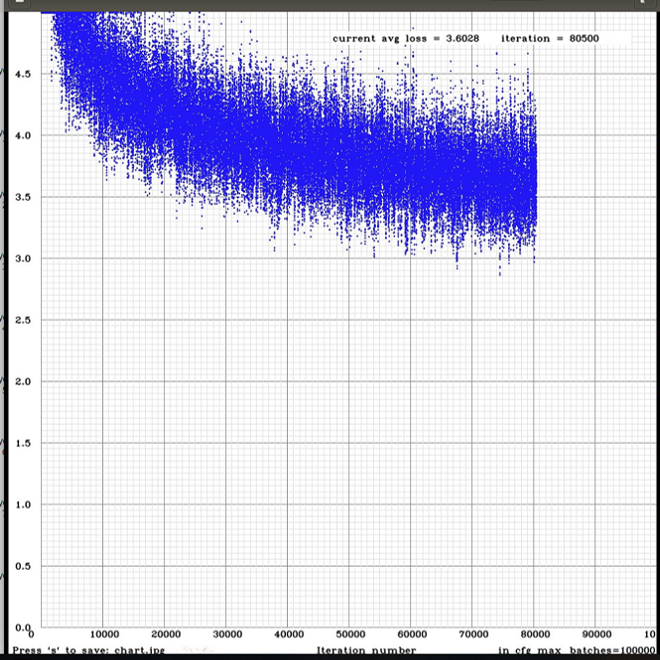
In none of my workouts, (I've tried with yolov3 and yolov3 tiny) AVG LOSS values have dropped 1.5, how did you get 0.06?
I stopped the training when AVG LOSS values start to rise or have reached a stability
I have tried the results and I suspect that I have overfitting, I have the confusion of what weights to finally use
Thank you
 victorvargass
on 12 Dec 2018
victorvargass
on 12 Dec 2018
@victorvargass
- What GPU do you use?
- What params do you use in the Makefile?
I have tried the results and I suspect that I have overfitting, I have the confusion of what weights to finally use
- If you saved intermediate weights files yolo_obj_10000.weights, yolo_obj_20000.weights, ..., yolo_obj_70000.weights then just check mAP (mean average precisions) for these weights: yolo_obj_10000.weights https://github.com/AlexeyAB/darknet#when-should-i-stop-training
./darknet detector map data/obj.data yolo-obj.cfg backup\yolo-obj_10000.weights
./darknet detector map data/obj.data yolo-obj.cfg backup\yolo-obj_20000.weights
...
./darknet detector map data/obj.data yolo-obj.cfg backup\yolo-obj_70000.weights
And get the weights file with the highest mAP.
- For further trainings, you can download new version of Darknet from this repository, recompile, and run training with
-mapflag, for example: https://github.com/AlexeyAB/darknet#when-should-i-stop-training
./darknet detector train data/obj.data yolo-obj.cfg darknet53.conv.74 -map
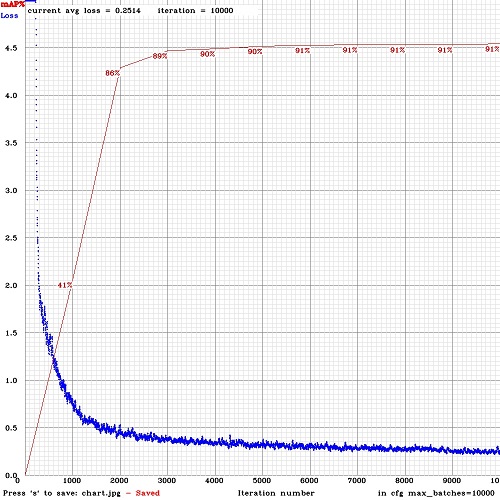
So you will see mAP values (red-line) on the Loss-chart for each 4 Epochs (1 Epoch = images_in_train_txt / batch iterations)
AlexeyAB
on 12 Dec 2018
Thanks @AlexeyAB
- What GPU do you use?
Im using a Nvidia GTX 1080 Ti
What params do you use in the Makefile?
GPU=1
CUDNN=1
CUDNN_HALF=0
OPENCV=1
AVX=0
OPENMP=0
LIBSO=0If you saved intermediate weights files yolo_obj_10000.weights, yolo_obj_20000.weights, ..., yolo_obj_70000.weights then just check mAP (mean average precisions) for these weights: yolo_obj_10000.weights https://github.com/AlexeyAB/darknet#when-should-i-stop-training
No matter how many steps you have trained and the avg loss value?
- For further trainings, you can download new version of Darknet from this repository, recompile, and run training with -map flag, for example: https://github.com/AlexeyAB/darknet#when-should-i-stop-training
Thanks! i will download it
victorvargass
on 12 Dec 2018
Another question, @AlexeyAB
in your example chart, have i choose the 6000 iteration weights? or another? why?
if i understand, i would choose the 6000 iteration weights...
victorvargass
on 12 Dec 2018
@victorvargass
in your example chart, have i choose the 6000 iteration weights? or another? why?
if i understand, i would choose the 6000 iteration weights...
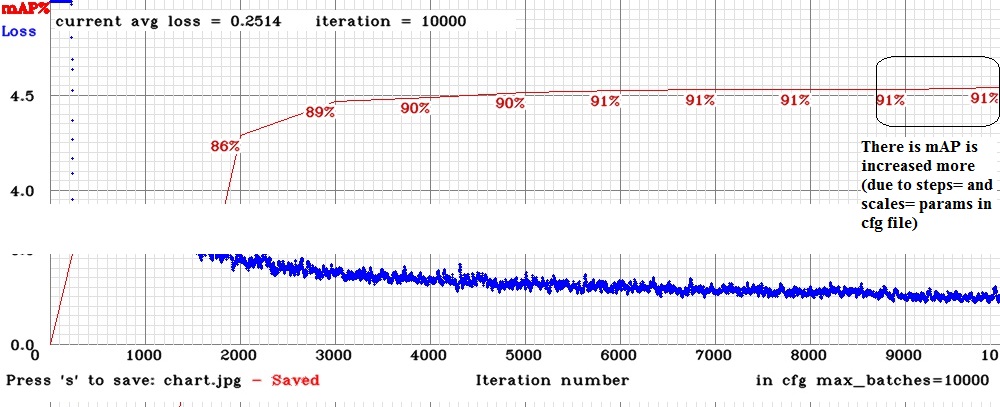
It depends on - do you want to get +0.27 % mAP by wasting time on training another 4000 iterations or not.
- mAP =
90.52 %for 6000 iterations weights-file - mAP =
90.79 %for 10000 iterations weights-file
If you saved intermediate weights files yolo_obj_10000.weights, yolo_obj_20000.weights, ..., yolo_obj_70000.weights then just check mAP (mean average precisions) for these weights: yolo_obj_10000.weights https://github.com/AlexeyAB/darknet#when-should-i-stop-training
No matter how many steps you have trained and the avg loss value?
Yes. No matter how many steps you have trained and the avg loss value.
If you train without
-mapflag - then Avg loss is used only to catch the point when it will not reduce more, then it means that mAP will not increase more and you can stop training.If you train with
-mapflag - then Avg loss is not needed at all. Just see when mAP will not increase more, then you can stop training (then I usually decrease the learning_rate from0.001to0.0001and train more, when mAP is stoped again, I decrease the learning_rate from0.0001to0.00001and train more, when mAP is stoped - this is the end, so I can get+0.5-2%mAP. Or just setscales=0.1,0.1andsteps=for the required iterations number, so learning_rate will be decreased automatically at this iteration numbers)
I.e. as you can see on this Loss and mAP chart, mAP is stuck at 7000-9000 iterations, but mAP was increased from 9000-10000 iterations, because learning_rate will be decreased at 9000 (10x) and 9500 (100x) iterations due to parameters steps=9000,9500 and scales=0.1,0.1 in my cfg-file: https://github.com/AlexeyAB/darknet/issues/2014#issuecomment-446615135
AlexeyAB
on 12 Dec 2018
Ohhh! thats a wonderful information...
Thank you very much!!
But i have a question about this:
If you train with -map flag - then Avg loss is not needed at all. Just see when mAP will not increase more, then you can stop training (then I usually decrease the learning_rate from 0.001 to 0.0001 and train more, when mAP is stoped again, I decrease the learning_rate from 0.0001 to 0.00001 and train more, when mAP is stoped - this is the end, so I can get +0.5-2% mAP. Or just set scales=0.1,0.1 and steps= for the required iterations number, so learning_rate will be decreased automatically at this iteration numbers)
- Do you start the train from the beginning? or do you use a transfer learning?(i dont know how to do that)
- Or the learning rate will be decreases automatically with scales and steps values?
I have a large dataset for face and hands and always only captures faces well...i must to add more hand labeled dataset? im labeling more data now...
victorvargass
on 12 Dec 2018
@victorvargass
Do you start the train from the beginning? or do you use a transfer learning?(i dont know how to do that)
I start training with learning_rate=0.001 in cfg-file:
darknet.exe detector train data/obj.data yolov3-tiny_obj.cfg yolov3-tiny.conv.15 -map
When mAP is stopped, I set learning_rate=0.0001 in cfg-file and continue training:
darknet.exe detector train data/obj.data yolov3-tiny_obj.cfg backup/yolov3-tiny_obj_7000.weights -map
When mAP is stopped again, I set learning_rate=0.00001 in cfg-file and continue training:
darknet.exe detector train data/obj.data yolov3-tiny_obj.cfg backup/yolov3-tiny_obj_9000.weights -map
When mAP is stopped - I stop the training and use last weights file.
Or the learning rate will be decreases automatically with scales and steps values?
If I set steps corretly (if I guessed correctly) - then mAP will be stopped only after iterations > last value in
steps=param, not earlier. In this case I just get the last weights files when mAP is stopped.- If I set steps incorretly (if I didn't guess correctly) - then mAP will be stopped much earlier than the first value in
steps=param. For example mAP is stopped at 4000 iterations, butsteps=8000,9000. In this case I can go 2 ways:
Stop training, reduce learning_rate=0.0001 and continue training:
darknet.exe detector train data/obj.data yolov3-tiny_obj.cfg backup/yolov3-tiny_obj_4000.weights -mapJust wait while training goes up to 8000 iterations, and mAP will continue to decrease. Theoretically there can be overfitting while I train from 4000 to 8000 iterations, but actually there is a very-very low probability of overfitting happening in Yolo v3, because there is used Batch-normalization, Data augmentation (for default
jitter, random, hue, exposure, saturationparameters in cfg), and there are used 200-2000 training images per class or more - this usually means that you have to train millions of iterations to get overfitting. (But if you setrandom=0 jitter=0 exposure=0 hue=0 saturation=0and uses ~100 images - you can get overfitting for small number of iterations)
- If I set steps incorretly (if I didn't guess correctly) - then mAP will be stopped much earlier than the first value in
So you can not afraid overfitting, and the main difference between 1 and 2 is wasted time for training for 4000 iterations (from 4000 to 8000).
I have a large dataset for face and hands and always only captures faces well...i must to add more hand labeled dataset? im labeling more data now...
Yes.
AlexeyAB
on 12 Dec 2018
Thank you for your quick response... i will do that
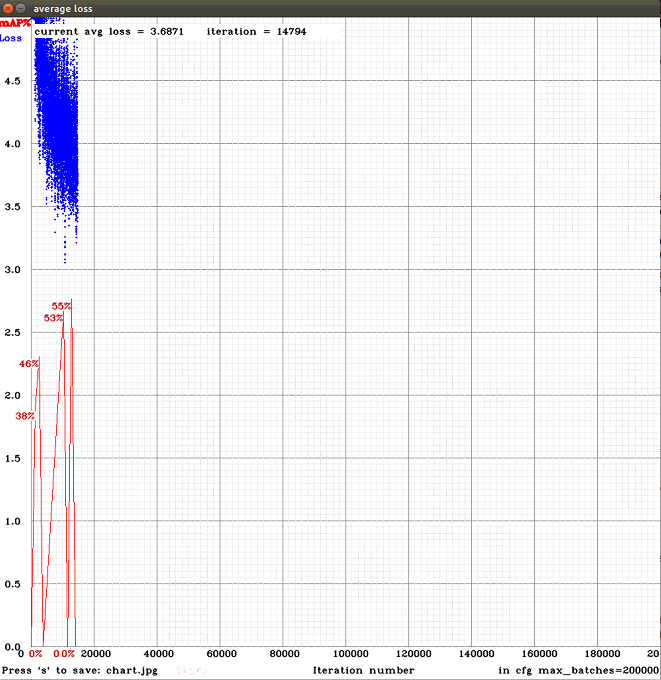
Im doing the train with -map but i get strange data from the chart...
Do you know what happened?
victorvargass
on 12 Dec 2018
@victorvargass
This is strange.
Or something broken in mAP calculation or mAP drawing.
Or training somethime goes wrong, but it is very strange.
Do you use one nvidia GTX 1080 Ti or many with
-gpus 0,1,2,3?How many images in the train.txt and valid.txt files?
Do you use different images in train.txt and valid.txt? Or the same? Or one is a part of the other?
Do you train for 1 class as I see in your cfg-file? https://github.com/AlexeyAB/darknet/issues/2014#issue-387317718 But there you said that you tain for 2 classes: Faces and Hands: https://github.com/AlexeyAB/darknet/issues/2014#issuecomment-446647339
Did you check that all your images are correct by using Yolo_mark?
Do you have files
bad.listorbad_label.listnear with executable ./darknet file?Try to check mAP by using
./darknet detector map data/obj.data yolo-obj.cfg backup\yolo-obj_10000.weights
./darknet detector map data/obj.data yolo-obj.cfg backup\yolo-obj_11000.weights
./darknet detector map data/obj.data yolo-obj.cfg backup\yolo-obj_12000.weights
...
./darknet detector map data/obj.data yolo-obj.cfg backup\yolo-obj_20000.weights
Will be there mAP value ~ 0% mAP for any of weights?
AlexeyAB
on 12 Dec 2018
Can i use more gpus? i didn't know about that, and how to use it
- Dataset: 23091 images
- train.txt: 20782
- valid.txt: 2309
There are different images on valid and train txt files
My cfg its different, i will upload it
I use another program for labeling: LabelImage
Yes I have some bad images(33) i think its a low number of images... Will there be a problem with that?
Detector map values:
Weight/ mAP
10000/50.49%
11000/51.38%
12000/50.46%
13000/51.65%
14000/50.78%
15000/51.53%
16000/50.78%
17000/52.19%
18000/49.73%
19000/53.04%
Anyone gets 0% of mAP ...
victorvargass
on 12 Dec 2018
@victorvargass
Detector map values:
Weight/ mAP
10000/50.49%
11000/51.38%
12000/50.46%
13000/51.65%
14000/50.78%
15000/51.53%
16000/50.78%
17000/52.19%
18000/49.73%
19000/53.04%Anyone gets 0% of mAP ...
I use another program for labeling: LabelImage
Yes I have some bad images(33) i think its a low number of images... Will there be a problem with that?
No, I think it is not a problem.
Something wrong in drawing mAP.
I added a fix, try to update your code from GitHub, may be it will solve this problem.
AlexeyAB
on 12 Dec 2018
Okay, i will try to do the train again
thanks @AlexeyAB
victorvargass
on 12 Dec 2018
The chart error stills :/ @AlexeyAB

victorvargass
on 13 Dec 2018
I have a question... @AlexeyAB
Im labeling a large dataset... It always happens that the larger the dataset, the better the training or not necessarily?
victorvargass
on 13 Dec 2018
@victorvargass
Im labeling a large dataset... It always happens that the larger the dataset, the better the training or not necessarily?
This is true, only if all training images are different, and if such objects from Training dataset will be in the Test images. I.e. yes - in the most cases.
The main thing - any modern neural network can detect only the same objects, which were in the Training dataset (with the same: rotation, scale, aspect ratio, color (hue, exposure, saturation),... +- ~5-15%). So you should add images with such objects (details, shape, size, color, ...), which you want to detect.
Partially it can be solved by data augmentation: scale, aspect ratio, color (hue, exposure, saturation).
You can think about neural network, like it uses lossy compression to remeber all images from Training dataset (and all changed images by using data augmentation) to the one weights file. And it compresses imortant features with higher quality than unimportant features. But it can't invent someting new, that it didn't see.
AlexeyAB
on 13 Dec 2018
Yes @AlexeyAB , i get the idea of neural networks,
i want to track hands on my model, i think if i get more data, the system will be able to detect hands in every position , or the most of them...
- Partially it can be solved by data augmentation: scale, aspect ratio, color (hue, exposure, saturation).
Is there any way to modify these parameters?
Thanks for the good explaination
victorvargass
on 13 Dec 2018
@victorvargass
Also can you do some test?
Add getchar(); here in this line: https://github.com/AlexeyAB/darknet/blob/f0bed8ef735f03e4d2ccbed9d1683b4f63043f44/src/detector.c#L965
And run training with -map.
After each mAP calculation the Training will be stopped, and will wait for press Enter in the terminal (console) window. Can you check, what mAP will be in the console window, will be there mAP ~= 0%, and will it be equal to the mAP in the Loss-chart window?
Partially it can be solved by data augmentation: scale, aspect ratio, color (hue, exposure, saturation).
Is there any way to modify these parameters?
Yes, change these params - but if you increase jitter from 0.3 to 0.4 - usually you should train 10x more iterations:
(and it does not make sense to increase all the parameters, it is unlikely that you need to detect green hands, or 5x times vertically extended objects from their original size)
- https://github.com/AlexeyAB/darknet/blob/f0bed8ef735f03e4d2ccbed9d1683b4f63043f44/cfg/yolov3.cfg#L14-L16
- https://github.com/AlexeyAB/darknet/blob/f0bed8ef735f03e4d2ccbed9d1683b4f63043f44/cfg/yolov3.cfg#L785
- set
random=1https://github.com/AlexeyAB/darknet/blob/f0bed8ef735f03e4d2ccbed9d1683b4f63043f44/cfg/yolov3.cfg#L788
A little bit about this params: https://github.com/AlexeyAB/darknet/issues/1842#issuecomment-433918329
AlexeyAB
on 13 Dec 2018
@AlexeyAB i let the parameters just i have, i already had random = 1
And!
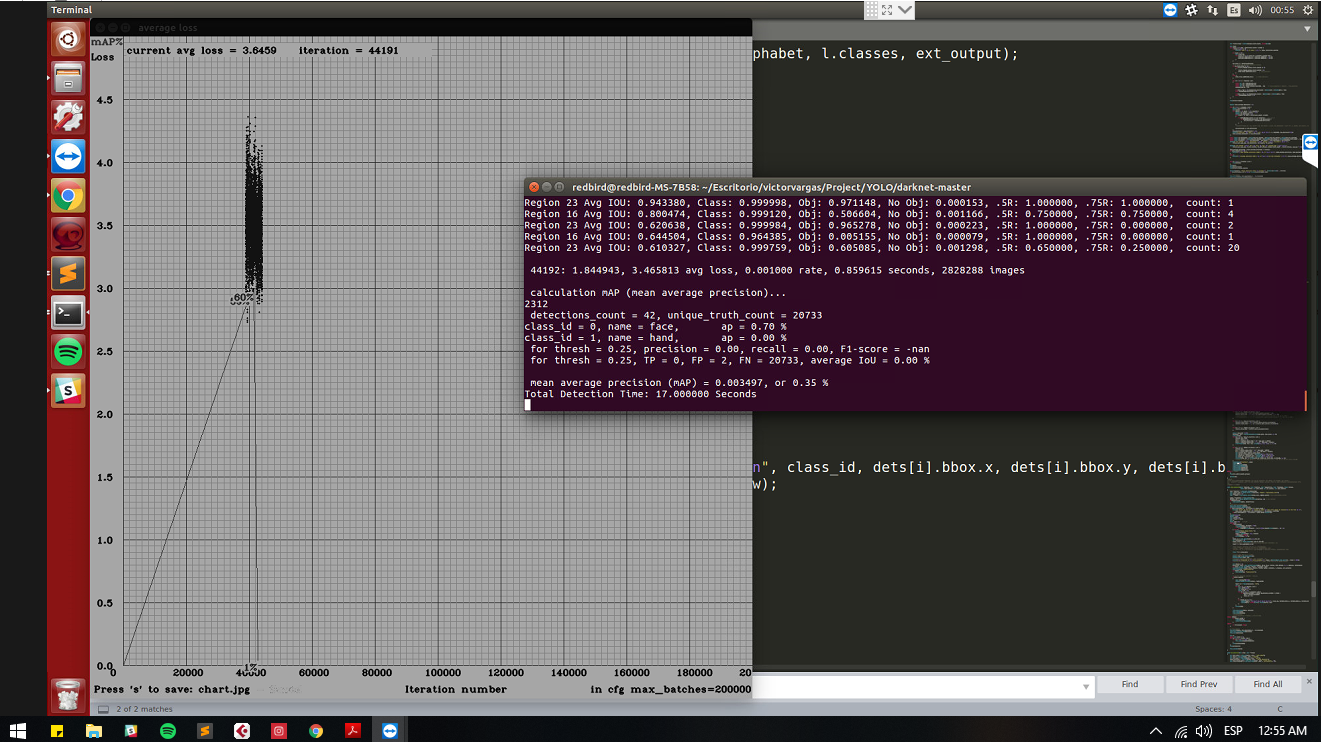
After each mAP calculation the Training will be stopped, and will wait for press Enter in the terminal (console) window. Can you check, what mAP will be in the console window, will be there mAP ~= 0%, and will it be equal to the mAP in the Loss-chart window?
Yes it shows on chart the correct value :D thanks!
victorvargass
on 13 Dec 2018
@AlexeyAB But can you change detector.c for remove the need to press the key so that the training continues without stopping?
victorvargass
on 13 Dec 2018
Look this @AlexeyAB
victorvargass
on 13 Dec 2018
@victorvargass
Add
getchar();here in this line: https://github.com/AlexeyAB/darknet/blob/f0bed8ef735f03e4d2ccbed9d1683b4f63043f44/src/detector.c#L965@AlexeyAB But can you change detector.c for remove the need to press the key so that the training continues without stopping?
Just remove getchar(); that you added )
It seems something wrong with mAP calculation when it is used from training function.
AlexeyAB
on 13 Dec 2018
I am glad that my question started so much debate:)
@victorvargass to get back to my initial question, after 60000 iterations I had an average loss of about 0.8 (the loss started to vary between 0.3-1.2) but the model started to have an mAP close to the trained tiny-yolov3.
To train I used GCP with a Nvidia Tesla v100
Tzuya14
on 13 Dec 2018
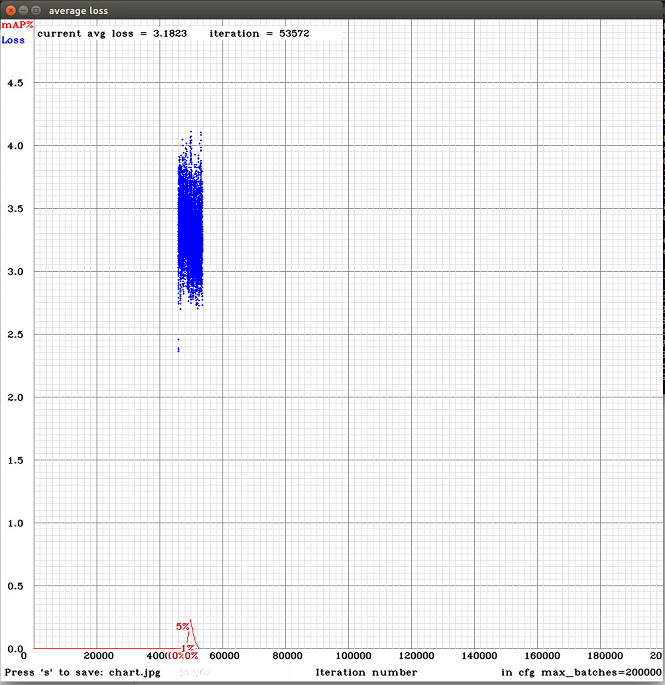
@AlexeyAB the error persist :( i deleted the getchar();
What will be happening?
I think the mAP in the chart is very important hehe, the calculus maybe is wrong
victorvargass
on 13 Dec 2018
@Tzuya14 did you use tiny yolov3 or yolov3?
victorvargass
on 13 Dec 2018
@victorvargass The problem is that, I can't reproduce this error. I will try to run it on another PC.
@AlexeyAB the error persist :( i deleted the getchar();
What will be happening?
I think the mAP in the chart is very important hehe, the calculus maybe is wrong
I'm trying to understand what the problem is.
Try to comment these lines:
- https://github.com/AlexeyAB/darknet/blob/f0bed8ef735f03e4d2ccbed9d1683b4f63043f44/src/detector.c#L623
- https://github.com/AlexeyAB/darknet/blob/f0bed8ef735f03e4d2ccbed9d1683b4f63043f44/src/detector.c#L960
- And add between these 2 lines: https://github.com/AlexeyAB/darknet/blob/f0bed8ef735f03e4d2ccbed9d1683b4f63043f44/src/detector.c#L622-L623
these lines:
#ifdef GPU
        cudaStreamSynchronize(get_cuda_stream());
#endif
If it doesn't help - try to compile Darknet with GPU=1 CUDNN=0 will be there this problem?
Look this @AlexeyAB
Also when you will meet mAP ~= 0% in the chart - try to calculate mAP for the approximately same weights file by using this command, will it be ~0% too?
./darknet detector map data/obj.data yolo-obj.cfg backup\yolo-obj_44000.weights
or
./darknet detector map data/obj.data yolo-obj.cfg backup\yolo-obj_last.weights
AlexeyAB
on 13 Dec 2018
@victorvargass I used a modified version of yolov3. Basically I cut some blocks and reduced the number of filters. The cfg is in the first comment
Tzuya14
on 13 Dec 2018
I changed the lines as you told me, and i runned the yolov3 training....after this, i will change CUDNN to 0 if does not help
I ran the detector map command between 44000 and 50000 weights and their values arent around 0...
i think its another error
victorvargass
on 13 Dec 2018
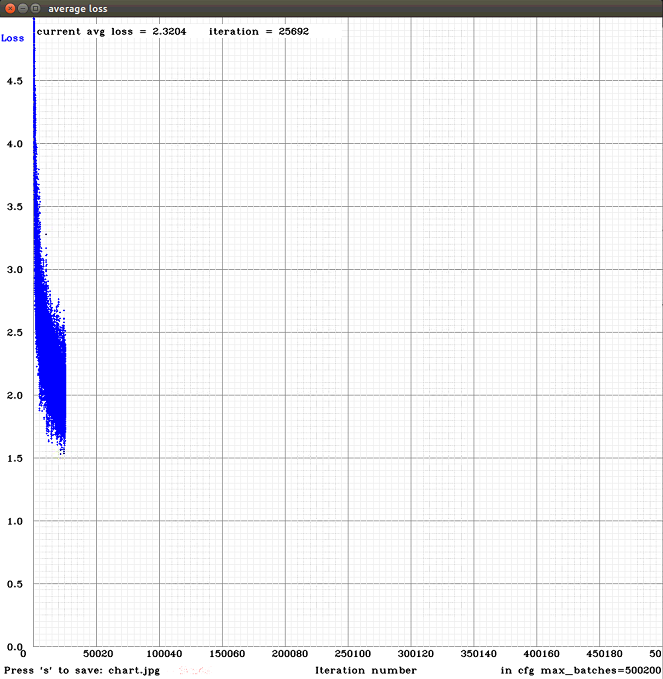
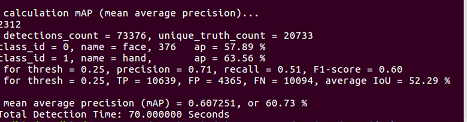
@AlexeyAB Hi, i did a test with this weights, and the results arent so good...
I feel there are an overfitting because the model just detect good the faces and hands from the train images... :/ that could be happening?
victorvargass
on 14 Dec 2018
@victorvargass
- What mAP can you get on train.txt?
- What mAP can you get on valid.txt?
- Can you show screenshot of point of cloud by using this command?
./darknet detector calc_anchors data/obj.data -num_of_clusters 6 -width 416 -height 416 -show
and
./darknet detector calc_anchors data/obj.data -num_of_clusters 9 -width 416 -height 416 -show
And what anchors does it generate?
AlexeyAB
on 14 Dec 2018
@AlexeyAB how can i get mAP on train and valid separately?
Can you show screenshot of point of cloud by using this command?
Num of clusters 6
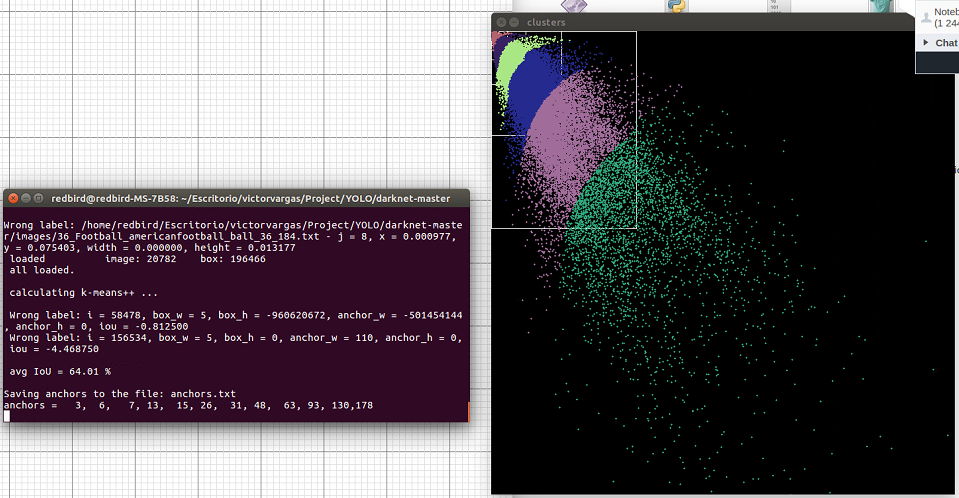
Num of clusters 9
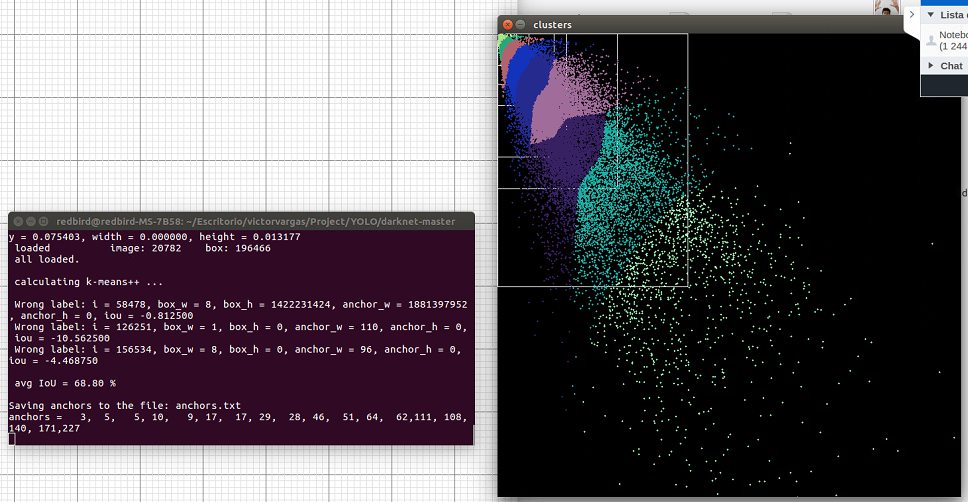
I didnt change this values on cfg to train...
victorvargass
on 14 Dec 2018
@victorvargass
how can i get mAP on train and valid separately?
Set valid=train.txt in obj.data and run:
./darknet detector map data/obj.data yolo-obj.cfg backup\yolo-obj_40000.weights
Then set valid=valid.txt in obj.data and run:
./darknet detector map data/obj.data yolo-obj.cfg backup\yolo-obj_40000.weights
AlexeyAB
on 14 Dec 2018
@victorvargass
Num of clusters 9
You have many small objects.
Try to train by using this cfg-file without any changes. It is 25% slower, but should be much better for small objects:
yolov3-tiny_3l.cfg.txt
AlexeyAB
on 14 Dec 2018
@AlexeyAB
How do you know that i have many small objects? Explain me the point of cloud please...
I think that my type of train or logic is bad.. because i want to detect big hands and big face(closer videocapture) and you say that i have many small objects :(
Looking this... i tell you what i want to do:
I want to track hands and face for detect gestures of sign language... and the videocapture that i need is close.. so i undertand that i have to train with big hands images... and then, changes the cfg... what do you recomend me? What parameters of cfg(i dont care about the train time... But i want to detect fast, learning rate, height and weigth), the images(more big hands, or big and small hands)
Please help me!
victorvargass
on 14 Dec 2018
@AlexeyAB
PD: im using yolov3, not yolov3-tiny
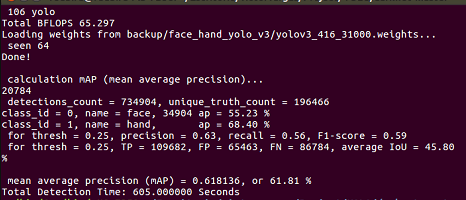
And the mAP values are:
valid = valid.txt

valid=train.txt
victorvargass
on 14 Dec 2018
@victorvargass
How do you know that i have many small objects? Explain me the point of cloud please...
Each point is a size of object. width of object = x point, height = y point.
anchors - are the average sizes of objects.valid mAP = 55.35%, training mAP = 61.81%, only about 12% difference
61.81/55.35 - 1 ~= 0.12. So there is no overfitting.
PD: im using yolov3, not yolov3-tiny
- Can you attach your cfg-file?
Do you use network resolution width=608 height=608?
You can try to train your model by using this cfg-file instead of yolov3.cfg: https://github.com/AlexeyAB/darknet/blob/master/cfg/yolov3_5l.cfg
There are 5[yolo]layers instead of 3 [yolo]-layers.
So you should recalculate anchors by using:
./darknet detector calc_anchors data/obj.data -num_of_clusters 15 -width 608 -height 608 -show
and set these 15 anchors (30 values) in each of 5 [yolo] layers in theyolov3_5l.cfg, also set filters=21 and classes=2 in 5 places.Or try to train with
yolov3-tiny.cfgwithwidth=1024 height=1024
AlexeyAB
on 14 Dec 2018
Thanks for the excellent information @AlexeyAB
About train and valid map, if the relation % is more than 100%, ¿there are overfitting?
cfg file that im using now
yolov3-416.cfg.txt
I use a 416 resolutions...
I will try to use that cfg's and follow your instructions...after finish the yolov3-416.cfg training
victorvargass
on 14 Dec 2018
@victorvargass
About train and valid map, if the relation % is more than 100%, ¿there are overfitting?
To say definitely that this is overfitting - you can only if continuing to train, the accuracy (mAP) on the validation dataset will decrease.
But ~10% difference between Training and Validation mAP is the most usual thing that I met. So I think there is no overfitting.
- If there are high requirements for detection speed, then:
Calculate 9 anchors for 832x832
./darknet detector calc_anchors data/obj.data -num_of_clusters 9 -width 832 -height 832 -show
Set these anchors in 3 [yolo]-layers and train this cfg-file with width=832 height=832: https://github.com/AlexeyAB/darknet/files/2681547/yolov3-tiny_3l.cfg.txt
- If there are not high requirements for detection speed, then:
Calculate 15 anchors for 832x832
./darknet detector calc_anchors data/obj.data -num_of_clusters 15 -width 832 -height 832 -show
Set these anchors in 5 [yolo]-layers and train this cfg-file with width=832 height=832: https://github.com/AlexeyAB/darknet/blob/master/cfg/yolov3_5l.cfg
(to avoid Out of memory errors, set batch=64 subdivisions=64)
In both cases I think you should get higher mAP.
AlexeyAB
on 14 Dec 2018
I have to detect with a huge speed :) so i will use the first one
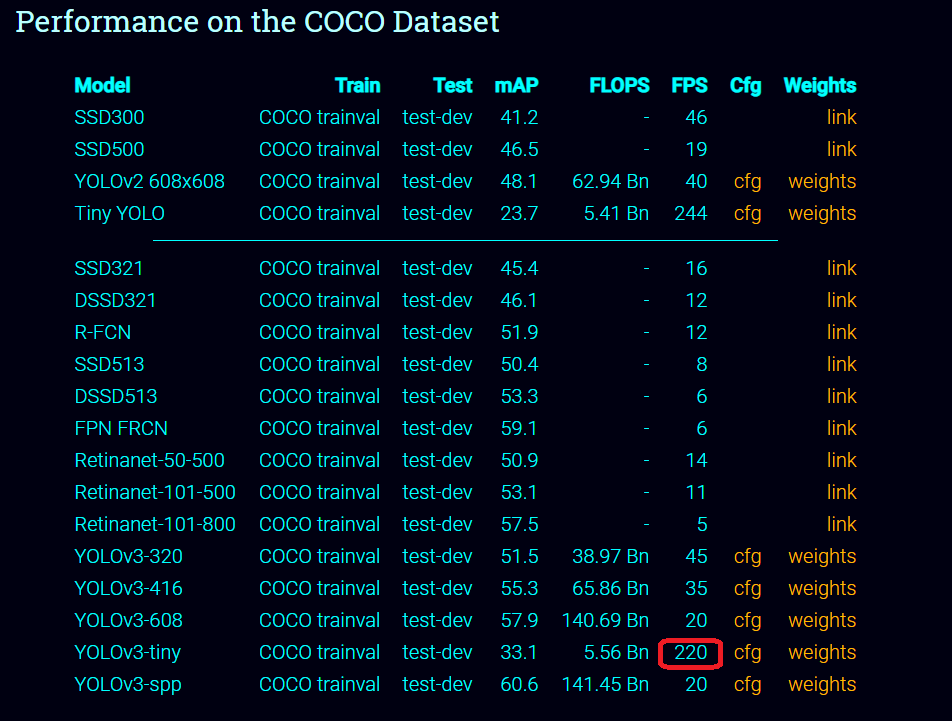
Why tiny and no just yolo v3? I dont understand why is teorically different... Tiny is for more speed detection but less accuracy precision?
victorvargass
on 15 Dec 2018
 AlexeyAB
on 15 Dec 2018
AlexeyAB
on 15 Dec 2018
@AlexeyAB
Okey, a last question for today haha, with what weights i start the train in yolo tiny v3? i have this...
"yolov3-tiny.conv.15"
victorvargass
on 15 Dec 2018
@victorvargass
Using yolov3-tiny.conv.15 https://github.com/AlexeyAB/darknet#how-to-train-tiny-yolo-to-detect-your-custom-objects
AlexeyAB
on 15 Dec 2018
@AlexeyAB @victorvargass Hi, AlexeyAB, Thanks for your great repo, I meet the same problem with victorvargass,
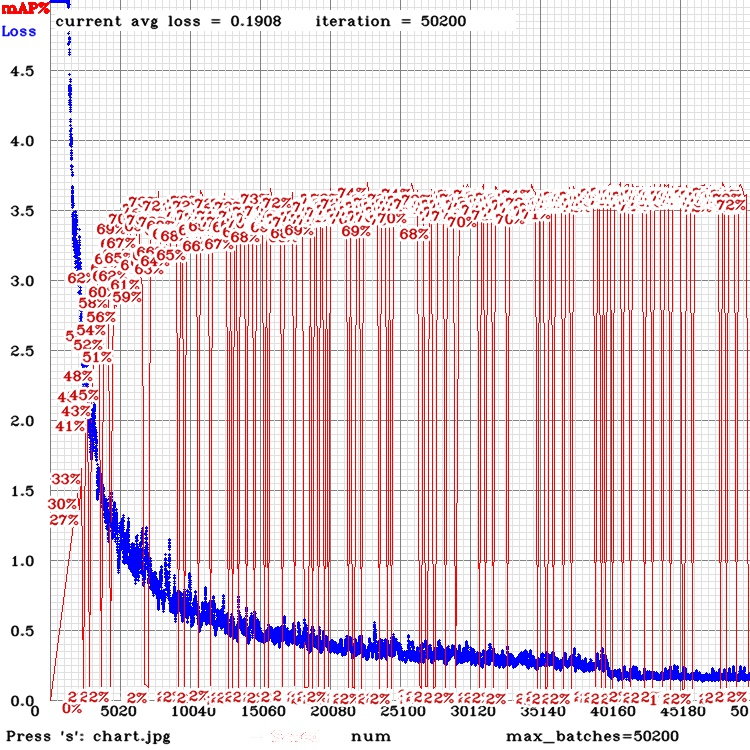
it's very strange and I can not find the problem , why does this happen?
 feitiandemiaomi
on 18 Dec 2018
feitiandemiaomi
on 18 Dec 2018
@AlexeyAB I have a doubt..
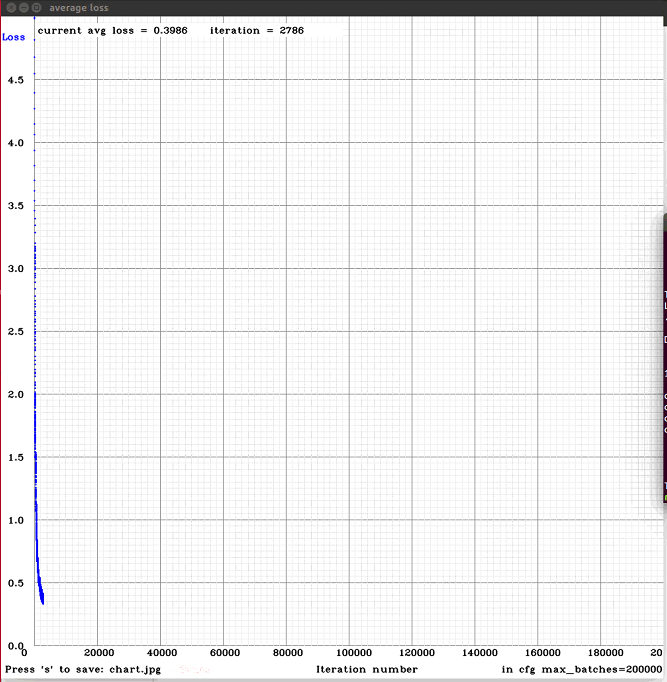
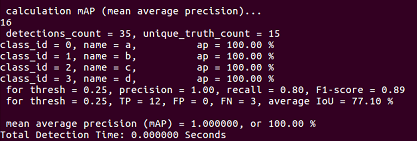
I'm doing another training, with less images and more classes (letters of the sign language alphabet for deaf people), for now I only tried with the first 4 (a, b, c, d) and to my surprise, they reach 100% of mAP, excellently detects each class, but only the training and validation images, other external images, does not detect them.
How do you think you could achieve the goal?
victorvargass
on 19 Dec 2018
@victorvargass
excellently detects each class, but only the training and validation images, other external images, does not detect them.
- high mAP for validation dataset because validation set is too small and very similar to training dataset
- low mAP for external images because external images are not very similar to the training dataset
AlexeyAB
on 19 Dec 2018
How many images do you recommend for each class for a good detection? And others configurations? (from cfg)
Im using the same cfg for the last trainings (yolov3 tiny 3l 832-832)
victorvargass
on 19 Dec 2018
@victorvargass 2000 per class: https://github.com/AlexeyAB/darknet#how-to-improve-object-detection
desirable that your training dataset include images with objects at diffrent: scales, rotations, lightings, from different sides, on different backgrounds - you should preferably have 2000 different images for each class or more, and you should train 2000*classes iterations or more
For very small objects use
- yolov3 tiny 3l 832x832
- or yolov3 5l 832x832 (if your gpu have enough memory and have enough speed)
AlexeyAB
on 19 Dec 2018
Thanks mate!
The objects(hands) are medium to big size
What another yolo can i use?
victorvargass
on 19 Dec 2018
Related issues
 hemp110
·
3Comments
hemp110
·
3Comments
 PROGRAMMINGENGINEER-NIKI
·
3Comments
PROGRAMMINGENGINEER-NIKI
·
3Comments
 jasleen137
·
3Comments
jasleen137
·
3Comments
 bit-scientist
·
3Comments
bit-scientist
·
3Comments
 louisondumont
·
3Comments
louisondumont
·
3Comments