Darknet: memory leak of train detector
Hi, Alexey
The improvement of train yolo indeed is faster than original version. but there train progress was observered memory leak. Here are some top command output for audit. Memory usage (first column of bold text, second column is training duration) always increase in the training.
My platform has AMD Reyzen 1700 and 2 EVGA 1080ti graphics cards, with load data threads
args.threads = 3 * ngpus;
23257 link 20 0 79.118g 0.010t 170584 R 725.8 66.1 11:17.25 darknet
23257 link 20 0 78.749g 0.011t 167284 R 715.0 75.0 48:47.10 darknet
23257 link 20 0 79.526g 0.012t 171624 R 843.7 75.3 51:23.15 darknet
23257 link 20 0 80.531g 0.012t 165752 R 753.3 76.3 55:40.08 darknet
@AlexeyAB
 lqian
lqian
All 32 comments
@lqian Hi,
- How many training images do you have?
- What params do you use in the Makefile?
- Do you use Windows or Linux?
- Do you use the latest version of Github?
- Do you train yolov3.cfg model?
 AlexeyAB
on 28 Oct 2018
AlexeyAB
on 28 Oct 2018
My box is16G ram of Ubuntu 16.04 LTS that installed CUDA 9.2 and cuDNN 7.1. I train yolov3-tiny on 74426 training samples of dataset with config as:
batch=64
subdivisions=4
width=448
height=448
the source code was commited at Oct 25
commit 31df5e27356b6b11ffd43baace9afdd3800a8aa2
Author: Alexey AlexeyAB@users.noreply.github.com
Date: Thu Oct 25 21:39:27 2018 +0300
compile params:
GPU=1
CUDNN=1
CUDNN_HALF=0
OPENCV=1
AVX=1
OPENMP=1
LIBSO=1
Is the high memory usage a design feature? or was I made a mistake?
lqian
on 28 Oct 2018
@lqian Hi,
I have the same issue, have you already solved the problem ?
Best Regards
 phamngocthanhtrung
on 18 Jan 2019
phamngocthanhtrung
on 18 Jan 2019
same issue here on newest commit:
commit 381f90ebb8d1518141e809521fe2985a2d506fc1
Author: AlexeyAB alexeyab84@gmail.com
Date: Tue Jan 29 13:46:30 2019 +0300
Fixed CUDA error checking
Makefile:
compile params:
GPU=1
CUDNN=1
CUDNN_HALF=0
OPENCV=1
AVX=1
OPENMP=1
LIBSO=1
yolov3-spp.cfg:
batch=64
subdivisions=32
width=608
height=608
channels=3
momentum=0.9
decay=0.0005
angle=0
saturation = 1.5
exposure = 1.5
hue=.1
learning_rate=0.001
learning_rate = 0.0005 # for 2 gpus
burn_in=1000
burn_in = 2000 # for 2gpus
training on 4000+ image
Ubuntu 16.04
32GB memory got full after one hour trainning
 JoeyZhu
on 31 Jan 2019
JoeyZhu
on 31 Jan 2019
training on 1 gpu, darknet takes 18.5% memory. On 2 gpu, it takes all the way to 100% and then killed. But when memory almost full, leak speed seems became slow.
JoeyZhu
on 31 Jan 2019
@JoeyZhu Hi,
- What command do you use for training?
- Do you use
-mapflag? - Can you show screenshot of this error?
- Does it happen if you compile with?
GPU=1
CUDNN=0
CUDNN_HALF=0
OPENCV=0
AVX=0
OPENMP=0
LIBSO=0
train command: ./darknet detector train cfg/car.data cfg/yolov3-spp-car.cfg backup/yolov3-spp-car_last.weights -gpus 0,1 -dont_show
no use -map flag
just be killed by system due to no memory, even on swap
recompile with only GPU enable, memory takes 14G stable for about 10 minutes, seems good, will report if it goes overflow.
Thank you!
JoeyZhu
on 31 Jan 2019
gpu + cudnn only seems good too. stable in 15GB for 10 minutes. But with opencv, go up to 21GB within 3 minutes. my opencv is compiled with 3.4.0-rc
JoeyZhu
on 31 Jan 2019
@JoeyZhu
Can you show content of bad.list and bad_label.list files if they exist?
Try to comment this line: https://github.com/AlexeyAB/darknet/blob/bd91d0a908fd0cd9364e16a00c395500f59cbf58/src/detector.c#L282
and compile withGPU=1 CUDNN=1 OPENCV=1
does it solve the problem?
If it doesn't solve the problem, try to change this line: https://github.com/AlexeyAB/darknet/blob/bd91d0a908fd0cd9364e16a00c395500f59cbf58/src/data.c#L731
to#ifdef OPENCV_DISABLED
does it colve the problem?Also can you try to use OpenCV 3.2.0, does it solve the problem?
If yes - then I just should migrate from C API to C++ API OpenCV, to solve this issue.
AlexeyAB
on 31 Jan 2019
@AlexeyAB
- not seen any bad.list or bad_label.list files. where should it be?
- no draw_train_loss with opencv enabled changes nothing...
- change to
OPENCV_DISABLEDseems did work, BUT, memory is indeed rising, but much slower than before. - recompile opencv3.2.0 without cuda and everything. ldd checked, darknet linked to opencv 3.2.0. same as above. slow memory leak.
JoeyZhu
on 1 Feb 2019
@JoeyZhu
But with opencv, go up to 21GB within 3 minutes. my opencv is compiled with 3.4.0-rc
Summary - does it happen only if:
- Darknet compiled with OpenCV
- and you try to train with
-gpus 0,1?
And it is enough to train yolov3-spp.cfg about 3 minutes to occupy 21 GB CPU-RAM?
AlexeyAB
on 1 Feb 2019
yes, with opencv( tried 3.4.0 and 3.2.0, same result) compiled or train on multi gpu, memory usage goes up very quickly. even use yolov3-tiny, it occupy 18GB after 10 minutes and still increasing:
00:00 8.5G
00:05 15.0G
00:10 18.1G
without opencv compiled, yolov3-tiny training on two gpus takes 9.3GB stablely.
but with OPENCV_DISABLED and commented draw_train_loss, memory usage goes up very slowly even on training yolov3-spp:
00:00 12.7G
00:08 16.7G
00:14 17.6G
00:27 19.3G
JoeyZhu
on 1 Feb 2019
@JoeyZhu
Another pair questions:
but with OPENCV_DISABLED and commented draw_train_loss, memory usage goes up very slowly even on training yolov3-spp:
But if you set OPENCV_DISABLED only (and don't comment draw_train_loss) is there a memory leak?
Do you use flag
-json_port 8070or-mjpeg_port 8090for training?Do you get memory leak if you train the model by using two the same numbers
-gpus 0,0of GPU?
./darknet detector train cfg/car.data cfg/yolov3-spp-car.cfg backup/yolov3-spp-car_last.weights -gpus 0,0 -dont_showDo you have very large images, with resolution more than 2000x2000?
Do you have the same issue on other training datasets ?
AlexeyAB
on 2 Feb 2019
good news!
below tested on :
commit 0543278a5bd7064fae6538afd1761b06b10f73ee
Author: AlexeyAB alexeyab84@gmail.com
Date: Thu Feb 7 00:15:31 2019 +0300
Partial fixed
- when * set OPENCV_DISABLED only, no memory leak when training yolov3-tiny with two gpus, but with -map, there is slow memory leak
- no use xxx_port flag
- use gpus 0,0 not tested yet.
- no, all image is 1280x960
- not tried on other datasets, will test with new structure later some times.
not tested on yolov3, I will test on it when I have time, thank you !
JoeyZhu
on 9 Feb 2019
@JoeyZhu
I fixed memory leak during training with flag -map and random=1 in cfg-file: https://github.com/AlexeyAB/darknet/commit/cad99fd75d944fda1d26f7e57e0cf5fb9d4fdf8f
AlexeyAB
on 22 Mar 2019
Hi, Alexey
I have same problem on two different PC(Ubuntu 16.04, openCV 3.4.5. Cuda 10.1 both) using current version of darknet from your repo.
[net]
batch=64
subdivisions=64
width=608
height=608
My first configuration has two 1080 8Gb. On this PC darknet use 40 Gb virtual memory running with -gpus 0 and ~70 Gb with -gpus 0,1
Second PC has 1060 with 6Gb. Here darknet use ~ 25 Gb virtual memory.
I`ve tried to use recommendations above(random=0, opencv=0, etc) but it worked poorly, Virtual memory decreased just 10-20%.
Maybe this leak is connected with size of GPU memory? Any ideas?
 aprentis
on 10 Apr 2019
aprentis
on 10 Apr 2019
@aprentis Hi,
Does Darknet training crash with some error?
How many CPU-RAM do you have?
Do you use GPU=1 CUDNN=1 CUDNN_HALF=0 OPENCV=1 and train yolov3.cfg?
What command do you use for training, do you use -map flag or other flags -dont_show, -show_imgs, ...?
On this PC darknet use 40 Gb virtual memory running with -gpus 0 and ~70 Gb with -gpus 0,1
Can you show screenshot?
AlexeyAB
on 10 Apr 2019
@AlexeyAB if i dont have enough swap memory - it crashes. Otherwise it dont =)
I have 32Gb/16Gb RAM on my PCs.
GPU=1
CUDNN=1
CUDNN_HALF=0
OPENCV=1
AVX=1
OPENMP=1
LIBSO=1
ZED_CAMERA=0
Usually i dont use any flags, but ive tried with and without -map flag, and there was almost no effect.
Also i`ve tried to compile without openCV and it was a small effect(10-20% decrease of memory use).
It seems to me, that this problem lies on GPU Memory size.
I`ve tried to copy my darknet folder from one PC to another and got this strange result( 1080 8GB takes 40 GB virtual memory, 1060 6Gb takes 20-25 Gb)
I use standart command for training like ./darknet detector train cfg/voc.data cfg/yolov3.cfg backup/yolov3.weights

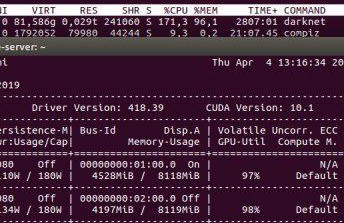
this one was taken after ./darknet detector train cfg/voc.data cfg/yolov3.cfg backup/yolov3.weights -map

and this one was taken on a PC with two 1080
aprentis
on 10 Apr 2019
@AlexeyAB My dataset is about 6Gb. it contains ~15000 jpgs, 3 classes.
aprentis
on 10 Apr 2019
@aprentis
Thanks. Do you have bad.list or bad_label.list files and what do they contain?
Also try to compile with - does it help?:
GPU=1
CUDNN=1
CUDNN_HALF=0
OPENCV=1
AVX=0
OPENMP=0
LIBSO=0
ZED_CAMERA=0
@AlexeyAB I don`t have bad.list or bad_label.list.
should i make this file?
Ive tried to compile as youve said right now. There was no change. 25Gb memory used on 1060.
aprentis
on 10 Apr 2019
@aprentis
I don`t have bad.list or bad_label.list.
should i make this file?
No.
There was no change. 25Gb memory used on 1060.
How long does it take for memory consumption to grow to 25 GB? (in seconds or minutes)
Do you use Darknet on Commits on Apr 10, 2019?
AlexeyAB
on 10 Apr 2019
@AlexeyAB It takes 5-10 seconds .
My screeshots were taken with darknet cloned a few hours ago.
aprentis
on 10 Apr 2019
@aprentis I can't reproduce this issue.
Do you use DEBUG=0 in the Makefile?
Try to use latest commits.
And try to train by using another dataset, for example, default datasets: Pascal VOC, MS COCO, ...
Or can you share the minimal part of your dataset, obj.data & cfg-file that can reproduce this issue?
AlexeyAB
on 11 Apr 2019
@AlexeyAB
i use DEBUG = 0.
GPU=1
CUDNN=1
CUDNN_HALF=0
OPENCV=1
Today i`ve pulled latest version and tried to train Pascal VOC dataset.
here is my network configuration
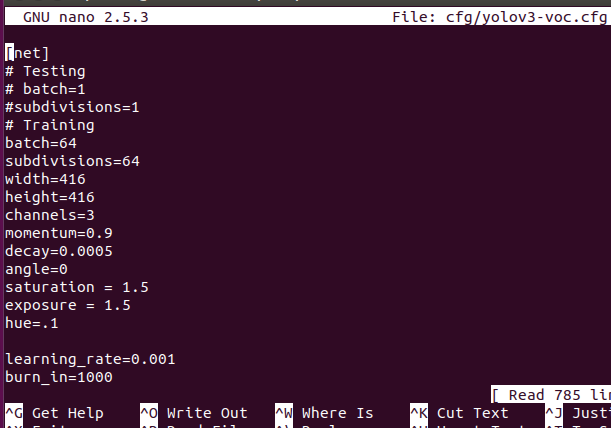
command

and result
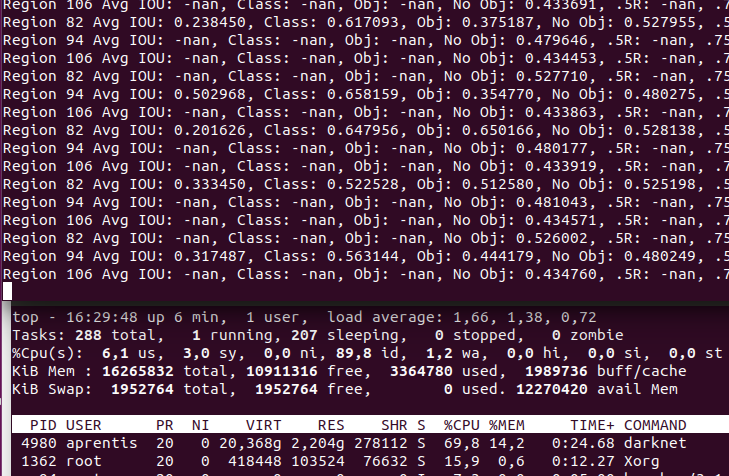
as you see it takes 20Gb of memory, which is almost similar.
aprentis
on 12 Apr 2019
@aprentis Thanks!
Can you show screenshot when Darknet is crashed during Training on Pascal VOC dataset?
Did you compile OpenCV in Release mode?
Do you have only one CUDA version on this PC?
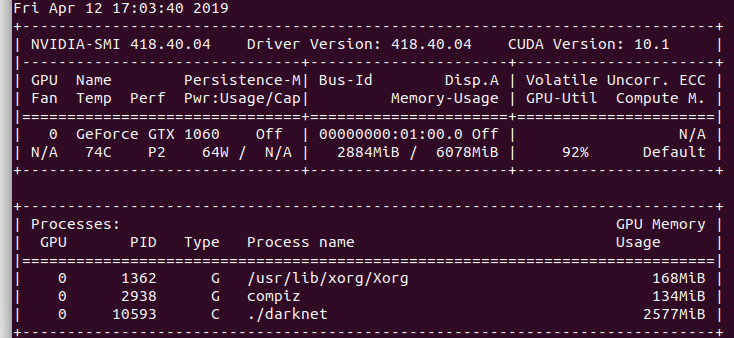
Can you show output of commands?
nvcc --version
nvidia-smi
gcc --versions
@AlexeyAB
I`ll wait several hours to see if Darknet crashes or not.
OpenCVwas built is Release mode.


aprentis
on 12 Apr 2019
@AlexeyAB I ran latest version of darknet on my 2x1080 configuration with Pascal VOC dataset. It took ~40 Gb of memory.

It crushed after ~500 iterations with CUDA Assertion 0' failed. Now i restarted the process and its running correctly, using 40 Gb permamently.
aprentis
on 12 Apr 2019
@aprentis
- Do you mean, that sometimes Darknet is crashed, but sometimes isn't?
- Does it happen if you train with only 1 GPU (without
-gpus 0,1flag)?
AlexeyAB
on 12 Apr 2019
@AlexeyAB
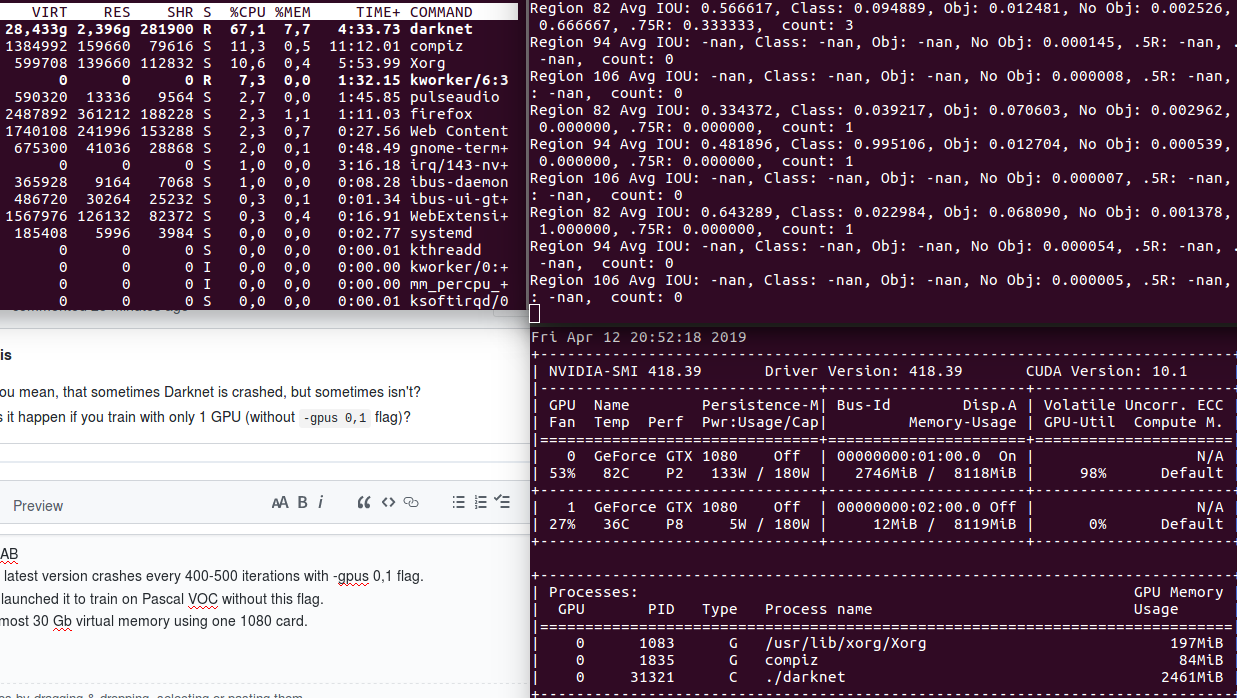
Yes, the latest version crashes every 400-500 iterations with -gpus 0,1 flag.
Now i've launched it to train on Pascal VOC without this flag.
It took almost 30 Gb virtual memory using one 1080 card.
aprentis
on 12 Apr 2019
@AlexeyAB Some news about this leak.
I`ve used another PC with ubuntu 16.04. and made clean install of nvidia-418 driver, Cuda 10.1 and OpenCV 3.4.5..
Here i have a full yolov3, and tiny version both training. I`ve used a small dataset(1 class, <300 files)
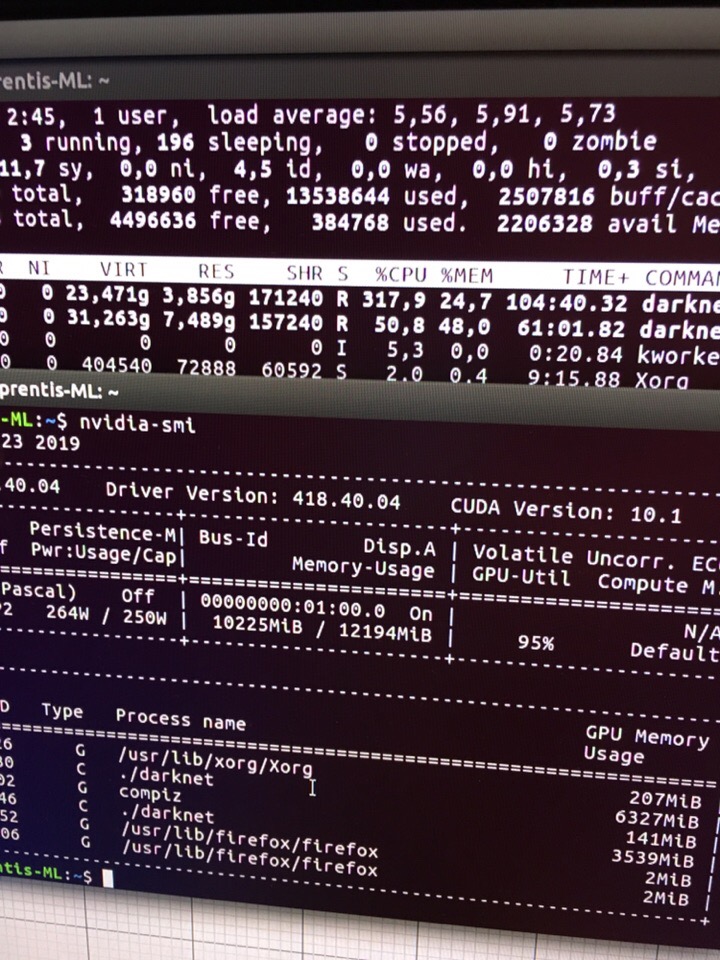
As you see, it still takes quite a lot of memory.
aprentis
on 14 Apr 2019
I have same problem,I disable opencv on makefile and rebuild it will fix it。
 hooklife
on 30 Jul 2019
hooklife
on 30 Jul 2019
Related issues
 Cipusha
·
3Comments
Cipusha
·
3Comments
 Yumin-Sun-00
·
3Comments
Yumin-Sun-00
·
3Comments
 rezaabdullah
·
3Comments
rezaabdullah
·
3Comments
 off99555
·
3Comments
off99555
·
3Comments
 Greta-A
·
3Comments
Greta-A
·
3Comments
Most helpful comment
@AlexeyAB Some news about this leak.
I`ve used another PC with ubuntu 16.04. and made clean install of nvidia-418 driver, Cuda 10.1 and OpenCV 3.4.5..
Here i have a full yolov3, and tiny version both training. I`ve used a small dataset(1 class, <300 files)

As you see, it still takes quite a lot of memory.