Darknet: Gtk-WARNING **: cannot open display: :0.0 when running darknet on google cloud instance
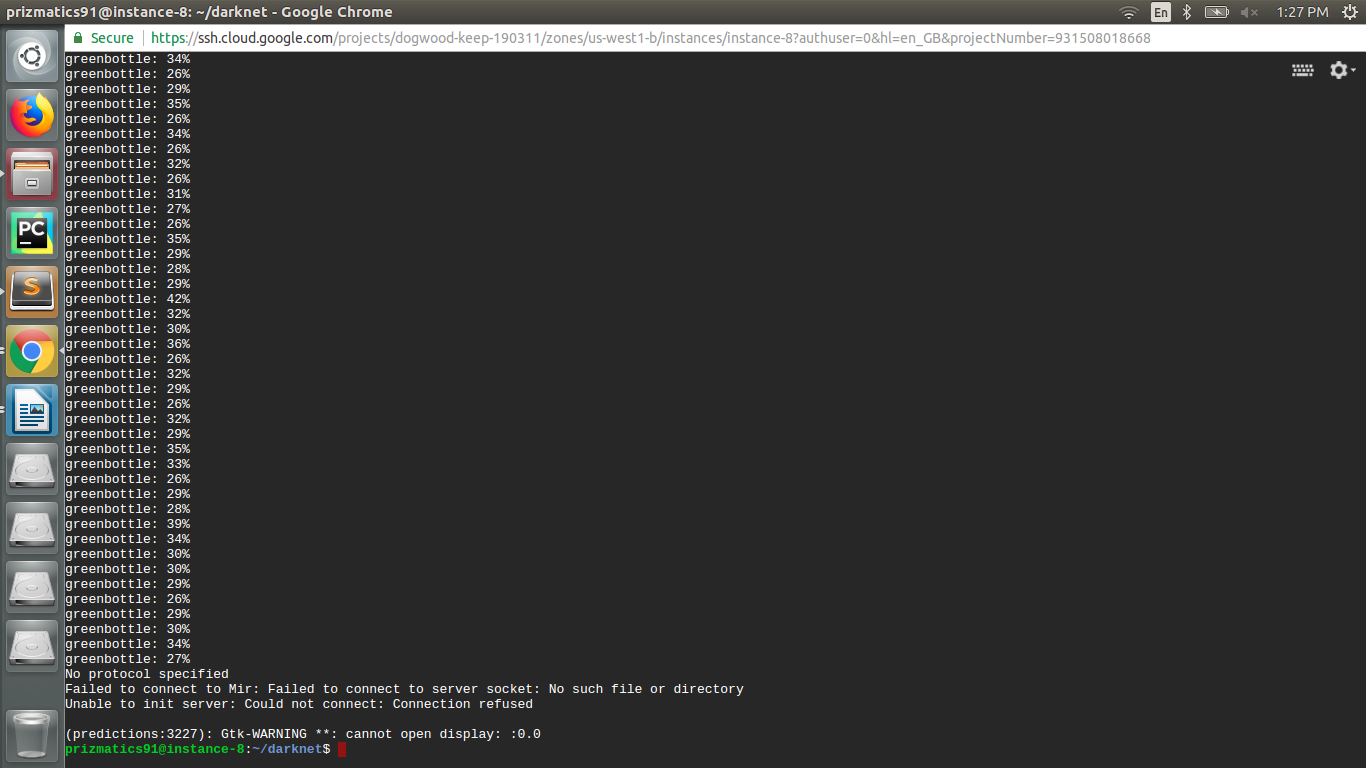
After training, when I tested the model it is not able to show me the output. I have tried setting various options like :
Setting Display = 0.0
Appending export Display = 1 in /.bashrc
Tried to set by using xhost +
But still not getting output
Ubuntu : 16.04
Cuda : 8.0
OpenCv : 3.4.0
 ritika890
All 5 comments
If you want to see result image, then you should setup remote display over ssh: https://www.google.com/search?q=display+over+ssh&rlz=1C1MSIM_enRU714RU714&oq=display+over+ssh&aqs=chrome..69i57j0l5.3007j0j7&sourceid=chrome&ie=UTF-8
Or just to avoid this error, try to add flag -dont_show at the end of your command. For example:
./darknet detector test data/obj.data yolo-obj.cfg yolo-obj.weights -dont_show
And then copy predictions.jpg to your computer and see it.
 AlexeyAB
on 18 Jul 2018
AlexeyAB
on 18 Jul 2018
Similar Question:
How could I transfer video to a output video file?
On GCP:
root@dl-tf:~/AlexeyAB-darknet# /root/darknet/darknet detector demo ./cfg/coco.data ./cfg/yolov2.cfg /root/yolo-file/yolov2.weights /root/yolo-file/Megamind.avi -i 0 -thresh 0.25
Demo
layer filters size input output
0 conv 32 3 x 3 / 1 416 x 416 x 3 -> 416 x 416 x 32 0.299 BFLOPs
1 max 2 x 2 / 2 416 x 416 x 32 -> 208 x 208 x 32
29 conv 1024 3 x 3 / 1 13 x 13 x1280 -> 13 x 13 x1024 3.987 BFLOPs
30 conv 425 1 x 1 / 1 13 x 13 x1024 -> 13 x 13 x 425 0.147 BFLOPs
31 detection
mask_scale: Using default '1.000000'
Loading weights from /root/yolo-file/yolov2.weights...Done!
video file: /root/yolo-file/Megamind.avi
(Demo:13215): Gtk-WARNING **: cannot open display:
 JeffCC
on 29 Sep 2018
JeffCC
on 29 Sep 2018
@JeffCC
./darknet detector demo data/obj.data yolo-obj.cfg yolo-obj.weights test.mp4 -dont_show -out_filename res.avi
For training on cloud (for example Amazon EC2) - read this: https://github.com/AlexeyAB/darknet/issues/1380#issuecomment-412333942
AlexeyAB
on 30 Sep 2018
If you want to see result image, then you should setup remote display over ssh: https://www.google.com/search?q=display+over+ssh&rlz=1C1MSIM_enRU714RU714&oq=display+over+ssh&aqs=chrome..69i57j0l5.3007j0j7&sourceid=chrome&ie=UTF-8
Or just to avoid this error, try to add flag
-dont_showat the end of your command. For example:
./darknet detector test data/obj.data yolo-obj.cfg yolo-obj.weights -dont_showAnd then copy
predictions.jpgto your computer and see it.
-dont_show works for me. I ran darknet in a docker
 leicao-me
on 4 Oct 2018
leicao-me
on 4 Oct 2018
I am running a similar command, but instead of trianing, I am using demo. So:
darknet detector demo cfg/final.data cfg/final.cfg weights/final.weights video_input.mp4 -dont_show -out_filename video-output.mp4
and I still get:
layer     filters    size              input                output
    0 conv     32  3 x 3 / 1   416 x 416 x   3   ->   416 x 416 x  32  0.299 BFLOPs
...
...
...
   31 detection
mask_scale: Using default '1.000000'
Loading weights from weights/final.weights...Done!
video file: video_input.mp4
Unable to init server: Could not connect: Connection refused

(Demo:7565): Gtk-WARNING **: 18:26:51.029: cannot open display:
EDIT: RESOLVED. I was running the pjreddie version of darknet, my bad.
 arunasank
on 23 Apr 2020
arunasank
on 23 Apr 2020
Related issues
 rezaabdullah
·
3Comments
rezaabdullah
·
3Comments
 HanSeYeong
·
3Comments
HanSeYeong
·
3Comments
 off99555
·
3Comments
off99555
·
3Comments
 jasleen137
·
3Comments
jasleen137
·
3Comments
 Mididou
·
3Comments
Mididou
·
3Comments
Most helpful comment
If you want to see result image, then you should setup remote display over ssh: https://www.google.com/search?q=display+over+ssh&rlz=1C1MSIM_enRU714RU714&oq=display+over+ssh&aqs=chrome..69i57j0l5.3007j0j7&sourceid=chrome&ie=UTF-8
Or just to avoid this error, try to add flag
-dont_showat the end of your command. For example:./darknet detector test data/obj.data yolo-obj.cfg yolo-obj.weights -dont_showAnd then copy
predictions.jpgto your computer and see it.