Darknet: Hardware configuration for 34 Live Camera Feeds
@AlexeyAB
Need some help regarding HD configuration.
Will a Nvidia Titan X 12 GB be able to manage 4 camera feeds with 1920x1080 resolution working at 25 FPS. I am using Yolov3 model.
Also need some help regarding CPU and RAM requirements.
- I have received a query regarding 34 camera setup. I am not sure about the Hardware requirements. As i have just worked on 940MX, 1050ti and 1080ti. Not sure about high end GPU's.
Also at max i can only have 3 servers. Price is not an issue.
Thanks !
 dexception
All 31 comments
@dexception hi,
https://en.wikipedia.org/wiki/List_of_Nvidia_graphics_processing_units#GeForce_10_series
- GeForce GTX 1080 Ti (GP102) - ~10 Tflops
- Nvidia TITAN X (GP102) - ~10 Tflops
These GPUs are approximately the same.
So just try to run 4 instances of Darknet Yolov3 with 4 x Video-files 1920x1080 on GeForce GTX 1080 Ti (GP102) and look at the FPS.
If it will show low performance, then you should use GeForce Titan V with CUDNN_HALF=1 to process 4 x video streams 1920x1080 with 25 FPS each.
Each Darknet instance takes ~2 GB CPU-RAM. So if you want to use 3 x GPU per server (12 x video-streams per server), then I think 64 GB CPU-RAM should be enough.
Also CPU can be a bottleneck in pre-processing of 12 video-streams (decompressing and resizing), so you should use ~24 CPU-Cores per server (~2 CPU-Cores-Skylake per video-stream).
So I recommend you to do test on GeForce GTX 1080 Ti (GP102) using 4 x Video-streams 1920x1080 25 FPS (with -out_filename res.avi if video saving is required), and measure FPS, CPU-usage, CPU-RAM-usage.
 AlexeyAB
on 17 Jul 2018
AlexeyAB
on 17 Jul 2018
I was able to manage only 2 x Video-streams 1920x1080 25 FPS on 1080ti and was able to detect faces upto 10-15 meters only on Centos 7 with opencv 3.4.0. Also my machine was a 16 core and i could see 50% CPU usage. :-(
Looks like 1700 cuda cores for single video stream. I would be needing 12 Tesla on 3 machines.
dexception
on 17 Jul 2018
I would be needing 12 Tesla on 3 machines.
Or Volta GeForce Titan V (GV100-400-A1).
was able to detect faces upto 10-15 meters only on Centos 7 with opencv 3.4.0.
Did you use default https://pjreddie.com/media/files/yolov3.weights model? Then only way to increase width=832 height=832 to detect small faces.
AlexeyAB
on 17 Jul 2018
I have trained my own model by merging images from different datasets. I am filtering faces with pose and minimum size of 40x40 with eyes before running recognition.
Would love to see a model between yolov3-tiny and yolov3. 👍
I feel there is a gap to fill here.
dexception
on 17 Jul 2018
@AlexeyAB
I just ran 8 yolov3-tiny in parallel on 1080 ti. same 1980x1080 resolution.
All 16 cores usage.
What is the configuration for one Yolov3-tiny ?
Cpu ?
Ram ?
Cuda cores ?
Not sure about how to calculate cuda cores... usage.
dexception
on 19 Jul 2018
I just ran 8 yolov3-tiny in parallel on 1080 ti. same 1980x1080 resolution.
How many FPS did you get for each of 8 yolov3-tiny?
AlexeyAB
on 19 Jul 2018
FPS of 35 on recorded and 20-25 on streaming .. streaming FPS varied i think this is because of the variable rate of data.
dexception
on 19 Jul 2018
I just ran 8 yolov3-tiny in parallel on 1080 ti. same 1980x1080 resolution.
All 16 cores usage.
- Is there 100% usage of all CPU Cores?
FPS of 35 on recorded and 20-25 on streaming .. streaming FPS varied i think this is because of the variable rate of data.
Or may be because there is a bottleneck in CPU for decompressing stream (100% CPU-usage).
- Do you use flag
-out_filename res.avito save output videofile? It can consume CPU too.
So looks like you should have more than 2 CPU-Cores per 1 video-stream.
Not sure about how to calculate cuda cores... usage.
Run in separate terminal this command, it will be showing permanently: GPU-index, time, GPU-usage, GPU-power, GPU-temperature:
nvidia-smi -i 0 --query-gpu=index,timestamp,utilization.gpu,power.draw,temperature.gpu --format=csv -l 1
Or just put it to the gpu_usage.sh file and run it in a separate terminal.
AlexeyAB
on 19 Jul 2018
Yes, 100% CPU usage but it is green. With 80% usage i can run 6 streams in parallel. I think the GPU can handle more but the CPU is creating problems. If you remember in this thread we discussed the same ..
https://github.com/pjreddie/darknet/issues/754
Also yesterday discussed that opencv is allocated unnecessary resources but i ran it like -dont_show with a shell script:
#!/bin/sh
for i in 1 2 3 4 5 6 7 8
do
echo "Looping ... number $i"
cd /opt/github/darknet/
./darknet detector demo cfg/coco.data cfg/yolov3-tiny.cfg yolov3-tiny.weights /opt/github/darknet/sample.avi -i 0 -dont_show &
done
https://github.com/AlexeyAB/darknet/issues/1213
I will add one more Xeon later on in this architecture.
So what do you think how many streams 1080ti would be able to handle on yolov3-tiny given that cpu is not a limiting factor ?
I am only saving images and not saving the entire videos.
Each stream is consuming about roughly 3 cores.
Will run the command and tell you tomorrow.
dexception
on 19 Jul 2018
I think at least 10 video-streams 1980x1080 25 FPS yolov3-tiny can be processed on 1080ti if there is High-perfomance CPU.
There is no issue with PCIe lanes since you have issue even with 1 GPU, but if you want to use CPU with many lanes, you can try to use AMD EPYC 7281 Hexadeca-core (16 Core) 2.10 GHz with 128 PCIe-lanes - ~700$: https://www.amd.com/en/products/cpu/amd-epyc-7281 But CPU-Cores can remain a bottleneck.
AlexeyAB
on 19 Jul 2018
@AlexeyAB
So should we be able to get 25fps at 1920x1080 as the input resolution to Yolov3? I've attempted to run inference with a Yolov3 model (using that resolution) on a V100 with CUDNN_HALF=1, but it ends up crashing overtime. I was wondering if you had any idea why this might be? I'm using CUDA 9.0 and CUDNN 7.0.5.
The error I get is:
darknet: ./src/utils.c:255: error: Assertion '0' failed.
 benjaminrwilson
on 23 Jul 2018
benjaminrwilson
on 23 Jul 2018
@benjaminrwilson
Here we spoke about several 1920x1080 video-streams resolution on 416x416 neural network resolution (Yolo v3 or Yolo v3 tiny).
You should get on Tesla V100 (16 GB with CUDNN_HALF=1) about ~25 FPS on 1920x1080 video-stream resolution:
- on width=768 height=768 Yolo v3
- on width=1920 height=1080 Yolo v3 tiny
AlexeyAB
on 23 Jul 2018
Dear @AlexeyAB,
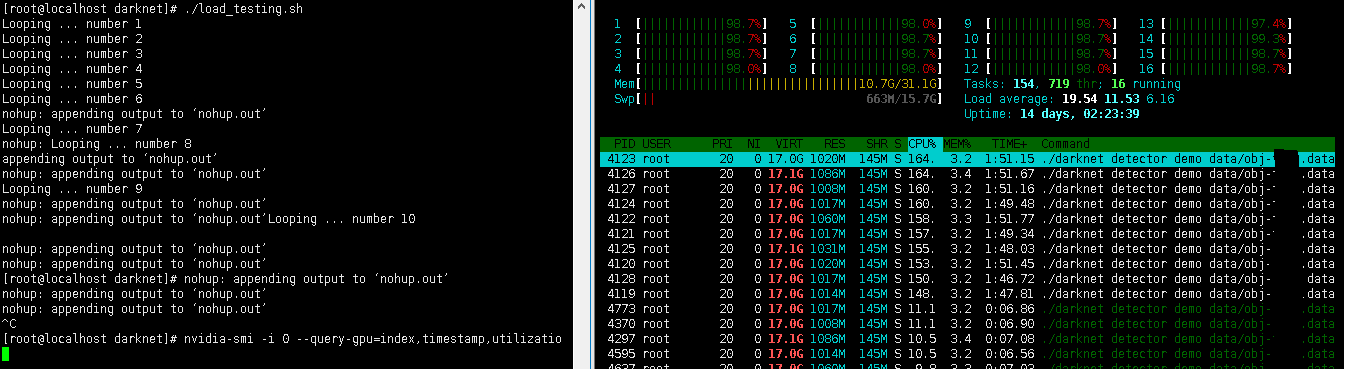
3 cores per stream is too much. I am not able to understand what is taking so many cores. Can you throw some light on this issue ?
Running 10 instances of yolov3-tiny on 16 cores.
index, timestamp, utilization.gpu [%], power.draw [W], temperature.gpu
0, 2018/08/01 04:45:55.133, 91 %, 176.64 W, 66
0, 2018/08/01 04:45:56.136, 87 %, 187.01 W, 67
0, 2018/08/01 04:45:57.138, 86 %, 181.67 W, 67
0, 2018/08/01 04:45:58.141, 85 %, 200.28 W, 67
0, 2018/08/01 04:45:59.143, 84 %, 187.10 W, 67
0, 2018/08/01 04:46:00.148, 86 %, 178.58 W, 67
0, 2018/08/01 04:46:01.153, 87 %, 196.14 W, 67
0, 2018/08/01 04:46:02.161, 87 %, 201.46 W, 68
0, 2018/08/01 04:46:03.165, 88 %, 177.07 W, 68
0, 2018/08/01 04:46:04.174, 88 %, 194.87 W, 68
0, 2018/08/01 04:46:05.177, 85 %, 193.52 W, 68
0, 2018/08/01 04:46:06.183, 91 %, 192.82 W, 69
0, 2018/08/01 04:46:07.187, 90 %, 184.14 W, 69
0, 2018/08/01 04:46:08.191, 87 %, 189.76 W, 69
0, 2018/08/01 04:46:09.194, 88 %, 177.89 W, 69
0, 2018/08/01 04:46:10.198, 88 %, 186.44 W, 69
0, 2018/08/01 04:46:11.202, 86 %, 192.63 W, 69
0, 2018/08/01 04:46:12.205, 87 %, 189.49 W, 69
0, 2018/08/01 04:46:13.209, 83 %, 201.82 W, 69
0, 2018/08/01 04:46:14.212, 85 %, 196.43 W, 70
0, 2018/08/01 04:46:15.215, 89 %, 187.72 W, 70
0, 2018/08/01 04:46:16.219, 89 %, 187.66 W, 70
0, 2018/08/01 04:46:17.222, 87 %, 198.09 W, 70
0, 2018/08/01 04:46:18.226, 90 %, 199.79 W, 70
0, 2018/08/01 04:46:19.229, 89 %, 200.59 W, 70
0, 2018/08/01 04:46:20.233, 86 %, 182.04 W, 70
0, 2018/08/01 04:46:21.236, 88 %, 197.31 W, 70
0, 2018/08/01 04:46:22.239, 86 %, 197.26 W, 70
0, 2018/08/01 04:46:23.243, 86 %, 199.39 W, 71
0, 2018/08/01 04:46:24.247, 85 %, 194.36 W, 70
0, 2018/08/01 04:46:25.250, 87 %, 200.93 W, 70
0, 2018/08/01 04:46:26.253, 88 %, 204.65 W, 70
0, 2018/08/01 04:46:27.256, 84 %, 188.17 W, 71
0, 2018/08/01 04:46:28.260, 88 %, 183.93 W, 71
0, 2018/08/01 04:46:29.265, 85 %, 202.28 W, 71
0, 2018/08/01 04:46:30.267, 87 %, 197.69 W, 71
0, 2018/08/01 04:46:31.270, 87 %, 199.35 W, 71
0, 2018/08/01 04:46:32.275, 86 %, 190.53 W, 71
0, 2018/08/01 04:46:33.278, 88 %, 190.21 W, 71
0, 2018/08/01 04:46:34.285, 87 %, 199.64 W, 71
0, 2018/08/01 04:46:35.287, 86 %, 194.66 W, 71
0, 2018/08/01 04:46:36.291, 86 %, 183.63 W, 71
0, 2018/08/01 04:46:37.293, 85 %, 189.67 W, 71
0, 2018/08/01 04:46:38.297, 86 %, 192.28 W, 71
0, 2018/08/01 04:46:39.299, 84 %, 200.09 W, 71
0, 2018/08/01 04:46:40.301, 88 %, 184.45 W, 71
0, 2018/08/01 04:46:41.310, 82 %, 200.48 W, 71
0, 2018/08/01 04:46:42.312, 85 %, 185.58 W, 71
0, 2018/08/01 04:46:43.314, 82 %, 196.06 W, 72
0, 2018/08/01 04:46:44.317, 84 %, 199.17 W, 71
0, 2018/08/01 04:46:45.319, 83 %, 194.65 W, 71
0, 2018/08/01 04:46:46.321, 85 %, 195.54 W, 71
0, 2018/08/01 04:46:47.325, 87 %, 188.77 W, 72
0, 2018/08/01 04:46:48.329, 85 %, 189.43 W, 71
0, 2018/08/01 04:46:49.336, 88 %, 186.61 W, 72
0, 2018/08/01 04:46:50.340, 86 %, 198.99 W, 72
0, 2018/08/01 04:46:51.349, 89 %, 189.20 W, 72
0, 2018/08/01 04:46:52.351, 89 %, 189.48 W, 72
0, 2018/08/01 04:46:53.359, 85 %, 199.27 W, 72
0, 2018/08/01 04:46:54.363, 86 %, 182.76 W, 72
0, 2018/08/01 04:46:55.368, 88 %, 174.79 W, 72
0, 2018/08/01 04:46:56.373, 86 %, 205.18 W, 72
0, 2018/08/01 04:46:57.379, 85 %, 191.98 W, 72
0, 2018/08/01 04:46:58.386, 84 %, 203.77 W, 72
0, 2018/08/01 04:46:59.388, 84 %, 189.51 W, 72
0, 2018/08/01 04:47:00.390, 86 %, 199.57 W, 72
0, 2018/08/01 04:47:01.393, 87 %, 204.48 W, 72
0, 2018/08/01 04:47:02.396, 89 %, 202.96 W, 72
0, 2018/08/01 04:47:03.399, 85 %, 195.19 W, 72
0, 2018/08/01 04:47:04.401, 86 %, 184.35 W, 72
0, 2018/08/01 04:47:05.403, 85 %, 187.33 W, 72
0, 2018/08/01 04:47:06.406, 87 %, 199.31 W, 72
0, 2018/08/01 04:47:07.408, 85 %, 201.36 W, 72
0, 2018/08/01 04:47:08.412, 86 %, 203.92 W, 72
0, 2018/08/01 04:47:09.414, 86 %, 207.28 W, 72
0, 2018/08/01 04:47:10.416, 86 %, 179.31 W, 72
0, 2018/08/01 04:47:11.420, 87 %, 199.98 W, 72
0, 2018/08/01 04:47:12.422, 84 %, 209.36 W, 72
0, 2018/08/01 04:47:13.424, 88 %, 196.95 W, 72
0, 2018/08/01 04:47:14.427, 86 %, 204.65 W, 72
0, 2018/08/01 04:47:15.429, 84 %, 193.30 W, 72
0, 2018/08/01 04:47:16.431, 83 %, 195.82 W, 72
0, 2018/08/01 04:47:17.434, 83 %, 197.72 W, 72
0, 2018/08/01 04:47:18.437, 88 %, 203.95 W, 72
0, 2018/08/01 04:47:19.441, 85 %, 200.07 W, 72
0, 2018/08/01 04:47:20.444, 85 %, 196.62 W, 72
0, 2018/08/01 04:47:21.448, 81 %, 178.45 W, 72
0, 2018/08/01 04:47:22.451, 88 %, 197.59 W, 72
0, 2018/08/01 04:47:23.455, 85 %, 196.18 W, 72
0, 2018/08/01 04:47:24.463, 86 %, 189.17 W, 72
0, 2018/08/01 04:47:25.465, 89 %, 204.01 W, 72
0, 2018/08/01 04:47:26.467, 86 %, 195.16 W, 72
0, 2018/08/01 04:47:27.470, 90 %, 199.49 W, 72
0, 2018/08/01 04:47:28.472, 88 %, 182.72 W, 73
0, 2018/08/01 04:47:29.475, 86 %, 192.18 W, 72
0, 2018/08/01 04:47:30.479, 88 %, 203.57 W, 72
0, 2018/08/01 04:47:31.482, 88 %, 196.22 W, 73
0, 2018/08/01 04:47:32.486, 85 %, 187.79 W, 72
0, 2018/08/01 04:47:33.490, 87 %, 194.33 W, 73
0, 2018/08/01 04:47:34.500, 91 %, 208.81 W, 73
0, 2018/08/01 04:47:35.502, 85 %, 175.97 W, 72
0, 2018/08/01 04:47:36.506, 88 %, 193.36 W, 73
0, 2018/08/01 04:47:37.508, 82 %, 185.02 W, 72
0, 2018/08/01 04:47:38.510, 85 %, 189.48 W, 72
0, 2018/08/01 04:47:39.513, 77 %, 170.51 W, 72
0, 2018/08/01 04:47:40.515, 62 %, 136.01 W, 71
0, 2018/08/01 04:47:41.519, 52 %, 144.30 W, 70
0, 2018/08/01 04:47:42.522, 49 %, 150.79 W, 69
0, 2018/08/01 04:47:43.526, 34 %, 130.93 W, 68
0, 2018/08/01 04:47:44.530, 18 %, 101.68 W, 66
0, 2018/08/01 04:47:45.532, 17 %, 106.27 W, 65
0, 2018/08/01 04:47:46.536, 0 %, 69.91 W, 63
0, 2018/08/01 04:47:47.541, 0 %, 69.31 W, 62
dexception
on 1 Aug 2018
@dexception
takes CPU-usage:
- mpeg/h264 video decoder
- frame resizing to the network size 1920x1080 -> 416x416 (with linear interpolation)
- showing frame on the screen
- store result to the videofile (if it is used)
AlexeyAB
on 1 Aug 2018
I think it is darknet that is taking the cpu and not the video decoder. If i play a simple video on windows using opencv 3.4.0 it hardly takes any cpu and i am also showing the video. This is the same video i used for load testing.

loading_testing.sh
#!/bin/sh
for i in 1 2 3 4 5 6 7 8 9 10
do
echo "Looping ... number $i"
cd /opt/github/darknet/
nohup ./darknet detector demo data/obj.data cfg/objv3-tiny.cfg objv3-tiny.weights /opt/github/darknet/sample.avi -i 0 -dont_show </dev/null >/dev/null 2>&1 &
done
@dexception, have you tried Visual studio's performance profiler? It will tell you the accumulative CPU usage by each individual function call.
 WeiZRPW
on 3 Aug 2018
WeiZRPW
on 3 Aug 2018
hi there,
My IP camera resolution: 1280x720
GPU: GTX 1080ti
CPU: i5-8400
RAM: 16GB
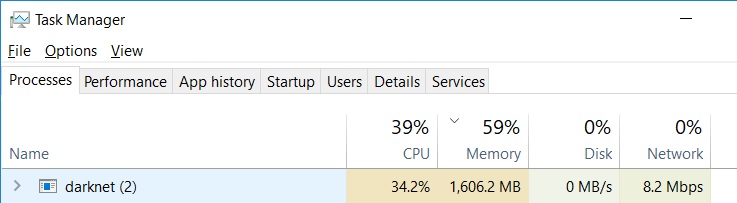
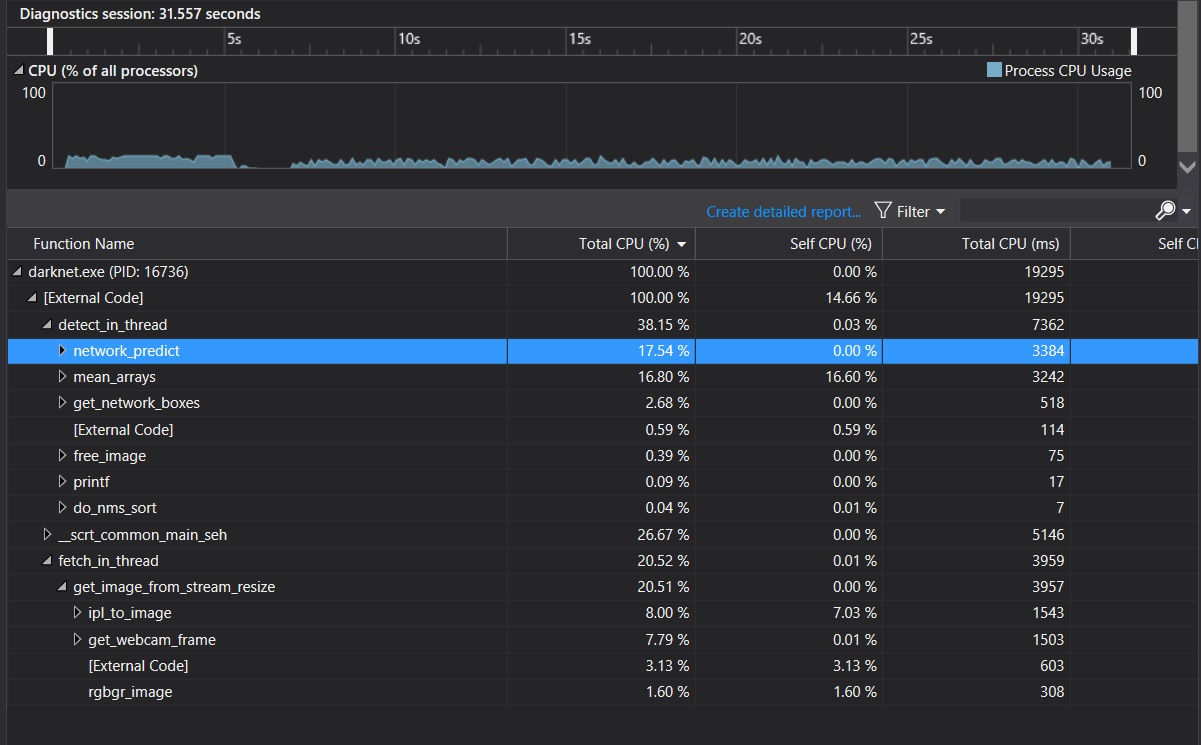
the following 3 pictures were from the Visual Studio performance profiler of darknet.exe
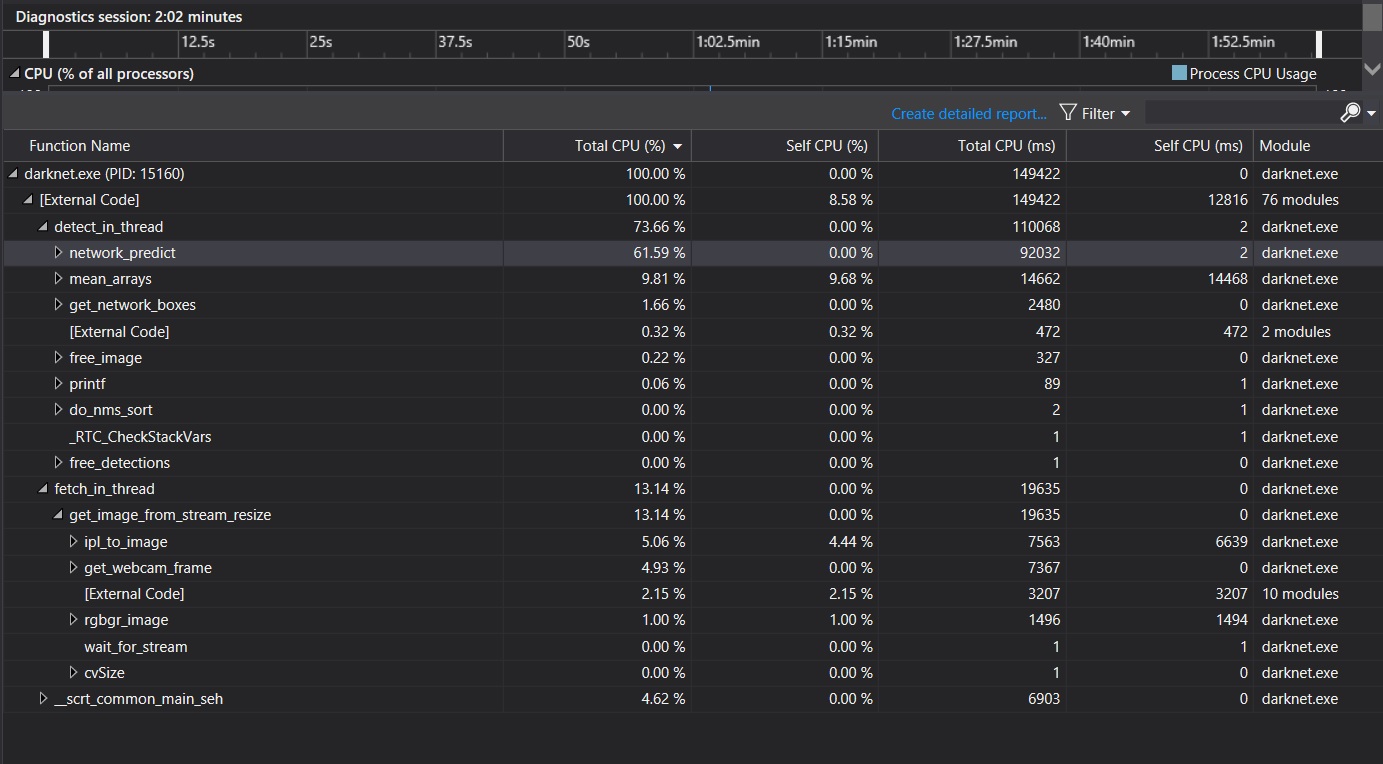
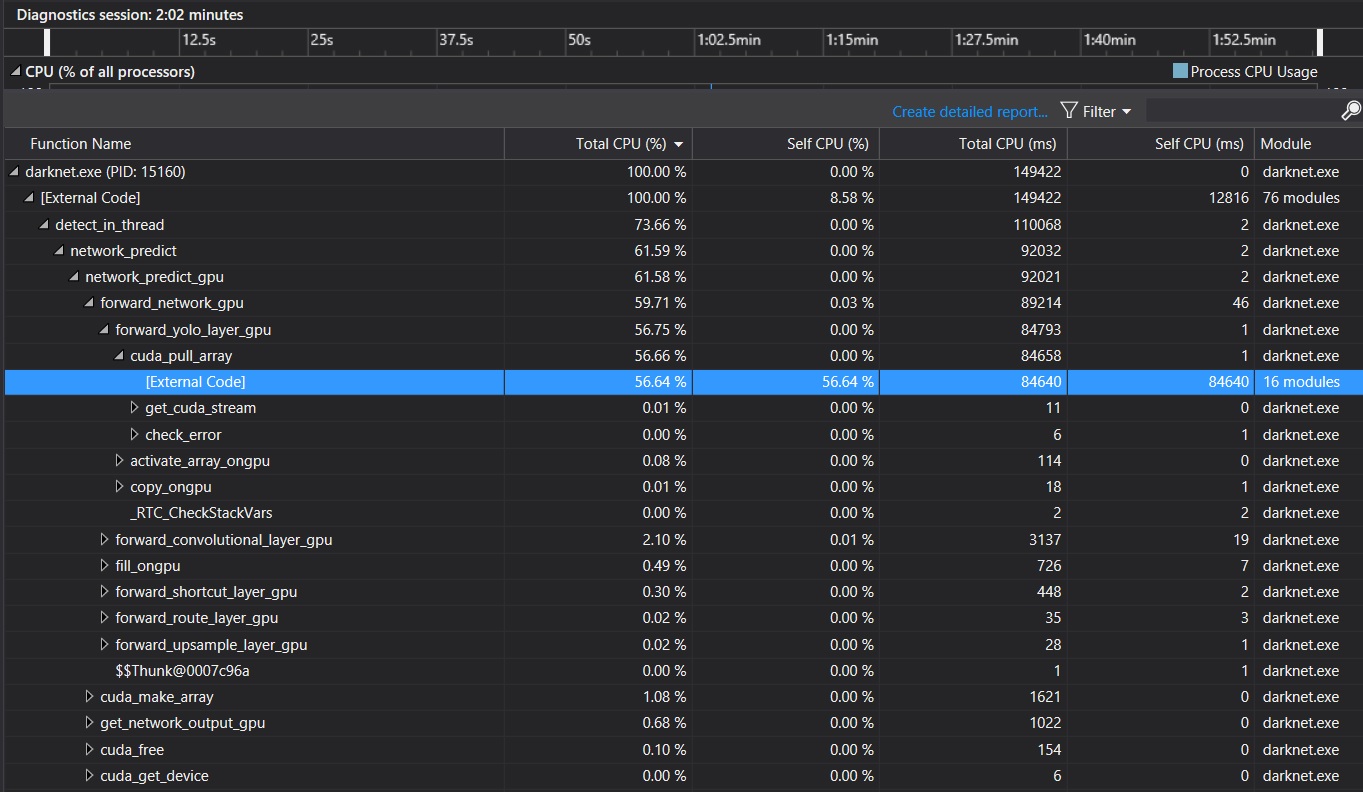
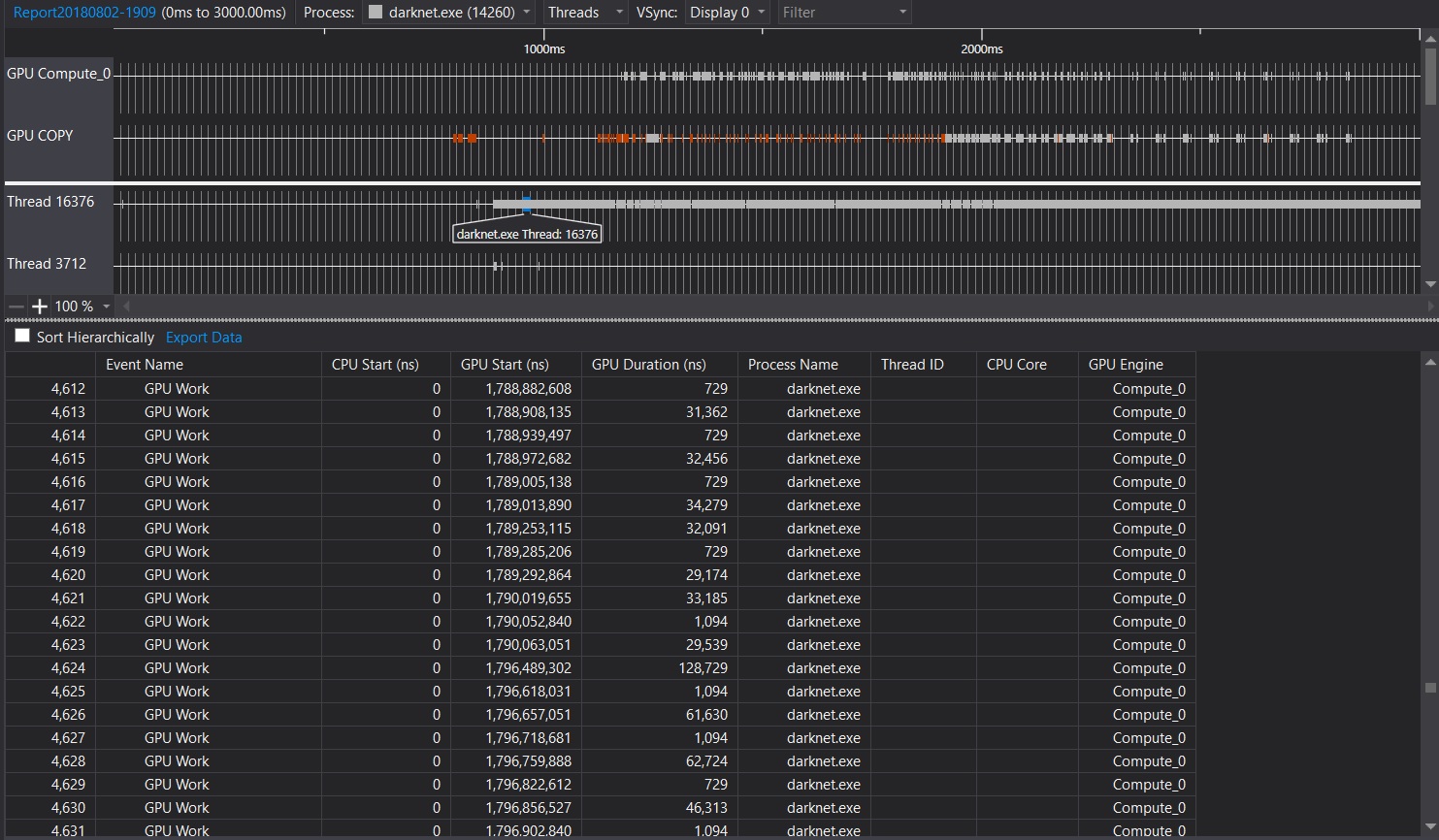
Conclusion: from these analysis, we can see that cuda_pull_array function took more than half of CPU resource utilized by darknet. I guess cudaError_t status = cudaMemcpyAsync(x, x_gpu, size, cudaMemcpyDeviceToHost, get_cuda_stream()) in cuda_pull_array is the key consumer of CPU resource.
WeiZRPW
on 3 Aug 2018
@Iamthegeekdavid
Can you please share your version of cuda ? I would like to compare this on multiple versions of cuda and see if this has been optimized on the newer versions.
Thanks for sharing your knowledge.
dexception
on 3 Aug 2018
@Iamthegeekdavid
Try to change this code: https://github.com/AlexeyAB/darknet/blob/6682f0b98984e2b92049e985b21ed81b76666565/src/darknet.c#L378-L380
To this:
    if(gpu_index >= 0){
        cuda_set_device(gpu_index);
        check_error(cudaSetDeviceFlags(cudaDeviceScheduleBlockingSync));
    }
@dexception
CUDA 9.2
WeiZRPW
on 3 Aug 2018
@AlexeyAB @Iamthegeekdavid
How many yolov3-tiny instances will i be able run in parallel on Tesla p100 ?
I have never tried CUDNN_HALF.
dexception
on 3 Aug 2018
@AlexeyAB
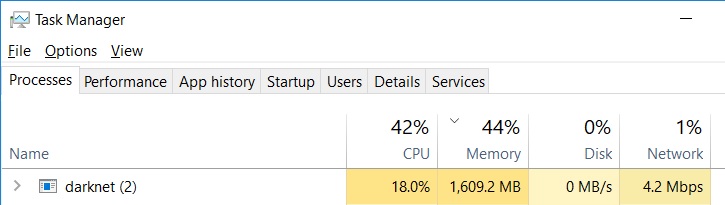
CPU resource occupancy lowered from 34% to 18% after I made the change that you suggested.
It is a huge improvement of the performance.

WeiZRPW
on 3 Aug 2018
@dexception
If I've understood correctly from the above discussion, you could manage to have multiple live camera (or video) stream as input to one process of darknet.exe to do the object detection.
I wonder how could you maintain several camera streams in one process of darknet.exe. My poor guess is that current version darknet.exe could only have one stream input.
Let me know how you could manage it to work. FYI @AlexeyAB
Thanks,
Let me know how you did it.
WeiZRPW
on 3 Aug 2018
34 live streams in 34 separate processes. I am using it on centos not windows.
Edit: This is my brother's I'd. We both write code together.
Further optimization is needed as I have got to know that someone else is running 500 live stream on 3 Tesla P100.
 uday60
on 3 Aug 2018
uday60
on 3 Aug 2018
@uday60 @dexception
500 live stream on 3 Tesla P100 use darknet? What is the resolution of each stream? How many PCs/servers do they use?
In my test, each process consumes 1.6G RAM and 18% of CPU resource. For 500 live streams (i.e., 500 darknet processes), you can only do it with about 100 computers (a rough estimate).
WeiZRPW
on 3 Aug 2018
This was an Israeli product which is not open source. I came to know about it through some sources. I was completely shocked to see the specs. But just wanted to tell you that it is possible.
uday60
on 4 Aug 2018
@dexception @uday60
No matter how the detection application was designed and implemented and how it is deployed, I think the bottleneck is the CPU and RAM resource for darkenet. Both CPU and RAM resource load is going to linearly scale up as you increase live camera feeds. Consumption of GPU resource per frame is relatively light.
WeiZRPW
on 4 Aug 2018
@AlexeyAB
Thanks man. This is a huge CPU improvement.
I will share the results of load_testing.sh script soon.
dexception
on 5 Aug 2018
From 2.6 CPU per stream to 2.3 cpu per stream on Intel(R) Xeon(R) CPU E5-2620 v4 @ 2.10GHz
dexception
on 7 Aug 2018
@dexception What is the FPS detection in this case? Since CPU-usage depends on FPS.
Do you use stream resolution 1920x1080?
AlexeyAB
on 7 Aug 2018
FPS 25
Yes i have used the same video with resolution 1920x1080.
Tested in multiple times by playing 2 or 4 or 6 or 8.
CPU started choking after 8 streams.
uday60
on 7 Aug 2018
Related issues
 hemp110
·
3Comments
hemp110
·
3Comments
 shootingliu
·
3Comments
shootingliu
·
3Comments
 qianyunw
·
3Comments
qianyunw
·
3Comments
 HilmiK
·
3Comments
HilmiK
·
3Comments
 Cipusha
·
3Comments
Cipusha
·
3Comments
Most helpful comment
@Iamthegeekdavid
Try to change this code: https://github.com/AlexeyAB/darknet/blob/6682f0b98984e2b92049e985b21ed81b76666565/src/darknet.c#L378-L380
To this:
More info: https://docs.nvidia.com/cuda/cuda-runtime-api/group__CUDART__DEVICE.html#group__CUDART__DEVICE_1g69e73c7dda3fc05306ae7c811a690fac