Darknet: Can I Learn even small images ?
Hi,
Can I learn even small images?
I could not do it well.
For example, Image size is 416 * 32.
I tried the following settings
[net]
width=416
height=32
[yolo]
anchors = 11.3186,18.4342, 11.3495,23.6338, 16.2385,21.0475, 13.2598,28.8015, 16.0004,25.3587, 20.3254,24.8049, 18.4719,29.2200, 23.0463,28.7159, 27.3326,29.7581
If you had known about that, please tell me how to set up.
Thank you
 RexKT
RexKT
All 13 comments
Hi,
- Do all of your images have the same size 416x32?
- Did you recalculate anchors and change in all 3 [yolo]-layer? https://github.com/AlexeyAB/darknet#how-to-improve-object-detection
darknet.exe detector calc_anchors data/obj.data -num_of_clusters 9 -width 416 -height 32
I could not do it well.
- How many iterations did you train and what mAP did you get? https://github.com/AlexeyAB/darknet#when-should-i-stop-training
 AlexeyAB
on 28 Jun 2018
AlexeyAB
on 28 Jun 2018
Thanks for the reply.
・Do all of your images have the same size _416x32?
Yes, Learning image are all same size(416x32).
but, I pasted a random small image to the white background.
・Did you recalculate anchors and change in all 3 [yolo]-layer?
Yes, I chenged the all 3[yolo]-layer.
・How many iterations did you train and what mAP did you get?
I trained 50020 times and got the mAP value is 95.46%
Other result:
for thresh = 0.25, precision = 0.92, recall = 1.00, F1-score = 0.96
for thresh = 0.25, TP = 54627, FP = 4496, FN = 216, average IoU = 80.85 %
I can detect to a certain extent.
but, Sometimes detected frame in a strange place.
Here is the file No.1:

Here is the file No.2:

Thank you in advance.
RexKT
on 29 Jun 2018
@RexKT Can you attach your cfg-file? Just rename it to txt file and drag-n-drop to your message.
Also did you check your dataset by using Yolo_mark? https://github.com/AlexeyAB/Yolo_mark
AlexeyAB
on 29 Jun 2018
Thanks for the reply.
@RexKT Can you attach your cfg-file?
Here is my cfg-file:
yolov3-custom-train.txt
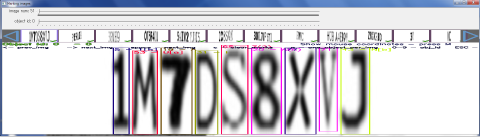
Also did you check your dataset by using Yolo_mark?
Yes. It is as follows:
Thank you in advance.
RexKT
on 2 Jul 2018
Here is my cfg-file:
yolov3-custom-train.txt
Use saturation=1 instead of saturation=0 to disable color data augmentation.
And set steps=40000,45000 instead of steps=400000,450000
Also try to set ignore_thresh = .7 instead of ignore_thresh = .5 in each of 3 [yolo]-layers, may be it will solve this issue:
And train again from the begining.
AlexeyAB
on 2 Jul 2018
I changed cfg file as follows and learned it again (50020 iteration).
・saturation=1
・steps=40000,45000
・ignore_thresh = .7 in each of 3 [yolo]-layers
As a result, I could improve false detection a little.
However, there is a false detection as described below,
and the value of "prob" is also high (65.8%), so it is difficult to remove it.

Because the target image was very similar to mine,
I also carried out the following advice on issue # 1123.
Can you show screenshot of result of this command?
darknet.exe detector calc_anchors data/obj.data -num_of_clusters 5 -width 13 -height 9
The result as follows:
0.3531,3.8528, 0.4225,4.6509, 0.4847,5.3221, 0.5472,5.9653, 0.6093,6.5904
As a result, false detection has increased very much.
And I also learned the image like below with yolov3.cfg's default network size and anchor.
As a result, there was no false detection.
However, in order to detect it faster, I would like to reduce the network size to about 416 * 32.
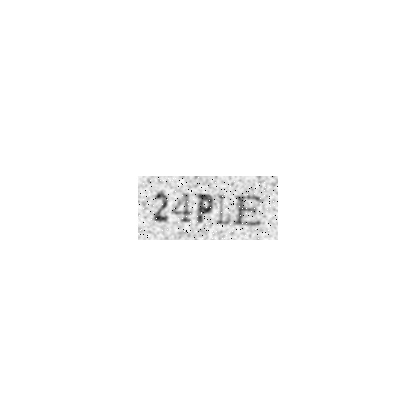
Because it is very effective to change the setting of the anchor,
please advise the setting of a better anchor.
Thank you in advance.
RexKT
on 5 Jul 2018
You can just pseudo-disable the 1st [yolo]-layer:
Change last 3 anchors values to the very high values:
anchors = 11.3186,18.4342, 11.3495,23.6338, 16.2385,21.0475, 13.2598,28.8015, 16.0004,25.3587, 20.3254,24.8049, 100,100, 200,200, 300,300Set it for all 3 [yolo] layers
Train again.
And check mAP
So will be used only 2nd and 3rd [yolo]-layers with higher size of final feature map, so it can distinguish close placed objects better.
AlexeyAB
on 5 Jul 2018
I changed the anchors and trained again(50020 iteration).
The result as follows:
for thresh = 0.25, precision = 0.99, recall = 1.00, F1-score = 1.00
for thresh = 0.25, TP = 72936, FP = 416, FN = 56, average IoU = 89.06 %
mean average precision (mAP) = 0.992149, or 99.21 %
If the threshold is lowered, the following false detection will occur,
but since it can be erased later, there is no problem.


Thank you for your advice.
RexKT
on 9 Jul 2018
@RexKT Hi, My data is very similar to you, and the resolution is low(about 100*50),how can I improve recall using yolov3.Can you tell me your resolution of your picture?
 zhliu2018
on 13 Jul 2018
zhliu2018
on 13 Jul 2018
@zhliu2018 Resolution of picture is 416x32.
So just set very high last 6 values in you anchors like 100,100, 200,200, 300,300 in each of 3 [yolo] layers in your cfg-file.
AlexeyAB
on 23 Jul 2018
@RexKT I try to do the same things. Do you have dataset with characters for training?
 Lepiloff
on 25 Apr 2019
Lepiloff
on 25 Apr 2019
I read. It's a wonderful character enclosure.
I want to use this yolo, how do I do it?
can you tell me?
Now I can use keras-yolov3 Ordinary pattern.
 eye289475
on 31 Jan 2020
eye289475
on 31 Jan 2020
Thanks for the reply.
@RexKT Can you attach your cfg-file?
Here is my cfg-file:
yolov3-custom-train.txtAlso did you check your dataset by using Yolo_mark?
Yes. It is as follows:
Thank you in advance.
I changed cfg file as follows and learned it again:
- use channel = 3
=>Unrecognizable results
Why channel = 1 => The identification results are quite accurate ?
 KO-KMS-AT12
on 15 Feb 2020
KO-KMS-AT12
on 15 Feb 2020
Related issues
 yongcong1415
·
3Comments
yongcong1415
·
3Comments
 siddharth2395
·
3Comments
siddharth2395
·
3Comments
 off99555
·
3Comments
off99555
·
3Comments
 Cipusha
·
3Comments
Cipusha
·
3Comments
 Mididou
·
3Comments
Mididou
·
3Comments
Most helpful comment
I changed the anchors and trained again(50020 iteration).
The result as follows:
for thresh = 0.25, precision = 0.99, recall = 1.00, F1-score = 1.00
for thresh = 0.25, TP = 72936, FP = 416, FN = 56, average IoU = 89.06 %
mean average precision (mAP) = 0.992149, or 99.21 %
If the threshold is lowered, the following false detection will occur,


but since it can be erased later, there is no problem.
Thank you for your advice.