Hi all,
I'm training on my own dataset and assume the anchors need to be modified to fit my data. Does the code take care of this automatically or is there a way to generate anchors?
I've seen this for the Keras implementation of YOLO for anchor generation: https://github.com/experiencor/keras-yolo2/blob/master/gen_anchors.py
Thanks!
 RJVisee44
All 16 comments
I also tried this:
./darknet detector calc_anchors data/hand.data -num_of_clusters 9 -width 720 -height 405 -show
as I am using the Linux implementation. but nothing happened. I believe the link I attached above is the same or similar to this: https://github.com/AlexeyAB/darknet/blob/master/scripts/gen_anchors.py
RJVisee44
on 26 Jun 2018
@RyanCodes44 Hi,
You should use this repository to get anchors: https://github.com/AlexeyAB/darknet
By using this command for Yolo v3 (or v2):
./darknet detector calc_anchors data/hand.data -num_of_clusters 9 -width 720 -height 405 -show
You can use this script only for Yolo v2 (not v3):
https://github.com/AlexeyAB/darknet/blob/master/scripts/gen_anchors.py
 AlexeyAB
on 26 Jun 2018
AlexeyAB
on 26 Jun 2018
@AlexeyAB thank you. I am using Yolov2 so I generated anchors using the script. If i set -num_clusters=9 in that script I get 18 anchors (and 1 average IoU I think). Do I use all of the anchors?
RJVisee44
on 26 Jun 2018
For Yolo v2 use:
./darknet detector calc_anchors data/hand.data -num_of_clusters 5 -width 22 -height 18 -show
720/32=22
405/32=18
Also: https://github.com/AlexeyAB/darknet#how-to-train-to-detect-your-custom-objects
Note: If you changed width= or height= in your cfg-file, then new width and height must be divisible by 32.
AlexeyAB
on 26 Jun 2018
Okay awesome. Thank you for your help.
RJVisee44
on 27 Jun 2018
@AlexeyAB does the height/width have to be the same height/width of the images in the dataset? I ask because 720 and 405 are not divisible by 32.
RJVisee44
on 3 Jul 2018
@RyanCodes44
height and width in cfg file and for calc_anchors should be divisible by 32.
height and width of your images can be any for each image: one image 100x50, another image 500x700, 1920x1080, ...
AlexeyAB
on 3 Jul 2018
@AlexeyAB so for calc_anchors:
./darknet detector calc_anchors data/hand.data -num_of_clusters 5 -width 22 -height 18 -show
The width and height does not have to be the width and height of the images in my dataset (720x405). They only have to be divisible by 32?
RJVisee44
on 3 Jul 2018
@RyanCodes44 Yes.
for Yolo v2:
width=704 height=576in cfg-file
./darknet detector calc_anchors data/hand.data -num_of_clusters 5 -width 22 -height 18 -showfor Yolo v3:
width=704 height=576in cfg-file
./darknet detector calc_anchors data/hand.data -num_of_clusters 9 -width 704 -height 576 -show
And you can use any images with any sizes.
AlexeyAB
on 3 Jul 2018
Thanks!
RJVisee44
on 3 Jul 2018
@AlexeyAB Hi @AlexeyAB thank you for your answers .
After train with 3000 iterations and I used yolov2 when i test the result of detect is not good such as my goal is to detect the iris of eyes but my result
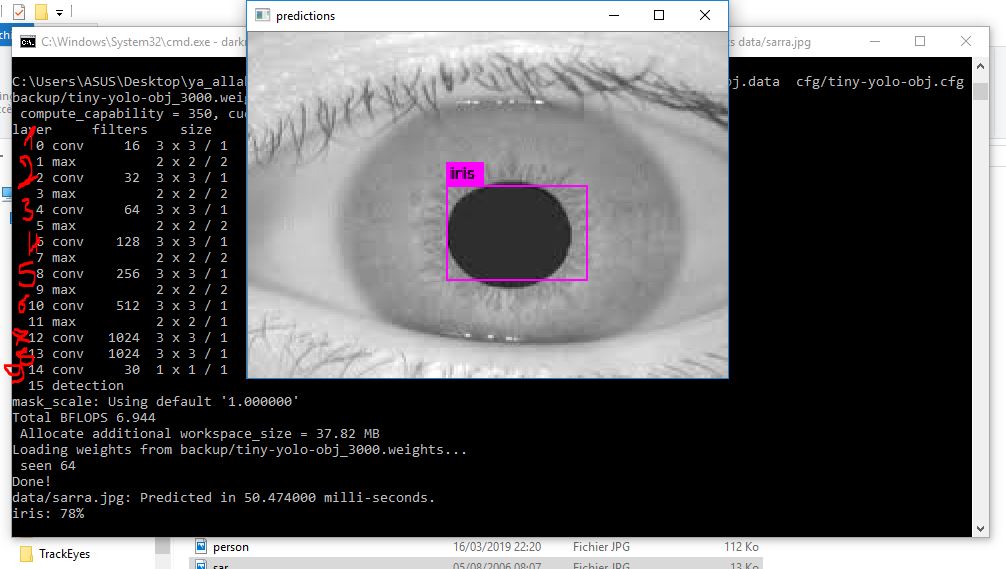
it can be caused by the anchros.
Remark: the size of my all images is :320*280
Thank you very much @AlexeyAB to help me
such as my file configuration is :
[net]
batch=64
subdivisions=64
width=520
height=520
channels=3
momentum=0.9
decay=0.0005
angle=0
saturation = 1.5
exposure = 1.5
hue=.1
learning_rate=0.001
max_batches = 120000
policy=steps
steps=-1,100,80000,100000
scales=.1,10,.1,.1
[convolutional]
batch_normalize=1
filters=16
size=3
stride=1
pad=1
activation=leaky
[maxpool]
size=2
stride=2
[convolutional]
batch_normalize=1
filters=32
size=3
stride=1
pad=1
activation=leaky
[maxpool]
size=2
stride=2
[convolutional]
batch_normalize=1
filters=64
size=3
stride=1
pad=1
activation=leaky
[maxpool]
size=2
stride=2
[convolutional]
batch_normalize=1
filters=128
size=3
stride=1
pad=1
activation=leaky
[maxpool]
size=2
stride=2
[convolutional]
batch_normalize=1
filters=256
size=3
stride=1
pad=1
activation=leaky
[maxpool]
size=2
stride=2
[convolutional]
batch_normalize=1
filters=512
size=3
stride=1
pad=1
activation=leaky
[maxpool]
size=2
stride=1
[convolutional]
batch_normalize=1
filters=1024
size=3
stride=1
pad=1
activation=leaky
#
[convolutional]
batch_normalize=1
size=3
stride=1
pad=1
filters=1024
activation=leaky
[convolutional]
size=1
stride=1
pad=1
filters=30
activation=linear
[region]
anchors = 0.738768,0.874946, 2.42204,2.65704, 4.30971,7.04493, 10.246,4.59428, 12.6868,11.8741
bias_match=1
classes=1
coords=4
num=5
softmax=1
jitter=.2
rescore=1
object_scale=5
noobject_scale=1
class_scale=1
coord_scale=1
absolute=1
thresh = .6
random=1
 sarratouil
on 18 Mar 2019
sarratouil
on 18 Mar 2019
there are three fields (anchors) in the cfg file.
Which ones do i change and replace with my new calculated anchors??
[net]
Testing
batch=1
subdivisions=1
Training
batch=64
subdivisions=64
width=416
height=416
channels=3 #changed from 3 to 1
momentum=0.9
decay=0.0005
angle=0
saturation = 1.5
exposure = 1.5
hue=.1
learning_rate=0.001
burn_in=1000
max_batches = 4000
policy=steps
steps=3200,3600
scales=.1,.1
[convolutional]
batch_normalize=1
filters=32
size=3
stride=1
pad=1
activation=leaky
Downsample
[convolutional]
batch_normalize=1
filters=64
size=3
stride=2
pad=1
activation=leaky
[convolutional]
batch_normalize=1
filters=32
size=1
stride=1
pad=1
activation=leaky
[convolutional]
batch_normalize=1
filters=64
size=3
stride=1
pad=1
activation=leaky
[shortcut]
from=-3
activation=linear
Downsample
[convolutional]
batch_normalize=1
filters=128
size=3
stride=2
pad=1
activation=leaky
[convolutional]
batch_normalize=1
filters=64
size=1
stride=1
pad=1
activation=leaky
[convolutional]
batch_normalize=1
filters=128
size=3
stride=1
pad=1
activation=leaky
[shortcut]
from=-3
activation=linear
[convolutional]
batch_normalize=1
filters=64
size=1
stride=1
pad=1
activation=leaky
[convolutional]
batch_normalize=1
filters=128
size=3
stride=1
pad=1
activation=leaky
[shortcut]
from=-3
activation=linear
Downsample
[convolutional]
batch_normalize=1
filters=256
size=3
stride=2
pad=1
activation=leaky
[convolutional]
batch_normalize=1
filters=128
size=1
stride=1
pad=1
activation=leaky
[convolutional]
batch_normalize=1
filters=256
size=3
stride=1
pad=1
activation=leaky
[shortcut]
from=-3
activation=linear
[convolutional]
batch_normalize=1
filters=128
size=1
stride=1
pad=1
activation=leaky
[convolutional]
batch_normalize=1
filters=256
size=3
stride=1
pad=1
activation=leaky
[shortcut]
from=-3
activation=linear
[convolutional]
batch_normalize=1
filters=128
size=1
stride=1
pad=1
activation=leaky
[convolutional]
batch_normalize=1
filters=256
size=3
stride=1
pad=1
activation=leaky
[shortcut]
from=-3
activation=linear
[convolutional]
batch_normalize=1
filters=128
size=1
stride=1
pad=1
activation=leaky
[convolutional]
batch_normalize=1
filters=256
size=3
stride=1
pad=1
activation=leaky
[shortcut]
from=-3
activation=linear
[convolutional]
batch_normalize=1
filters=128
size=1
stride=1
pad=1
activation=leaky
[convolutional]
batch_normalize=1
filters=256
size=3
stride=1
pad=1
activation=leaky
[shortcut]
from=-3
activation=linear
[convolutional]
batch_normalize=1
filters=128
size=1
stride=1
pad=1
activation=leaky
[convolutional]
batch_normalize=1
filters=256
size=3
stride=1
pad=1
activation=leaky
[shortcut]
from=-3
activation=linear
[convolutional]
batch_normalize=1
filters=128
size=1
stride=1
pad=1
activation=leaky
[convolutional]
batch_normalize=1
filters=256
size=3
stride=1
pad=1
activation=leaky
[shortcut]
from=-3
activation=linear
[convolutional]
batch_normalize=1
filters=128
size=1
stride=1
pad=1
activation=leaky
[convolutional]
batch_normalize=1
filters=256
size=3
stride=1
pad=1
activation=leaky
[shortcut]
from=-3
activation=linear
Downsample
[convolutional]
batch_normalize=1
filters=512
size=3
stride=2
pad=1
activation=leaky
[convolutional]
batch_normalize=1
filters=256
size=1
stride=1
pad=1
activation=leaky
[convolutional]
batch_normalize=1
filters=512
size=3
stride=1
pad=1
activation=leaky
[shortcut]
from=-3
activation=linear
[convolutional]
batch_normalize=1
filters=256
size=1
stride=1
pad=1
activation=leaky
[convolutional]
batch_normalize=1
filters=512
size=3
stride=1
pad=1
activation=leaky
[shortcut]
from=-3
activation=linear
[convolutional]
batch_normalize=1
filters=256
size=1
stride=1
pad=1
activation=leaky
[convolutional]
batch_normalize=1
filters=512
size=3
stride=1
pad=1
activation=leaky
[shortcut]
from=-3
activation=linear
[convolutional]
batch_normalize=1
filters=256
size=1
stride=1
pad=1
activation=leaky
[convolutional]
batch_normalize=1
filters=512
size=3
stride=1
pad=1
activation=leaky
[shortcut]
from=-3
activation=linear
[convolutional]
batch_normalize=1
filters=256
size=1
stride=1
pad=1
activation=leaky
[convolutional]
batch_normalize=1
filters=512
size=3
stride=1
pad=1
activation=leaky
[shortcut]
from=-3
activation=linear
[convolutional]
batch_normalize=1
filters=256
size=1
stride=1
pad=1
activation=leaky
[convolutional]
batch_normalize=1
filters=512
size=3
stride=1
pad=1
activation=leaky
[shortcut]
from=-3
activation=linear
[convolutional]
batch_normalize=1
filters=256
size=1
stride=1
pad=1
activation=leaky
[convolutional]
batch_normalize=1
filters=512
size=3
stride=1
pad=1
activation=leaky
[shortcut]
from=-3
activation=linear
[convolutional]
batch_normalize=1
filters=256
size=1
stride=1
pad=1
activation=leaky
[convolutional]
batch_normalize=1
filters=512
size=3
stride=1
pad=1
activation=leaky
[shortcut]
from=-3
activation=linear
Downsample
[convolutional]
batch_normalize=1
filters=1024
size=3
stride=2
pad=1
activation=leaky
[convolutional]
batch_normalize=1
filters=512
size=1
stride=1
pad=1
activation=leaky
[convolutional]
batch_normalize=1
filters=1024
size=3
stride=1
pad=1
activation=leaky
[shortcut]
from=-3
activation=linear
[convolutional]
batch_normalize=1
filters=512
size=1
stride=1
pad=1
activation=leaky
[convolutional]
batch_normalize=1
filters=1024
size=3
stride=1
pad=1
activation=leaky
[shortcut]
from=-3
activation=linear
[convolutional]
batch_normalize=1
filters=512
size=1
stride=1
pad=1
activation=leaky
[convolutional]
batch_normalize=1
filters=1024
size=3
stride=1
pad=1
activation=leaky
[shortcut]
from=-3
activation=linear
[convolutional]
batch_normalize=1
filters=512
size=1
stride=1
pad=1
activation=leaky
[convolutional]
batch_normalize=1
filters=1024
size=3
stride=1
pad=1
activation=leaky
[shortcut]
from=-3
activation=linear
#
[convolutional]
batch_normalize=1
filters=512
size=1
stride=1
pad=1
activation=leaky
[convolutional]
batch_normalize=1
size=3
stride=1
pad=1
filters=1024
activation=leaky
[convolutional]
batch_normalize=1
filters=512
size=1
stride=1
pad=1
activation=leaky
[convolutional]
batch_normalize=1
size=3
stride=1
pad=1
filters=1024
activation=leaky
[convolutional]
batch_normalize=1
filters=512
size=1
stride=1
pad=1
activation=leaky
[convolutional]
batch_normalize=1
size=3
stride=1
pad=1
filters=1024
activation=leaky
[convolutional]
size=1
stride=1
pad=1
filters=21
activation=linear
[yolo]
mask = 6,7,8
anchors = 71, 60, 37,144, 32,353, 105,112, 339, 49, 103,203, 68,386, 182,175, 157,332
classes=2
num=9
jitter=.3
ignore_thresh = .7
truth_thresh = 1
random=1
[route]
layers = -4
[convolutional]
batch_normalize=1
filters=256
size=1
stride=1
pad=1
activation=leaky
[upsample]
stride=2
[route]
layers = -1, 61
[convolutional]
batch_normalize=1
filters=256
size=1
stride=1
pad=1
activation=leaky
[convolutional]
batch_normalize=1
size=3
stride=1
pad=1
filters=512
activation=leaky
[convolutional]
batch_normalize=1
filters=256
size=1
stride=1
pad=1
activation=leaky
[convolutional]
batch_normalize=1
size=3
stride=1
pad=1
filters=512
activation=leaky
[convolutional]
batch_normalize=1
filters=256
size=1
stride=1
pad=1
activation=leaky
[convolutional]
batch_normalize=1
size=3
stride=1
pad=1
filters=512
activation=leaky
[convolutional]
size=1
stride=1
pad=1
filters=21
activation=linear
[yolo]
mask = 3,4,5
anchors = 10,13, 16,30, 33,23, 30,61, 62,45, 59,119, 116,90, 156,198, 373,326
classes=2
num=9
jitter=.3
ignore_thresh = .7
truth_thresh = 1
random=1
[route]
layers = -4
[convolutional]
batch_normalize=1
filters=128
size=1
stride=1
pad=1
activation=leaky
[upsample]
stride=2
[route]
layers = -1, 36
[convolutional]
batch_normalize=1
filters=128
size=1
stride=1
pad=1
activation=leaky
[convolutional]
batch_normalize=1
size=3
stride=1
pad=1
filters=256
activation=leaky
[convolutional]
batch_normalize=1
filters=128
size=1
stride=1
pad=1
activation=leaky
[convolutional]
batch_normalize=1
size=3
stride=1
pad=1
filters=256
activation=leaky
[convolutional]
batch_normalize=1
filters=128
size=1
stride=1
pad=1
activation=leaky
[convolutional]
batch_normalize=1
size=3
stride=1
pad=1
filters=256
activation=leaky
[convolutional]
size=1
stride=1
pad=1
filters=21
activation=linear
[yolo]
mask = 0,1,2
anchors = 10,13, 16,30, 33,23, 30,61, 62,45, 59,119, 116,90, 156,198, 373,326
classes=2
num=9
jitter=.3
ignore_thresh = .7
truth_thresh = 1
random=1
 mehio
on 21 Aug 2019
mehio
on 21 Aug 2019
@mehio Hi, I have the same question, do you fix your problem now?
 cloudhuang
on 3 Sep 2019
cloudhuang
on 3 Sep 2019
- ./darknet detector calc_anchors data/hand.data -num_of_clusters 9 -width 704 -height 576 -show
Hi do you know why this doesnt work on macOS?
 rakin374
on 8 Dec 2019
rakin374
on 8 Dec 2019
@RyanCodes44 Yes.
- for Yolo v2:
width=704 height=576in cfg-file
./darknet detector calc_anchors data/hand.data -num_of_clusters 5 -width 22 -height 18 -show- _for Yolo v3_:
width=704 height=576in cfg-file
./darknet detector calc_anchors data/hand.data -num_of_clusters 9 -width 704 -height 576 -showAnd you can use any images with any sizes.
giant@MainPower:~/AlexeyAB_darknet$ ./darknet detector

usage: ./darknet detector [train/test/valid/demo/map] [data] [cfg] [weights (optional)]

giant@MainPower:~/AlexeyAB_darknet$ ./darknet detector calc_anchors

usage: ./darknet detector [train/test/valid/demo/map] [data] [cfg] [weights (optional)]
But after I "make" the repo, I have got no sub-option like "calc_anchors" in the help prompt.
 BitbeyHub
on 17 Dec 2019
BitbeyHub
on 17 Dec 2019
@RyanCodes44 Yes.
- for Yolo v2:
width=704 height=576in cfg-file
./darknet detector calc_anchors data/hand.data -num_of_clusters 5 -width 22 -height 18 -show- _for Yolo v3_:
width=704 height=576in cfg-file
./darknet detector calc_anchors data/hand.data -num_of_clusters 9 -width 704 -height 576 -showAnd you can use any images with any sizes.
giant@MainPower:~/AlexeyAB_darknet$ ./darknet detector

usage: ./darknet detector [train/test/valid/demo/map] [data] [cfg] [weights (optional)]

giant@MainPower:~/AlexeyAB_darknet$ ./darknet detector calc_anchors

usage: ./darknet detector [train/test/valid/demo/map] [data] [cfg] [weights (optional)]
But after I "make" the repo, I have got no sub-option like "calc_anchors" in the help prompt.
Hey! I've got the same issue, did you find a solution?
 legoloco45
on 14 Jan 2020
legoloco45
on 14 Jan 2020
Related issues
 cadip92
·
3Comments
cadip92
·
3Comments
 kthordarson
·
3Comments
kthordarson
·
3Comments
 job2003
·
3Comments
job2003
·
3Comments
 ivomarvan
·
3Comments
ivomarvan
·
3Comments
 AndyZX
·
3Comments
AndyZX
·
3Comments
Most helpful comment
@RyanCodes44 Yes.
for Yolo v2:
width=704 height=576in cfg-file./darknet detector calc_anchors data/hand.data -num_of_clusters 5 -width 22 -height 18 -showfor Yolo v3:
width=704 height=576in cfg-file./darknet detector calc_anchors data/hand.data -num_of_clusters 9 -width 704 -height 576 -showAnd you can use any images with any sizes.