Darknet: Two errors when running yolo v3 in opencv 4.0 (from repo)
Hello,
I´m trying to use Yolo v3 with OpenCV 4.0 (because I saw some changes in the opencv repo to allow Yolo V3) but I had a problem when running the program.
The error:
¨myPath¨/opencv/modules/dnn/src/darknet/darknet_io.cpp:615: error: (-215:Assertion failed) classes > 0 && num_of_anchors > 0 && (num_of_anchors * 2) == anchors_vec.size() in function 'ReadDarknetFromCfgFile'
My model works well in Darknet so I don´t know why is complaining about that. I thought that validation might be an issue (because the changes in the opencv repo are very new) so I commented that line. However, I´ve got this another issue:
¨myPath¨/opencv/modules/dnn/src/dnn.cpp:936: error: (-2:Unspecified error) Requested layer "detection_out" not found in function 'getLayerData'
So now don´t have any idea how to solve that.
By the way I´m initializing the net like this:
    String modelConfiguration = "/darknet/rosesDetection/yolov3-tiny-2c.cfg";
    // The path to the .weights file with learned network.
    String modelBinary = "/darknet/backup/yolov3-tiny-2c_3500.weights";
    Net net = readNetFromDarknet(modelConfiguration, modelBinary);
My yolov3-tiny-2c.cfg is:
[net]
# Testing
batch=64
subdivisions=64
# Training
# batch=64
# subdivisions=2
width=608
height=608
channels=3
momentum=0.9
decay=0.0005
angle=0
saturation = 1.5
exposure = 1.5
hue=.1

learning_rate=0.001
burn_in=1000
max_batches = 500200
policy=steps
steps=400000,450000
scales=.1,.1

[convolutional]
batch_normalize=1
filters=16
size=3
stride=1
pad=1
activation=leaky

[maxpool]
size=2
stride=2

[convolutional]
batch_normalize=1
filters=32
size=3
stride=1
pad=1
activation=leaky

[maxpool]
size=2
stride=2

[convolutional]
batch_normalize=1
filters=64
size=3
stride=1
pad=1
activation=leaky

[maxpool]
size=2
stride=2

[convolutional]
batch_normalize=1
filters=128
size=3
stride=1
pad=1
activation=leaky

[maxpool]
size=2
stride=2

[convolutional]
batch_normalize=1
filters=256
size=3
stride=1
pad=1
activation=leaky

[maxpool]
size=2
stride=2

[convolutional]
batch_normalize=1
filters=512
size=3
stride=1
pad=1
activation=leaky

[maxpool]
size=2
stride=1

[convolutional]
batch_normalize=1
filters=1024
size=3
stride=1
pad=1
activation=leaky

###########

[convolutional]
batch_normalize=1
filters=256
size=1
stride=1
pad=1
activation=leaky

[convolutional]
batch_normalize=1
filters=512
size=3
stride=1
pad=1
activation=leaky

[convolutional]
size=1
stride=1
pad=1
filters=21
activation=linear


[yolo]
mask = 3,4,5
anchors = 15.6662,18.4605, 18.1803,25.3333, 24.2513,23.7031, 23.5429,32.4787, 26.2638,42.3456, 32.4676,34.2745, 37.1007,49.2311, 52.3133,68.1044, 100.7000,104.5000
classes=2
num=6
jitter=.3
ignore_thresh = .7
truth_thresh = 1
random=1

[route]
layers = -4

[convolutional]
batch_normalize=1
filters=128
size=1
stride=1
pad=1
activation=leaky

[upsample]
stride=2

[route]
layers = -1, 8

[convolutional]
batch_normalize=1
filters=256
size=3
stride=1
pad=1
activation=leaky

[convolutional]
size=1
stride=1
pad=1
filters=21
activation=linear

[yolo]
mask = 1,2,3
anchors = 15.6662,18.4605, 18.1803,25.3333, 24.2513,23.7031, 23.5429,32.4787, 26.2638,42.3456, 32.4676,34.2745, 37.1007,49.2311, 52.3133,68.1044, 100.7000,104.5000
classes=2
num=6
jitter=.3
ignore_thresh = .7
truth_thresh = 1
random=1
Regards,
Felipe
 fadonoso
All 14 comments
@fadonoso Hi,
I´m trying to use Yolo v3 with OpenCV 4.0
Where did you get OpenCV 4.0? As I see there are only OpenCV 3.4.0 and 3.4.1: https://opencv.org/releases.html
Also there are branches:master, 2.4, 3.4in the OpenCV GitHub repo.Yes, there is Yolo v3 in the OpenCV master-branch from 16 Apr 2018: https://github.com/opencv/opencv/pull/11322
Try to use master-branch from this repository: https://github.com/opencv/opencv
At first, try to use default
yolov3.weights and yolov3.cfgby using this example: https://github.com/opencv/opencv/blob/master/samples/dnn/object_detection.cppthis part of code is related to Yolo v2/v3: https://github.com/dkurt/opencv/blob/97fec07d9630e3c3010210490dd73bb8d3008ae5/samples/dnn/object_detection.cpp#L184-L215
 AlexeyAB
on 31 May 2018
AlexeyAB
on 31 May 2018
Dear @AlexeyAB,
first of all, thank you very much for your prompt response. You have already helped me.
Asking your first question: Where did you get OpenCV 4.0?
I'm using Yolo v3 with Intel RealSense. I'm adapted two examples of RealSense which one used Opencv Caffe network and other to replay recorded data (D415 camera). Everything went well with OpenCV 3.4.1, but Yolo V3 does not work in that version so I downloaded the last repo of OpenCV (because Yolo v3 is already supported) and I had some issues with Intel RealSense SDK. This issues are reported here:
https://github.com/IntelRealSense/librealsense/issues/1634
As you can see in that issue the reported said that the problem was with OpenCV 4.0!! What!!?? So I double check it in the output of cmake when compiling Intel RealSense SDK and I saw this:
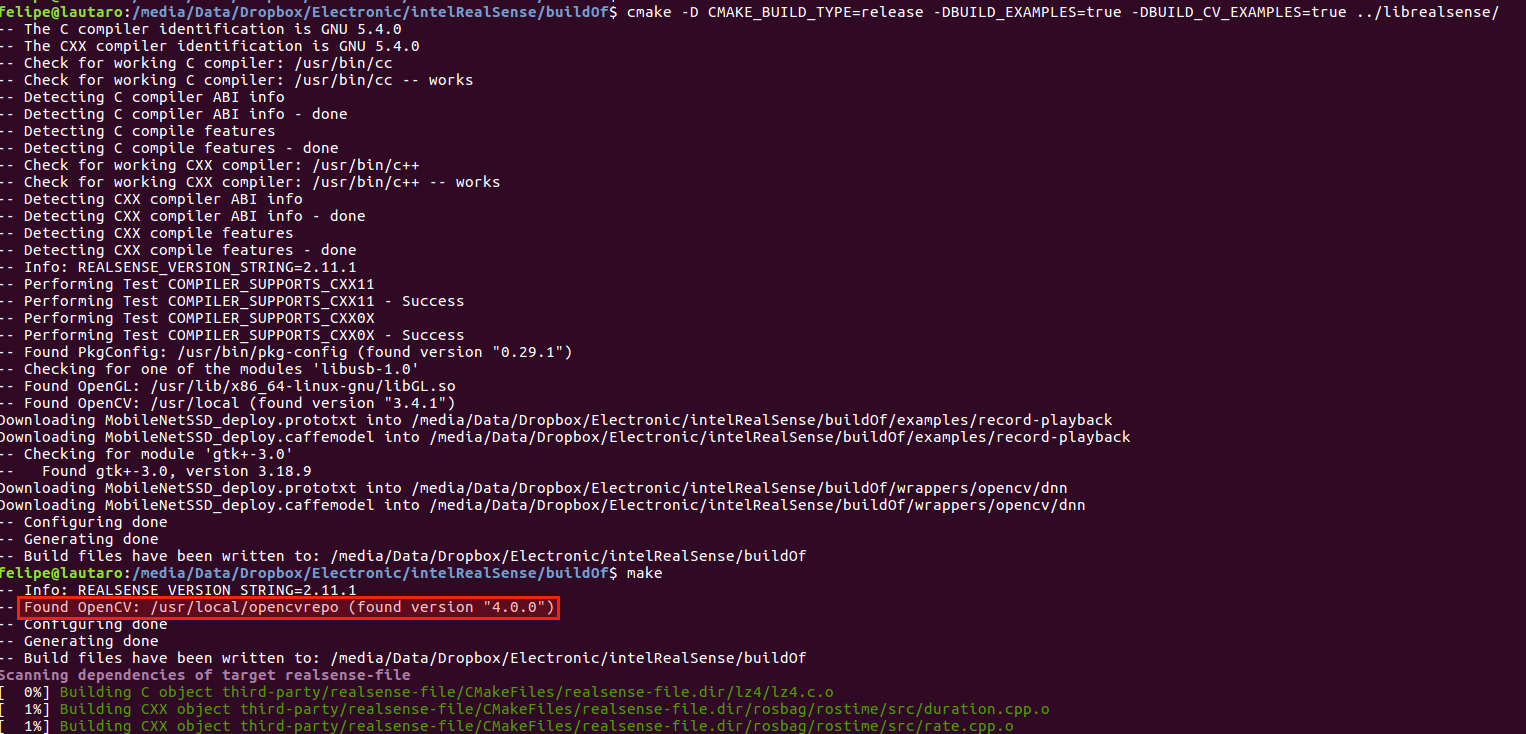
That is the reason because I thought that I´m using OpenCV 4.0.
I will implement the net using the example provided by you and I will leave another comment with the results. Anyway this way of instance the NET might be with some issues:
Net net = readNetFromDarknet(modelConfiguration, modelBinary);
Felipe
fadonoso
on 31 May 2018
@fadonoso
[yolo]
mask = 1,2,3
anchors = 15.6662,18.4605, 18.1803,25.3333, 24.2513,23.7031, 23.5429,32.4787, 26.2638,42.3456, 32.4676,34.2745, 37.1007,49.2311, 52.3133,68.1044, 100.7000,104.5000
classes=2
num=6
Should be num*2 == <values in anchors>, but in your case num=6 but number of anchors = 18
For yolov3-tiny you should have 6 anchors (12 values) when num=6
- https://github.com/AlexeyAB/darknet/blob/0713fd9784bbd0c67eb82df6f6e2c072a53e09e8/cfg/yolov3-tiny.cfg#L134
- https://github.com/AlexeyAB/darknet/blob/0713fd9784bbd0c67eb82df6f6e2c072a53e09e8/cfg/yolov3-tiny.cfg#L176
So to calculate anchors for yolov3-tiny you should use command:
./darknet detector calc_anchors data/obj.data -num_of_clusters 6 -width 416 -height 416
AlexeyAB
on 31 May 2018
Dear @AlexeyAB,
again thanks for all your help. You were right in respect of the anchors for tiny yolo. Using specially made anchors for tiny yolo, this methods works fine:
Net net = readNetFromDarknet(modelConfiguration, modelBinary);
The problem that I had was that I was following a RealSense example for Caffe thus to get the ¨detection¨ they use this method:
Mat detection = net.forward("detection_out"); //compute output
So I wrongly supposed that the same method would work fine for the Darknet net, but I was wrong because "detection_out" is the output layer of Caffe not Darknet and worst in Yolo v3 (tiny) there is two output layers and in the .cfg file are shown with a name of ¨yolo¨ however that is not the real name of the layer (it is a yolo_#). In conclusion the way to get the out layers is how is shown in the example:
https://github.com/opencv/opencv/blob/master/samples/dnn/object_detection.cpp
What is:
        std::vector<Mat> outs;
        net.forward(outs, getOutputsNames(net));
Where getOutputsNames(net) get ¨automatically¨" the names of the output layers.
Best regards,
Felipe
fadonoso
on 1 Jun 2018
@AlexeyAB @dkurt Thank yor for your introduction of this work. Now I can run the yolov3.cfg with yolov3.weight. But when I change it to my model, I get the same error
File "object_detection-noshow.py", line 52, in
net = cv.dnn.readNet(args.model, args.config, args.framework)
cv2.error: OpenCV(4.0.0-pre) /opencv/modules/dnn/src/darknet/darknet_io.cpp:615: error: (-215:Assertion failed) classes > 0 && num_of_anchors > 0 && (num_of_anchors * 2) == anchors_vec.size() in function 'ReadDarknetFromCfgFile'
my command is,
python object_detection-noshow.py --input /mnt/voc_tt100k_512/JPEGImages/train/out_13911_pl60_0.jpg --model /opencv/tmp/model/yolov3-tt100k_top30-512_290000.weights --config /opencv/tmp/cfg/yolov3-tt100k_top30-512-test.cfg --framework darknet --height 512 --width 512
the cfg be like:
[convolutional]
size=1
stride=1
pad=1
filters=105
activation=linear
[yolo]
mask = 0,1,2
anchors = 16,18, 22 25, 30,36, 41,47, 55,58, 68,79, 92,95, 117,132, 183,178
classes=30
num=9
jitter=.1
ignore_thresh = .8
truth_thresh = 1
random=1
The "anchor", "num", "classes" are all correct. I can run it in darknet but just cannot run it here.
I don't know whether my class text file is right, but the format is like,
cls1
cls2
...
clsn
 HoracceFeng
on 14 Jun 2018
HoracceFeng
on 14 Jun 2018
updates: Then I close the CV_assert, make and run it again. Now the error gone, but the result is really bad. (This model is well trained and evaluated in darknet yolo3 source code). Very strange. Anyone can help?
Thank you!
HoracceFeng
on 14 Jun 2018
@HoracceFeng, is it possible to share your model? This way I can try to reproduce it locally.
 dkurt
on 14 Jun 2018
dkurt
on 14 Jun 2018
@HoracceFeng
anchors = 16,18, 22 25, 30,36, 41,47, 55,58, 68,79, 92,95, 117,132, 183,178
There is a typo, you forgot , between 22 and 25
use it in each of 3 [yolo] layers:
anchors = 16,18, 22,25, 30,36, 41,47, 55,58, 68,79, 92,95, 117,132, 183,178
AlexeyAB
on 14 Jun 2018
@AlexeyAB Thank you for telling me this. I delete the comma when doing some edit ... Anyway, I think this is the reason of the CV_assert error. Thank you so much.
BTW, the result is still bad. I also try the yolov3.weight and find that the result also very bad. I run the following command:
python object_detection-noshow.py --model /opencv/tmp/model/yolov3.weights --config /opencv/tmp/cfg/yolov3.cfg --height 416 --width 416 --input /opencv/tmp/data/dog.jpg
And the result is:
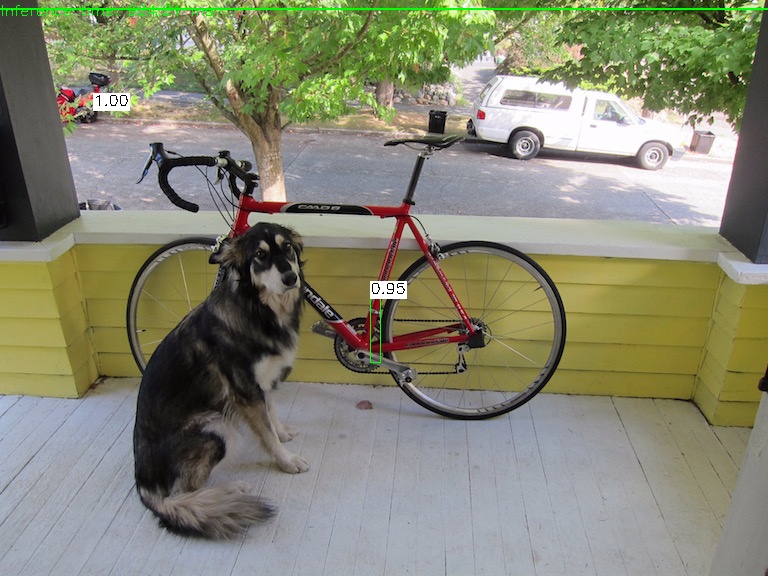
@dkurt now I think this question is not for my model only. It may result from the input method "cv.dnn.blobFromImage" (since in the darknet code I use cv2.imread and everythings's good), or it may results from the postprocess(though I don't think so)
Another possible reason is due to my installation (?). I run it in docker container, by installing gcc, cmake, opencv step by step, the system is Ubuntu14.04, docker images is the official Ubuntu14.04, everything seems smooth, so IDK why...
HoracceFeng
on 14 Jun 2018
@HoracceFeng, you need to choose an appropriate preprocessing. Try to add the following arguments:
--scale 0.00392 --width 416 --height 416 --rgb if your model was trained on 416x416 images or
--scale 0.00392 --width 512 --height 512 --rgb if on 512x512 ones.
@AlexeyAB, that's a perfect catch!
dkurt
on 14 Jun 2018
Thank you guys for help! Finally figure out the error. I haven’t use args.scale. Now all things work well! Very impressive work! BTW, would you tell me why the scale flag should be added? You know, It is just a ... scale factor. How the number 0.00392 be calculated?
Sent from my iPhone
On Jun 14, 2018, at 20:12, Dmitry Kurtaev <[email protected]notifications@github.com> wrote:
@HoracceFenghttps://github.com/HoracceFeng, you need to choose an appropriate preprocessing. Try to add the following arguments:
--scale 0.00392 --width 416 --height 416 --rgb if your model was trained on 416x416 images or
--scale 0.00392 --width 512 --height 512 --rgb if on 512x512 ones.
—
You are receiving this because you were mentioned.
Reply to this email directly, view it on GitHubhttps://github.com/AlexeyAB/darknet/issues/940#issuecomment-397272293, or mute the threadhttps://github.com/notifications/unsubscribe-auth/AT2_6aSXlDHZUMIf8M5RKM0TCwRgzBqwks5t8lM0gaJpZM4UUKsQ.
HoracceFeng
on 14 Jun 2018
@HoracceFeng, 0.00392 = 1 / 255. Input images from cv.imread have values in range [0, 255] and we need to normalize it to [0, 1]. Different networks just work with different data distributions.
dkurt
on 14 Jun 2018
Get it, Thx!
Sent from my iPhone
On Jun 14, 2018, at 20:35, Dmitry Kurtaev <[email protected]notifications@github.com> wrote:
@HoracceFenghttps://github.com/HoracceFeng, 0.00392 = 1 / 255. Input images from cv.imread have values in range [0, 255] and we need to normalize it to [0, 1]. Different networks just work with different data distributions.
—
You are receiving this because you were mentioned.
Reply to this email directly, view it on GitHubhttps://github.com/AlexeyAB/darknet/issues/940#issuecomment-397278169, or mute the threadhttps://github.com/notifications/unsubscribe-auth/AT2_6bd-GD-WMLwqifZq94YJ4jav0CTWks5t8likgaJpZM4UUKsQ.
HoracceFeng
on 14 Jun 2018
@dkurt Sorry for bother, just wanna make sure one things. Seems that the YOLOv3 model can support image size different from the network size theoretically, and actually I have tried and it works. I am not sure if you have try input rectangle images to do detection in a square network like 406406, but if not, you may check this code:
in samples/dnn/object_detection.py:134-135, it seems that the code should be:
width = int(detection[2] * frameHeight)
height = int(detection[3] * frameWidth)
I know it is a little bit strange, but I think you may make a mistake here. I have tested it in my 10881920 images with network shape 512*512 and the bounding boxes are tight after making this change.
HoracceFeng
on 19 Jun 2018
Related issues
 siddharth2395
·
3Comments
siddharth2395
·
3Comments
 rezaabdullah
·
3Comments
rezaabdullah
·
3Comments
 qianyunw
·
3Comments
qianyunw
·
3Comments
 louisondumont
·
3Comments
louisondumont
·
3Comments
 hemp110
·
3Comments
hemp110
·
3Comments
Most helpful comment
@HoracceFeng
There is a typo, you forgot
,between 22 and 25use it in each of 3 [yolo] layers:
anchors = 16,18, 22,25, 30,36, 41,47, 55,58, 68,79, 92,95, 117,132, 183,178