Darknet: How can I overfit a dataset?
I tried training only on 64 images. And I cannot even overfit a dataset of 64 images. The loss stays around 30+. I tested mAP on the training set itself and it's 0.0002, very low. (I set train and valid to be the same list of images)
What I am expecting is that the loss must reduce every iteration if the learning rate is low enough because the whole dataset is trained together (batch gradient descent, not stochastic). But after reducing the learning rate, the loss doesn't go lower every time as I expected. And it's still stuck around 30+.
So I think, maybe the model is too small to fit this dataset of 133 classes. (I used yolov3-tiny)
I tried increasing the size of the model by increasing the number of filters two times in every convolutional layer and it also doesn't make the loss lower still.
Now, I'm out of thoughts as to what might be the solution. Please suggest me.
What is the flaw in my thinking here?
If the problem is not being able to overfit a dataset, what would you suggest investigating?
 off99555
All 13 comments
Referring to #160 for the reason why I want to overfit the dataset. I want to do a cheap sanity check.
off99555
on 18 May 2018
@off99555 I didn't do this. But you can try:
Try to add to the train.txt only 1-10 images with object classid-0
And add to the valid.txt another 1-10 images with object classid-0
Set random=0 jitter=0 in the [yolo] or [region] layers.
And in the [net] section set hue=0 exposure=0 saturation=0 flip=0
Change this line: https://github.com/AlexeyAB/darknet/blob/24f563ce7165c2c44486fe8d0a2caea8d7c5a887/src/detector.c#L200
to this
if(i >= (iter_save + 5)) {
And check mAP on the validation dataset for each saved weights-file.
Check whether mAP will every decrease?
 AlexeyAB
on 18 May 2018
AlexeyAB
on 18 May 2018
My images always contain more than one classid.
It's a license plate consisting of many numbers.
Should I remove other classes from the image? I don't know what we are trying to accomplish here.
Shouldn't we expect that mAP will increase?
Could you experiment with my dataset for me? Just show me how to overfit these 3 images. (low loss, and get high mAP, good prediction jpg) then I could get the idea and continue on my own. You can change class id to anything in range 0-67 just for training purpose.
https://drive.google.com/file/d/1vYh4x0oPx3OrDqZ7V1qUTW4gjBUyVV-g/view?usp=sharing
(For class id = 10, it means unknown character)
If you want the whole training set I can give it to you too.
I've tried my best and I couldn't figure it out. I see that you understand this more than me so I'll be thankful for that if you help me. I can also mention your name in my project report as a helpful person if you want.
Anyway, if you don't want to do it then you can tell me, that's fine too.
We can continue resolving the issue like this.
off99555
on 18 May 2018
@off99555
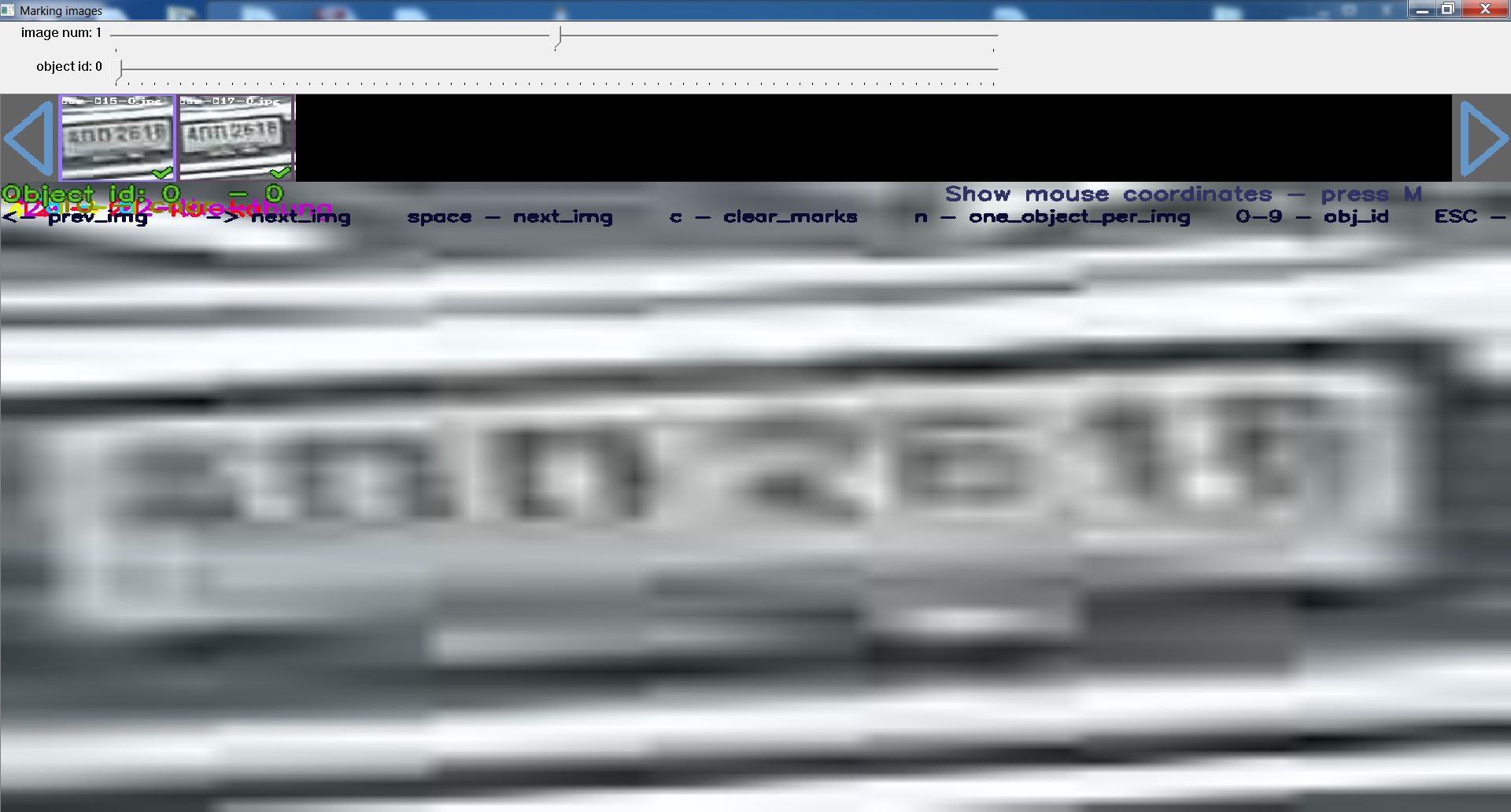
Your dataset is wrong:
AlexeyAB
on 18 May 2018
Do you mean there are no bounding boxes?
Or the txt file is improperly calculated?
I have *.xml files from labelImg and I converted it to *.txt.
off99555
on 18 May 2018
Look at the top left corner on the image that I pinned. All labels are in the top-left corner.
AlexeyAB
on 18 May 2018
Oh! I got it now. Ahhhhhhhhhhh
The conversion tool use <width> and <height> number from the tag inside the file which is incorrect because this file is cropped from the bigger car image.
This is the content of my .xml file:
<annotation>
    <folder>cctv-images-car-2</folder>
    <filename>car-014.jpeg</filename>
    <path>C:\Users\iitod\Desktop\lp-annotation-project\cctv-images-car-2\car-014.jpeg</path>
    <source>
        <database>Unknown</database>
    </source>
    <size>
        <width>1280</width>
        <height>960</height>
        <depth>3</depth>
    </size>
    <segmented>0</segmented>
    <object>
        <name>char</name>
        <pose>Unspecified</pose>
        <truncated>0</truncated>
        <difficult>0</difficult>
        <bndbox>
            <xmin>6</xmin>
            <ymin>17</ymin>
            <xmax>12</xmax>
            <ymax>32</ymax>
        </bndbox>
    </object>
    <object>
        <name>char</name>
        <pose>Unspecified</pose>
        <truncated>0</truncated>
        <difficult>0</difficult>
        <bndbox>
            <xmin>11</xmin>
            <ymin>16</ymin>
            <xmax>20</xmax>
            <ymax>28</ymax>
        </bndbox>
    </object>
    <object>
        <name>char</name>
        <pose>Unspecified</pose>
        <truncated>0</truncated>
        <difficult>0</difficult>
        <bndbox>
            <xmin>18</xmin>
            <ymin>17</ymin>
            <xmax>26</xmax>
            <ymax>28</ymax>
        </bndbox>
    </object>
    <object>
        <name>char</name>
        <pose>Unspecified</pose>
        <truncated>0</truncated>
        <difficult>0</difficult>
        <bndbox>
            <xmin>28</xmin>
            <ymin>15</ymin>
            <xmax>34</xmax>
            <ymax>28</ymax>
        </bndbox>
    </object>
    <object>
        <name>char</name>
        <pose>Unspecified</pose>
        <truncated>0</truncated>
        <difficult>0</difficult>
        <bndbox>
            <xmin>34</xmin>
            <ymin>15</ymin>
            <xmax>41</xmax>
            <ymax>27</ymax>
        </bndbox>
    </object>
    <object>
        <name>char</name>
        <pose>Unspecified</pose>
        <truncated>0</truncated>
        <difficult>0</difficult>
        <bndbox>
            <xmin>38</xmin>
            <ymin>14</ymin>
            <xmax>46</xmax>
            <ymax>27</ymax>
        </bndbox>
    </object>
    <object>
        <name>char</name>
        <pose>Unspecified</pose>
        <truncated>0</truncated>
        <difficult>0</difficult>
        <bndbox>
            <xmin>44</xmin>
            <ymin>14</ymin>
            <xmax>53</xmax>
            <ymax>27</ymax>
        </bndbox>
    </object>
</annotation>
That's why its width and height is relative to a big number which makes it smaller than one pixel.
Instead of using 56x56 as the shape, it used 1280x960.
Thank you so much! This is very invisible bug that is so difficult to find.
off99555
on 18 May 2018
I will try fixing this and will report what happens soon.
off99555
on 18 May 2018
Can you please check this in yolo_mark again?
https://drive.google.com/file/d/1vYh4x0oPx3OrDqZ7V1qUTW4gjBUyVV-g/view?usp=sharing
Thank you.
off99555
on 18 May 2018
Looks like correct:
But can you by yourself, looking at this small picture, recognize the bottom rectnagle that this is 52 - bangkok?


AlexeyAB
on 19 May 2018
@AlexeyAB lol. No. I hired people to annotate these for me and the license plate came from CCTV footage so they saw that the license plate in the next frame has more resolution and they saw that it's Bangkok so they went back to the previous frame and annotated it as the same. Even though the previous frame looks unrecognizable, I expect mAP to at least not be 0.00 like it was previously.
off99555
on 19 May 2018
I got 0.5 mAP. This is acceptable for me.
Thank you. It works!
I'll mention you in acknowledgement section in my work.
off99555
on 19 May 2018
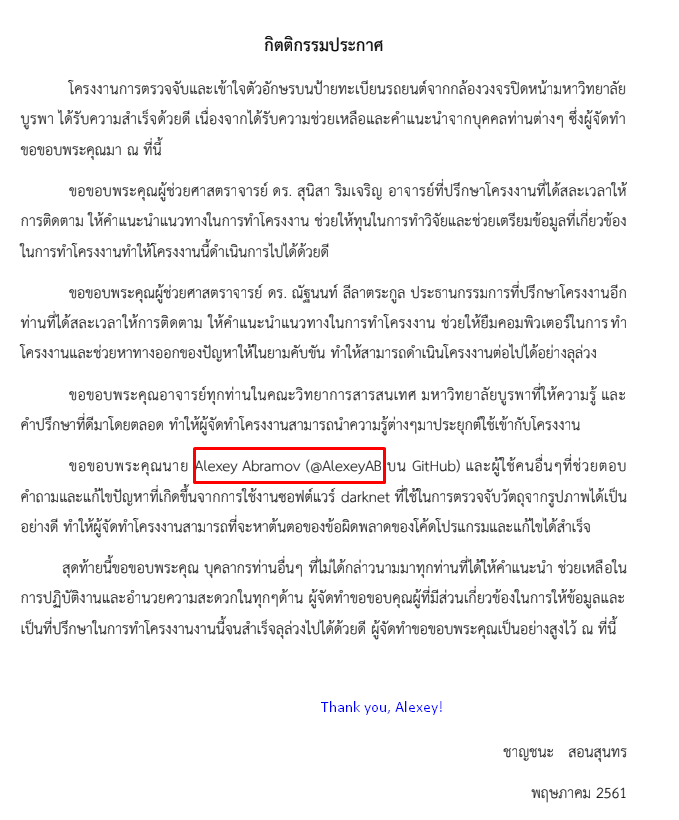
Hey, just to confirm, I forget to tell you. I mentioned you in the thank section of my paper about half a year ago. It's Thai paper.
Thank you very much @AlexeyAB. It was my stressful time back then, being under the deadline pressure. But I survived!
off99555
on 17 Dec 2018
Related issues
 shootingliu
·
3Comments
shootingliu
·
3Comments
 HanSeYeong
·
3Comments
HanSeYeong
·
3Comments
 bit-scientist
·
3Comments
bit-scientist
·
3Comments
 Yumin-Sun-00
·
3Comments
Yumin-Sun-00
·
3Comments
 HilmiK
·
3Comments
HilmiK
·
3Comments
Most helpful comment
Hey, just to confirm, I forget to tell you. I mentioned you in the thank section of my paper about half a year ago. It's Thai paper.

Thank you very much @AlexeyAB. It was my stressful time back then, being under the deadline pressure. But I survived!