Darknet: No boxes in Python wrapper when calling draw_detections()
First things first, i apologize you have to look at other's people's attempt at creativity. It's.. a process, also so unfair...
With that, please allow my creativity to issue through.
I put together this method, which does everything right except draw the boxes:
# print()s removed for redability

def detect(net, meta, image, thresh=.5, hier_thresh=.5, nms=.45, outfile='out'):
    im = load_image(image, 0, 0)
    pnum = pointer(c_int(0))
    predict_image(net, im)
    dets = get_network_boxes(net, im.w, im.h, thresh, hier_thresh, None, 0, pnum)
    num = pnum[0]
    if (nms): do_nms_obj(dets, num, meta.classes, nms);

    # draw bounding boxes
    masks = POINTER(POINTER(c_float))()
    alphabet = load_alphabet_with_path('../data/labels')
    names = meta.names
    classes = meta.classes
    draw_detections(im, dets, num, thresh, names, alphabet, classes)
    save_image_png(im, outfile)

    res = []
    for j in range(num):
        for i in range(meta.classes):
            if dets[j].prob[i] > 0:
                b = dets[j].bbox
                res.append((meta.names[i], dets[j].prob[i], (b.x, b.y, b.w, b.h)))
    res = sorted(res, key=lambda x: -x[1])
    free_image(im)
    free_detections(dets, num)

    return res
Output:
...
  103 conv    128  1 x 1 / 1    52 x  52 x 256   ->    52 x  52 x 128  0.177 BFLOPs
  104 conv    256  3 x 3 / 1    52 x  52 x 128   ->    52 x  52 x 256  1.595 BFLOPs
  105 conv    255  1 x 1 / 1    52 x  52 x 256   ->    52 x  52 x 255  0.353 BFLOPs
  106 yolo

Loading weights from ../yolov3.weights...Done!

image size:  1600 899
names:  <darknet.LP_c_char_p object at 0x7f5dab2f9950>
classes:  80

[draw_detections()] Drawing boxes...
args to draw_detections():  <darknet.IMAGE object at 0x7f5dab2f95f0>
<darknet.LP_DETECTION object at 0x7f5dab2f97a0>
34
0.5
<darknet.LP_c_char_p object at 0x7f5dab2f9950>
<darknet.LP_LP_IMAGE object at 0x7f5dab2f98c0>
80

car: 96%
person: 97%
sheep: 91%
sheep: 90%
sheep: 61%
bus: 86%
dog: 79%
person: 86%
sheep: 85%
sheep: 83%
sheep: 82%
sheep: 59%
bus: 78%
sheep: 68%
sheep: 65%
sheep: 63%
sheep: 63%
person: 56%

[save_image()] Saving image...
[('person', 0.9659849405288696, (1223.782958984375, 280.9737243652344, 118.53887176513672, 269.96759033203125)), ('car', 0.9581449627876282, (923.3218383789062, 271.22760009765625, 596.198486328125, 257.76605224609375)), blah blah blah...
So detection goes fine, but drawing is completely off and most of the time nowhere:
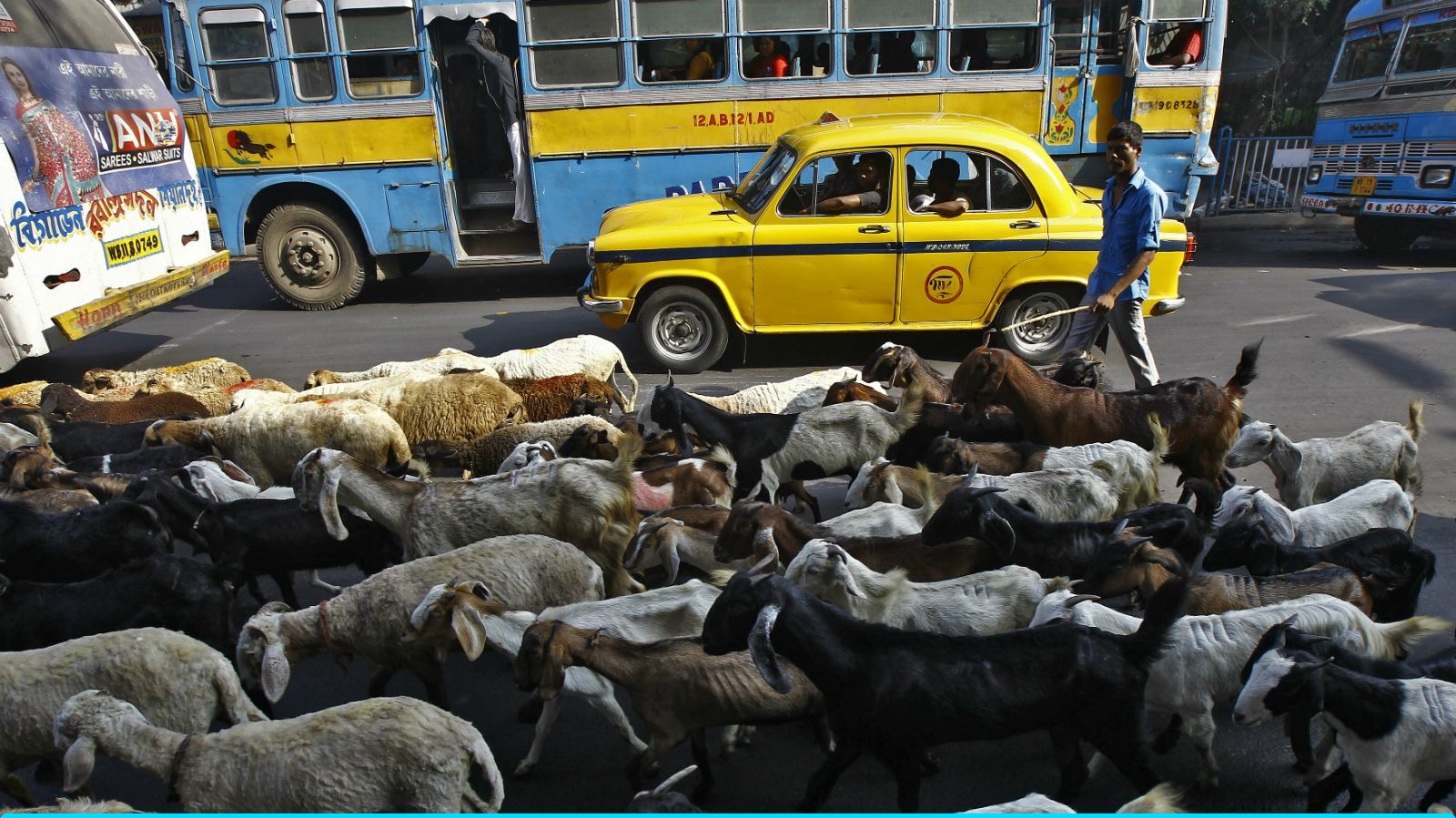
Note the cyan line at the bottom... i believe it's a completely failed attempt at drawing one or more of the boxes?... That dash of color only shows up in higher res images, which leads me to believe there's horrible positioning data being fed into draw_detections().
Calling the C binary with the same parameters (cfg, names) draws magnificent boxes. I'm pretty sure the fault is somewhere in calling
draw_detections(im, dets, num, thresh, names, alphabet, classes)
Maybe in dets? But if dets is wrong, then how am i getting that correct list of coordinates?
My ctypes definition:
draw_detections = lib.draw_detections
draw_detections.argtypes = [
    IMAGE,
    POINTER(DETECTION),
    c_int,
    c_float,
    POINTER(c_char_p),
    POINTER(POINTER(IMAGE)),
    c_int
]
draw_detections.restype = c_void_p
 snobu
snobu
>All comments
Nevermind, i fixed it once i understood which of the parameters passed into draw_detections() was whack.
To do that i instrumented src/image.c with a printf in draw_box():
fprintf(stdout, "Bounding box: x1=%i, y1=%i, x2=%i, y2=%i\n", x1, x2, x2, y2);
The difference was night and day:
// C
Bounding box: x1=131, y1=607, x2=607, y2=444
Bounding box: x1=132, y1=606, x2=606, y2=443
Bounding box: x1=133, y1=605, x2=605, y2=442

// Python
Bounding box: x1=101832, y1=772, x2=772, y2=511
Bounding box: x1=101833, y1=771, x2=771, y2=510
Bounding box: x1=101834, y1=770, x2=770, y2=509
DAT x1 !!!
So, yeah, the boxes were being drawn but somewhere in the _cloud_.
To fix it, i carefully matched the C function call:
# C proto:
# *get_network_boxes(network *net, int w, int h, float thresh, float hier, int *map, int relative, int *num);

pnum = pointer(c_int(0))
dets = get_network_boxes(net, im.w, im.h, thresh, hier_thresh, pnum, 1, pnum)
New Python result:
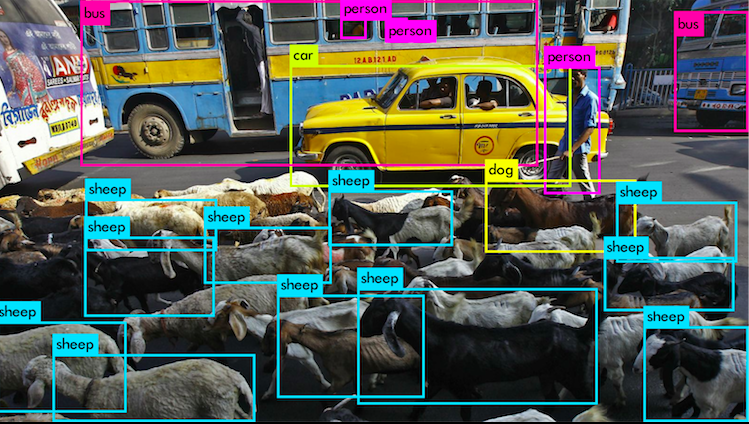

In closing, what are those last three parameters for, do i ever need to care about them if all i want is bounding boxes?
int *map, int relative, int *num
Related issues
 sujithm
·
3Comments
sujithm
·
3Comments
 bujingdexin
·
3Comments
bujingdexin
·
3Comments
 MaverickLoneshark
·
3Comments
MaverickLoneshark
·
3Comments
 sayanmutd
·
3Comments
sayanmutd
·
3Comments
 HoracceFeng
·
3Comments
HoracceFeng
·
3Comments
Most helpful comment
Nevermind, i fixed it once i understood which of the parameters passed into
draw_detections()was whack.To do that i instrumented
src/image.cwith aprintfindraw_box():The difference was night and day:
DAT x1 !!!
So, yeah, the boxes were being drawn but somewhere in the _cloud_.
To fix it, i carefully matched the C function call:
New Python result:
In closing, what are those last three parameters for, do i ever need to care about them if all i want is bounding boxes?