Darknet: Couldn't open file: obj.names
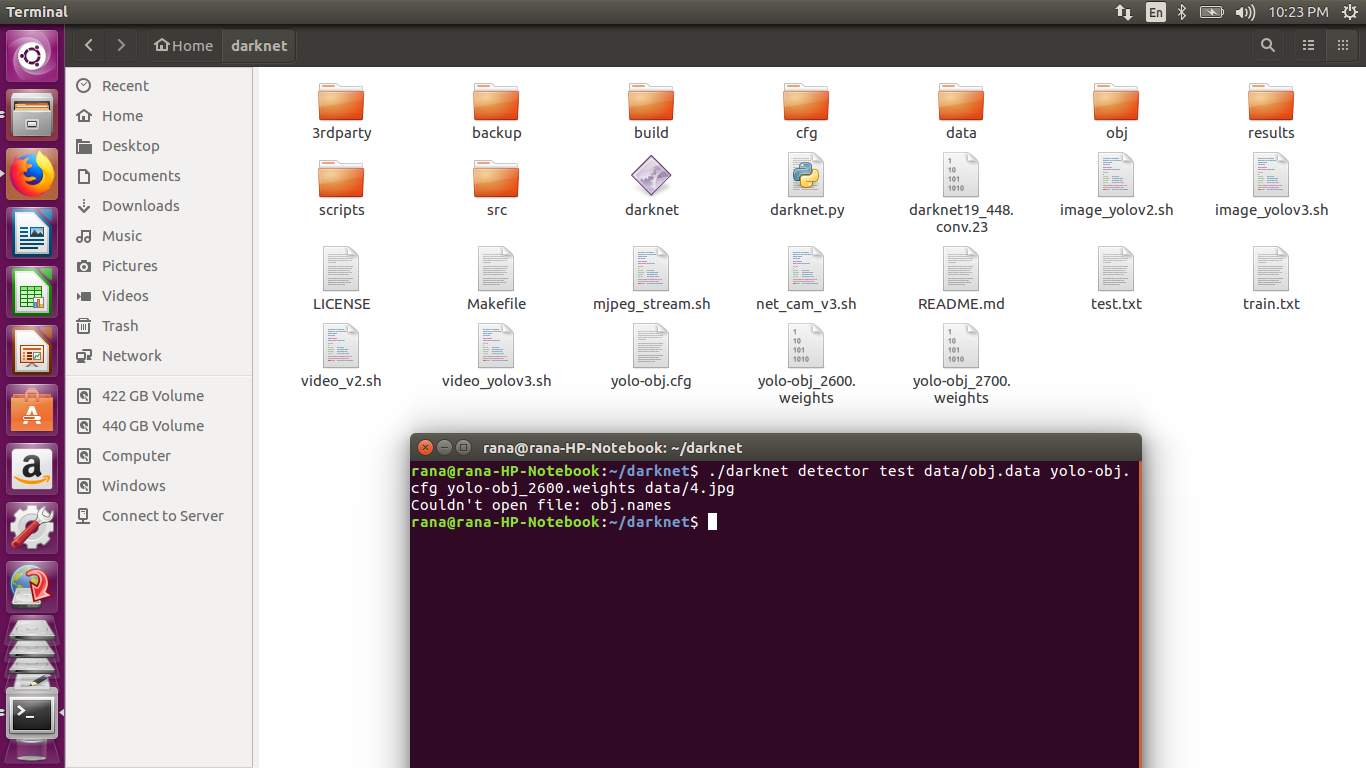
i have placed obj.data and obj.names in data folder then why this error occurs Please help me
 veer345
All 14 comments
Hi, show content of the file obj.data
 AlexeyAB
on 17 Apr 2018
AlexeyAB
on 17 Apr 2018
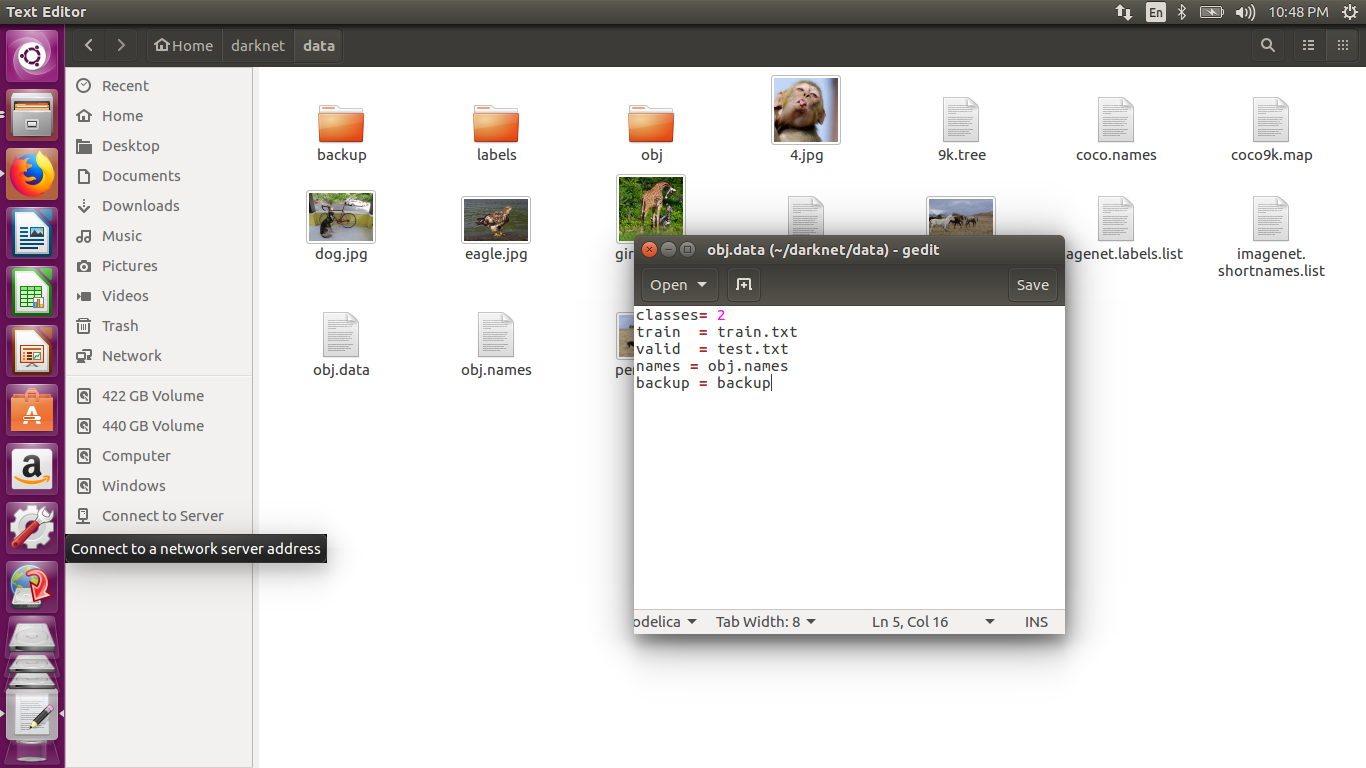
HELP ME OUT !!
veer345
on 17 Apr 2018
Write data/obj.names instead of obj.names in the file obj.data
https://github.com/AlexeyAB/darknet#how-to-train-to-detect-your-custom-objects
Create file obj.data in the directory builddarknetx64data, containing (where classes = number of objects):
classes= 2
train  = data/train.txt
valid  = data/test.txt
names = data/obj.names
backup = backup/
Hello,
I have the same problem right now, training went fine, but now if I want to evaluate the map or the test data, it doesn't work. I specified the full directory for obj.names not the relative directory and it doesn't work. Why wouldn't it work for map and work for the training? I also added the line -map in the train command. Any help would be much appreciated!
 AbanoubMamdouh
on 23 Dec 2018
AbanoubMamdouh
on 23 Dec 2018
@AbanoubMamdouh Show your full commands for Test and mAP.
AlexeyAB
on 23 Dec 2018
The training command: ./darknet detector train data/obj.data cfg/yolov3-tiny_obj1.cfg yolov3-tiny.conv.15 -map
The map command: ./darknet detector map data/obj.data cfg/yolov3-tiny_obj1.cfg backup/yolov3-tiny_obj1_5000.weights
The test command: ./darknet detector test data/obj.data cfg/yolov3-tiny_obj1.cfg backup/yolov3-tiny_obj1_5000.weights
The content of obj.data:
classes= 8
train = /home/abanoub/Desktop/train.txt
valid = /home/abanoub/Desktop/train.txt
names = /home/abanoub/Desktop/daknet-master_last/data/obj.names
backup = backup/
Thank you very much for your help and swift response!
AbanoubMamdouh
on 23 Dec 2018
@AbanoubMamdouh
Try to do
cd home/abanoub/Desktop/daknet-master_last/data/
sudo apt-get install dos2unix
dos2unix obj.data
dos2unix obj.names
./darknet detector test data/obj.data cfg/yolov3-tiny_obj1.cfg backup/yolov3-tiny_obj1_5000.weights
What error do you get using this command?
AlexeyAB
on 23 Dec 2018
@AlexeyAB
./darknet detector test data/obj.data cfg/yolov3-tiny_obj1.cfg backup/yolov3-tiny_obj1_5000.weights What error do you get using this command?
It's the same error
Couldn't open file: /home/abanoub/Desktop/daknet-master_last/data/obj.names
I ran again the test command and it gave me the same error again
AbanoubMamdouh
on 23 Dec 2018
@AbanoubMamdouh
show me the full path to the
./darknetShow screenshot of output of these commands:
cat data/obj.data
cat /home/abanoub/Desktop/daknet-master_last/data/obj.names
ls -l /home/abanoub/Desktop/daknet-master_last/data/obj.names
- run this command:
./darknet detector test /home/abanoub/Desktop/daknet-master_last/obj.data cfg/yolov3-tiny_obj1.cfg backup/yolov3-tiny_obj1_5000.weights
AlexeyAB
on 23 Dec 2018
@AlexeyAB
The path to ./darknet is:
/home/abanoub/Desktop/darknet-master_last




Could it be something in the permissions?
AbanoubMamdouh
on 23 Dec 2018
@AbanoubMamdouh
Look at this image - there is incorrect path:
you should use data/obj.names instead obj.names
AlexeyAB
on 23 Dec 2018
@AlexeyAB
I just copied the path you wrote, added the path and same error again

AbanoubMamdouh
on 23 Dec 2018
@AbanoubMamdouh May be you should use darknet instead of daknet )
AlexeyAB
on 23 Dec 2018
The power of a letter... Thanks man!
AbanoubMamdouh
on 23 Dec 2018
Related issues
 Greta-A
·
3Comments
Greta-A
·
3Comments
 bit-scientist
·
3Comments
bit-scientist
·
3Comments
 qianyunw
·
3Comments
qianyunw
·
3Comments
 HanSeYeong
·
3Comments
HanSeYeong
·
3Comments
 siddharth2395
·
3Comments
siddharth2395
·
3Comments
Most helpful comment
@AbanoubMamdouh May be you should use
darknetinstead ofdaknet)