Darknet: Newbie having difficulty installing
Hi guys,
Im trying to install darknet on windows 10 with the latest version of VS2017. I have a darkflow version of Yolo running on my machine but I am eager to try out Yolo v3. When I clone the repo, darknet.sln does not open in visual studio? Any help would be much appreciated.
Lee
 LeeroyHannigan
All 25 comments
Not an expert but you have to set "Platform Toolset" to _Visual Studio 2015 (v140)_ (right click project -> Properties -> Configuration Properties -> General).
Then make sure you configured the project properly (Library Directories and the necessary Include Directories) according to https://github.com/AlexeyAB/darknet#
Good luck ;)
 fmgracias
on 8 Apr 2018
fmgracias
on 8 Apr 2018
Hi, thanks for your quick reply. I changed the platform toolset.
Got the following warning
error : Designtime build failed for project 'C:\Users\leero\Desktop\Darknet\darknet\build\darknet\darknet.vcxproj' configuration 'Debug|Win32'. IntelliSense might be unavailable.
Set environment variable TRACEDESIGNTIME = true and restart Visual Studio to investigate.
LeeroyHannigan
on 8 Apr 2018
You need to run/build it on Release configuration and x64 platform.
Check if it fixed that issue
fmgracias
on 8 Apr 2018
Still with the same error unfortunately
error : Designtime build failed for project 'C:\Users\leero\Desktop\Darknet\darknet\build\darknet\darknet.vcxproj' configuration 'Release|x64'. IntelliSense might be unavailable.
Set environment variable TRACEDESIGNTIME = true and restart Visual Studio to investigate.
LeeroyHannigan
on 8 Apr 2018
I'm not familiar with that specific error and I've always been able to open dakrnet.sln on VS2017 Community (with v140 toolset).
I guess @AlexeyAB might be able to help you.
fmgracias
on 8 Apr 2018
This is the error I receive when i try to build,
1>------ Build started: Project: darknet, Configuration: Release x64 ------
1>C:\Users\leero\Desktop\Darknet\darknet\build\darknet\darknet.vcxproj(55,5): error MSB4019: The imported project "C:\Program Files (x86)\Microsoft Visual Studio\2017\Enterprise\Common7\IDE\VC\VCTargets\BuildCustomizations\CUDA 9.1.props" was not found. Confirm that the path in the
1>Done building project "darknet.vcxproj" -- FAILED.
========== Build: 0 succeeded, 1 failed, 0 up-to-date, 0 skipped ==========
LeeroyHannigan
on 8 Apr 2018
I eventually got it working, thanks for your help @fmgracias I think if i hadnt have gotten over that hurdle id have given up.
Lee
LeeroyHannigan
on 8 Apr 2018
@LeeroyHannigan I'm getting the exact errors in VS2017 as you were describing a couple weeks ago. How did you end up getting it working?
 mdbrannock
on 22 Apr 2018
mdbrannock
on 22 Apr 2018
Have you downloaded VS2015 from Visual Studtio Installer? @mdbrannock
LeeroyHannigan
on 22 Apr 2018
I have VS2017, but I included the v140 toolset. Should I forgo 2017 entirely and just find the 2015 version?
mdbrannock
on 22 Apr 2018
No if you have the v140 then should be no problem. Have you configured to Release and X64?
LeeroyHannigan
on 22 Apr 2018
Also which version of Cuda have you installed?
LeeroyHannigan
on 22 Apr 2018
I did configure to Release and X64 and have Cuda 9.1. If getting the v140 toolset fixed the problem for you then I might just try to reinstall VS from scratch and give it another go.
mdbrannock
on 22 Apr 2018
Your CUDA path set up correctly?
I didn't have V140 installed, I installed that and set the correct path for CUDA and it worked.
What error are you getting?
LeeroyHannigan
on 22 Apr 2018
By correct path for CUDA do you mean the environment variable here?
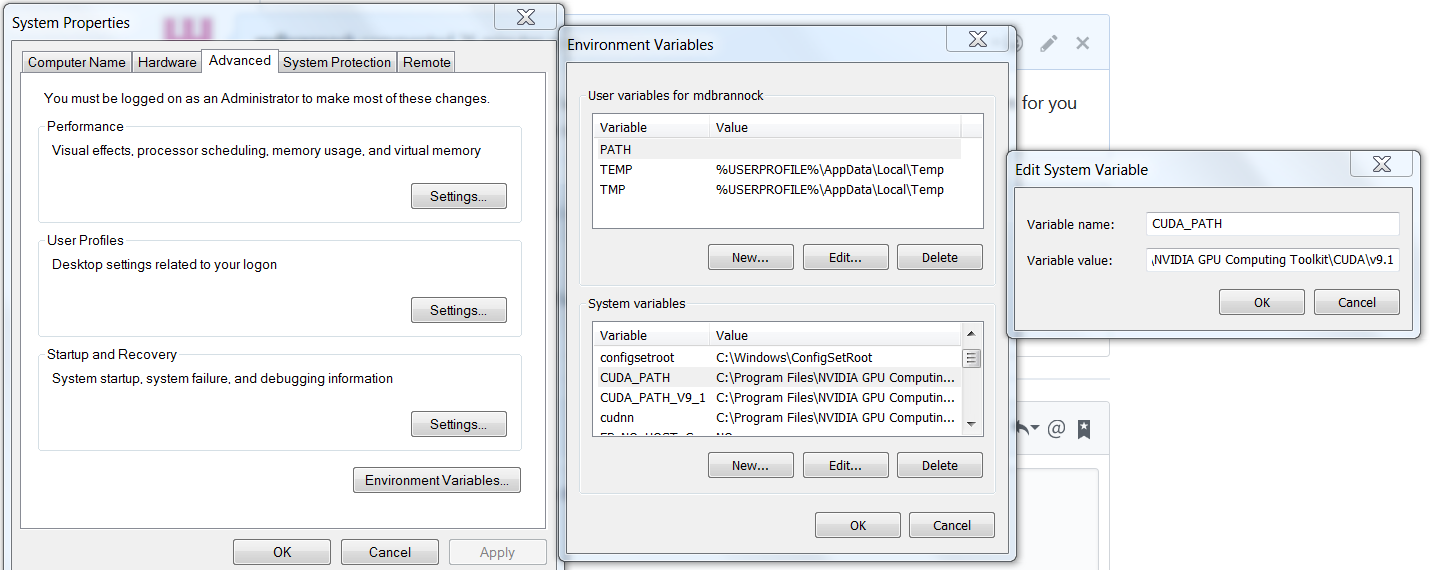
I _think_ it's right, but I suppose I'm not sure. Does that file path look similar to the one you used?
mdbrannock
on 22 Apr 2018
That looks good to me! What errors are you receiving?
LeeroyHannigan
on 22 Apr 2018
When you opened the solution if VS were you sure not to update to v141?
LeeroyHannigan
on 22 Apr 2018
Here's the error.

I see the CUDA 9.1.props file they are talking about, but it's not in the folder they are looking for it in. I could copy it over, but that doesn't seem like the right thing to do. It seems clear it doesn't know where to look for it, but I'm not sure how to fix that.
Yes, I was sure not to update, even though it seems to really want me to..
mdbrannock
on 22 Apr 2018
In the vcxproj file, does the import cuda match your file path that you have in environmental variable?
LeeroyHannigan
on 22 Apr 2018
Here's the line in the vcsproj file that is giving me trouble (line 55):
<Import Project="$(VCTargetsPath)\BuildCustomizations\CUDA 9.1.props" />
I'm not sure where the TCTargetsPath variable is set. It seems like if that line is meant to import CUDA then it should call the CUDA_PATH variable. I suppose I could hard code in the CUDA path, but I guess I'm confused as to why I'm having this problem when no one else seems to be.
Thanks for you help, by the way. I'm very new to this and about ready to give up.
mdbrannock
on 22 Apr 2018
Well, I hardcoded the path there and in one other place that referenced CUDA and the project built successfully! We'll see if it works as expected, but that's progress at least. Thanks again.
mdbrannock
on 22 Apr 2018
Nice one!! Keep me posted. I was about to give up too just before it worked.
LeeroyHannigan
on 22 Apr 2018
Well, there seems to be another path issue when I try to actually execute a .cmd
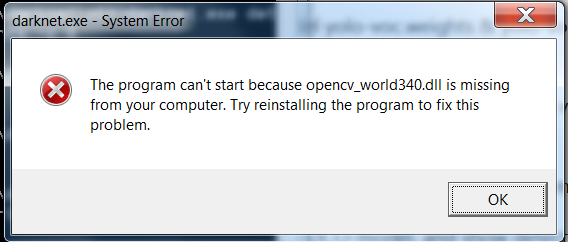
I'm pretty sure that .dll is exactly where it's supposed to be. Not sure when I'll get back to this, but if I figure out what's happening then I'll let you know.
mdbrannock
on 23 Apr 2018
@mdbrannock
Just try to copy this dll-file to the directory with darknet.exe
Or add path to this opencv_world340.dll in the system variables in the Windows:

 AlexeyAB
on 23 Apr 2018
AlexeyAB
on 23 Apr 2018
Thanks, @AlexeyAB! It looks like I gave up just a few minutes early. Copying opencv_world340.dll over resolved the problem and I was able to get everything working. Thanks again!
mdbrannock
on 1 May 2018
Related issues
 hemp110
·
3Comments
hemp110
·
3Comments
 HilmiK
·
3Comments
HilmiK
·
3Comments
 HanSeYeong
·
3Comments
HanSeYeong
·
3Comments
 shootingliu
·
3Comments
shootingliu
·
3Comments
 Cipusha
·
3Comments
Cipusha
·
3Comments