Darknet: yolov3: "Avg IOU: -nan, Class: -nan, Obj: -nan" while Retraining on voc data to detect custom class along with existing 20 classes
I am retraining yolov3 to detect custom class along with 20 existing classes using VOc 2007 and 2012 dataset. I followed instructions on
"https://github.com/AlexeyAB/darknet#how-to-train-to-detect-your-custom-objects"
Training is happening on GPU,
but intermittently I am getting few IOU, Class, Object as -nan.
Snapshot is as below
Region 82 Avg IOU: 0.236180, Class: 0.205503, Obj: 0.004179, No Obj: 0.009506, .5R: 0.000000, .75R: 0.000000, count: 1
Region 94 Avg IOU: 0.150655, Class: 0.315263, Obj: 0.005658, No Obj: 0.004314, .5R: 0.000000, .75R: 0.000000, count: 4
Region 106 Avg IOU: -nan, Class: -nan, Obj: -nan, No Obj: 0.001968, .5R: -nan, .75R: -nan, count: 0
279: 33.403381, 14.190192 avg, 0.000006 rate, 29.993717 seconds, 279 images
Loaded: 0.000050 seconds
I already done changes to obj.names obj.data as mentioned. My doubt is whether its okay to get -nan in training or I am missing out something.
Also how should I debug the root cause if -nan are not welcome
 ztilottama
All 20 comments
Just do the training for atleat 5k iterations , these nans will decrease . They generally come when subdivision batch has zero annotation (see count=0) . It can be because the anchors are big or object dimensions are too small.
 ahsan856jalal
on 3 Apr 2018
ahsan856jalal
on 3 Apr 2018
When I have finished retraining, I only get below results
**
Loading weights from yolo-obj_800.weights ...Done!
data/dog.jpg: Predicted in 21.787142 seconds.
**
But not like below, with detection probability and also Prediction Boxes are missing too.
> gaurav@Desktop-192:~/yolov3/darknet$
> Loading weights from yolov3.weights...Done!
> data/dog.jpg: Predicted in 21.787142 seconds.
> dog: 99%
> truck: 92%
> bicycle: 99%
gaurav@Desktop-192:~/yolov3/darknet$
ztilottama
on 3 Apr 2018
change batch and subdivisions to 1 in the cfg and try
./darknet detector test your_data.data your_cfg.cfg your_trained_model.weights data/dog.jpg
ahsan856jalal
on 3 Apr 2018
It didnt help.Attaching snapshot
105 conv 78 1 x 1 / 1 52 x 52 x 256 -> 52 x 52 x 78 0.108 BFLOPs
106 detection
Loading weights from backup/yolo-obj_800.weights...Done!
data/dog.jpg: Predicted in 21.481505 seconds.
gaurav@Desktop-192:~/yolov3/darknet$
It doesnt add bounding box in prediction.png
Also Training keeps showing NAN but initial iteration does had valid non NAN values
1968: nan, -nan avg, 0.001000 rate, 51.805366 seconds, 1968 images
Loaded: 0.000051 seconds
Region 82 Avg IOU: -nan, Class: nan, Obj: nan, No Obj: nan, .5R: 0.000000, .75R: 0.000000, count: 1
Region 94 Avg IOU: -nan, Class: nan, Obj: nan, No Obj: nan, .5R: 0.000000, .75R: 0.000000, count: 1
Region 106 Avg IOU: -nan, Class: -nan, Obj: -nan, No Obj: nan, .5R: -nan, .75R: -nan, count: 0
ztilottama
on 4 Apr 2018
./darknet detector train cfg/voc.data cfg/yolov3-voc.cfg darknet53.conv.74
5642: -nan, nan avg, 0.001000 rate, 0.117762 seconds, 5642 images
Loaded: 0.000021 seconds
Region 82 Avg IOU: nan, Class: nan, Obj: nan, No Obj: nan, .5R: 0.000000, .75R: 0.000000, count: 3
Region 94 Avg IOU: -nan, Class: -nan, Obj: -nan, No Obj: 0.000000, .5R: -nan, .75R: -nan, count: 0
Region 106 Avg IOU: -nan, Class: -nan, Obj: -nan, No Obj: 0.000000, .5R: -nan, .75R: -nan, count: 0
 NothingYF
on 4 Apr 2018
NothingYF
on 4 Apr 2018
default config(batch=1, subdivisions=1) is just for test, uncomment Training batch=64 subdivisions=8 to train. correct me if i'm wrong
 raytroop
on 6 Apr 2018
raytroop
on 6 Apr 2018
I with setting mentioned above only I am unable to detect the object. it just shows till
105 conv 78 1 x 1 / 1 52 x 52 x 256 -> 52 x 52 x 78 0.108 BFLOPs
106 detection
Loading weights from backup/yolo-obj_800.weights...Done!
there is no bounding box or below kinda
dog: 99%
truck: 92%
bicycle: 99%
results shown
ztilottama
on 6 Apr 2018
if you are not getting annotated image at the end , the problem is with the opencv version. Which OPencv version do you have . Try to install 3.4.1 and re-test
ahsan856jalal
on 6 Apr 2018
@ztilottama I got the same question. do you fix it and how?
 tigerdhl
on 13 Apr 2018
tigerdhl
on 13 Apr 2018
Same problem. I'm training on VOC 2012 like it described here: https://pjreddie.com/darknet/yolo/
At first I'm getting something that shows that data and labels are loaded correctly and network is training.
Region 82 Avg IOU: 0.104098, Class: 0.433959, Obj: 0.271554, No Obj: 0.476763, .5R: 0.000000, .75R: 0.000000, count: 2
Then, after ~1000 of iterations (with batch of 1 image) I'm getting only
Region 82 Avg IOU: nan, Class: 0.000000, Obj: 0.000000, No Obj: 0.000000, .5R: 0.000000, .75R: 0.000000, count: 5
Notice that count is non-zero (obviously IOU is nan if count=0).
Could that be that training is very unstable with such small batch size? I can't test with bigger batch, cause that's all that my video card can load.
 justanotheruser
on 20 Apr 2018
justanotheruser
on 20 Apr 2018
Tested on different PC - yes, that was the source. I think issue can be closed: just use bigger batch.
But I have another problem now, also not answered, here: https://github.com/pjreddie/darknet/issues/665
justanotheruser
on 20 Apr 2018
@justanotheruser : What is the root cause, did you figure it out? Can you provide me the solution which solved this problem. What was the batch size you have used
ztilottama
on 27 Apr 2018
@ztilottama : I used batch=64 and subdivisions=16, but it can be specific to your task. With single image SGD was diverging.
justanotheruser
on 28 Apr 2018
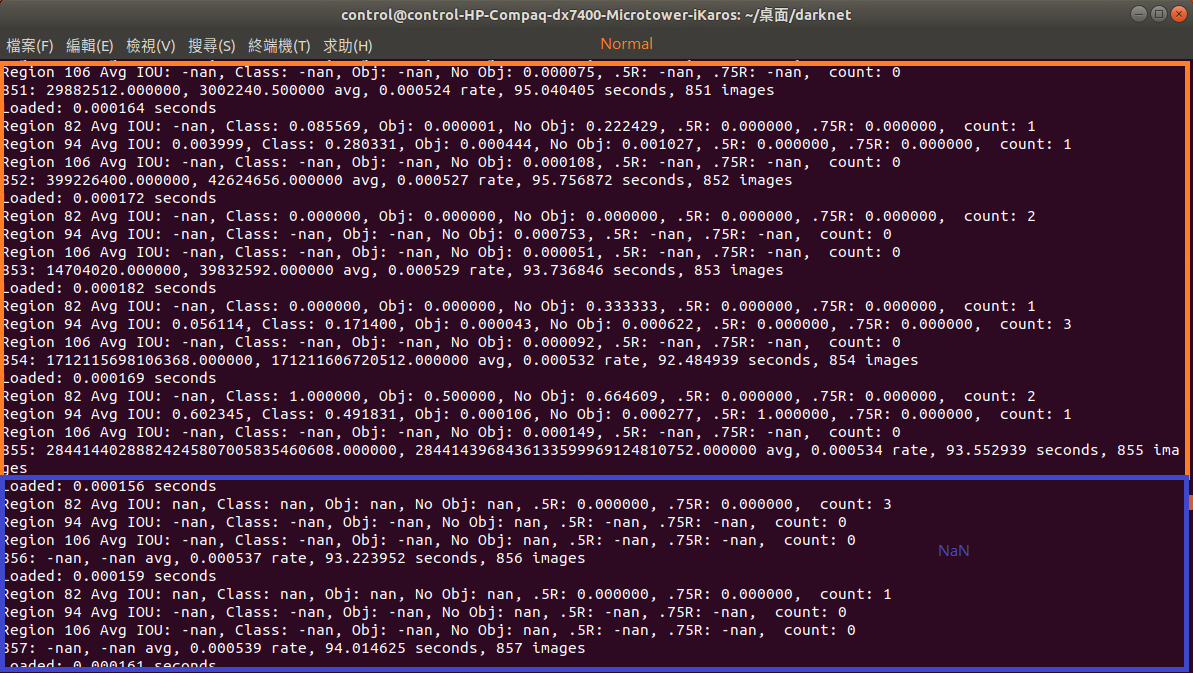
I am also training VOC dataset and have same problem, it's fine for first 855 pictures.
 axzxc1236
on 15 May 2018
axzxc1236
on 15 May 2018
@axzxc1236 it's seems that your loss is incredible high
 zhengshoujian
on 14 Oct 2018
zhengshoujian
on 14 Oct 2018
Note: If during training you see nan values for avg (loss) field - then training goes wrong, but if nan is in some other lines - then training goes well.
https://github.com/AlexeyAB/darknet#how-to-train-to-detect-your-custom-objects
 lhlong
on 21 Nov 2018
lhlong
on 21 Nov 2018
Same problem. I have changed batch and subdivisions to 1 in the cfg and try
./darknet detector test cfg/coco.data cfg/yolov3.cfg yolov3.weights data/00001.jpg
When I have finished retraining, I only get below results:
*
Loading weights from yolov3.weights...Done!
data/00001.jpg: Predicted in 0.035034 seconds.
*
No detection probability and also Prediction Boxes are missing too
 qianqian0523
on 22 Nov 2018
qianqian0523
on 22 Nov 2018
I got the same question. do you fix ??
 dongziqi001
on 10 Jan 2019
dongziqi001
on 10 Jan 2019
https://medium.com/@manivannan_data/how-to-train-yolov3-to-detect-custom-objects-ccbcafeb13d2
I had the same problem, and this post solved it. we need to change some more filters and batch size to 24.
Line 3: set batch=24, this means we will be using 24 images for every training step
    Line 4: set subdivisions=8, the batch will be divided by 8 to decrease GPU VRAM requirements.
    Line 603: set filters=(classes + 5)*3 in our case filters=21
    Line 610: set classes=2, the number of categories we want to detect
    Line 689: set filters=(classes + 5)*3 in our case filters=21
    Line 696: set classes=2, the number of categories we want to detect
    Line 776: set filters=(classes + 5)*3 in our case filters=21
    Line 783: set classes=2, the number of categories we want to detect
like this (when classes =2)
 yujiny97
on 24 Feb 2019
yujiny97
on 24 Feb 2019
Just do the training for atleat 5k iterations , these nans will decrease . They generally come when subdivision batch has zero annotation (see count=0) . It can be because the anchors are big or object dimensions are too small.
Hi, can you please specify what "anchors" refer to? thnx!
 lightningedge007a
on 1 Jul 2019
lightningedge007a
on 1 Jul 2019
Related issues
 HoracceFeng
·
3Comments
HoracceFeng
·
3Comments
 SK124
·
3Comments
SK124
·
3Comments
 spaul13
·
3Comments
spaul13
·
3Comments
 bujingdexin
·
3Comments
bujingdexin
·
3Comments
 ryuzakinho
·
4Comments
ryuzakinho
·
4Comments
Most helpful comment
I am also training VOC dataset and have same problem, it's fine for first 855 pictures.
