Darknet: capture doenst work on windows 10
why i cannot capture with my web cam, im using opencv 3.2,3.3.0,3.3.1,3.4.0 but it also doesnt work.
 rezkimm
All 13 comments
Me too. It can work well with video file, images. Only camera is interupt and not working.
I dont know why?
 Aki1987
on 2 Apr 2018
Aki1987
on 2 Apr 2018
@rezkimm @Aki1987
Do you use this repository?
Do you use this command?
darknet.exe detector demo data/coco.data cfg/yolov3.cfg yolov3.weights -c 0Can your web-cam work with any other your OpenCV application?
I just tried to use SJCAM 4000 in Web-Cam-mode with OpenCV 3.4.0, and I can successfully use it using this command:
darknet.exe detector demo data/coco.data cfg/yolov3.cfg yolov3.weights -c 0
 AlexeyAB
on 2 Apr 2018
AlexeyAB
on 2 Apr 2018
yup i use that command, but the camera is not responding, but im using opencv videocapture is work, its only doesnt work using cvcapture command
rezkimm
on 2 Apr 2018
@rezkimm Probably you use you original repo.
yup i use that command, but the camera is not responding, but im using opencv videocapture is work, its only doesnt work using cvcapture command
This repo uses cv::VideoCapture instead of cvcapture, so it should work: https://github.com/AlexeyAB/darknet/blob/726cebd3fb67d65ec6d2d49fa6bfba4c053085df/src/http_stream.cpp#L199-L228
AlexeyAB
on 2 Apr 2018
im using your repo
but the camera is stop working
rezkimm
on 2 Apr 2018
@rezkimm Same with me. When I debug, It has a mistake in reading function cap.opened(). That means openCV has problem here. But it already solved when I add opencv 2.4.13. I think we have some problem in installing opencv. I am trying to install opencv with CMake.
Aki1987
on 3 Apr 2018
@Aki1987
I'm experiencing this exact same issue. No problems with other uses of opencv 3.4.0.12.
Did you find a solution or did you stick with opencv 2.4.13?
Edit: Working with opencv 2.4.13 also solved my instance of this issue.
 mhgwilliams
on 5 Apr 2018
mhgwilliams
on 5 Apr 2018
@mhgwilliams I have done my best but it still is not solved. However I check IP Cam, unbelievably it works well. I just think our fault because of camera?
Aki1987
on 10 Apr 2018
@Aki1987 @mhgwilliams @rezkimm
Try to update your code from github.
I fixed issue with Web-cam in some last commits.
AlexeyAB
on 10 Apr 2018
Thank you your great work @AlexeyAB . This problem has already solved.
Aki1987
on 12 Apr 2018
Still broken (web cam causes crash)
I downloaded latest version, recompiled.
It does work every 1 in 15 times I try to run it, so I think it might be a rare memory leak ?
I am using a HD camera 1920x1080, so might be using more memory. Is there anyway to launch the camera at lower res, say 480p ?
My camera works fine when I run it through the windows camera app.
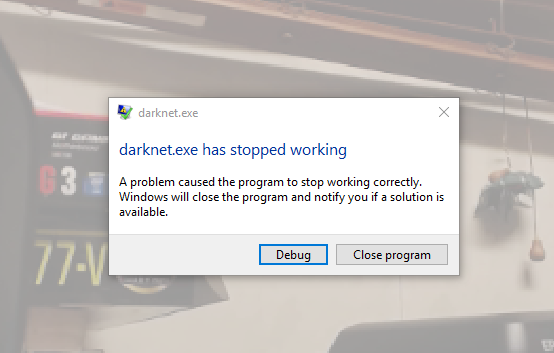
Using darknet on a video file seems to work well.
 AweSwan
on 19 Apr 2018
AweSwan
on 19 Apr 2018
Hi,
Installed the latest nvidia drivers and it's working every time now. Could be that the memory has just moved around, but I am hoping the crash was due to drivers. Also would love to be able to set the cam at lower res.
Cheers
AweSwan
on 19 Apr 2018
@AweSwan Hi,
Un-comment these 2 lines and set required resolution: https://github.com/AlexeyAB/darknet/blob/c2c8595b083ec3586a99bb913b8a986e81e3a42a/src/http_stream.cpp#L203-L204
But OpenCV has a bug, so probably it can set lower resolution than you set.
AlexeyAB
on 19 Apr 2018
Related issues
 yongcong1415
·
3Comments
yongcong1415
·
3Comments
 Greta-A
·
3Comments
Greta-A
·
3Comments
 Cipusha
·
3Comments
Cipusha
·
3Comments
 rezaabdullah
·
3Comments
rezaabdullah
·
3Comments
 Yumin-Sun-00
·
3Comments
Yumin-Sun-00
·
3Comments