https://pjreddie.com/darknet/yolo/
YOLO v3 is now available. can I use v3 cfg in Windows?
 wkdhkr
All 32 comments
Take a look at yolov3.cfg: https://github.com/pjreddie/darknet/blob/master/cfg/yolov3.cfg
It has new parameters in it that I don't quite understand. Hopefully, someone can fill in the blanks. For example, the [shortcut] layer replaces the typical maxpool layers, the last detection layer seems to have a new equation (filters=255?), what is mask 0-9? and the anchored [yolo] layers are spread out. People aren't going to know how to custom this new .cfg, because the new features aren't documented anywhere.
 spinoza1791
on 25 Mar 2018
spinoza1791
on 25 Mar 2018
It looks like the training procedure is the same, but uses the new Darknet53 model instead of Darknet19 or TinyYolo (currently).
The inferencing time is definitely slower though.
 lesreaper
on 25 Mar 2018
lesreaper
on 25 Mar 2018
@wkdhkr @spinoza1791 @lesreaper
You can train Yolo v3 using this repo
[shortcut]- already implemented - this is simply residual connection from ResNet[upsample]- is a new layer - something like old [reorg] layer but with correct premutations: https://github.com/pjreddie/darknet/blob/d3828827e70b293a3045a1eb80bfb4026095b87b/src/blas.c#L334-L349[yolo]- new detector layer instead of old [region] layer: https://github.com/pjreddie/darknet/blob/d3828827e70b293a3045a1eb80bfb4026095b87b/src/yolo_layer.c
 AlexeyAB
on 26 Mar 2018
AlexeyAB
on 26 Mar 2018
Thank you @AlexeyAB
 visionNoob
on 26 Mar 2018
visionNoob
on 26 Mar 2018
What is the difference between YOLO v3 and YOLO v2? The new layer and new network structures are add?
 TaihuLight
on 26 Mar 2018
TaihuLight
on 26 Mar 2018
@TaihuLight seems like he added feature pyramids https://github.com/pjreddie/darknet/issues/555 and probably more.
 TheMikeyR
on 26 Mar 2018
TheMikeyR
on 26 Mar 2018
YOLO v3 added. (d9ae3dd681ed1c98e807ff937dbbb9cfc4d19fe0)
If I want to use YOLO v3 in dll format in Windows, can I use the function in yolo_v2_class.hpp?
Its name is v2, so I wonder if v3 applies.
 DeHysolate
on 29 Mar 2018
DeHysolate
on 29 Mar 2018
Yolo v3 can be trained successfully.
Just trained 5000 iterations on Windows 7 x64, CUDA 9.1, cuDNN 7.0, OpenCV 3.4.0 using this command:
darknet.exe detector train data/obj.data yolov3_obj.cfg darknet53.conv.74
Result accuracy:
darknet.exe detector map data/obj.data yolov3_obj.cfg backup/yolov3_obj_5000.weights
 for thresh = 0.25, precision = 0.97, recall = 0.99, F1-score = 0.98
 for thresh = 0.25, TP = 8490, FP = 271, FN = 88, average IoU = 74.62 %

 mean average precision (mAP) = 0.906889, or 90.69 %
Total Detection Time: 465.000000 Seconds
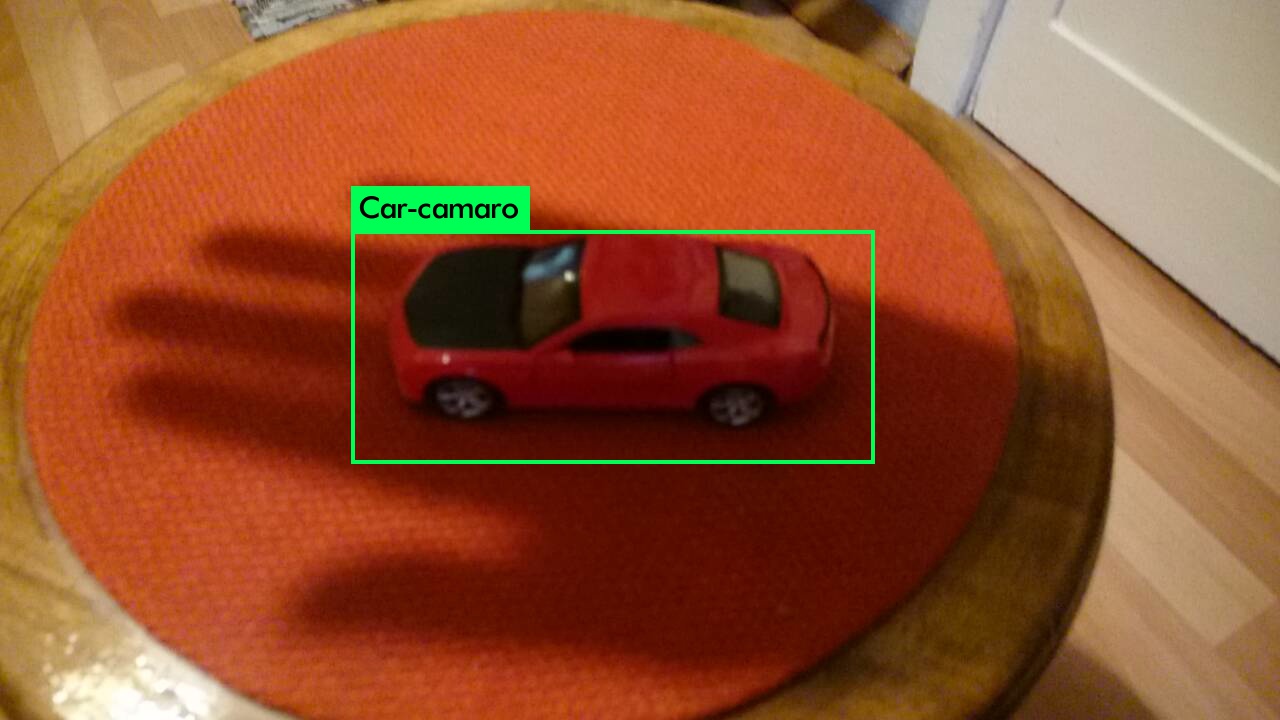
Detection:
darknet.exe detector test data/obj.data yolov3_obj.cfg backup/yolov3_obj_5000.weights img_4_109.jpg
img_4_109.jpg: Predicted in 0.035000 seconds.
Car-camaro: 100%
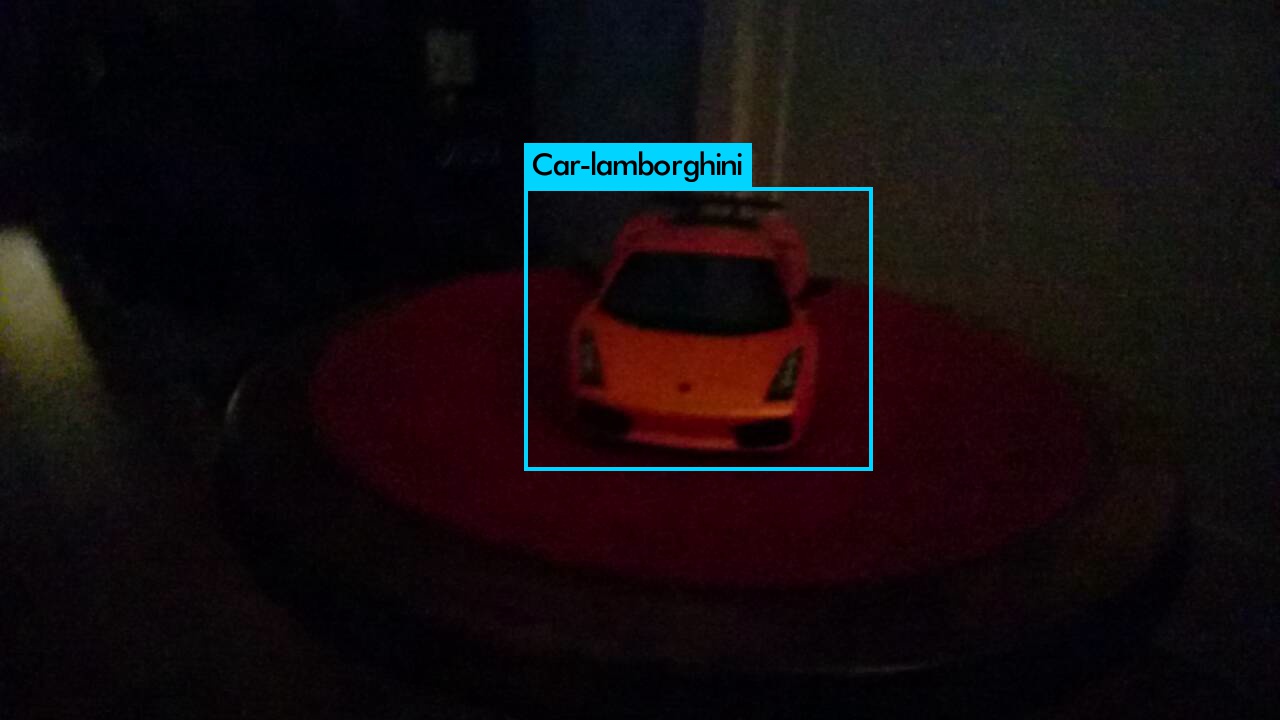
darknet.exe detector test data/obj.data yolov3_obj.cfg backup/yolov3_obj_5000.weights img_5_769.jpg
img_5_769.jpg: Predicted in 0.034000 seconds.
Car-lamborghini: 100%
Average loss during training:

AlexeyAB
on 29 Mar 2018
great work!!
wkdhkr
on 29 Mar 2018
@AlexeyAB how do you add this chart showing errors in pjreddie's fork. Moreover did you modify this fork as your fork always converge faster than pjreddie's
 ahsan856jalal
on 30 Mar 2018
ahsan856jalal
on 30 Mar 2018
@ahsan856jalal I made many changes some of them I already do not remember, some of them: https://github.com/AlexeyAB/darknet/issues/529#issuecomment-377204382
Loss chart is enabled by default in this fork:
AlexeyAB
on 30 Mar 2018
darknet.exe detector map ,where the functions you defined ? There is no detector.c, I want to draw the presion and recall curve,but only extract map from training log.
 Gotta-C
on 20 Apr 2018
Gotta-C
on 20 Apr 2018
is opencv necessary for this chart to get created?
 dfsaw
on 11 Jul 2018
dfsaw
on 11 Jul 2018
@dfsaw Yes.
AlexeyAB
on 11 Jul 2018
I am getting this error while running make file with open cv=1
cannot find -lippicv .
Can please someone help me out.
dfsaw
on 11 Jul 2018
@dfsaw
- What OpenCV version do you use?
Try to do
sudo cp 3rdparty/ippicv/unpack/ippicv/lib/intel64/libippicv.a /usr/local/lib/
Or try to install OpenCV 3.3.0: https://github.com/opencv/opencv/archive/3.3.0.zip
May it can help to solve your issue:
AlexeyAB
on 11 Jul 2018
i am using 3.3.0.10 I am trying to run on GPU. it is working fine without Opencv but since I need to generate training loss chart i need open cv
dfsaw
on 11 Jul 2018
Is there any other way to generate avg loss for training set without opencv. It would be really great if someone could help.
I tried running this script but the log file under scripts folder is not generated
/darknet detector train build/darknet/x64/data/obj.data cfg/yolov3-tiny-obj.cfg yolov3-tiny.conv.15 > test.log
dfsaw
on 11 Jul 2018
can anyone tell me how to plot the graph of loss function of yolov3.
 vikasmishra591
on 5 Nov 2018
vikasmishra591
on 5 Nov 2018
Dear
@dfsaw & @vikasmishra591
did you get any solutions ?
how can I get the .log file ?
before or after the training is there any why to save the log outputs
I want to plot the Accuracy vs epoch , loss vs epoch
I am training my own dataset using darknet , tiny yolo v2
thank you
 jalaldev1980
on 23 Nov 2018
jalaldev1980
on 23 Nov 2018
Hi @jalaldev1980 ,
Got any solution ?
 Rahul-Venugopal
on 16 Jan 2019
Rahul-Venugopal
on 16 Jan 2019
@Rahul-Venugopal
You can save the log output by using | tee log.txt at the end of command:
./darknet detector train cfg/coco.data yolov3.cfg darknet53.conv.74 | tee log.txt
(on windows you should download wtee.exe: https://code.google.com/archive/p/wintee/ and use command darknet.exe detector train cfg/coco.data yolov3.cfg darknet53.conv.74 | wtee log.txt)
Then you can use this script to draw Loss-chart by using saved log.txt file: https://github.com/AlexeyAB/darknet/tree/master/scripts/log_parser
Also i the latest version of darknet the Loss-chart will be saved automatically to the file chart.png for each 100 iterations, if you compiled Darknet with OpenCV.
(even if you use flag -dont_show if you train the model on Amazon EC2)
If you use flag -map then will be saved Loss-chart & accuracy mAP-chart to the chart.png
Also you can run training on the remote server:
./darknet detector train cfg/coco.data yolov3.cfg darknet53.conv.74 -dont_show -mjpeg_port 8090 -map
And then see Loss & mAP charts by using web-browser Chrome/Firefox by using URL with ip-address of remote server: http://ip-address:8090
More: https://github.com/AlexeyAB/darknet#how-to-use-on-the-command-line
AlexeyAB
on 16 Jan 2019
Hi @AlexeyAB ,
Thank you so much for such a quick response . It saved my day :)
Rahul-Venugopal
on 16 Jan 2019
Hi @AlexeyAB
I am training on remote cluster where I can not use graphics therefore I am force to use "dont_show" parameter. Is there any option to save the chart instead of printing it while training or do I have to write it my self? Thank you in advance.
 kocica
on 30 Jan 2019
kocica
on 30 Jan 2019
@kocica Hi,
Compile with OPENCV=1 and chart.png will be saved automatically for each 100 iterations
./darknet detector train cfg/coco.data yolov3.cfg darknet53.conv.74 -dont_showwill be saved Loss-chart./darknet detector train cfg/coco.data yolov3.cfg darknet53.conv.74 -dont_show -mapwill be saved mAP & Loss-chart
AlexeyAB
on 30 Jan 2019
Darknet.exe detector train ..... -map,
Doesnt show map progress in graph and only extract map from training log.
 anthonymg1994
on 29 Mar 2019
anthonymg1994
on 29 Mar 2019
@anthonymg1994
darknet.exe detector train ..... -map - it shows map progress in graph during training. It doesn't extract map from training log.
AlexeyAB
on 29 Mar 2019
@ahsan856jalal I made many changes some of them I already do not remember, some of them: #529 (comment)
Loss chart is enabled by default in this fork:
Please, @ahsan856jalal for me doesn't work.
I add in line 107:
img = draw_train_chart(max_img_loss, net.max_batches, number_of_lines, img_size);
and in lines 176 to 177:
if(!dont_show)
`draw_train_loss(img, img_size, avg_loss, max_img_loss, i, net.max_batches);`
and the detector.c was changed by (split some changes):
        /*
           int zz;
           for(zz = 0; zz < train.X.cols; ++zz){
           image im = float_to_image(net->w, net->h, 3, train.X.vals[zz]);
           int k;
           for(k = 0; k < l.max_boxes; ++k){
           box b = float_to_box(train.y.vals[zz] + k*5, 1);
           printf("%f %f %f %f\n", b.x, b.y, b.w, b.h);
           draw_bbox(im, b, 1, 1,0,0);
           }
           show_image(im, "truth11");
           img = draw_train_chart(max_img_loss, net.max_batches, number_of_lines, img_size);
           save_image(im, "truth11");
           }
         */
and
        if (xmin < 0) xmin = 0;
        if (ymin < 0) ymin = 0;
        if (xmax > w) xmax = w;
        if (ymax > h) ymax = h;
        if(!dont_show)
        draw_train_loss(img, img_size, avg_loss, max_img_loss, i, net.max_batches);
Any tips?
 Leprechault
on 18 Mar 2020
Leprechault
on 18 Mar 2020
@Rahul-Venugopal
You can save the log output by using
| tee log.txtat the end of command:
./darknet detector train cfg/coco.data yolov3.cfg darknet53.conv.74 | tee log.txt(on windows you should download
wtee.exe: https://code.google.com/archive/p/wintee/ and use commanddarknet.exe detector train cfg/coco.data yolov3.cfg darknet53.conv.74 | wtee log.txt)Then you can use this script to draw Loss-chart by using saved
log.txtfile: https://github.com/AlexeyAB/darknet/tree/master/scripts/log_parserAlso i the latest version of darknet the Loss-chart will be saved automatically to the file
chart.pngfor each 100 iterations, if you compiled Darknet with OpenCV.
(even if you use flag-dont_showif you train the model on Amazon EC2)If you use flag
-mapthen will be saved Loss-chart & accuracy mAP-chart to thechart.pngAlso you can run training on the remote server:
./darknet detector train cfg/coco.data yolov3.cfg darknet53.conv.74 -dont_show -mjpeg_port 8090 -map
And then see Loss & mAP charts by using web-browser Chrome/Firefox by using URL with ip-address of remote server:http://ip-address:8090More: https://github.com/AlexeyAB/darknet#how-to-use-on-the-command-line
Hi, I trained the darknet with -map and have the information about map progress during the training. However, when I use this script with the log the output only show the loss graph, do you know how can I use this script or similar to plot map too?
Thanks.
 LuizBoina
on 25 Aug 2020
LuizBoina
on 25 Aug 2020
Did you forget to use the -map parameter?
This is the command that I personally use:
~/darknet/darknet detector -map -dont_show train cars.data cars.cfg 2>&1 | tee --append output.log
 stephanecharette
on 25 Aug 2020
stephanecharette
on 25 Aug 2020
Hi @stephanecharette, no, I dont.
I used this line of command on my remote server to train the network:
./darknet detector train data/obj.data cfg/yolov3_custom.cfg darknet53.conv.74 -map -dont_show | tee log.txt
The log.txt have a lot of map progress like this:
(next mAP calculation at 8305 iterations)
Last accuracy [email protected] = 93.41 %, best = 93.41 %
And the few last lines have similar information as when I run detector map, but when I use log_parser this only give me the graph with loss and nothing about the map.
LuizBoina
on 25 Aug 2020
I don't know if it matters, but I have -map -dont_show at the start of the command, while you have it at the end. Note that the mAP% doesn't appear on the chart until 1000 iterations have been completed.
stephanecharette
on 25 Aug 2020
Related issues
 off99555
·
3Comments
off99555
·
3Comments
 Mididou
·
3Comments
Mididou
·
3Comments
 kebundsc
·
3Comments
kebundsc
·
3Comments
 HanSeYeong
·
3Comments
HanSeYeong
·
3Comments
 rezaabdullah
·
3Comments
rezaabdullah
·
3Comments
Most helpful comment
@wkdhkr @spinoza1791 @lesreaper
You can train Yolo v3 using this repo
[shortcut]- already implemented - this is simply residual connection from ResNet[upsample]- is a new layer - something like old [reorg] layer but with correct premutations: https://github.com/pjreddie/darknet/blob/d3828827e70b293a3045a1eb80bfb4026095b87b/src/blas.c#L334-L349[yolo]- new detector layer instead of old [region] layer: https://github.com/pjreddie/darknet/blob/d3828827e70b293a3045a1eb80bfb4026095b87b/src/yolo_layer.c