Darknet: mAP and IOU calculations by the last commit (8474f49 )
Hi,
I tried to calculate the mAP for my own dataset. It delivers 100% for the mAP and 81.5% for the average IoU.
The command that I used was this:
darknet.exe detector map data/obj.data yolo-obj.cfg backup/yolo-obj_final.weights
I think the mAP is correct since it detects all validation sets correctly (I don't know in how much shift with annotation labels) but for the average IoU, does this number should be equal to the number which we get by running a command like this? because I get 83.56% in the last row by running the validation.
darknet.exe detector recall data/obj.data yolo-obj.cfg backup/yolo-obj_final.weights -i 0
 VanitarNordic
All 18 comments
Hi,
In my code using
detector mapthe average IoU is calculated correctly for defaultthesh = 0.24.Using
detector recallthe IoU is calculated forthresh = 0.001and then only the best IoUs are taken without comparing the class id - i.e. network can detect apples when on images are only oranges - and IoU will be high - so this is purely an internal indicator for developers, Joseph never wrote that you should use it, I wrote about it only until I added a mAP.
Code ofdetector recall:
https://github.com/AlexeyAB/darknet/blob/8474f491f2be64222fb1662b088d87529a22670f/src/detector.c#L455-L468
 AlexeyAB
on 19 Feb 2018
AlexeyAB
on 19 Feb 2018
I tried to calculate the mAP for my own dataset. It delivers 100% for the mAP and 81.5% for the average IoU.
- Also how many TP, FP, FN did you get?
- And how many AP for each class?
AlexeyAB
on 19 Feb 2018
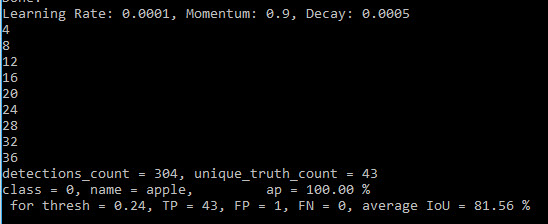
There is one class, there you go:
VanitarNordic
on 19 Feb 2018
mAP is calculated from PR-curve that is calculated from (TP, FP, FN), where TP (true-positive) += 1 if current IoU > 0.5, so mAP can be 100% even if average IoU < 100%.
AlexeyAB
on 19 Feb 2018
in the statistics, it shows one False positive. so by this, the effect is on the IoU since mAP is 100%
VanitarNordic
on 19 Feb 2018
I have one question about small_object=1 effect also.
By defining this value, the images in the training dataset will be randomly scaled, isn't it?
if Yes, may I ask you to check it again because I couldn't detect any small object until I added 3-4 images from some small target objects into the training dataset. Therefore the scaling might not work.
VanitarNordic
on 19 Feb 2018
in the statistics, it shows one False positive. so by this, the effect is on the IoU since mAP is 100%
You can un-comment this line, and re run mAP calculation, it will give you more info about 11 points on PR-curve: https://github.com/AlexeyAB/darknet/blob/4a7a076d0939a491af8fe3fd63e5012ffd5afebc/src/detector.c#L775
AlexeyAB
on 19 Feb 2018
I have one question about small_object=1 effect also.
By defining this value, the images in the training dataset will be randomly scaled, isn't it?
if Yes, may I ask you to check it again because I couldn't detect any small object until I added 3-4 images from some small target objects into the training dataset. Therefore the scaling might not work.
No, small_object=1 isn't about scaling.
There was a problem during training, if size of ground truth of object less than 0.1-1% of image width or height - it leads to Nan. So these small ground truth were rejected during training and this led to the fact that the model was trained not to detect small objects: https://github.com/pjreddie/darknet/blob/80d9bec20f0a44ab07616215c6eadb2d633492fe/src/data.c#L435
The problem is in small truth boxes, but not in small objects.
So now, these small objects aren't rejected, but just bounded box size increased up to 1% x 1% of image size: https://github.com/AlexeyAB/darknet/blob/4a7a076d0939a491af8fe3fd63e5012ffd5afebc/src/data.c#L309-L314
Now small objects can be detected (only box will be not less than 1% x 1%)
AlexeyAB
on 19 Feb 2018
Therefore scaling is not performed in the augmentation phase as rotation. if we do this (random scaling), it might increase the performance, yes?
VanitarNordic
on 19 Feb 2018
Scaling performed in the augmentation phase if random=1. It increases precision.
AlexeyAB
on 19 Feb 2018
As I realized, random=1 also upscale the images not just downscale them isn't it?
second, what is the effect of these values?
object_scale=5
noobject_scale=1
class_scale=1
coord_scale=1
Assume the original image is this:
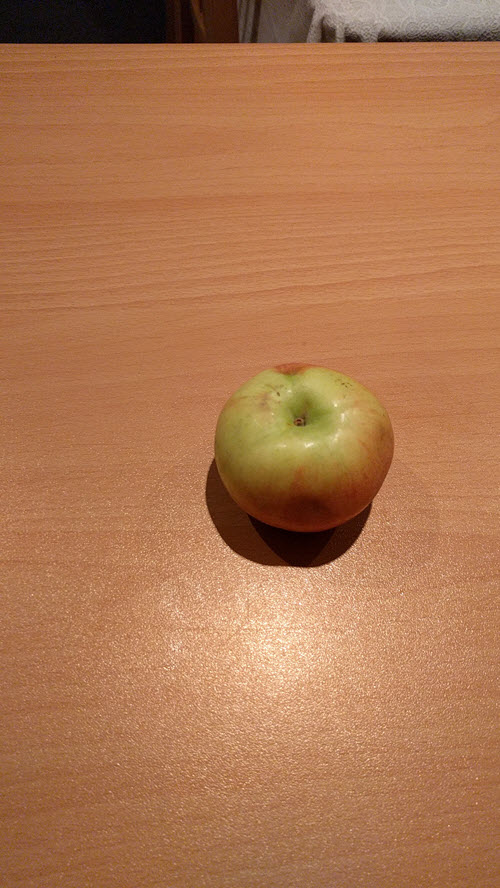
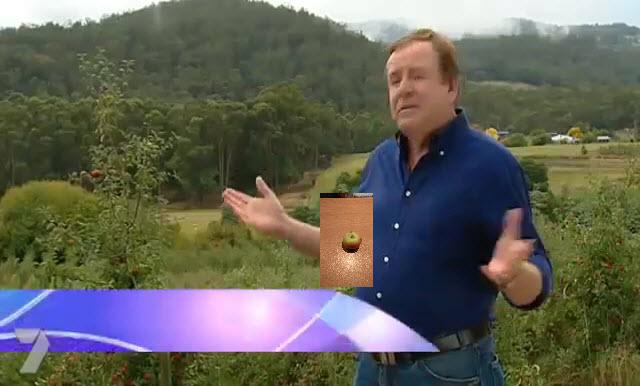
Do you like resizing and integration in the new image to feed the model with its minimum possible size also?
VanitarNordic
on 23 Feb 2018
As I realized, random=1 also upscale the images not just downscale them isn't it?
Yes.
Do you like resizing and integration in the new image to feed the model with its minimum possible size also?
Try it. But it is better if the object is inserted without a superfluous background (without a table).
So if you insert an object with a background (table) into other images (forest+man), then the network can learn to search for an object only with this background (table) - this is overfitting. I.e. the probability of detection will be shifted to the case when apple will be detected only if around the apple there is piece of table.
AlexeyAB
on 24 Feb 2018
you mean it is better to crop the bbox and then mix it with a new background?
if I crop it, still small parts of the table is around the apple in the bbox.
VanitarNordic
on 24 Feb 2018
No, I mean it is better to crop an object by borders of object.
AlexeyAB
on 24 Feb 2018
By borders of the object? I don't get. May I ask you to mention an example or picture?
VanitarNordic
on 24 Feb 2018
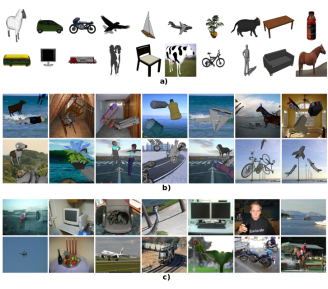
@AlexeyAB means something similar to the idea mentioned in the paper below:
Use some kind of a slicing tool to select only the object of interest (without any background involved) & emboss it on different backgrounds.
This makes the NN to search for the objects without over-fitting to the background.
https://arxiv.org/pdf/1709.00849.pdf
 sivagnanamn
on 24 Feb 2018
sivagnanamn
on 24 Feb 2018
@VanitarNordic Adding one more paper for your reference:
Synthesizing Training Data for Object Detection in Indoor Scenes
sivagnanamn
on 27 Feb 2018
Related issues
 qianyunw
·
3Comments
qianyunw
·
3Comments
 louisondumont
·
3Comments
louisondumont
·
3Comments
 HilmiK
·
3Comments
HilmiK
·
3Comments
 bit-scientist
·
3Comments
bit-scientist
·
3Comments
 kebundsc
·
3Comments
kebundsc
·
3Comments
Most helpful comment
@AlexeyAB means something similar to the idea mentioned in the paper below:
Use some kind of a slicing tool to select only the object of interest (without any background involved) & emboss it on different backgrounds.
This makes the NN to search for the objects without over-fitting to the background.
https://arxiv.org/pdf/1709.00849.pdf