Darknet: Trained model gives zero detections
I compiled your version of darknet on Amazon Linux (using Tesla K80 GPU) with the following settings:
GPU=1
CUDNN=1
OPENCV=1
DEBUG=0
OPENMP=0
LIBSO=0

...

ARCH=  -gencode arch=compute_37,code=sm_37
I trained Yolo for 300 iterations using the steps described in https://pjreddie.com/darknet/yolo/ .
When I try to perform detection on a single image:
./darknet detector test cfg/voc.data cfg/yolo-voc.cfg backupVOC/yolo-voc_300.weights VOCdevkit/VOC2007/JPEGImages/009460.jpg
I get no detections. I think I should get some (though not correct detections) even though the training was limited.
On another occasion I trained a classifier reproducing the steps from this tutorial https://timebutt.github.io/static/how-to-train-yolov2-to-detect-custom-objects/ . Training went on for a few thousand iterations with the average lost as low as 0.05 in the end and yet still I was unable to detect anything with that model.
What might I be doing wrong ?
 bonzoq
All 74 comments
You should recompile with OpenCV=0 then the result will be saved as an image in the root folder of darknet. The OpenCV is only used to show detections in a window and since you are using the AWS I assume you are doing it through an ssh connection.
 TheMikeyR
on 26 Oct 2017
TheMikeyR
on 26 Oct 2017
@bonzoq Results of successfully training on Windows and Linux: https://github.com/AlexeyAB/darknet/issues/243#issuecomment-340908751
Can you get any bounded boxes using this command?
./darknet detector test cfg/voc.data cfg/yolo-voc.cfg backupVOC/yolo-voc_300.weights VOCdevkit/VOC2007/JPEGImages/009460.jpg -thresh 0.01
 AlexeyAB
on 26 Oct 2017
AlexeyAB
on 26 Oct 2017
Thanks for your quick responses @TheMikeyR and @AlexeyAB.
I recompiled with OpenCV=0 and even with the threshold set to 0.01 I get no detections.
Threshold 0.00 also gives no detections. When I use the original yolo model I get plenty of detections.
bonzoq
on 26 Oct 2017
I have the same problem. But training with tiny-yolo-voc.cfg is ok.
 sc1234qwer
on 26 Oct 2017
sc1234qwer
on 26 Oct 2017
@bonzoq
When I use the original yolo model I get plenty of detections.
Do you use
yolo-voc_300.weightstrained on my fork, to test on original fork, and it gives plenty of detections?Do you use batch=64 and subdivison=8 in your
yolo-voc.cfgfile for training?Try to update code from the last commit, and try to train again using in your cfg-file such params:
learning_rate=0.0001
steps=100,25000,35000
scales=10,.1,.1
@AlexeyAB
When I use your fork to perform detections on this one image I mentioned above (
VOCdevkit/VOC2007/JPEGImages/009460.jpg) with the model _https://pjreddie.com/media/files/yolo.weights_ I get plenty of detections.yolo-voc_300.weightsI trained on your fork. When I try to use it to perform detections on the same image I get zero detections.Yes, I use
batch=64andsubdivison=8in my yolo-voc.cfg file for training.I will try to retrain using your last commit and updated cfg file.
Thanks, I will let you know!
bonzoq
on 26 Oct 2017
@bonzoq
When I use your fork to perform detections on this one image I mentioned above (
VOCdevkit/VOC2007/JPEGImages/009460.jpg) with the model _https://pjreddie.com/media/files/yolo.weights_ I get plenty of detections.
yolo.weightsis COCO-model and it should be used foryolo.cfgonly, so check that you use it in a such way:./darknet detector test cfg/coco.data cfg/yolo.cfg yolo.weights VOCdevkit/VOC2007/JPEGImages/009460.jpgTo use VOC-model, download
yolo-voc.weightsand use it such:./darknet detector test cfg/voc.data cfg/yolo-voc.cfg yolo-voc.weights VOCdevkit/VOC2007/JPEGImages/009460.jpgAlso if you train your model on VOC-dataset, usually you can see any detections after >1000 iterations with low threshold
-thresh 0.01And to train your own model, try to use such params: https://github.com/AlexeyAB/darknet/issues/243#issuecomment-339659709
AlexeyAB
on 26 Oct 2017
@AlexeyAB thanks for pointing out I was using a COCO model with VOC config.
Also if you train your model on VOC-dataset, usually you can see any detections after >1000 iterations with low threshold -thresh 0.01
Does it mean that when training on VOC-dataset I won't get any detections with -thresh 0.01 and fewer than 1000 iterations?
bonzoq
on 26 Oct 2017
Hi,
I'm having the same problem. I think something is wrong with generated weights files after commit ae74d0ef31485f84e1856b4733135d2753dbb033.
Weights files created before are ok.
I use VS 2017, Cuda 9.0, cuDNN 7, OpenCV 3.2.0
cfg: yolo-voc.2.0.cfg and resnet50_yolo.cfg
 phqmourao
on 26 Oct 2017
phqmourao
on 26 Oct 2017
@phqmourao Thank you, I fixed it.
@bonzoq @TheMikeyR @sc1234qwer An error was added 5 days ago. Now I have fixed it.
AlexeyAB
on 26 Oct 2017
So I compiled the code with the latest commit Fixed bug with: net->seen and trained the network with default parameters. After 1000 iterations I get zero detections even with threshold 0.001.
Maybe the problem lays somewhere else? How can I debug?
bonzoq
on 26 Oct 2017
@bonzoq
- What command line do you use to train?
- Can you detect anything using standard model using this fork?
/darknet detector test cfg/voc.data cfg/yolo-voc.cfg yolo-voc.weights VOCdevkit/VOC2007/JPEGImages/009460.jpg - Also can you provide your cfg and weights files and image on which you try to detect objects?
This is strange, I just train my own model with 6 objects based on yolo-voc.2.0.cfg using 400 iterations on Windows 7x64 (CUDA 8.0, cuDNN 6.0, OpenCV 3.3.0), and it can detect objects.
- train:
darknet.exe detector train data/obj.data yolo-obj.cfg darknet19_448.conv.23 - detect:
darknet.exe detector test data/obj.data yolo-obj.cfg backup/yolo-obj_400.weights img_4_109.jpg
AlexeyAB
on 26 Oct 2017
@AlexeyAB I will reply tomorrow as I don't have access to the server right now. Thank you for your prompt reply. Greatly appreciated.
bonzoq
on 26 Oct 2017
@AlexeyAB
./darknet detector test cfg/voc.data cfg/yolo-voc.cfg yolo-voc.weights VOCdevkit/VOC2007/JPEGImages/009460.jpg
gives me no detections whatsoever.
- I downloaded yolo-voc.weights from https://pjreddie.com/media/files/yolo-voc.weights
VOC.data:
train  = VOCdevkit/train.txt
valid  = VOCdevkit/2007_test.txt
names = data/voc.names
backup = backupVOC2
yolo-voc.cfg:
[net]
# Testing
#batch=1
#subdivisions=1
# Training
batch=64
subdivisions=16
height=416
width=416
channels=3
momentum=0.9
decay=0.0005
angle=0
saturation = 1.5
exposure = 1.5
hue=.1

learning_rate=0.001
burn_in=1000
max_batches = 80200
policy=steps
steps=40000,60000
scales=.1,.1

[convolutional]
batch_normalize=1
filters=32
size=3
stride=1
pad=1
activation=leaky

[maxpool]
size=2
stride=2

[convolutional]
batch_normalize=1
filters=64
size=3
stride=1
pad=1
activation=leaky

[maxpool]
size=2
stride=2

[convolutional]
batch_normalize=1
filters=128
size=3
stride=1
pad=1
activation=leaky

[convolutional]
batch_normalize=1
filters=64
size=1
stride=1
pad=1
activation=leaky

[convolutional]
batch_normalize=1
filters=128
size=3
stride=1
pad=1
activation=leaky

[maxpool]
size=2
stride=2

[convolutional]
batch_normalize=1
filters=256
size=3
stride=1
pad=1
activation=leaky

[convolutional]
batch_normalize=1
filters=128
size=1
stride=1
pad=1
activation=leaky

[convolutional]
batch_normalize=1
filters=256
size=3
stride=1
pad=1
activation=leaky

[maxpool]
size=2
stride=2

[convolutional]
batch_normalize=1
filters=512
size=3
stride=1
pad=1
activation=leaky

[convolutional]
batch_normalize=1
filters=256
size=1
stride=1
pad=1
activation=leaky

[convolutional]
batch_normalize=1
filters=512
size=3
stride=1
pad=1
activation=leaky

[convolutional]
batch_normalize=1
filters=256
size=1
stride=1
pad=1
activation=leaky

[convolutional]
batch_normalize=1
filters=512
size=3
stride=1
pad=1
activation=leaky

[maxpool]
size=2
stride=2

[convolutional]
batch_normalize=1
filters=1024
size=3
stride=1
pad=1
activation=leaky

[convolutional]
batch_normalize=1
filters=512
size=1
stride=1
pad=1
activation=leaky

[convolutional]
batch_normalize=1
filters=1024
size=3
stride=1
pad=1
activation=leaky

[convolutional]
batch_normalize=1
filters=512
size=1
stride=1
pad=1
activation=leaky

[convolutional]
batch_normalize=1
filters=1024
size=3
stride=1
pad=1
activation=leaky


#######

[convolutional]
batch_normalize=1
size=3
stride=1
pad=1
filters=1024
activation=leaky

[convolutional]
batch_normalize=1
size=3
stride=1
pad=1
filters=1024
activation=leaky

[route]
layers=-9

[convolutional]
batch_normalize=1
size=1
stride=1
pad=1
filters=64
activation=leaky

[reorg]
stride=2

[route]
layers=-1,-4

[convolutional]
batch_normalize=1
size=3
stride=1
pad=1
filters=1024
activation=leaky

[convolutional]
size=1
stride=1
pad=1
filters=125
activation=linear


[region]
anchors =  1.3221, 1.73145, 3.19275, 4.00944, 5.05587, 8.09892, 9.47112, 4.84053, 11.2364, 10.0071
bias_match=1
classes=20
coords=4
num=5
softmax=1
jitter=.3
rescore=1

object_scale=5
noobject_scale=1
class_scale=1
coord_scale=1

absolute=1
thresh = .6
random=1
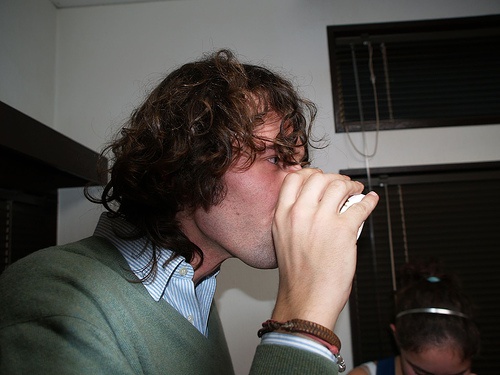
VOCdevkit/VOC2007/JPEGImages/009460.jpg
bonzoq
on 27 Oct 2017
@bonzoq Try to use this command with -i 0 at the end: ./darknet detector test cfg/voc.data cfg/yolo-voc.cfg yolo-voc.weights VOCdevkit/VOC2007/JPEGImages/009460.jpg -i 0
And if it doesn't work show screenshot of your console output.
Just now I try it on both Windows 7x64 and Linux x64 (Debian 8):

AlexeyAB
on 27 Oct 2017
@AlexeyAB sadly still no luck:
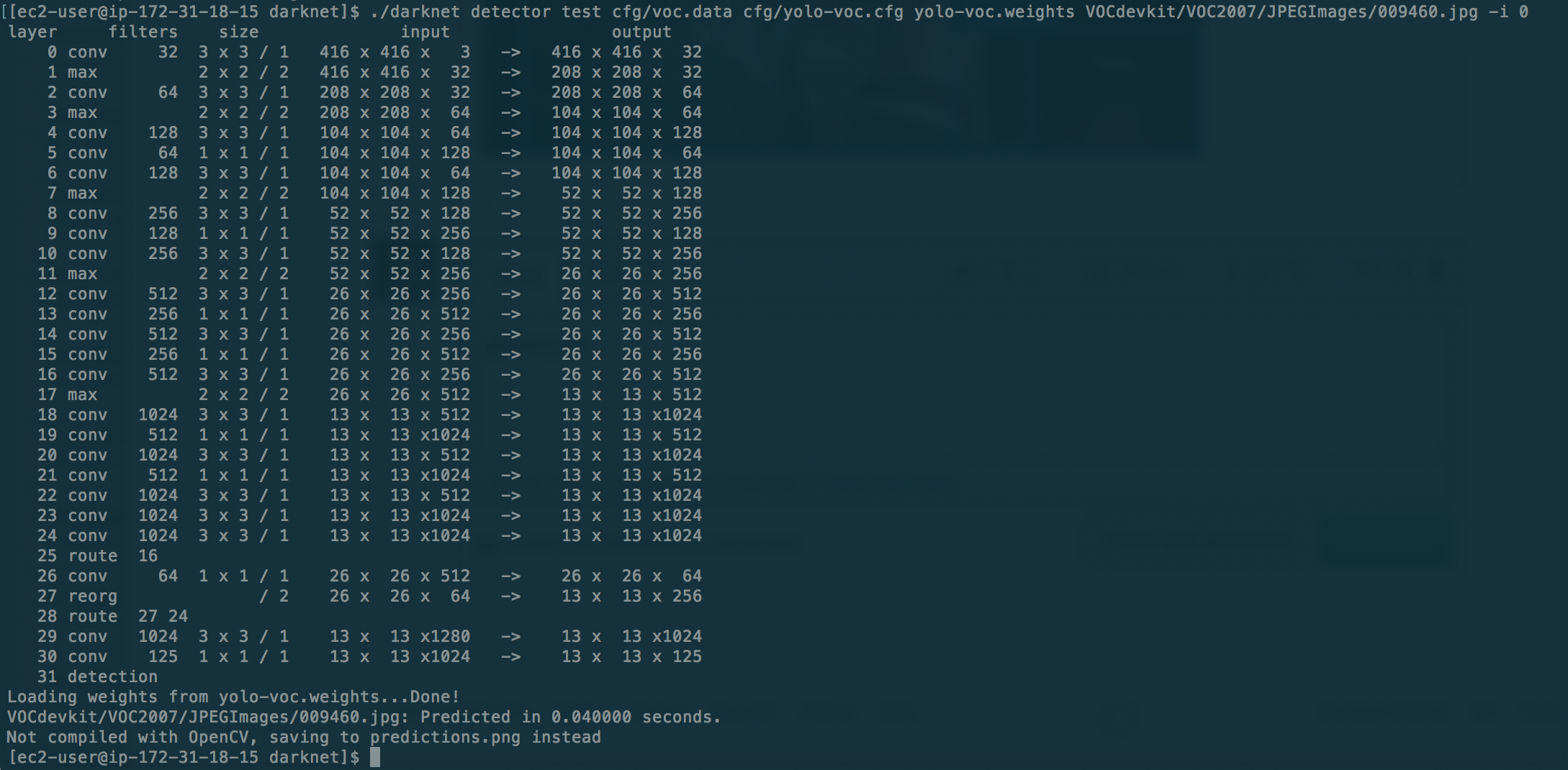
I updated the my previous comment to include the whole content of yolo-voc.cfg, which it didn't before.
bonzoq
on 27 Oct 2017
@bonzoq I found the solution - set batch=1 subdivision=1 for detection.
In general
On Linux:
- for training you must set
batch=64 subdivision=16(or subdivision=8) - for detection you must set
batch=1 subdivision=1
On Windows:
- for training you must set
batch=64 subdivision=16(or subdivision=8) - for detection you can set any values:
batch=1 subdivision=1orbatch=64 subdivision=16
I'll look for a reason why we must set the values (batch=1 subdivision=1) for detection on Linux.
AlexeyAB
on 27 Oct 2017
@AlexeyAB I set batch=1 and subdivision=1.
Sadly it didn't help. Can I debug this somehow?
bonzoq
on 27 Oct 2017
@bonzoq
- Also try to build without CUDA, and do:
./darknet detector test cfg/voc.data cfg/yolo-voc.cfg yolo-voc.weights VOCdevkit/VOC2007/JPEGImages/009460.jpg -i 0
GPU=0
CUDNN=0
OPENCV=0
DEBUG=0
OPENMP=0
LIBSO=0
- Try to build with
LIBSO=1, putyolo-voc.cfgandyolo-voc.weightsnear with compileduselibfile and do:./uselib VOCdevkit/VOC2007/JPEGImages/009460.jpg
AlexeyAB
on 27 Oct 2017
Hi all,
I have sort of the same issue than @bonzoq here. The training looks ok, it converges to an avg 0.06, high IOU, Recall 1.0 almost everywhere, but on detection it always draws a box around the whole image even there's nothing to detect. :/
 scamianbas
on 27 Oct 2017
scamianbas
on 27 Oct 2017
@AlexeyAB
- I built with those settings to no avail.
- I built with
LIBSO=1and tried but that did not work:

bonzoq
on 27 Oct 2017
@AlexeyAB
I encounter the same question in windows10, could you help to fix the bug?
I downloaded the stop and yield JPEG format images from http://guanghan.info/blog/en/my-works/train-yolo/,
Merged them together, the image number only is 554. I trained the images following the instruction “How to train (to detect your custom objects):”, cmd is “darknet.exe detector train data/obj.data yolo-obj.cfg darknet19_448.conv.23”,after 3000 iterations get the following result, Avg recall = 1.000, avg loss = 0.103, but I can’t detect any objects with cmd”arknet.exe detector test data/obj.data yolo-obj.cfg backup/yolo-obj_3000.weights”.
Following is the training processing screenshot.
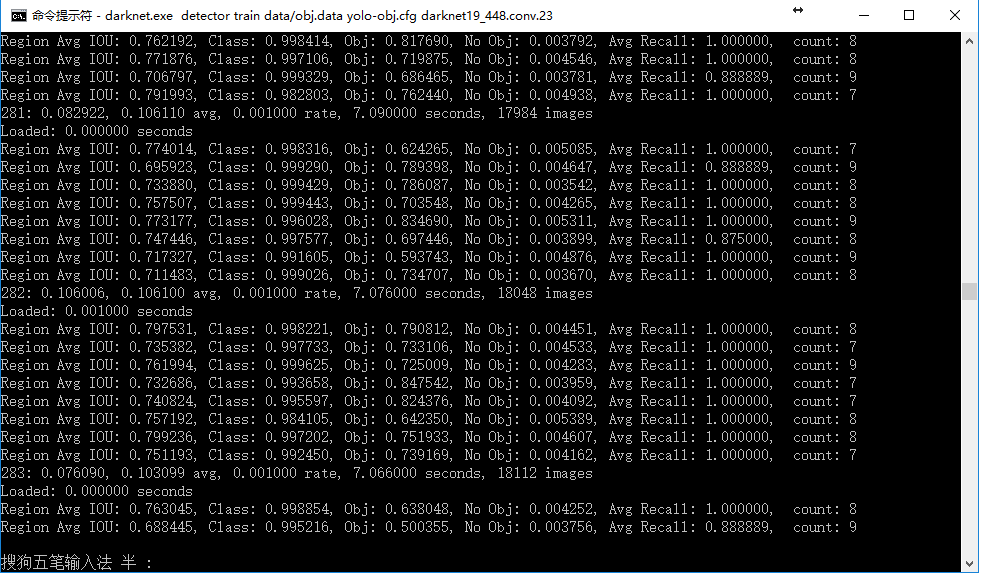
Following is the obj.data file content:
_classes= 2
train = data/train.txt
valid = data/train.txt
names = data/obj.names
backup = backup/_
Following is the yolo-obj.cfg file content:
_[net]
batch=64
subdivisions=8
height=416
width=416
channels=3
momentum=0.9
decay=0.0005
angle=0
saturation = 1.5
exposure = 1.5
hue=.1
learning_rate=0.0001
max_batches = 45000
policy=steps
steps=100,25000,35000
scales=10,.1,.1
[convolutional]
batch_normalize=1
filters=32
size=3
stride=1
pad=1
activation=leaky
[maxpool]
size=2
stride=2
[convolutional]
batch_normalize=1
filters=64
size=3
stride=1
pad=1
activation=leaky
[maxpool]
size=2
stride=2
[convolutional]
batch_normalize=1
filters=128
size=3
stride=1
pad=1
activation=leaky
[convolutional]
batch_normalize=1
filters=64
size=1
stride=1
pad=1
activation=leaky
[convolutional]
batch_normalize=1
filters=128
size=3
stride=1
pad=1
activation=leaky
[maxpool]
size=2
stride=2
[convolutional]
batch_normalize=1
filters=256
size=3
stride=1
pad=1
activation=leaky
[convolutional]
batch_normalize=1
filters=128
size=1
stride=1
pad=1
activation=leaky
[convolutional]
batch_normalize=1
filters=256
size=3
stride=1
pad=1
activation=leaky
[maxpool]
size=2
stride=2
[convolutional]
batch_normalize=1
filters=512
size=3
stride=1
pad=1
activation=leaky
[convolutional]
batch_normalize=1
filters=256
size=1
stride=1
pad=1
activation=leaky
[convolutional]
batch_normalize=1
filters=512
size=3
stride=1
pad=1
activation=leaky
[convolutional]
batch_normalize=1
filters=256
size=1
stride=1
pad=1
activation=leaky
[convolutional]
batch_normalize=1
filters=512
size=3
stride=1
pad=1
activation=leaky
[maxpool]
size=2
stride=2
[convolutional]
batch_normalize=1
filters=1024
size=3
stride=1
pad=1
activation=leaky
[convolutional]
batch_normalize=1
filters=512
size=1
stride=1
pad=1
activation=leaky
[convolutional]
batch_normalize=1
filters=1024
size=3
stride=1
pad=1
activation=leaky
[convolutional]
batch_normalize=1
filters=512
size=1
stride=1
pad=1
activation=leaky
[convolutional]
batch_normalize=1
filters=1024
size=3
stride=1
pad=1
activation=leaky
#
[convolutional]
batch_normalize=1
size=3
stride=1
pad=1
filters=1024
activation=leaky
[convolutional]
batch_normalize=1
size=3
stride=1
pad=1
filters=1024
activation=leaky
[route]
layers=-9
[reorg]
stride=2
[route]
layers=-1,-3
[convolutional]
batch_normalize=1
size=3
stride=1
pad=1
filters=1024
activation=leaky
[convolutional]
size=1
stride=1
pad=1
filters=35
activation=linear
[region]
anchors = 1.08,1.19, 3.42,4.41, 6.63,11.38, 9.42,5.11, 16.62,10.52
bias_match=1
classes=2
coords=4
num=5
softmax=1
jitter=.2
rescore=1
object_scale=5
noobject_scale=1
class_scale=1
coord_scale=1
absolute=1
thresh = .6
random=0_
Following is the detection cmd and result screenshot.
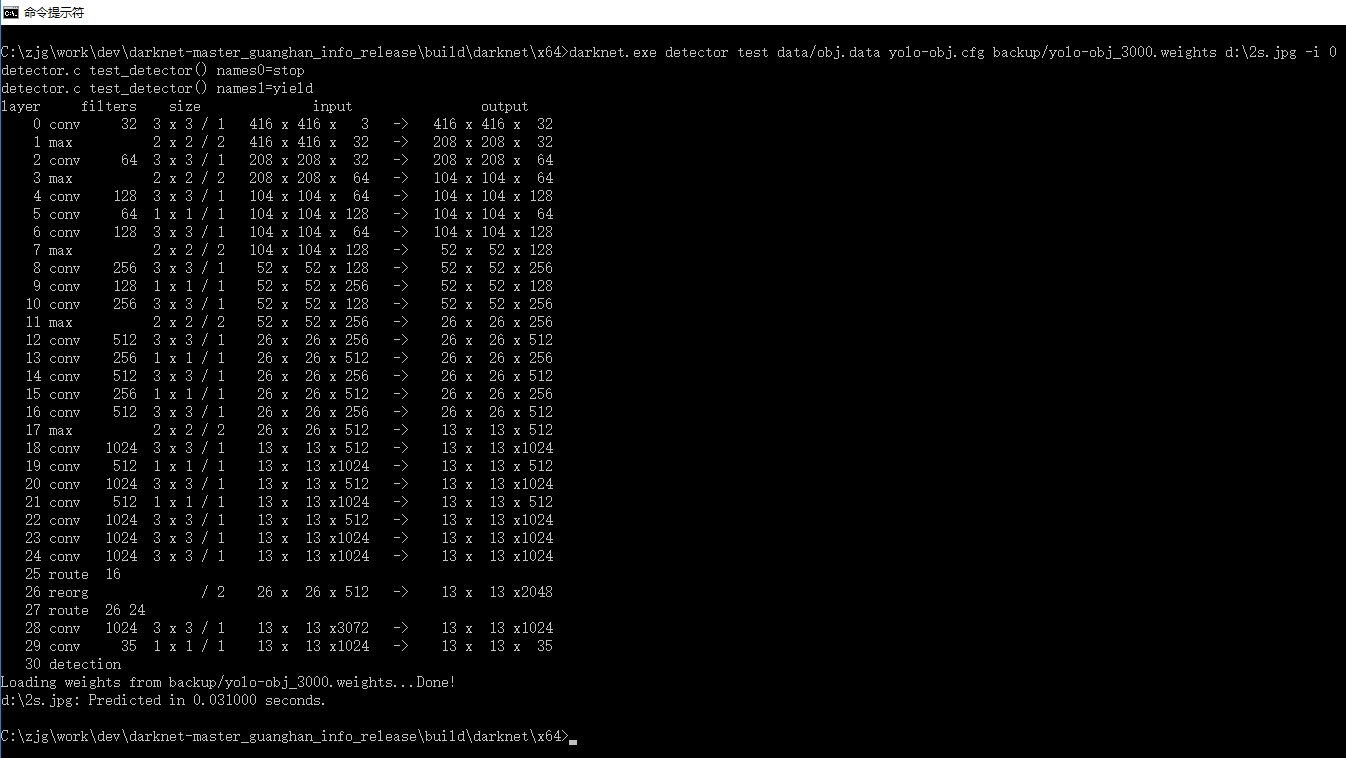
 zhang11wu4
on 29 Oct 2017
zhang11wu4
on 29 Oct 2017
@zhang11wu4 Can you detect anything using default trained model yolo-voc.cfg and yolo-voc.weights downloaded by the link? https://pjreddie.com/darknet/yolo/
AlexeyAB
on 29 Oct 2017
@AlexeyAB
yes, I can detect objects correctly with "yolo-voc.cfg" and "yolo-voc.weights" downloaded from that website.
zhang11wu4
on 30 Oct 2017
@zhang11wu4 Can you share your yolo-obj_3000.weights using GoogleDisk?
AlexeyAB
on 30 Oct 2017
@AlexeyAB
https://drive.google.com/file/d/0Bw2dL4mXINuzMVBUaGFlamk0WUU/view?usp=sharing
pls check, thanks!
zhang11wu4
on 30 Oct 2017
@zhang11wu4 I can't detect anything too using this weights-file.
- What commit do you use - when did you clone the repository?
- Did you use this fork on Windows 7/10 or Linux?
- What version of MSVS, CUDA, cuDNN, OpenCV do you use?
- Can you share your
train.txtand all training dataset (images and labels) in one archive?
AlexeyAB
on 30 Oct 2017
@AlexeyAB
- Commit maybe b714004546b97e9a43fae3e385dbefb56cecafb6 [b714004], I just downloaded the zip file.
2.My operation system is Win10 with cuda8.0, cudnn5.1,opencv3.2,vs2015.
3.I have compress all project files(including train.txt, images and others) into a rar file to google disk:
https://drive.google.com/open?id=0Bw2dL4mXINuzaVllaklkMHNDYzg
Pls check, thanks a lot!
zhang11wu4
on 30 Oct 2017
@zhang11wu4 I just trained model of 400 iterations using your dataset without any changes by using this command: darknet.exe detector train stopsign/obj.data stopsign/yolo-obj.cfg darknet19_448.conv.23
- I used MSVS 2015, CUDA 8.0, cuDNN v6 (for CUDA 8.0), OpenCV 3.3.0, Windows 7 x64. On GeForce GTX 970 (4 GB RAM) Maxwell - Compute capability (CC) 5.2
- I set
batch=64 subdivision=8in theyolo-obj.cfgfrom yourdarknet-master_guanghan_info_release.rar obj.data:
classes=2
train =stopsign/train.txt
valid =stopsign/test.txt
names=stopsign/obj.names
backup=backup/
train.txtdidn't changed, and didn't changed images and txt-labels. Images placed:
- C:\zjg\work\dev\darknet-master_guanghan_info\build\darknet\x64\data\obj\stopsign
- C:\zjg\work\dev\darknet-master_guanghan_info\build\darknet\x64\data\obj\yieldsign
And I can detect stop sign by using this command: darknet.exe detector test stopsign/obj.data stopsign/yolo-obj.cfg backup/yolo-obj_400.weights stopsign/014.jpg -thresh 0.1

AlexeyAB
on 30 Oct 2017
@zhang11wu4
- Do you use cudnn5.1 for CUDA 8.0, not for CUDA 7.5? https://developer.nvidia.com/rdp/cudnn-download
- What GPU do you use?
- Try to train without cuDNN
open\darknet.sln-> (right click on project) -> properties -> C/C++ -> Preprocessor -> Preprocessor Definitions, and remove:CUDNN;
AlexeyAB
on 30 Oct 2017
@AlexeyAB
1.Yes, I use CUDA8.0 with cudnn5.1;
2.GPU is GForce 980M;
3.I tried commit 6ccb418, it works, I can detect objects successfully with 4000 iterations with original dataset including stop signs and yield signs.
Train cmd: darknet.exe detector train data/obj.data yolo-obj.cfg darknet19_448.conv.23
Test cmd: darknet.exe detector test data/obj.data yolo-obj.cfg backup/yolo-obj_4000.weights
zhang11wu4
on 31 Oct 2017
Hi @AlexeyAB , @zhang11wu4 , @bonzoq
here's my conf :
- Ubuntu 14.04.5 LTS
- Nvidia GeForce GTX 760 4GB
- Nvidia Driver Version 375.39
- CUDA Version 8.0.61
- CUDNN 6.0.21
I used the tarball provided by @zhang11wu4 and enabled GPU, CUDNN, OPENCV and OPENMP in the Makefile then "make" it.
Then in "build/darknet/x64" I edited data/obj.data like this:
classes=2
train =data/train.txt
valid =data/test.txt
names=data/obj.names
backup=backup/
because train.txt, test.txt and obj.names were located there. (there is no directory called stopsign)
I also had to rebuild train.txt and test.txt to have the paths in linux format and relative to current directory:
root@0e5c13ae42c1:~/WilliamZhang/build/darknet/x64# head data/train.txt
data/obj/stopsign/001.JPEG
data/obj/stopsign/002.JPEG
data/obj/stopsign/003.JPEG
I did'nt change anything else.
Then I ran the following command: "/root/WilliamZhang/darknet detector train data/obj.data yolo-obj.cfg darknet19_448.conv.23"

After 400 iterations, I ran the following command: "/root/WilliamZhang/darknet detector test data/obj.data yolo-obj.cfg backup/yolo-obj_400.weights data/obj/stopsign/014.JPEG -thresh 0.1"
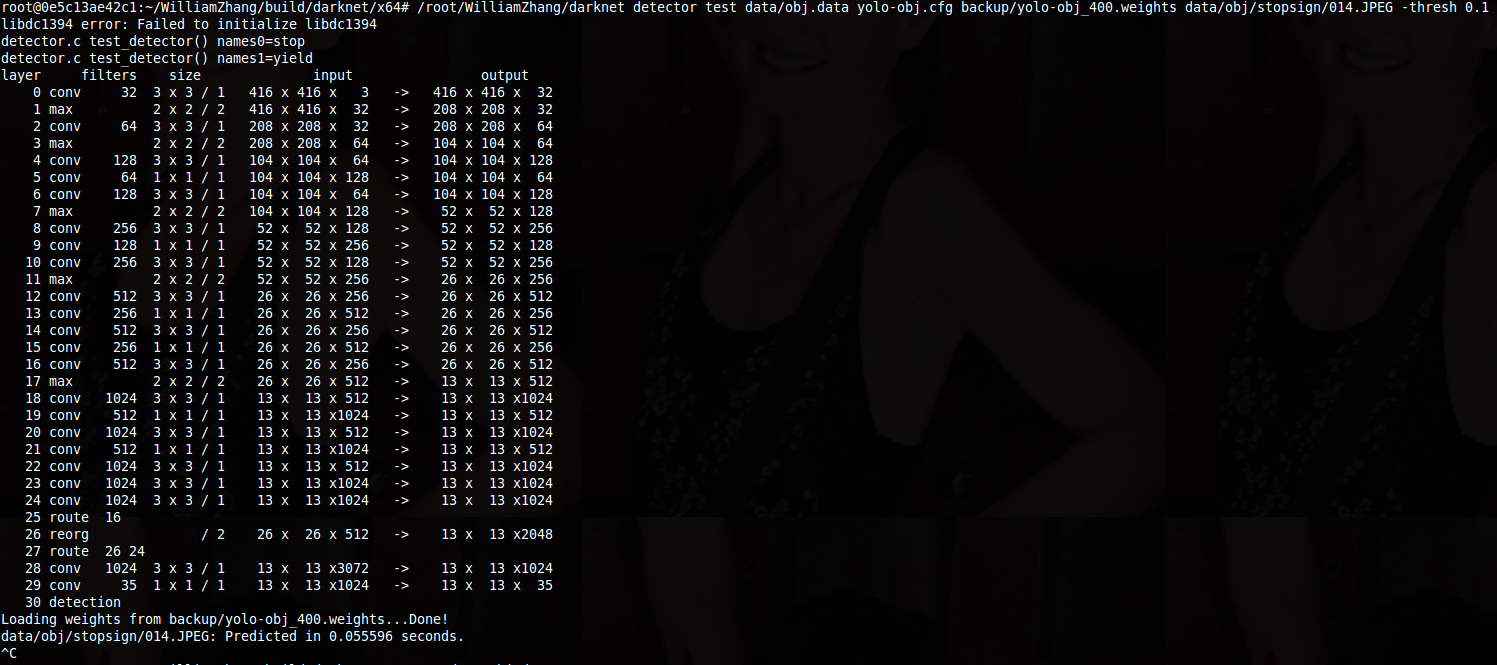
The result is no detections.
I also tried with smaller thresholds (down to zero!) and even by setting batch and subdivisions to 1 in yolo-obj.cfg , again no detections.
I really don't understand what's going on ...
Maybe it's a linux specific issue when generating weights because when I try weights from the official website for instance the detection works very well, the problem it's when try to generate it by myself, maybe you can share your "yolo-obj_4000.weights" so I can give it a try ?
Thank you very much for your help
Mirko
scamianbas
on 31 Oct 2017
@scamianbas
Try to update your code from the last commit.
Check that you edit the same obj.data that used in training command line
Then in "build/darknet/x64" I edited data/obj.data like this:
Then I ran the following command: "/root/WilliamZhang/darknet detector train data/obj.data yolo-obj.cfg darknet19_448.conv.23"
- Later I'll check training using last commit on Linux, but earlier it worked fine.
AlexeyAB
on 31 Oct 2017
@scamianbas
this the weight file https://drive.google.com/open?id=0Bw2dL4mXINuzS2hqOVRvaWZkMzA
following is my cmd and detection result screenshot:
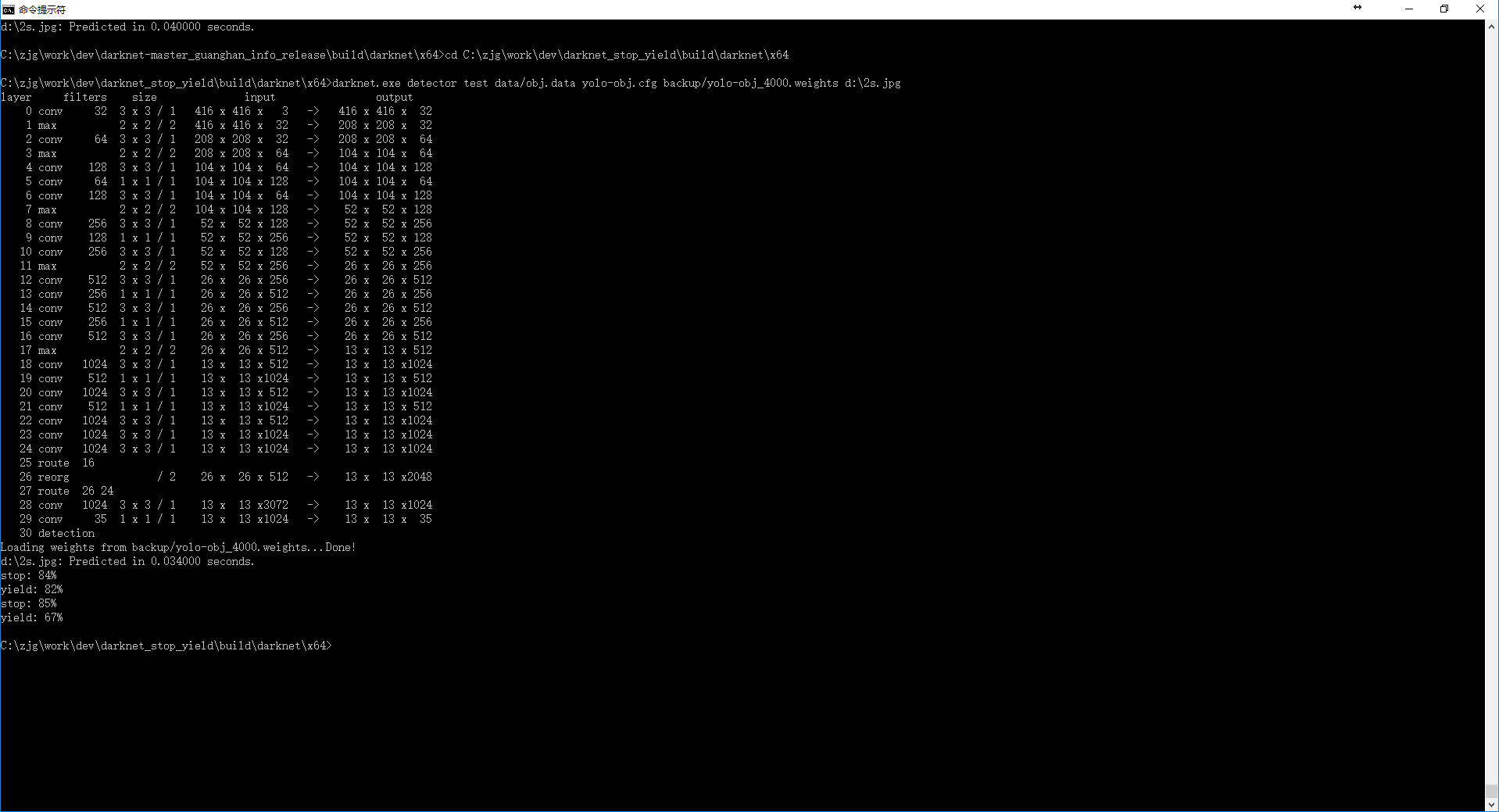

zhang11wu4
on 31 Oct 2017
@AlexeyAB
- I used commit 6ccb418 (same as @zhang11wu4) which is the latest as far as I know
- I'm sure that I used the same obj.data, there's only one in my working directory (se below)

- cool, I can't wait ! :+1:
@zhang11wu4
Thanks for your weights file, the detection worked fine ! (with batch=1 subdivisions=1)
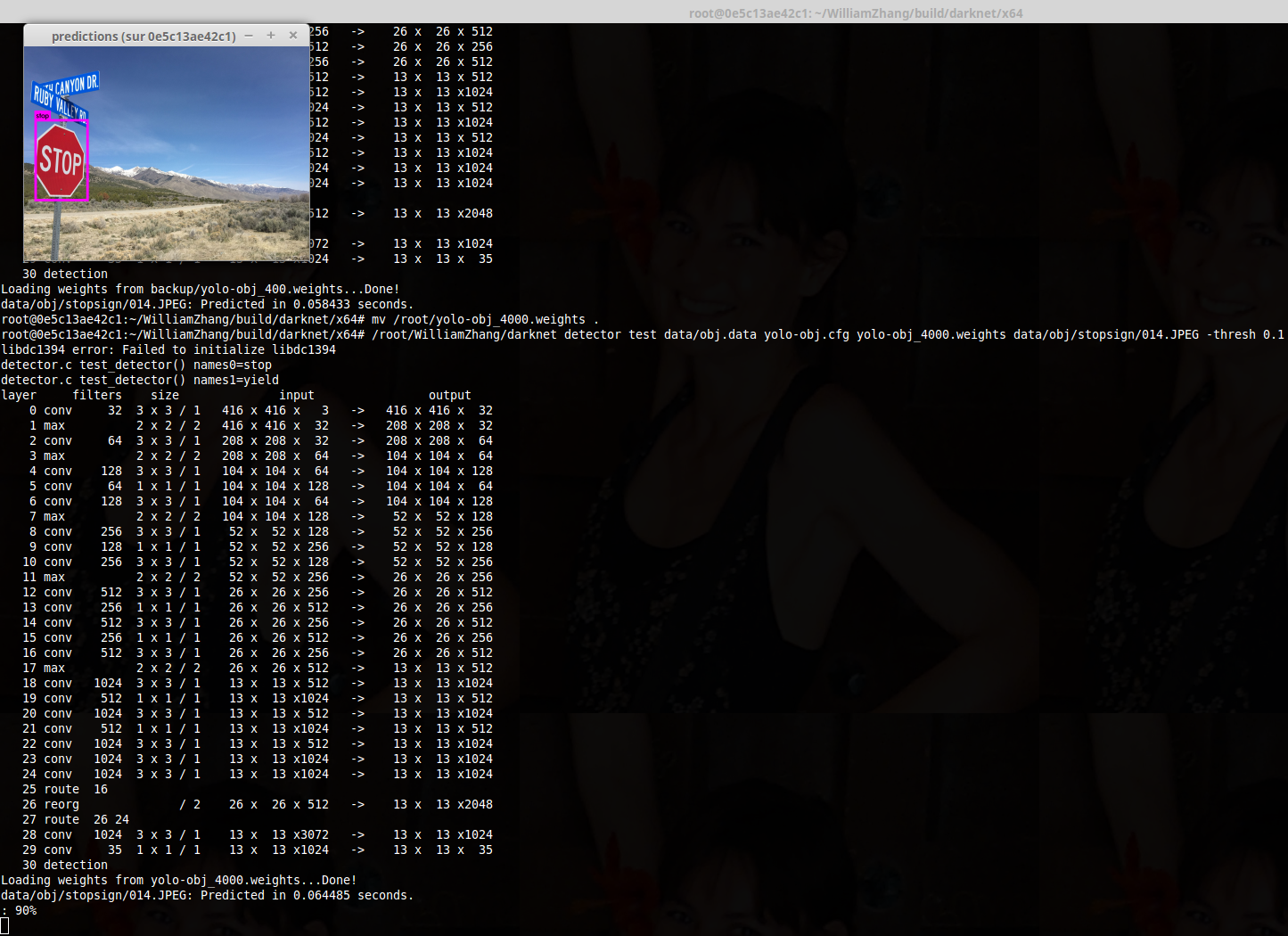
It really looks like the issue is linux related...
scamianbas
on 31 Oct 2017
one class with 100 images and after about 400--800 iterations,the weights work well, i am doubtful, the train so fast ??
sc1234qwer
on 31 Oct 2017
@scamianbas
- So I successfully trained model on Windows: https://github.com/AlexeyAB/darknet/issues/243#issuecomment-340512559
- And successfully trained model on Linux x64 Debian 8: source code, executable file
darknet, training dataset/data/obj, two trained models in/backupfolder - you can download all by the url: https://drive.google.com/open?id=0BwRgzHpNbsWBZi0xVENMbm1ZMVk - unpack
darknet_port.zip - try to run
img_sign.sh - if it doesn't work, then recompile executable file, do:
make cleanandmake -j8in folder withMakefile - run
img_sign.shto check detection work - run
valid_sign.shto check recall work - run
train_sign.shto check training, and after 100 iterations, cancel training CTRL+C and check detection - runimg_sign.sh
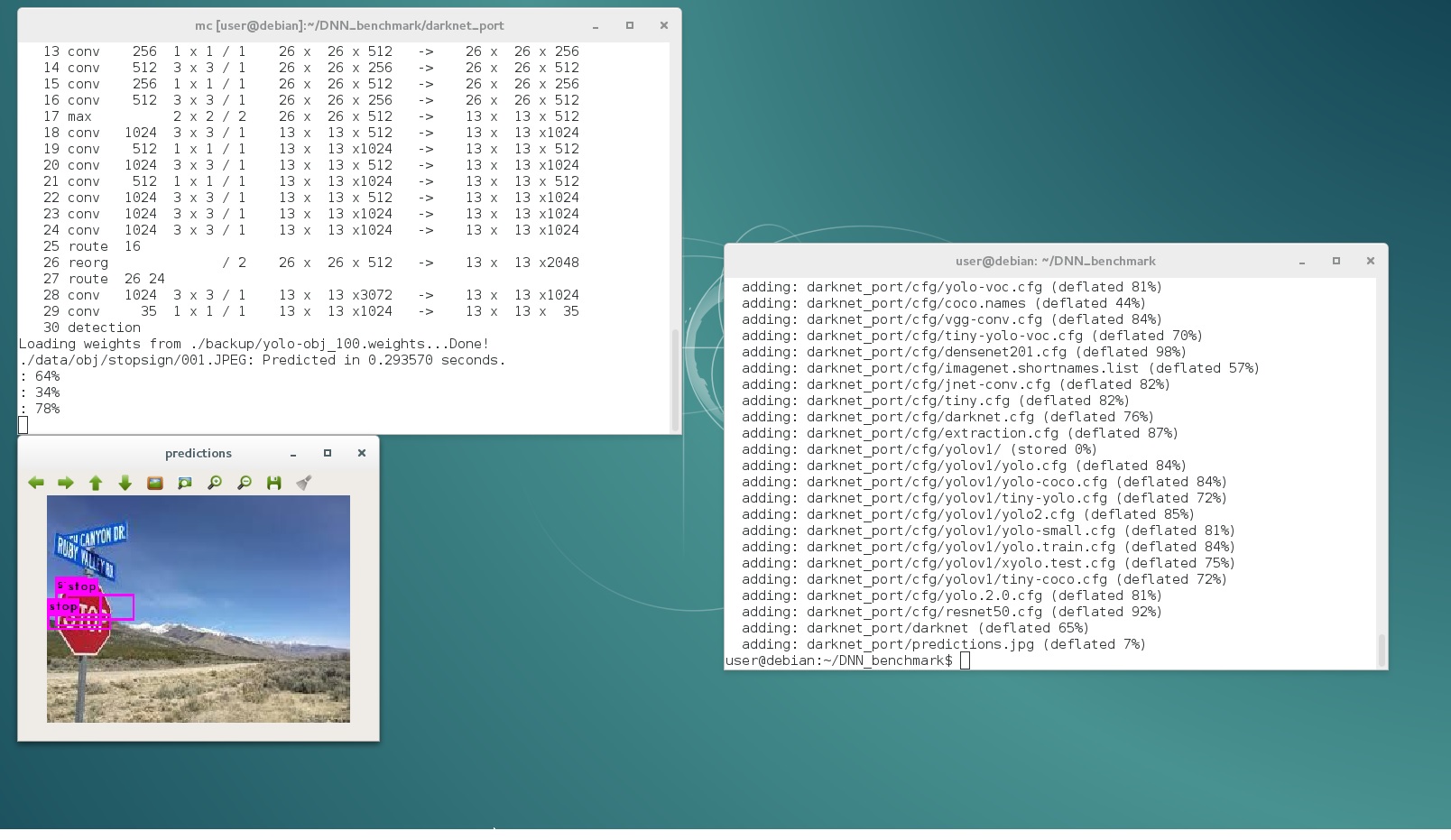
100 iterations too few for good prediction, but it enough to detect anything.
For good prediction it should be trained ~4000 iterations for 2 classes (stop, yield) = 2000 per class
AlexeyAB
on 31 Oct 2017
@AlexeyAB Yep it works ! Thank you very much !
Tomorrow I will analyze why and keep you informed.
I had to recompile, dos2unix the .sh files and invoke bash to xecute them.
Thanks a lot again !
scamianbas
on 31 Oct 2017
@AlexeyAB please find below the src differences with @zhang11wu4 version, if you want analyze it:
root@0e5c13ae42c1:~/darknet_port# diff -rq src /root/WilliamZhang/src
Files src/demo.c and /root/WilliamZhang/src/demo.c differ
Files src/detector.c and /root/WilliamZhang/src/detector.c differ
Files src/image.c and /root/WilliamZhang/src/image.c differ
Files src/network.h and /root/WilliamZhang/src/network.h differ
Files src/parser.c and /root/WilliamZhang/src/parser.c differ
Files src/parser.h and /root/WilliamZhang/src/parser.h differ
Files src/yolo_console_dll.cpp and /root/WilliamZhang/src/yolo_console_dll.cpp differ
Files src/yolo_v2_class.cpp and /root/WilliamZhang/src/yolo_v2_class.cpp differ
root@0e5c13ae42c1:~/darknet_port# diff src/demo.c /root/WilliamZhang/src/demo.c
128c128
<     net = parse_network_cfg_custom(cfgfile, 1);
---
>     net = parse_network_cfg(cfgfile);


md5-610352280534504247bf1d349ce6096e


root@0e5c13ae42c1:~/darknet_port# diff src/detector.c /root/WilliamZhang/src/detector.c
14d13
<
17,18c16
< #define OPENCV_VERSION CVAUX_STR(CV_VERSION_MAJOR)""CVAUX_STR(CV_VERSION_MINOR)""CVAUX_STR(CV_VERSION_REVISION)
< #pragma comment(lib, "opencv_world" OPENCV_VERSION ".lib")
---
> #pragma comment(lib, "opencv_world320.lib")
20,23c18,20
< #define OPENCV_VERSION CVAUX_STR(CV_VERSION_EPOCH)""CVAUX_STR(CV_VERSION_MAJOR)""CVAUX_STR(CV_VERSION_MINOR)
< #pragma comment(lib, "opencv_core" OPENCV_VERSION ".lib")
< #pragma comment(lib, "opencv_imgproc" OPENCV_VERSION ".lib")
< #pragma comment(lib, "opencv_highgui" OPENCV_VERSION ".lib")
---
> #pragma comment(lib, "opencv_core2413.lib")
> #pragma comment(lib, "opencv_imgproc2413.lib")
> #pragma comment(lib, "opencv_highgui2413.lib")
25d21
<
27d22
<
31a27
>   printf("detector.c train_detector()\n");
33a30
>   printf("detector.c train_images=%s\n", train_images);
35c32
<
---
>   printf("detector.c backup_directory=%s\n", backup_directory);
37a35
>   printf("detector.c basefile=%s\n", base);
461a460,461
>   printf("detector.c test_detector() names0=%s\n", names[0]);
>   printf("detector.c test_detector() names1=%s\n", names[1]);
464c464
<     network net = parse_network_cfg_custom(cfgfile, 1);
---
>     network net = parse_network_cfg(cfgfile);
478d477
<           if (input[strlen(input) - 1] == 0x0d) input[strlen(input) - 1] = 0;
565d563
<       if (filename[strlen(filename) - 1] == 0x0d) filename[strlen(filename) - 1] = 0;


md5-610352280534504247bf1d349ce6096e


root@0e5c13ae42c1:~/darknet_port# diff src/image.c /root/WilliamZhang/src/image.c
19d18
< #include "opencv2/imgcodecs/imgcodecs_c.h"
188c187
<
---
>   //printf("draw_detections()_num=%d\n", num);
190a190
>       //printf("draw_detections()_class=%d\n", class);
191a192
>       //printf("draw_detections()_prob=%f\n", prob);
194,201d194
<           //// for comparison with OpenCV version of DNN Darknet Yolo v2
<           //printf("\n %f, %f, %f, %f, ", boxes[i].x, boxes[i].y, boxes[i].w, boxes[i].h);
<           // int k;
<           //for (k = 0; k < classes; ++k) {
<           //  printf("%f, ", probs[i][k]);
<           //}
<           //printf("\n");
<
301c294
<           //printf("left=%d, right=%d, top=%d, bottom=%d, obj_id=%d, obj=%s \n", left, right, top, bot, class, names[class]);
---
>
1368,1369c1361,1362
<   //image out = load_image_stb(filename, c);  // OpenCV 3.x
<   image out = load_image_cv(filename, c);
---
>   image out = load_image_stb(filename, c);    // OpenCV 3.x
>   //image out = load_image_cv(filename, c);


md5-610352280534504247bf1d349ce6096e


root@0e5c13ae42c1:~/darknet_port# diff src/network.h /root/WilliamZhang/src/network.h
24c24
<   int *seen;
---
>   uint64_t *seen;


md5-610352280534504247bf1d349ce6096e


root@0e5c13ae42c1:~/darknet_port# diff src/parser.c /root/WilliamZhang/src/parser.c
587,591d586
<   return parse_network_cfg_custom(filename, 0);
< }
<
< network parse_network_cfg_custom(char *filename, int batch)
< {
608d602
<   if (batch > 0) net.batch = batch;
708,709d701
<
<
847c839
<     fwrite(net.seen, sizeof(int), 1, fp);
---
>     fwrite(net.seen, sizeof(uint64_t), 1, fp);
1036,1038c1028
<       uint64_t iseen = 0;
<       fread(&iseen, sizeof(uint64_t), 1, fp);
<       *net->seen = iseen;
---
>       fread(net->seen, sizeof(uint64_t), 1, fp);
1041c1031,1033
<       fread(net->seen, sizeof(int), 1, fp);
---
>       int iseen = 0;
>       fread(&iseen, sizeof(int), 1, fp);
>       *net->seen = iseen;


md5-610352280534504247bf1d349ce6096e


root@0e5c13ae42c1:~/darknet_port# diff src/parser.h /root/WilliamZhang/src/parser.h
6d5
< network parse_network_cfg_custom(char *filename, int batch);


md5-610352280534504247bf1d349ce6096e


root@0e5c13ae42c1:~/darknet_port# diff src/yolo_console_dll.cpp /root/WilliamZhang/src/yolo_console_dll.cpp
88c88
<   Detector detector("cfg/yolo-voc.cfg", "yolo-voc.weights");
---
>   Detector detector("yolo-voc.cfg", "yolo-voc.weights");


md5-610352280534504247bf1d349ce6096e


root@0e5c13ae42c1:~/darknet_port# diff src/yolo_v2_class.cpp /root/WilliamZhang/src/yolo_v2_class.cpp
57c57
<   net = parse_network_cfg_custom(cfgfile, 1);
---
>   net = parse_network_cfg(cfgfile);
@AlexeyAB @bonzoq @scamianbas hello , i am using windows 10 , cuda 9.0 and Cudacnn 7.0 . and i followed all the steps mentioned in the blog to train the model https://timebutt.github.io/static/how-to-train-yolov2-to-detect-custom-objects/ and successfully trained the model . but when i am predicting using cmd PS C:darknetdarknetbuilddarknetx64> .darknet.exe detector test cfgobj.data cfgyolo-obj.cfg backupyolo-obj_1000.weights C:darknetdarknetbuilddarknetx64NFPAdatas
etpos-1.jpg i ma not getting any detection . even i tried with yolo-9000 weights and label still its not detecting anything .

 Chanki8658
on 31 Oct 2017
Chanki8658
on 31 Oct 2017
obj.zip
@bonzoq @AlexeyAB @scamianbas my config file are attached in zip file
Chanki8658
on 31 Oct 2017
root@0e5c13ae42c1:~/darknet_port# diff src/network.h /root/WilliamZhang/src/network.h
24c24
<   int *seen;
---
>   uint64_t *seen;
@scamianbas Yes, definitely @zhang11wu4 code version without bug fixes, i.e. one of commit between these two:
- https://github.com/AlexeyAB/darknet/commit/ae74d0ef31485f84e1856b4733135d2753dbb033#diff-3d6e69dd5b0d5232fc0779ad2cea1e00R24 commit with bug >= used commit
- https://github.com/AlexeyAB/darknet/commit/b714004546b97e9a43fae3e385dbefb56cecafb6#diff-3d6e69dd5b0d5232fc0779ad2cea1e00R24 commit with bug fix < used commit
@Chanki8658 Try to update your code from this repo.
AlexeyAB
on 31 Oct 2017
@AlexeyAB changes of b714004#diff-3d6e69dd5b0d5232fc0779ad2cea1e00R24 commit with bug fix < used commit this branch is already in my code which i built . How can i debug this . when i debug the code everything seems to be fine and just that float *probs = calloc(l.wl.h*l.n, sizeof(float *)); probability is always coming zero . could you please suggest
Chanki8658
on 1 Nov 2017
@AlexeyAB
parser.zip
parser.c and network.c
network.zip
is attached
Chanki8658
on 1 Nov 2017
@AlexeyAB could you suggest the last correct branch which built and predict successfully on windows .
Chanki8658
on 1 Nov 2017
@AlexeyAB i also tried with pre-train weights . but still its not showing up anything
https://drive.google.com/open?id=0B6yBEDUqsu7Ta1M1dE40OFV1Tms
Chanki8658
on 1 Nov 2017
@Chanki8658 You should do each step described here: https://github.com/AlexeyAB/darknet/issues/243#issuecomment-340908751
AlexeyAB
on 1 Nov 2017
I saw the "help wanted"-label have been applied to this thread. I've completed the steps in https://github.com/AlexeyAB/darknet/issues/243#issuecomment-340908751 (had to make again for it to work) and I have no issues, detecting everything fine also after a new training.
./data/obj/stopsign/001.JPEG: Predicted in 0.067797 seconds.
: 73%
: 57%
System Info
GPU: Quadro M1200
OS: Ubuntu 16.04
CUDA: 8.0
CUDNN: 5.1
TheMikeyR
on 1 Nov 2017
Hi @AlexeyAB
what is the "-i 0" option for ?
Thanks
scamianbas
on 1 Nov 2017
@scamianbas For using GPU number 0.
AlexeyAB
on 1 Nov 2017
@AlexeyAB do i need to change the configuration as you mentioned that follow #243 (comment)
I used MSVS 2015, CUDA 8.0, cuDNN v6 (for CUDA 8.0), OpenCV 3.3.0, Windows 7 x64. On GeForce GTX 970 (4 GB RAM) Maxwell - Compute capability (CC) 5.2
i used MSVS 2017 ,cuda 9.0 ,cuDNN 7 , opencv 3.0.0 ,windows 10 x64 on Ge force GTX 1070 . is it happening because of my msvs and cuda version.
can i not continue with cuda 9 .
Chanki8658
on 1 Nov 2017
@AlexeyAB this is just to inform you that I git cloned the repository this morning and it works as your zip does. Nevertheless I noticed that the exact cfg file "data/yolo-obj.cfg" that we used is not present in the repository (content below). Maybe you should add it ? Thanks !
[net]
batch=64
subdivisions=16
height=416
width=416
channels=3
momentum=0.9
decay=0.0005
angle=0
saturation = 1.5
exposure = 1.5
hue=.1

learning_rate=0.0001
max_batches = 45000
policy=steps
steps=100,25000,35000
scales=10,.1,.1

[convolutional]
batch_normalize=1
filters=32
size=3
stride=1
pad=1
activation=leaky

[maxpool]
size=2
stride=2

[convolutional]
batch_normalize=1
filters=64
size=3
stride=1
pad=1
activation=leaky

[maxpool]
size=2
stride=2

[convolutional]
batch_normalize=1
filters=128
size=3
stride=1
pad=1
activation=leaky

[convolutional]
batch_normalize=1
filters=64
size=1
stride=1
pad=1
activation=leaky

[convolutional]
batch_normalize=1
filters=128
size=3
stride=1
pad=1
activation=leaky

[maxpool]
size=2
stride=2

[convolutional]
batch_normalize=1
filters=256
size=3
stride=1
pad=1
activation=leaky

[convolutional]
batch_normalize=1
filters=128
size=1
stride=1
pad=1
activation=leaky

[convolutional]
batch_normalize=1
filters=256
size=3
stride=1
pad=1
activation=leaky

[maxpool]
size=2
stride=2

[convolutional]
batch_normalize=1
filters=512
size=3
stride=1
pad=1
activation=leaky

[convolutional]
batch_normalize=1
filters=256
size=1
stride=1
pad=1
activation=leaky

[convolutional]
batch_normalize=1
filters=512
size=3
stride=1
pad=1
activation=leaky

[convolutional]
batch_normalize=1
filters=256
size=1
stride=1
pad=1
activation=leaky

[convolutional]
batch_normalize=1
filters=512
size=3
stride=1
pad=1
activation=leaky

[maxpool]
size=2
stride=2

[convolutional]
batch_normalize=1
filters=1024
size=3
stride=1
pad=1
activation=leaky

[convolutional]
batch_normalize=1
filters=512
size=1
stride=1
pad=1
activation=leaky

[convolutional]
batch_normalize=1
filters=1024
size=3
stride=1
pad=1
activation=leaky

[convolutional]
batch_normalize=1
filters=512
size=1
stride=1
pad=1
activation=leaky

[convolutional]
batch_normalize=1
filters=1024
size=3
stride=1
pad=1
activation=leaky


#######

[convolutional]
batch_normalize=1
size=3
stride=1
pad=1
filters=1024
activation=leaky

[convolutional]
batch_normalize=1
size=3
stride=1
pad=1
filters=1024
activation=leaky

[route]
layers=-9

[reorg]
stride=2

[route]
layers=-1,-3

[convolutional]
batch_normalize=1
size=3
stride=1
pad=1
filters=1024
activation=leaky

[convolutional]
size=1
stride=1
pad=1
filters=35
activation=linear

[region]
anchors = 1.08,1.19,  3.42,4.41,  6.63,11.38,  9.42,5.11,  16.62,10.52
bias_match=1
classes=2
coords=4
num=5
softmax=1
jitter=.2
rescore=1

object_scale=5
noobject_scale=1
class_scale=1
coord_scale=1

absolute=1
thresh = .6
random=0
Hi , @AlexeyAB i followed above steps as mentioned still its not detecting anything on windows .
Chanki8658
on 2 Nov 2017
@Chanki8658
- Can you see any detection using any default models? https://github.com/AlexeyAB/darknet#pre-trained-models-for-different-cfg-files-can-be-downloaded-from-smaller---faster--lower-quality
- What command line do you use for detection?
- Can you show screenshot of your console output?
AlexeyAB
on 2 Nov 2017
@AlexeyAB
no i cant even see any detection on pretrain models

for train:
darknet.exe detector train cfg/obj.data cfg/yolo-obj.cfg yolo-obj_2000.weights
for test:
darknet.exe detector test cfg/obj.data cfg/yolo-obj.cfg yolo-obj1000.weights data/testimage.jpg
Chanki8658
on 2 Nov 2017
@AlexeyAB i followed this link to train the model .
https://timebutt.github.io/static/how-to-train-yolov2-to-detect-custom-objects/
Chanki8658
on 2 Nov 2017
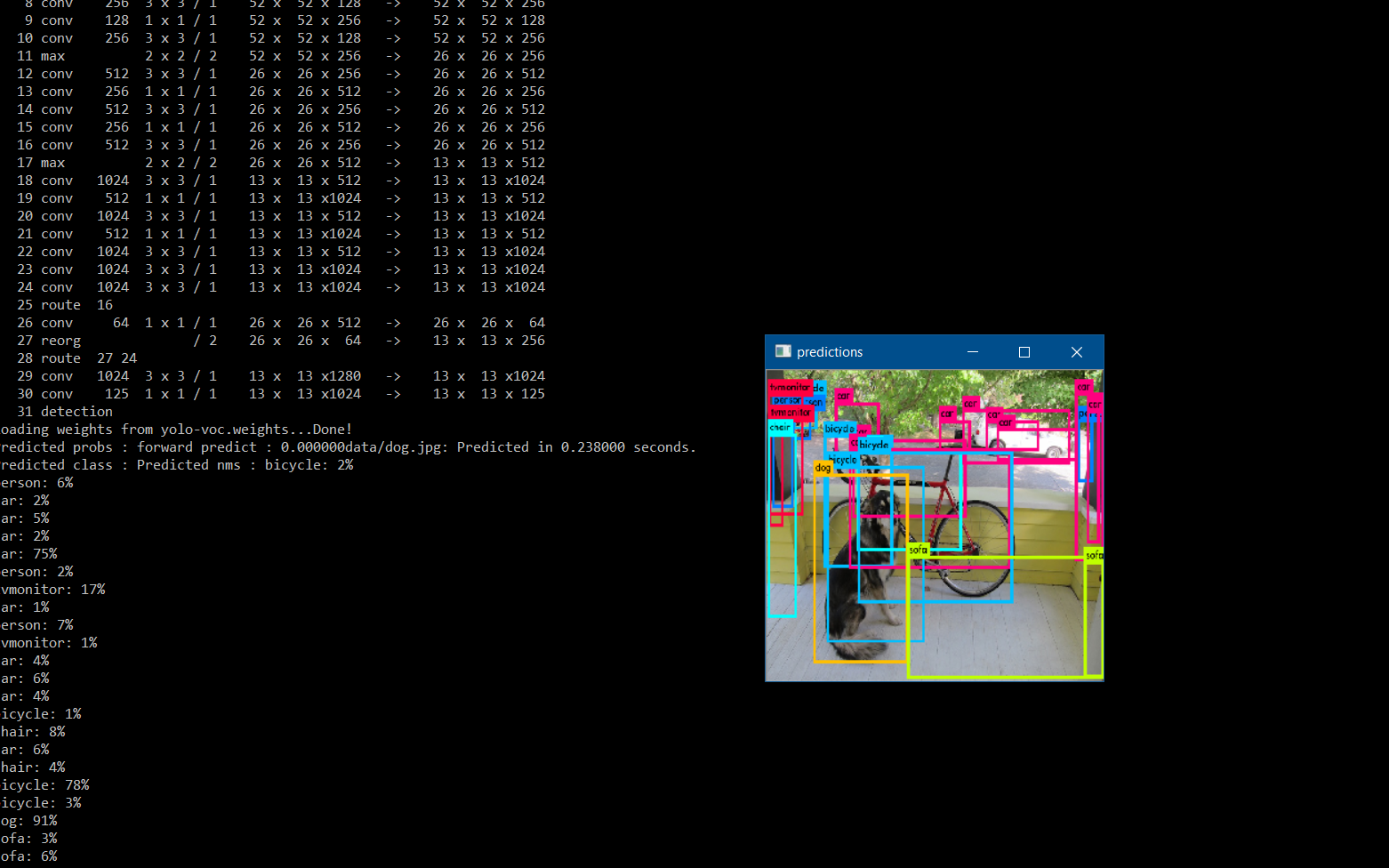
@Chanki8658
Download this yolo-voc.weights-model http://pjreddie.com/media/files/yolo-voc.weights
And try this command: darknet.exe detector test data/voc.data yolo-voc.cfg yolo-voc.weights data/dog.jpg
Show screenshot of your console output.
AlexeyAB
on 2 Nov 2017
@AlexeyAB it worked for me . please the attached output .
Chanki8658
on 2 Nov 2017
@AlexeyAB is it problem with my training or weights i used for training
Chanki8658
on 2 Nov 2017
@Chanki8658 Yes, your problem in training. Now try to train model on this sign-stop-yield-dataset: https://drive.google.com/file/d/0Bw2dL4mXINuzaVllaklkMHNDYzg/view
As described here: https://github.com/AlexeyAB/darknet/issues/243#issuecomment-340512559
- Train
darknet.exe detector train stopsign/obj.data stopsign/yolo-obj.cfg darknet19_448.conv.23 - Detect
darknet.exe detector test stopsign/obj.data stopsign/yolo-obj.cfg backup/yolo-obj_400.weights stopsign/014.jpg -thresh 0.1
If you want to train your own model, use this manual (don't use any other): https://github.com/AlexeyAB/darknet#how-to-train-to-detect-your-custom-objects
AlexeyAB
on 2 Nov 2017
@AlexeyAB thanks a lot .. I follow that
Chanki8658
on 2 Nov 2017

@AlexeyAB I have trained the model on signs data but still its not predicting i am attaching my model weights and config in below link . i am not sure whenever i train model its not predicting .
https://drive.google.com/open?id=0B6yBEDUqsu7TSHpWbnI4MGdOZlk
Chanki8658
on 3 Nov 2017
@Chanki8658
You should base your cfg-file on
yolo-voc.2.0.cfginstead ofyolo-voc.cfgas described here: https://github.com/AlexeyAB/darknet#how-to-train-to-detect-your-custom-objectsAs it made in the
darknet-master_guanghan_info_release.rararchive by path\build\darknet\x64\yolo-obj.cfg
https://drive.google.com/file/d/0Bw2dL4mXINuzaVllaklkMHNDYzg/viewYou should update your code from the last commit.
AlexeyAB
on 3 Nov 2017
@AlexeyAB thanks you Alexey it worked for me now i can detect the regions .
Chanki8658
on 4 Nov 2017
@AlexeyAB so I trained YOLOv2 the other day with this .cfg file and everything went fine during testing:
classes= 2
train = /home//darknet/own_data/trainAB.txt
valid = /home/darknet/own_data/GroupC.txt
names = data/hand.names
backup = GroupCValBackup
But then I tried training again, but this time using an empty validation text file (because I don't want the code to train using any GroupC data):
classes= 2
train = /home//darknet/own_data/trainAB.txt
valid = /home/darknet/own_data/emptyFile.txt
names = data/hand.names
backup = GroupCValBackup
The training went well (trained for 12000 iterations, see attached chart). But when I test the valid by using the "map" command, I get no detections. I change the .cfg file to the original version during validation and ran this code:
./darknet detector map cfg/hand.data cfg/yolov2-hand.cfg GroupBValBackup/yolov2-hand_8000.weights

Does this mean I have to include the GroupC validation data during training? I don't want the model to see any of this data until testing though. I believe everything in my .cfg file for the model is correct, as I didn't change anything from when it worked.
 RJVisee44
on 11 Jul 2018
RJVisee44
on 11 Jul 2018
@RyanCodes44
Darknet doesn't see
valid=during training.For calculation map
./darknet detector mapDarknet usesvalid=file, so if it is empty, then mAP will be 0.
AlexeyAB
on 11 Jul 2018
@AlexeyAB when I ran the map command I changed "valid=" to the text file with all the paths to the images I want to test on. Still 0.
RJVisee44
on 11 Jul 2018
@RyanCodes44
when I ran the map command I changed "valid=" to the text file with all the paths to the images I want to test on. Still 0.
Can you show screenshot?
What mAP can you get when
valid= /home//darknet/own_data/trainAB.txt?
AlexeyAB
on 11 Jul 2018
@AlexeyAB
- Can you show screenshot?
Attached. Get about 5.52%. Need more training? The last one I trained only required 9000 iterations and worked really well. However, in that one, I also didn't change the learning rate at 90/95% of 12000 iterations. And based on my average loss chart above, it looks like it should work decently well.

- What mAP can you get when
valid= /home//darknet/own_data/trainAB.txt?
Will attach soon. However, even when I run the detector (via./darknet detector test cfg/hand.data cfg/yolov2-hand.cfg GroupCValBackup/yolov2-hand_9000.weights image1.jpg) where image1 is a train image, it is unable to detect any hands.
RJVisee44
on 11 Jul 2018
@RyanCodes44
. I change the .cfg file to the original version during validation and ran this code:
./darknet detector map cfg/hand.data cfg/yolov2-hand.cfg GroupBValBackup/yolov2-hand_8000.weights
What did you change?
- So did you train from the begining 1st time and Detection works well?
- Then you train from the begining 2nd time (just change
valid=emptyFile.txt), and now Detection doesn't work, isn't it?
I think you changed something else in the second case. In the 2nd case you did something wrong.
Also if you train to distinguish Left-something and Right-something, you should set flip=0 in the [net]-section in your cfg-file before training.
AlexeyAB
on 12 Jul 2018
@AlexeyAB
What did you change?
Sorry if this wasn't clear. But so far I have trained 2 models. Model 1: trained on GroupAB (tested on GroupC after training), Model 2: trained on GroupAC (tested on GroupB after training). Training and testing on Model 1 went really well. For Model 2 during training, instead of including the validation file in the "hand.data", I placed an empty .txt file to ensure none of the GroupB data was being used during training. Training went well, as viewed above. Then, when I ran detector map, I placed changed "hand.data" by placing the correct .txt file for GroupB for valid =.
So did you train from the begining 1st time and Detection works well?
Yes I believe I trained from beginning (not entirely sure what you mean). I trained via:
./darknet detector train cfg/hand.data cfg/yolov2-hand.cfg darknet19_448.conv.23
Then you train from the begining 2nd time (just change valid=emptyFile.txt), and now Detection doesn't work, isn't it?
No, I think I wasn't clear on my process but hopefully the above clears this up. The second model is an exact replica of the first model, except it is trained on different groups. The first model gives me over 90% mAP.
So Model 1 "hand.data":
classes= 2
train = /home/darknet/own_data/trainAB.txt
valid = /home/darknet/own_data/GroupC.txt
names = data/hand.names
backup = GroupCValBackup
Model 2 "hand.data":
classes= 2
train = /home/darknet/own_data/trainAC.txt
valid = /home/darknet/own_data/GroupB.txt
names = data/hand.names
backup = GroupCValBackup
However, during training in Model 2, the bolded text was just an emptyFile.txt to ensure GroupB wasn't used during training. After training completion, I changed Model 2 "hand.data" as seen above, ran detector map and got very poor results.
Also if you train to distinguish Left-something and Right-something, you should set flip=0 in the [net]-section in your cfg-file before training.
Why do I need to do this? Thanks!
RJVisee44
on 12 Jul 2018
@AlexeyAB
What mAP can you get when valid= /home//darknet/own_data/trainAB.txt ?
./darknet detector map cfg/hand.data cfg/yolov2-hand.cfg GroupBValBackup2/yolov2-hand_10000.weights

Could this be something wrong with the weights file? I'm gonna try to rebuild darknet.
RJVisee44
on 13 Jul 2018
@AlexeyAB seems to be a problem with the number of iterations trained. Unable to get decent results until at least 12,500 iterations now for some reason.
RJVisee44
on 17 Jul 2018
@AlexeyAB I am facing the same issue when training with COCO data set for only 9 classes. When I run "detector test" command, I do not see any predictions in the predictions.jpg. Please help me.
 nagarajdesai
on 25 Apr 2019
nagarajdesai
on 25 Apr 2019
Related issues
 kebundsc
·
3Comments
kebundsc
·
3Comments
 Greta-A
·
3Comments
Greta-A
·
3Comments
 qianyunw
·
3Comments
qianyunw
·
3Comments
 PROGRAMMINGENGINEER-NIKI
·
3Comments
PROGRAMMINGENGINEER-NIKI
·
3Comments
 shootingliu
·
3Comments
shootingliu
·
3Comments