Darknet: Saving image using python wrapper
I am fairly new in using YOLO. I was wondering which function could I call to save an image from the darknet.py file found in /python directory. I would like to specify a manual location to save the detected image(containing detected markings).
I have looked at various function in .c files, but was unable to pinpoint the respective function. Although, I tried calling save_image(im) but I need to pass the detected image.
Any suggestions would be of great help!
 ishansan
All 26 comments
I can't run the code currently (Issue #241), but I'd assume it should be possible to take the result (bounding boxes) and draw them using the OpenCV rectangle function.
Since I can't run the code I can't confirm if detect() returns the bounding boxes, but looking at the code I'm simply assuming it because of line 110 in darknet.py res.append((meta.names[i], probs[j][i], (boxes[j].x, boxes[j].y, boxes[j].w, boxes[j].h))) .
So taking these coordinates, feeding them into the function and drawing the rectangle by yourself would be the solution I'd go for. I'd provide you with some code, but since I can't run it, that doesn't make much sense. After implementing a function for saving the image from the result of detect() you could make a pull request, so that other user can profit from your code as well.
I hope this helped you. When #241 get's solved I can help you more.
 njoye
on 11 Oct 2017
njoye
on 11 Oct 2017
Thanks @njoye. I'll look into it once, and make a request if it works fine.
ishansan
on 11 Oct 2017
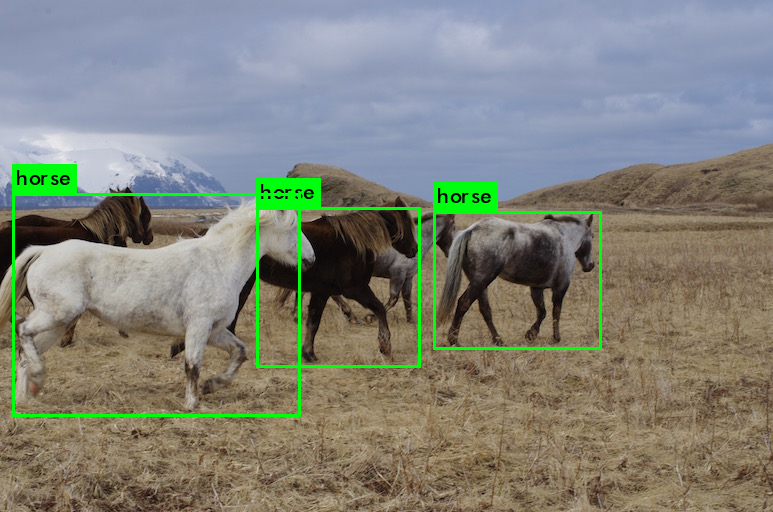
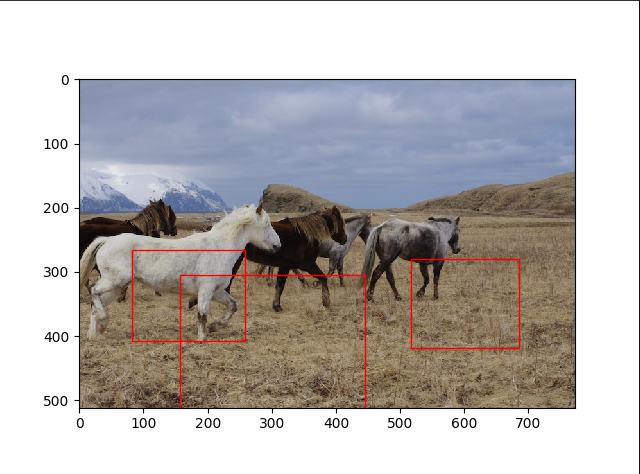
I was able to predict the boxes, but looks like the python wrapper is not able to predict the correct coordinates for the image. I have attached two samples: from the original shell implementation and other from the python wrapper implementation, using the coordinates found on line 110 in python/darknet.py:
res.append((meta.names[i], probs[j][i], (boxes[j].x, boxes[j].y, boxes[j].w, boxes[j].h)))
ishansan
on 11 Oct 2017
That is weird. Could you provide the code for drawing the boxes ? It's possible that you've switched the coordinates without wanting it. It also happened to me very (like seriously, extremely) often that the way coordinates were given were different! For example the given coordinates would be x1, y1, x2, y2 where the the values would be distance from the upper left corner, but the drawing function would count values from the lower left corner.
I think this is the case here as well, since the general prediction amount (3 boxes) and the size of the boxes seem to be right. It just looks as if the boxes are a little off. My suggestion would be to look at the coordinates again and try to figure out if they have been set correctly in the drawing function.
njoye
on 11 Oct 2017
Yes sure @njoye .
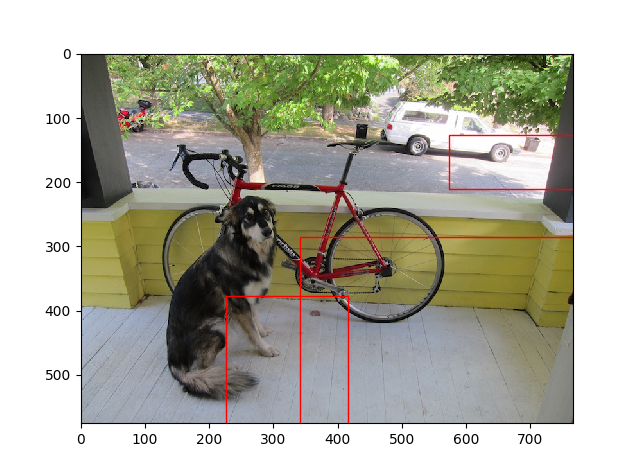
Here is the code and the output:
res.append((meta.names[i], probs[j][i], boxes[j].x, boxes[j].y, boxes[j].w, boxes[j].h))
Name: bicycle Predict %: 0.853098213673 X: 341.839660645 Y: 285.840026855 W: 492.894165039 Z: 323.559906006
Name: dog Predict %: 0.823984861374 X: 226.710205078 Y: 376.563171387 W: 189.13192749 Z: 289.121612549
Name: truck Predict %: 0.635909080505 X: 574.128173828 Y: 126.135978699 W: 212.539764404 Z: 83.7097015381
ishansan
on 11 Oct 2017
@ishansan I also meant the code where you call opencv (or what you used for creating the rectangles) to create the rectangles. That information is crucial to my thought :)
njoye
on 11 Oct 2017
@njoye Sure.
Here is the complete code:
def detect(net, meta, image, thresh=.5, hier_thresh=.5, nms=.45):
im = load_image(image, 0, 0)
boxes = make_boxes(net)
probs = make_probs(net)
num = num_boxes(net)
network_detect(net, im, thresh, hier_thresh, nms, boxes, probs)
res = []
for j in range(num):
for i in range(meta.classes):
if probs[j][i] > 0.25:
res.append((meta.names[i], probs[j][i], boxes[j].x, boxes[j].y, boxes[j].w, boxes[j].h))
# print meta.names[i],probs[j][i],boxes[j].x,boxes[j].y,boxes[j].w,boxes[j].h
res = sorted(res, key=lambda x: -x[1])
free_image(im)
free_ptrs(cast(probs, POINTER(c_void_p)), num)
return resif __name__ == "__main__":
#net = load_net("cfg/densenet201.cfg", "/home/pjreddie/trained/densenet201.weights", 0)
#im = load_image("data/wolf.jpg", 0, 0)
#meta = load_meta("cfg/imagenet1k.data")
#r = classify(net, meta, im)
#print r[:10]img = "../data/dog.jpg" net = load_net("../cfg/yolo.cfg", "../../yolo-weights/yolo.weights", 0) meta = load_meta("../cfg/coco.data") r = detect(net, meta, img) for k in range(len(r)): print "Name: ",r[k][0],"Predict %: ",r[k][1],"X: ",r[k][2],"Y: ",r[k][3],"W: ",r[k][4],"Z: ",r[k][5],'\n' #get detected image im2 = np.array(Image.open(img), dtype=np.uint8) fig,ax = plt.subplots(1) fig.set_size_inches(imgw,imgh) ax.imshow(im2) for k in range(len(r)): rect = patches.Rectangle((r[k][2],r[k][5]),r[k][4],r[k][5],linewidth=1,edgecolor='r',facecolor='none') ax.add_patch(rect) plt.show() plt.savefig('image.jpg')
ishansan
on 11 Oct 2017
I don’t have a good enough internet connection to post the code atm, but the problem you have is solved by calculating y=y-(height/2) and x=x-(width/2) because the function seems to only return the center of the bounding box (whyever though). I’ll post the code tomorrow if you need it.
njoye
on 11 Oct 2017
Yes. It worked perfectly!
ishansan
on 12 Oct 2017
@njoye @ishansan can anyone post the whole code? I didn't get where to change y=y-(height/2) and x=x-(width/2)
Thank you
 Ankit09
on 7 Dec 2017
Ankit09
on 7 Dec 2017
@Ankit09 That need to be afterprocessing from when you do the r = detect(net, meta, img).
You get the output back as center x, y, width and height.
OpenCV rectangle function wants top left and bottom right corner as an input https://docs.opencv.org/3.0-beta/modules/imgproc/doc/drawing_functions.html#rectangle
So you need to convert the output from darknet to "opencv-format"
 TheMikeyR
on 7 Dec 2017
TheMikeyR
on 7 Dec 2017
@TheMikeyR thanks for your reply, but I am not getting any X and Y values from detect().
How can I get the perfect square on my detected object?
Ankit09
on 7 Dec 2017
@Ankit09 Can't help you without knowing anything about what you are trying to execute, your code etc. If this is not related to the above issue, "saving an image using python wrapper" feel free to open a new ticket with description of your system, what you did and your issue.
TheMikeyR
on 7 Dec 2017
@TheMikeyR ,
Thanks for your time brother,
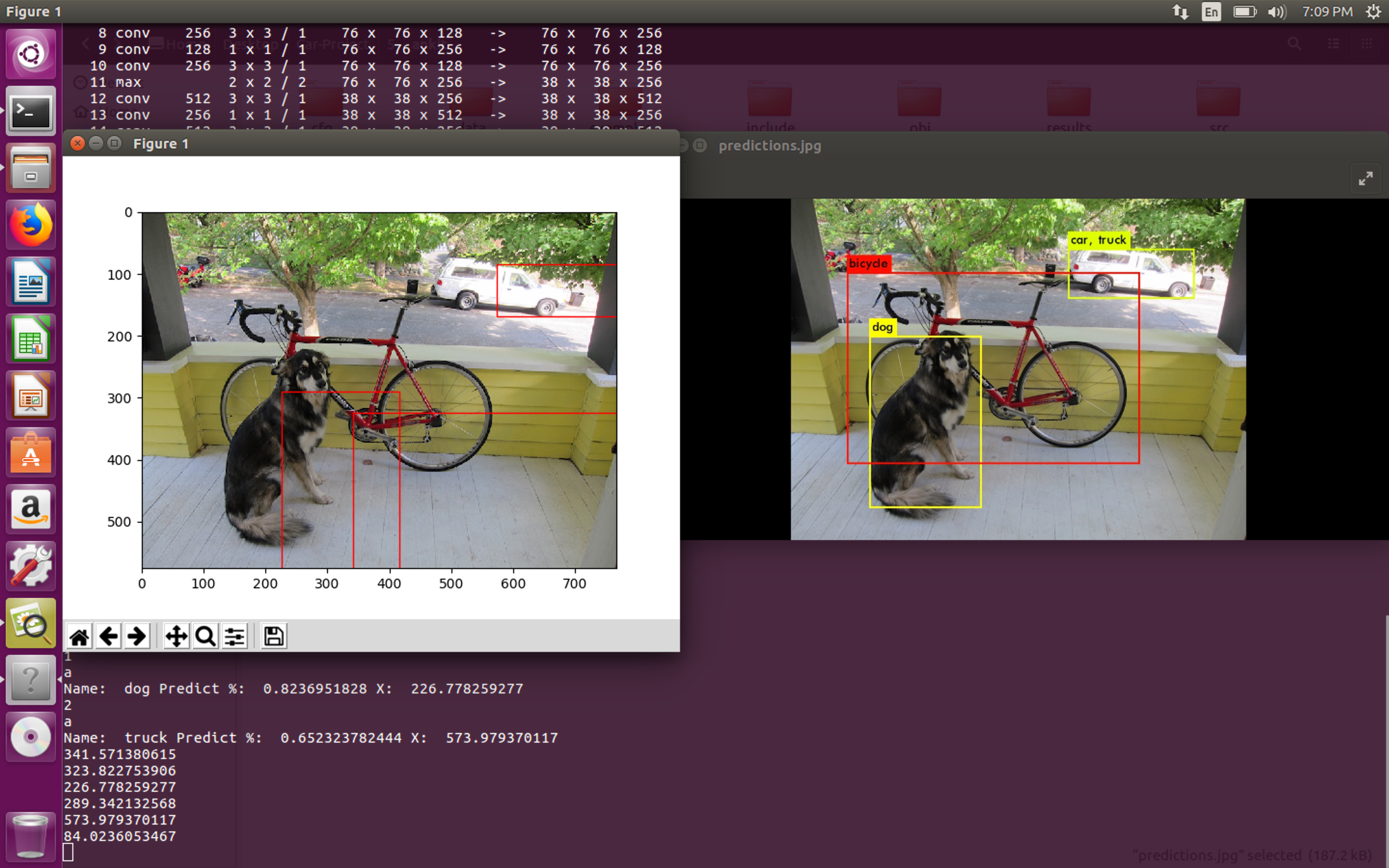
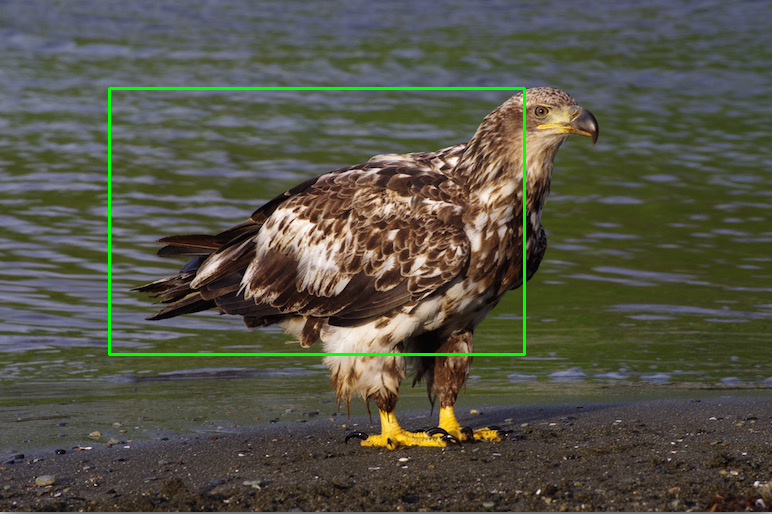
I am getting the output of prediction and rectangle that is shown in the image (left side). The expected output is on right side.
How I can get the perfect x,y co-ordinated and draw my expected output?
Ankit09
on 7 Dec 2017
@Ankit09 you need to post your code where you draw the rectangles and how you process the output from the detection step.
TheMikeyR
on 7 Dec 2017
@TheMikeyR
this is my whole code:
from ctypes import *
import math
import random
import cv2
import numpy as np
from PIL import Image
import matplotlib.pyplot as plt
import matplotlib.patches as patches
def sample(probs):
s = sum(probs)
probs = [a/s for a in probs]
r = random.uniform(0, 1)
for i in range(len(probs)):
r = r - probs[i]
if r <= 0:
return i
return len(probs)-1
def c_array(ctype, values):
return (ctype * len(values))(*values)
class BOX(Structure):
_fields_ = [("x", c_float),
("y", c_float),
("w", c_float),
("h", c_float)]
class IMAGE(Structure):
_fields_ = [("w", c_int),
("h", c_int),
("c", c_int),
("data", POINTER(c_float))]
class METADATA(Structure):
_fields_ = [("classes", c_int),
("names", POINTER(c_char_p))]
lib = CDLL("/media/psf/Home/Desktop/Car-Project/5/ankit/libdarknet.so", RTLD_GLOBAL)
lib.network_width.argtypes = [c_void_p]
lib.network_width.restype = c_int
lib.network_height.argtypes = [c_void_p]
lib.network_height.restype = c_int
predict = lib.network_predict
predict.argtypes = [c_void_p, POINTER(c_float)]
predict.restype = POINTER(c_float)
set_gpu = lib.cuda_set_device
set_gpu.argtypes = [c_int]
make_image = lib.make_image
make_image.argtypes = [c_int, c_int, c_int]
make_image.restype = IMAGE
make_boxes = lib.make_boxes
make_boxes.argtypes = [c_void_p]
make_boxes.restype = POINTER(BOX)
free_ptrs = lib.free_ptrs
free_ptrs.argtypes = [POINTER(c_void_p), c_int]
num_boxes = lib.num_boxes
num_boxes.argtypes = [c_void_p]
num_boxes.restype = c_int
make_probs = lib.make_probs
make_probs.argtypes = [c_void_p]
make_probs.restype = POINTER(POINTER(c_float))
detect = lib.network_predict
detect.argtypes = [c_void_p, IMAGE, c_float, c_float, c_float, POINTER(BOX), POINTER(POINTER(c_float))]
reset_rnn = lib.reset_rnn
reset_rnn.argtypes = [c_void_p]
load_net = lib.load_network
load_net.argtypes = [c_char_p, c_char_p, c_int]
load_net.restype = c_void_p
free_image = lib.free_image
free_image.argtypes = [IMAGE]
letterbox_image = lib.letterbox_image
letterbox_image.argtypes = [IMAGE, c_int, c_int]
letterbox_image.restype = IMAGE
load_meta = lib.get_metadata
lib.get_metadata.argtypes = [c_char_p]
lib.get_metadata.restype = METADATA
load_image = lib.load_image_color
load_image.argtypes = [c_char_p, c_int, c_int]
load_image.restype = IMAGE
rgbgr_image = lib.rgbgr_image
rgbgr_image.argtypes = [IMAGE]
predict_image = lib.network_predict_image
predict_image.argtypes = [c_void_p, IMAGE]
predict_image.restype = POINTER(c_float)
network_detect = lib.network_detect
network_detect.argtypes = [c_void_p, IMAGE, c_float, c_float, c_float, POINTER(BOX), POINTER(POINTER(c_float))]
def classify(net, meta, im):
out = predict_image(net, im)
res = []
for i in range(meta.classes):
res.append((meta.names[i], out[i]))
res = sorted(res, key=lambda x: -x[1])
return res
def detect(net, meta, image, thresh=.5, hier_thresh=.5, nms=.45):
im = load_image(image, 0, 0)
#cv2.imshow('frame',im)
boxes = make_boxes(net)
probs = make_probs(net)
num = num_boxes(net)
network_detect(net, im, thresh, hier_thresh, nms, boxes, probs)
res = []
for j in range(num):
for i in range(meta.classes):
if probs[j][i] > 0:
res.append((meta.names[i], probs[j][i], (boxes[j].x, boxes[j].y, boxes[j].w, boxes[j].h)))
print (meta.names[i])
print ("X1 is: %f and Y1 is: %f" % (boxes[j].x, boxes[j].y))
print ("X2 is: %f and Y2 is: %f" % (boxes[j].w, boxes[j].h))
res = sorted(res, key=lambda x: -x[1])
free_image(im)
free_ptrs(cast(probs, POINTER(c_void_p)), num)
return res
if __name__ == "__main__":
#net = load_net(b"/media/psf/Home/Desktop/Car-Project/5/ankit/cfg/yolo.cfg", b"/media/psf/Home/Desktop/Car-Project/5/ankit/yolo.weights", 0)
#meta = load_meta(b"/media/psf/Home/Desktop/Car-Project/5/ankit/cfg/coco.data")
#r = detect(net, meta, b"/media/psf/Home/Desktop/Car-Project/5/ankit/data/i.jpg")
img = "/media/psf/Home/Desktop/Car-Project/5/ankit/data/dog.jpg"
net = load_net("/media/psf/Home/Desktop/Car-Project/5/ankit/cfg/yolo.cfg", "/media/psf/Home/Desktop/Car-Project/5/ankit/hello.weights", 0)
meta = load_meta("/media/psf/Home/Desktop/Car-Project/5/ankit/cfg/coco.data")
r = detect(net, meta, img)
#print len(r)
#print r
#print r[0][0]
for k in range(len(r)):
    #print k
    #print "a"
    print "Name: ",r[k][0],"Predict %: ",r[k][1],"X: ",r[k][2][0],"Y: ",r[k][2][1],"W: ",r[k][2][2],"Z: ",r[k][2][3],'\n'

#get detected image
im2 = np.array(Image.open(img), dtype=np.uint8)
fig,ax = plt.subplots(1)
#fig.set_size_inches(imgw,imgh)
ax.imshow(im2)
for k in range(len(r)):
    print r[k][2][0]
    print r[k][2][3]
    rect = patches.Rectangle((r[k][2][0],r[k][2][3]),r[k][2][2],r[k][2][3],linewidth=1,edgecolor='r',facecolor='none')
rect = patches.Rectangle((r[k][2],r[k][5]),r[k][4],r[k][5],linewidth=1,edgecolor='r',facecolor='none')
    ax.add_patch(rect)
plt.show()
plt.savefig('image.jpg')
#print (r[:10])
#print (r[0])
Can you format it all using
```
```
at the top and bottom of the code to make one snippet
TheMikeyR
on 7 Dec 2017
@TheMikeyR sure brother,
'''
from ctypes import *
import math
import random
import cv2
import numpy as np
from PIL import Image
import matplotlib.pyplot as plt
import matplotlib.patches as patches
def sample(probs):
s = sum(probs)
probs = [a/s for a in probs]
r = random.uniform(0, 1)
for i in range(len(probs)):
r = r - probs[i]
if r <= 0:
return i
return len(probs)-1
def c_array(ctype, values):
return (ctype * len(values))(*values)
class BOX(Structure):
_fields_ = [("x", c_float),
("y", c_float),
("w", c_float),
("h", c_float)]
class IMAGE(Structure):
_fields_ = [("w", c_int),
("h", c_int),
("c", c_int),
("data", POINTER(c_float))]
class METADATA(Structure):
_fields_ = [("classes", c_int),
("names", POINTER(c_char_p))]
lib = CDLL("/media/psf/Home/Desktop/Car-Project/5/ankit/libdarknet.so", RTLD_GLOBAL)
lib.network_width.argtypes = [c_void_p]
lib.network_width.restype = c_int
lib.network_height.argtypes = [c_void_p]
lib.network_height.restype = c_int
predict = lib.network_predict
predict.argtypes = [c_void_p, POINTER(c_float)]
predict.restype = POINTER(c_float)
set_gpu = lib.cuda_set_device
set_gpu.argtypes = [c_int]
make_image = lib.make_image
make_image.argtypes = [c_int, c_int, c_int]
make_image.restype = IMAGE
make_boxes = lib.make_boxes
make_boxes.argtypes = [c_void_p]
make_boxes.restype = POINTER(BOX)
free_ptrs = lib.free_ptrs
free_ptrs.argtypes = [POINTER(c_void_p), c_int]
num_boxes = lib.num_boxes
num_boxes.argtypes = [c_void_p]
num_boxes.restype = c_int
make_probs = lib.make_probs
make_probs.argtypes = [c_void_p]
make_probs.restype = POINTER(POINTER(c_float))
detect = lib.network_predict
detect.argtypes = [c_void_p, IMAGE, c_float, c_float, c_float, POINTER(BOX), POINTER(POINTER(c_float))]
reset_rnn = lib.reset_rnn
reset_rnn.argtypes = [c_void_p]
load_net = lib.load_network
load_net.argtypes = [c_char_p, c_char_p, c_int]
load_net.restype = c_void_p
free_image = lib.free_image
free_image.argtypes = [IMAGE]
letterbox_image = lib.letterbox_image
letterbox_image.argtypes = [IMAGE, c_int, c_int]
letterbox_image.restype = IMAGE
load_meta = lib.get_metadata
lib.get_metadata.argtypes = [c_char_p]
lib.get_metadata.restype = METADATA
load_image = lib.load_image_color
load_image.argtypes = [c_char_p, c_int, c_int]
load_image.restype = IMAGE
rgbgr_image = lib.rgbgr_image
rgbgr_image.argtypes = [IMAGE]
predict_image = lib.network_predict_image
predict_image.argtypes = [c_void_p, IMAGE]
predict_image.restype = POINTER(c_float)
network_detect = lib.network_detect
network_detect.argtypes = [c_void_p, IMAGE, c_float, c_float, c_float, POINTER(BOX), POINTER(POINTER(c_float))]
def classify(net, meta, im):
out = predict_image(net, im)
res = []
for i in range(meta.classes):
res.append((meta.names[i], out[i]))
res = sorted(res, key=lambda x: -x[1])
return res
def detect(net, meta, image, thresh=.5, hier_thresh=.5, nms=.45):
im = load_image(image, 0, 0)
#cv2.imshow('frame',im)
boxes = make_boxes(net)
probs = make_probs(net)
num = num_boxes(net)
network_detect(net, im, thresh, hier_thresh, nms, boxes, probs)
res = []
for j in range(num):
for i in range(meta.classes):
if probs[j][i] > 0:
res.append((meta.names[i], probs[j][i], (boxes[j].x, boxes[j].y, boxes[j].w, boxes[j].h)))
print (meta.names[i])
print ("X1 is: %f and Y1 is: %f" % (boxes[j].x, boxes[j].y))
print ("X2 is: %f and Y2 is: %f" % (boxes[j].w, boxes[j].h))
res = sorted(res, key=lambda x: -x[1])
free_image(im)
free_ptrs(cast(probs, POINTER(c_void_p)), num)
return res
if __name__ == "__main__":
#net = load_net(b"/media/psf/Home/Desktop/Car-Project/5/ankit/cfg/yolo.cfg", b"/media/psf/Home/Desktop/Car-Project/5/ankit/yolo.weights", 0)
#meta = load_meta(b"/media/psf/Home/Desktop/Car-Project/5/ankit/cfg/coco.data")
#r = detect(net, meta, b"/media/psf/Home/Desktop/Car-Project/5/ankit/data/i.jpg")
img = "/media/psf/Home/Desktop/Car-Project/5/ankit/data/dog.jpg"
net = load_net("/media/psf/Home/Desktop/Car-Project/5/ankit/cfg/yolo.cfg", "/media/psf/Home/Desktop/Car-Project/5/ankit/hello.weights", 0)
meta = load_meta("/media/psf/Home/Desktop/Car-Project/5/ankit/cfg/coco.data")
r = detect(net, meta, img)
#print len(r)
#print r
#print r[0][0]
for k in range(len(r)):
    #print k
    #print "a"
    print "Name: ",r[k][0],"Predict %: ",r[k][1],"X: ",r[k][2][0],"Y: ",r[k][2][1],"W: ",r[k][2][2],"Z: ",r[k][2][3],'\n'

#get detected image
im2 = np.array(Image.open(img), dtype=np.uint8)
fig,ax = plt.subplots(1)
#fig.set_size_inches(imgw,imgh)
ax.imshow(im2)
for k in range(len(r)):
    print r[k][2][0]
    print r[k][2][3]
    rect = patches.Rectangle((r[k][2][0],r[k][2][3]),r[k][2][2],r[k][2][3],linewidth=1,edgecolor='r',facecolor='none')
rect = patches.Rectangle((r[k][2],r[k][5]),r[k][4],r[k][5],linewidth=1,edgecolor='r',facecolor='none')
    ax.add_patch(rect)
plt.show()
plt.savefig('image.jpg')
#print (r[:10])
#print (r[0])
'''
Ankit09
on 7 Dec 2017
According to matplotlib.patches.Rectangle https://matplotlib.org/api/_as_gen/matplotlib.patches.Rectangle.html#matplotlib.patches.Rectangle
It wants the input formatted as (x,y), w, h where (x,y) is the bottom left corner, so you need to translate the output from detect(). I don't have any system to test one currently since I'm booted up in Windows and can't shut it down due to some current work. You can try this out though by replacing the rect = patches... in your for loop with this:
for k in range(len(r)):
    width =  r[k][2][2]
    height = r[k][2][3]
    center_x = r[k][2][0]
    center_y = r[k][2][1]
    bottomLeft_x = center_x - (width / 2)
    bottomLeft_y = center_y - (height / 2)
    rect = patches.Rectangle((bottomLeft_x, bottomLeft_y), width, height, linewidth=1, edgecolor='r', facecolor='none')
If it gives an error it could be due to the number being a float, so you need to convert it to integer by encapsulating bottomLeft_x and bottomLeft_y with int() such as rect = patches.Rectangle((int(bottomLeft_x), int(bottomLeft_y)), width, height, linewidth=1, edgecolor='r', facecolor='none')
See if it works, as I said I didn't have a chance to test it, so there might be some errors.
TheMikeyR
on 7 Dec 2017
Oh thanks a lot brother, @TheMikeyR
It is working,
only one typo is, from bottomLeft_y = center_y + (height / 2) to
bottomLeft_y = center_y - (height / 2)
and it give me perfect output,
please be in touch, give me your email ID for any future work
check out:

Ankit09
on 7 Dec 2017
@Ankit09 Arh, I see matplotlib is drawing x,y in a different way than opencv which is the reason my math was wrong. Glad you worked it out for you anyway!
Sorry I don't have time to help you with future work, feel free to post on stackoverflow or if there is an issue for a specific repo do it on github.
TheMikeyR
on 7 Dec 2017
@TheMikeyR
thanks a lot,
and which is the best method for object detection on offline images and offline videos?
Send me some links or a code if you have done it before.
Thanks a lot brother.
Ankit09
on 7 Dec 2017
Hello
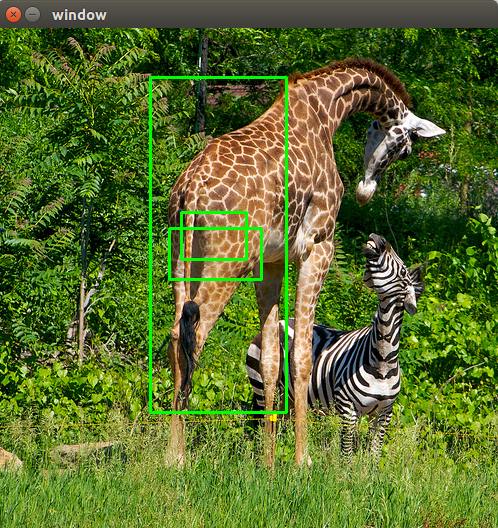
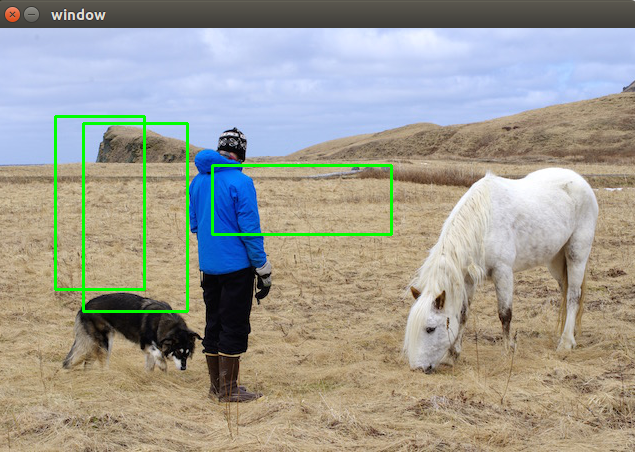
I have followed same Math as you guys discussed before to calculate the bounding boxes from values returned from detect() fuction. But, I am still getting the wrong bounding boxes. I am not sure where I am doing wrong. I use OpenCv to read and draw bounding boxes on input image. My code and its output can be seen below. Any help would be appreciated. Thanks
from ctypes import *
import numpy as np
import math
import random
import os
import cv2
def sample(probs):
s = sum(probs)
probs = [a/s for a in probs]
r = random.uniform(0, 1)
for i in range(len(probs)):
r = r - probs[i]
if r <= 0:
return i
return len(probs)-1
def c_array(ctype, values):
arr = (ctype*len(values))()
arr[:] = values
return arr
class BOX(Structure):
_fields_ = [("x", c_float),
("y", c_float),
("w", c_float),
("h", c_float)]
class DETECTION(Structure):
_fields_ = [("bbox", BOX),
("classes", c_int),
("prob", POINTER(c_float)),
("mask", POINTER(c_float)),
("objectness", c_float),
("sort_class", c_int)]
class IMAGE(Structure):
_fields_ = [("w", c_int),
("h", c_int),
("c", c_int),
("data", POINTER(c_float))]
class METADATA(Structure):
_fields_ = [("classes", c_int),
("names", POINTER(c_char_p))]
lib = CDLL("/home/pjreddie/documents/darknet/libdarknet.so", RTLD_GLOBAL)
lib = CDLL("darknet.so", RTLD_GLOBAL)
hasGPU = True
if os.name == "nt":
cwd = os.path.dirname(__file__)
os.environ['PATH'] = cwd + ';' + os.environ['PATH']
winGPUdll = os.path.join(cwd, "yolo_cpp_dll.dll")
winNoGPUdll = os.path.join(cwd, "yolo_cpp_dll_nogpu.dll")
envKeys = list()
for k, v in os.environ.items():
envKeys.append(k)
try:
try:
tmp = os.environ["FORCE_CPU"].lower()
if tmp in ["1", "true", "yes", "on"]:
raise ValueError("ForceCPU")
else:
print("Flag value '"+tmp+"' not forcing CPU mode")
except KeyError:
# We never set the flag
if 'CUDA_VISIBLE_DEVICES' in envKeys:
if int(os.environ['CUDA_VISIBLE_DEVICES']) < 0:
raise ValueError("ForceCPU")
try:
global DARKNET_FORCE_CPU
if DARKNET_FORCE_CPU:
raise ValueError("ForceCPU")
except NameError:
pass
# print(os.environ.keys())
# print("FORCE_CPU flag undefined, proceeding with GPU")
if not os.path.exists(winGPUdll):
raise ValueError("NoDLL")
lib = CDLL(winGPUdll, RTLD_GLOBAL)
except (KeyError, ValueError):
hasGPU = False
if os.path.exists(winNoGPUdll):
lib = CDLL(winNoGPUdll, RTLD_GLOBAL)
print("Notice: CPU-only mode")
else:
# Try the other way, in case no_gpu was
# compile but not renamed
lib = CDLL(winGPUdll, RTLD_GLOBAL)
print("Environment variables indicated a CPU run, but we didn't find "+winNoGPUdll+". Trying a GPU run anyway.")
else:
lib = CDLL("darknet.so", RTLD_GLOBAL)
lib.network_width.argtypes = [c_void_p]
lib.network_width.restype = c_int
lib.network_height.argtypes = [c_void_p]
lib.network_height.restype = c_int
predict = lib.network_predict
predict.argtypes = [c_void_p, POINTER(c_float)]
predict.restype = POINTER(c_float)
if hasGPU:
set_gpu = lib.cuda_set_device
set_gpu.argtypes = [c_int]
make_image = lib.make_image
make_image.argtypes = [c_int, c_int, c_int]
make_image.restype = IMAGE
get_network_boxes = lib.get_network_boxes
get_network_boxes.argtypes = [c_void_p, c_int, c_int, c_float, c_float, POINTER(c_int), c_int, POINTER(c_int), c_int]
get_network_boxes.restype = POINTER(DETECTION)
make_network_boxes = lib.make_network_boxes
make_network_boxes.argtypes = [c_void_p]
make_network_boxes.restype = POINTER(DETECTION)
free_detections = lib.free_detections
free_detections.argtypes = [POINTER(DETECTION), c_int]
free_ptrs = lib.free_ptrs
free_ptrs.argtypes = [POINTER(c_void_p), c_int]
network_predict = lib.network_predict
network_predict.argtypes = [c_void_p, POINTER(c_float)]
reset_rnn = lib.reset_rnn
reset_rnn.argtypes = [c_void_p]
load_net = lib.load_network
load_net.argtypes = [c_char_p, c_char_p, c_int]
load_net.restype = c_void_p
load_net_custom = lib.load_network_custom
load_net_custom.argtypes = [c_char_p, c_char_p, c_int, c_int]
load_net_custom.restype = c_void_p
do_nms_obj = lib.do_nms_obj
do_nms_obj.argtypes = [POINTER(DETECTION), c_int, c_int, c_float]
do_nms_sort = lib.do_nms_sort
do_nms_sort.argtypes = [POINTER(DETECTION), c_int, c_int, c_float]
free_image = lib.free_image
free_image.argtypes = [IMAGE]
letterbox_image = lib.letterbox_image
letterbox_image.argtypes = [IMAGE, c_int, c_int]
letterbox_image.restype = IMAGE
load_meta = lib.get_metadata
lib.get_metadata.argtypes = [c_char_p]
lib.get_metadata.restype = METADATA
load_image = lib.load_image_color
load_image.argtypes = [c_char_p, c_int, c_int]
load_image.restype = IMAGE
rgbgr_image = lib.rgbgr_image
rgbgr_image.argtypes = [IMAGE]
predict_image = lib.network_predict_image
predict_image.argtypes = [c_void_p, IMAGE]
predict_image.restype = POINTER(c_float)
def array_to_image(arr):
import numpy as np
need to return old values to avoid python freeing memory
arr = arr.transpose(2,0,1)
c = arr.shape[0]
h = arr.shape[1]
w = arr.shape[2]
arr = np.ascontiguousarray(arr.flat, dtype=np.float32) / 255.0
data = arr.ctypes.data_as(POINTER(c_float))
im = IMAGE(w,h,c,data)
return im, arr
def classify(net, meta, im):
out = predict_image(net, im)
res = []
for i in range(meta.classes):
if altNames is None:
nameTag = meta.names[i]
else:
nameTag = altNames[i]
res.append((nameTag, out[i]))
res = sorted(res, key=lambda x: -x[1])
return res
def detect(net, meta, image, thresh=.5, hier_thresh=.5, nms=.45, debug= False):
"""
Performs the meat of the detection
"""
pylint: disable= C0321
im = load_image(image, 0, 0)
import cv2
custom_image_bgr = cv2.imread(image) # use: detect(,,imagePath,)
custom_image = cv2.cvtColor(custom_image_bgr, cv2.COLOR_BGR2RGB)
custom_image = cv2.resize(custom_image,(lib.network_width(net), lib.network_height(net)), interpolation = cv2.INTER_LINEAR)
import scipy.misc
custom_image = scipy.misc.imread(image)
im, arr = array_to_image(custom_image) # you should comment line below: free_image(im)
if debug: print("Loaded image")
num = c_int(0)
if debug: print("Assigned num")
pnum = pointer(num)
if debug: print("Assigned pnum")
predict_image(net, im)
if debug: print("did prediction")
dets = get_network_boxes(net, custom_image_bgr.shape[1], custom_image_bgr.shape[0], thresh, hier_thresh, None, 0, pnum, 0) # OpenCV
dets = get_network_boxes(net, im.w, im.h, thresh, hier_thresh, None, 0, pnum, 0)
if debug: print("Got dets")
num = pnum[0]
if debug: print("got zeroth index of pnum")
if nms:
do_nms_sort(dets, num, meta.classes, nms)
if debug: print("did sort")
res = []
if debug: print("about to range")
for j in range(num):
if debug: print("Ranging on "+str(j)+" of "+str(num))
if debug: print("Classes: "+str(meta), meta.classes, meta.names)
for i in range(meta.classes):
if debug: print("Class-ranging on "+str(i)+" of "+str(meta.classes)+"= "+str(dets[j].prob[i]))
if dets[j].prob[i] > 0:
b = dets[j].bbox
if altNames is None:
nameTag = meta.names[i]
else:
nameTag = altNames[i]
if debug:
print("Got bbox", b)
print(nameTag)
print(dets[j].prob[i])
print((b.x, b.y, b.w, b.h))
res.append((nameTag, dets[j].prob[i], (b.x, b.y, b.w, b.h)))
if debug: print("did range")
res = sorted(res, key=lambda x: -x[1])
if debug: print("did sort")
free_image(im)
if debug: print("freed image")
free_detections(dets, num)
if debug: print("freed detections")
return res
netMain = None
metaMain = None
altNames = None
def performDetect(imagePath="/home/geolux/object_detection/darknet/data/giraffe.jpg", thresh= 0.25, configPath = "./cfg/yolov3.cfg", weightPath = "yolov3.weights", metaPath= "./cfg/coco.data", showImage= True, makeImageOnly = True, initOnly= False):
Import the global variables. This lets us instance Darknet once, then just call performDetect() again without instancing again
global metaMain, netMain, altNames #pylint: disable=W0603
assert 0 < thresh < 1, "Threshold should be a float between zero and one (non-inclusive)"
if not os.path.exists(configPath):
raise ValueError("Invalid config path "+os.path.abspath(configPath)+"")
if not os.path.exists(weightPath):
raise ValueError("Invalid weight path "+os.path.abspath(weightPath)+"")
if not os.path.exists(metaPath):
raise ValueError("Invalid data file path "+os.path.abspath(metaPath)+"")
if netMain is None:
netMain = load_net_custom(configPath.encode("ascii"), weightPath.encode("ascii"), 0, 1) # batch size = 1
if metaMain is None:
metaMain = load_meta(metaPath.encode("ascii"))
if altNames is None:
In Python 3, the metafile default access craps out on Windows (but not Linux)
Read the names file and create a list to feed to detect
try:
with open(metaPath) as metaFH:
metaContents = metaFH.read()
import re
match = re.search("names = *(.)$", metaContents, re.IGNORECASE | re.MULTILINE)
if match:
result = match.group(1)
else:
result = None
try:
if os.path.exists(result):
with open(result) as namesFH:
namesList = namesFH.read().strip().split("n")
altNames = [x.strip() for x in namesList]
except TypeError:
pass
except Exception:
pass
if initOnly:
print("Initialized detector")
return None
if not os.path.exists(imagePath):
raise ValueError("Invalid image path "+os.path.abspath(imagePath)+"")
if __name__ == "__main__":
imagePath="/home/geolux/object_detection/darknet/data/person.jpg"
weightPath = "yolov3.weights"
configPath = "./cfg/yolov3.cfg"
metaPath= "./cfg/coco.data"
netMain = load_net_custom(configPath.encode("ascii"), weightPath.encode("ascii"), 0, 1)
metaMain = load_meta(metaPath.encode("ascii"))
detections = detect(netMain, metaMain, imagePath.encode("ascii"), 0.50)
detections = detect(netMain, metaMain, cv2.imread(imagePath), 0.50)
image = cv2.imread(imagePath)
for detection in detections:
width = detection[2][2]
height = detection[2][3]
center_x = detection[2][0]
center_y = detection[2][1]
bottomLeft_x = int(center_x - (width / 2))
bottomLeft_y = int(center_y - (height / 2))
width = int(width)
height = int(height)
cv2.rectangle(image,(bottomLeft_x, bottomLeft_y), (width, height), (0,255,0),2)
cv2.imshow("window", image)
if cv2.waitKey(0) & 0xFF == ord('q'):
cv2.destroyAllWindows()
 nasir3843
on 26 Jun 2018
nasir3843
on 26 Jun 2018
@TheMikeyR @Ankit09
I am getting the below error while executing the code can you help me to get rid of it?
AttributeError: /home/bot/Documents/demo/Intellishef/libdarknet.so: undefined symbol: make_boxes
 abdulkalam1233
on 5 Jul 2018
abdulkalam1233
on 5 Jul 2018
@njoye It worked, thanks!
 nickliqian
on 9 Nov 2018
nickliqian
on 9 Nov 2018
def detect(net, meta, image, thresh=.5, hier_thresh=.5, nms=.45):
im = load_image(image, 0, 0)
num = c_int(0)
pnum = pointer(num)
predict_image(net, im)
dets = get_network_boxes(net, im.w, im.h, thresh, hier_thresh, None, 0, pnum)
num = pnum[0]
if (nms): do_nms_obj(dets, num, meta.classes, nms);
res = []
for j in range(num):
    for i in range(meta.classes):
        if dets[j].prob[i] > 0:
            b = dets[j].bbox
            res.append((meta.names[i], dets[j].prob[i], (b.x, b.y, b.w, b.h)))
res = sorted(res, key=lambda x: -x[1])
free_image(im)
free_detections(dets, num)
return res
if __name__ == "__main__":
net = load_net("./yolov3.cfg", "./yolov3.weights", 0)
meta = load_meta("./coco.data")
r = detect(net, meta, image)
for k in range(len(r)):
    #print k
    #print "a"
    print("Name: ",r[k][0],"Predict %: ",r[k][1],"X: ",r[k][2][0],"Y: ",r[k][2][1],"W: ",r[k][2][2],"Z: ",r[k][2][3],'\n')


 #get detected image
#im2 = np.array(Image.open(img), dtype=np.uint8)
# fig,ax = plt.subplots(1)
#for k in range(len(r)):
 #   print r[k][2][0]
  #  print r[k][2][3]
   # rect = patches.Rectangle((r[k][2][0],r[k][2][3]),r[k][2][2],r[k][2][3],linewidth=1,edgecolor='r',facecolor='none')
   # ax.add_patch(rect)
#plt.show()


#get detected image
im2 = np.array(Image.open(image), dtype=np.uint8)
fig,ax = plt.subplots(1)
#fig.set_size_inches(imgw,imgh)
ax.imshow(im2)
for k in range(len(r)):
    width =  r[k][2][2]
    height = r[k][2][3]
    center_x = r[k][2][0]
    center_y = r[k][2][3]
    bottomLeft_x = center_x / 2
    bottomLeft_y = center_y / 2
    print bottomLeft_x
    print bottomLeft_y

    rect = patches.Rectangle((bottomLeft_x, bottomLeft_y), width, height, linewidth=1, edgecolor='r', facecolor='none')
    ax.add_patch(rect)

imagepath = './static/' + filename

#fig.show()
fig.savefig(imagepath,bbox_inches="tight")
# image = Image.open('./image.jpg')
# image.show()
# #print (r[:10])
plt.close()
return r
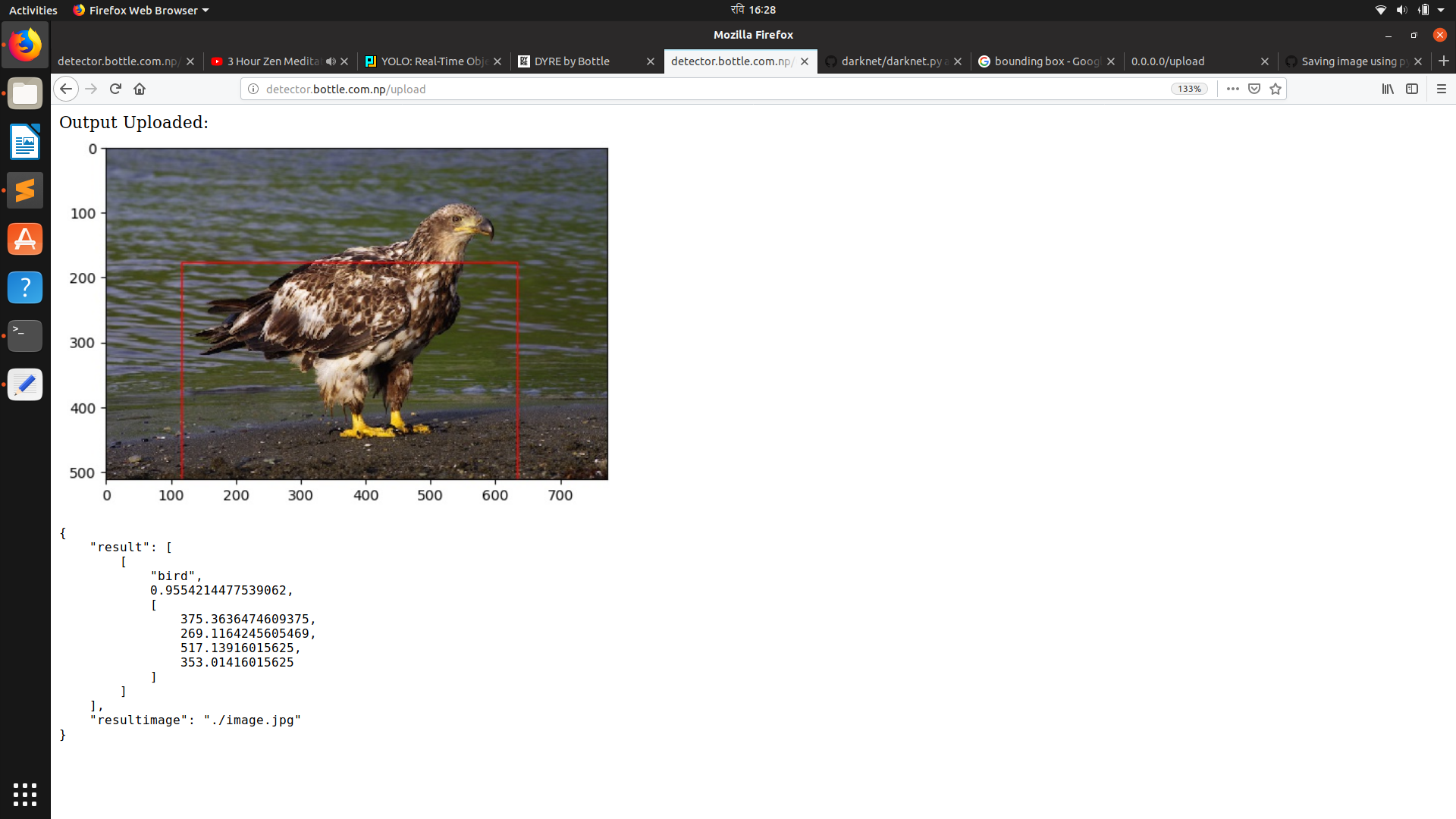
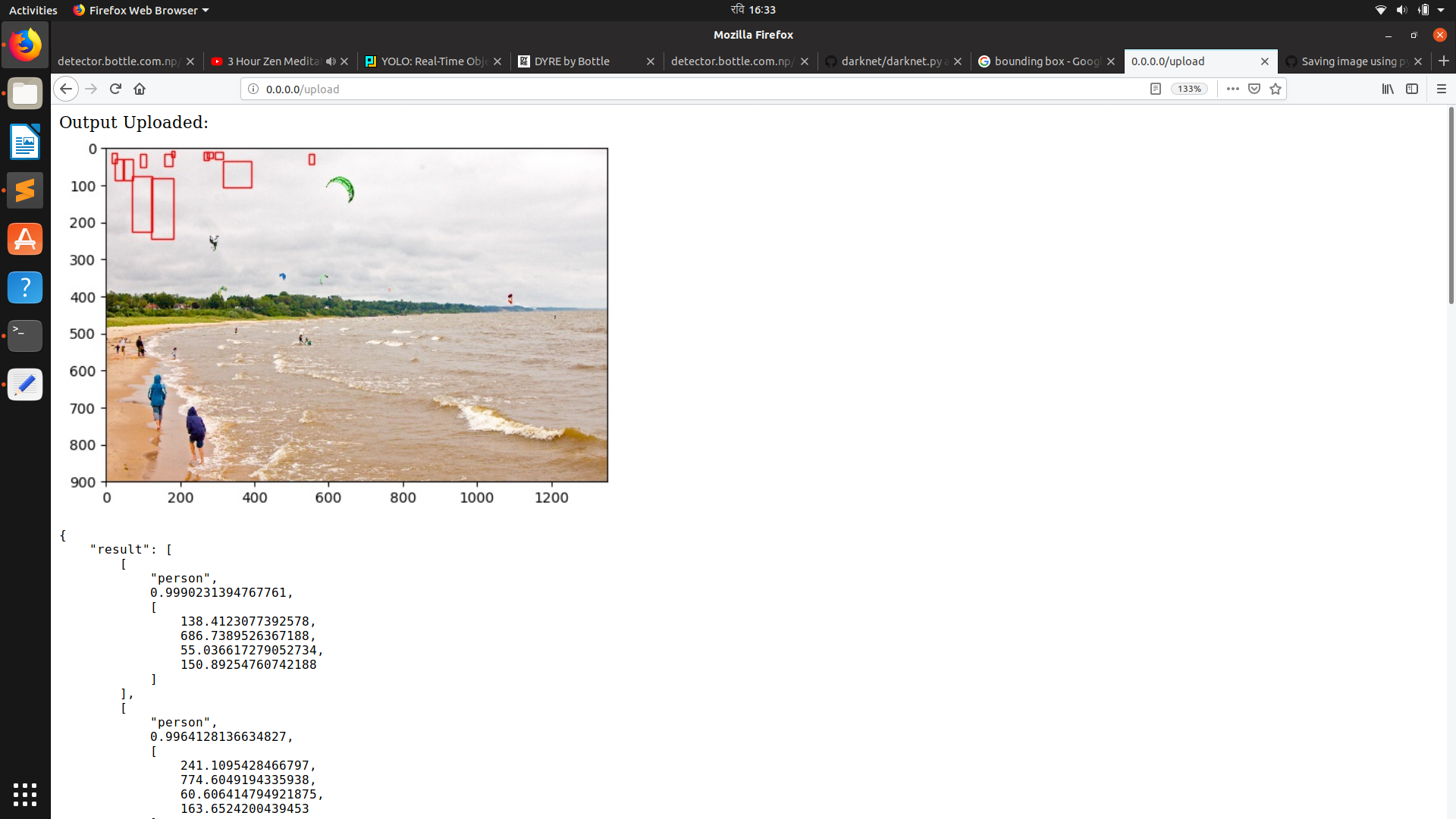
@TheMikeyR @njoye @Ankit09 @nasir3843 bad output of bounding box. Help please!
 zobrathemanish
on 10 Feb 2019
zobrathemanish
on 10 Feb 2019
Related issues
 AurusHuang
·
39Comments
AurusHuang
·
39Comments
 rucsacman
·
41Comments
rucsacman
·
41Comments
 ValerioNeriGit
·
25Comments
ValerioNeriGit
·
25Comments
 sonalambwani
·
218Comments
sonalambwani
·
218Comments
 MansourTrabelsi
·
44Comments
MansourTrabelsi
·
44Comments
Most helpful comment
I don’t have a good enough internet connection to post the code atm, but the problem you have is solved by calculating y=y-(height/2) and x=x-(width/2) because the function seems to only return the center of the bounding box (whyever though). I’ll post the code tomorrow if you need it.