Hi, all,
I am trying to compile YOLO with GPU=1.
I get the following error:

I already have done:
- Install the updated CUDA version (9.0)
- Add this line inside the makefile - NVCC += -D_FORCE_INLINES
Thanks,
Mark
 Kram951
All 20 comments
While CPU make succeeds and darknet works well, the GPU=1 make to enable GPU support fails in same way as for @AnanasPie . Other components like tensorflow-gpu are able to use CUDA in the system.
I get similar error with my GPU:
ptxas /tmp/tmpxft_00001c51_00000000-15_convolutional_kernels.compute_30.ptx, line 115; error : Call has wrong number of parameters ptxas /tmp/tmpxft_00001c51_00000000-15_convolutional_kernels.compute_30.ptx, line 144; error : Call has wrong number of parameters ptxas /tmp/tmpxft_00001c51_00000000-15_convolutional_kernels.compute_30.ptx, line 227; error : Call has wrong number of parameters ptxas /tmp/tmpxft_00001c51_00000000-15_convolutional_kernels.compute_30.ptx, line 257; error : Call has wrong number of parameters ptxas /tmp/tmpxft_00001c51_00000000-15_convolutional_kernels.compute_30.ptx, line 341; error : Call has wrong number of parameters ptxas /tmp/tmpxft_00001c51_00000000-15_convolutional_kernels.compute_30.ptx, line 361; error : Call has wrong number of parameters ptxas /tmp/tmpxft_00001c51_00000000-15_convolutional_kernels.compute_30.ptx, line 379; error : Call has wrong number of parameters ptxas /tmp/tmpxft_00001c51_00000000-15_convolutional_kernels.compute_30.ptx, line 399; error : Call has wrong number of parameters ptxas fatal : Ptx assembly aborted due to errors Makefile:91: recipe for target 'obj/convolutional_kernels.o' failed make: * [obj/convolutional_kernels.o] Error 255
System details:
OS: Ubuntu 16.04 x64
GPU: Nvidia GTX 1060
CUDA: 8.0
cuDNN: 6.0
nvidia-smi output:
`+-----------------------------------------------------------------------------+
| NVIDIA-SMI 384.81 Driver Version: 384.81 |
|-------------------------------+----------------------+----------------------+
| GPU Name Persistence-M| Bus-Id Disp.A | Volatile Uncorr. ECC |
| Fan Temp Perf Pwr:Usage/Cap| Memory-Usage | GPU-Util Compute M. |
|===============================+======================+======================|
| 0 GeForce GTX 106... Off | 00000000:01:00.0 On | N/A |
| 0% 43C P8 7W / 156W | 5955MiB / 6069MiB | 0% Default |
+-------------------------------+----------------------+----------------------+

+-----------------------------------------------------------------------------+
| Processes: GPU Memory |
| GPU PID Type Process name Usage |
|=============================================================================|
| 0 1042 G /usr/lib/xorg/Xorg 197MiB |
| 0 1839 G compiz 77MiB |
| 0 2923 G ...-token=5D46E4CA8207FFF70E348E0EA2F3C753 108MiB |
| 0 28788 C /home/sami/miniconda2/bin/python 5567MiB |
+-----------------------------------------------------------------------------+`
Any suggestions? What CUDA and CUDNN versions are supported?
Thanks,
Sami
 Dahlasam
on 8 Oct 2017
Dahlasam
on 8 Oct 2017
After downgrading to CUDA 8.0 and cuDNN 6.0 I found this hint from Stack Overflow:
Add the following to your ~/.bashrc
# DARKNET
export PATH=/usr/local/cuda-8.0/bin${PATH:+:${PATH}}
export LD_LIBRARY_PATH=/usr/local/cuda8.0/lib64${LD_LIBRARY_PATH:+:${LD_LIBRARY_PATH}}
After this change the compiling worked and darknet jumped into _CUDASpeed_ as expected!
Dahlasam
on 10 Oct 2017
Hi:
I have the same problem and even after adding these code to ~/.bashrc, it still could not be compiled. I'm using CUDA 7.5
+-----------------------------------------------------------------------------+
| NVIDIA-SMI 384.90 Driver Version: 384.90 |
|-------------------------------+----------------------+----------------------+
| GPU Name Persistence-M| Bus-Id Disp.A | Volatile Uncorr. ECC |
| Fan Temp Perf Pwr:Usage/Cap| Memory-Usage | GPU-Util Compute M. |
|===============================+======================+======================|
| 0 Quadro K620 Off | 00000000:01:00.0 On | N/A |
| 34% 33C P8 1W / 30W | 337MiB / 1992MiB | 0% Default |
+-------------------------------+----------------------+----------------------+
+-----------------------------------------------------------------------------+
| Processes: GPU Memory |
| GPU PID Type Process name Usage |
|=============================================================================|
| 0 1188 G /usr/lib/xorg/Xorg 189MiB |
| 0 1925 G compiz 70MiB |
| 0 2754 G ...-token=02DD3E6D0D22113602503DA6AAD1DD92 74MiB |
+-----------------------------------------------------------------------------+
Thanks!
 j5207
on 12 Nov 2017
j5207
on 12 Nov 2017
I'm having the same issue like @j5207 but with CUDA 9.1
Thanks for helping.
 MustaphaYacine
on 10 Feb 2018
MustaphaYacine
on 10 Feb 2018
I have the same issue with cuda-9.1
I tried editing ~/.bashrc by adding the following:
DARKNET
export PATH=/usr/local/cuda-9.1/bin${PATH:+:${PATH}}
export LD_LIBRARY_PATH=/usr/local/cuda-9.1/lib64${LD_LIBRARY_PATH:+:${LD_LIBRARY_PATH}}
but still have the:
ptxas /tmp/tmpxft_000077c1_00000000-15_convolutional_kernels.compute_30.ptx, line 115; error : Call has wrong number of parameters
etc. errors
I also tried updating the makefile thus:
COMMON+= -DGPU -I/usr/local/cuda-9.1/include/
CFLAGS+= -DGPU
LDFLAGS+= -L/usr/local/cuda-9.1/lib64 -lcuda -lcudart -lcublas -lcurand
but again same error
 markddesimone
on 14 Feb 2018
markddesimone
on 14 Feb 2018
i have the same error with cuda 9.1
 Darlynnnn
on 17 Mar 2018
Darlynnnn
on 17 Mar 2018
Had the same issue with cuda-9.0
- Added the lines to the .bashrc
export PATH=/usr/local/cuda-9.0/bin${PATH:+:${PATH}} export LD_LIBRARY_PATH=/usr/local/cuda9.0/lib64${LD_LIBRARY_PATH:+:${LD_LIBRARY_PATH}} - did source on the .bashrc
Then compilation worked fine.
Thanks @Dahlasam !
 kalanityL
on 29 Mar 2018
kalanityL
on 29 Mar 2018
@kalanityL
Hi It is already set as follows
export PATH=/usr/local/cuda-9.0/bin:/usr/local/sbin:/usr/local/bin:/usr/sbin:/usr/bin:/sbin:/bin:/snap/bin
export LD_LIBRARY_PATH=/usr/local/cuda-9.0/lib64:
still i get the following error at the make
/bin/sh: 1: nvcc: not found
Makefile:91: recipe for target 'obj/convolutional_kernels.o' failed
make: * [obj/convolutional_kernels.o] Error 127
 CharithEkanayake
on 16 Apr 2018
CharithEkanayake
on 16 Apr 2018
if you do cd /usr/local/cuda-9.0/ and ls, what do you see?
kalanityL
on 16 Apr 2018
nvidia@tegra-ubuntu:~$ cd /usr/local/cuda-9.0/
@kalanityL
I am running this on nvidia jetson tx2
nvidia@tegra-ubuntu:/usr/local/cuda-9.0$ ls
bin extras lib64 nvml README share tools
doc include LICENSE nvvm samples targets version.txt
nvidia@tegra-ubuntu:/usr/local/cuda-9.0$
CharithEkanayake
on 16 Apr 2018
@kalanityL
was able figure out with following link
by editing the nvcc=/usr/local/cuda-9.0/bin/nvcc
Thanks for your input
CharithEkanayake
on 16 Apr 2018
@charithforex
i updated
nvcc=/usr/local/cuda-80/bin/nvcc
and it worked for me
thanks
 EhabMedhat
on 23 Jun 2018
EhabMedhat
on 23 Jun 2018
@charithforex I solved this issue by using
PATH=/usr/local/cuda/bin:$PATH make
 tamato1
on 22 Nov 2018
tamato1
on 22 Nov 2018
Thank you very much @Dahlasam !
For me, it worked, by following your suggestion, on config:
Ubuntu 16.04 LTS,
CUDA: 9.0, cuDNN: 7.0.
 sachindesh
on 6 Dec 2018
sachindesh
on 6 Dec 2018
how can i edit .bashrc file @Dahlasam
 Rao-AbdulRehman
on 16 May 2019
Rao-AbdulRehman
on 16 May 2019
how can i edit .bashrc file @Dahlasam
just
vi ~/.bashrc
 iNusz
on 28 Oct 2019
iNusz
on 28 Oct 2019
@tamato1 It worked for me for cuda 10.2
 vman-x
on 22 Feb 2020
vman-x
on 22 Feb 2020
I'm on Windows and had a lot of trouble figuring this out. I edited these lines in my Makefile.in to point explicitly to my CUDA path:
COMMON+= -DGPU -I/C:/Users/
LDFLAGS+= -L/C:/Users/Cylon/
I'm using OpenCV 4.2.0 and CUDA 10.2
 ljsauer
on 4 Mar 2020
ljsauer
on 4 Mar 2020
@tamato1
@charithforex I solved this issue by using
PATH=/usr/local/cuda/bin:$PATH make
This work. for my: CUDA 10.2
+-----------------------------------------------------------------------------+
| NVIDIA-SMI 440.64.00 Driver Version: 440.64.00 CUDA Version: 10.2 |
|-------------------------------+----------------------+----------------------+
| GPU Name Persistence-M| Bus-Id Disp.A | Volatile Uncorr. ECC |
| Fan Temp Perf Pwr:Usage/Cap| Memory-Usage | GPU-Util Compute M. |
|===============================+======================+======================|
| 0 GeForce RTX 207... On | 00000000:07:00.0 On | N/A |
| 34% 39C P8 19W / 215W | 485MiB / 7979MiB | 9% Default |
+-------------------------------+----------------------+----------------------+
 dan-montano
on 1 Apr 2020
dan-montano
on 1 Apr 2020
@tamato1 thank you it's work with CUDA10.2 ,
but when i run my script python , i dont know why it use just 41 MIB :
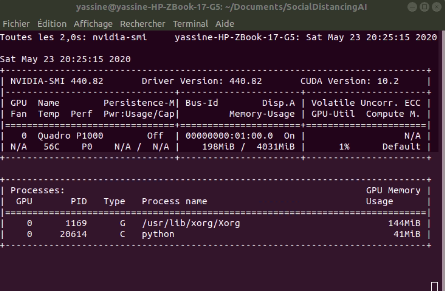
need a help please.
 ZIKO94ZIKO
on 24 May 2020
ZIKO94ZIKO
on 24 May 2020
Related issues
 arianaa30
·
3Comments
arianaa30
·
3Comments
 sujithm
·
3Comments
sujithm
·
3Comments
 kthordarson
·
3Comments
kthordarson
·
3Comments
 Vikalp-Reorder
·
3Comments
Vikalp-Reorder
·
3Comments
 groot-1313
·
4Comments
groot-1313
·
4Comments
Most helpful comment
@kalanityL
was able figure out with following link
https://stackoverflow.com/questions/39287744/ubuntu-16-04-nvidia-toolkit-8-0-rc-darknet-compilation-error-expected-a
by editing the nvcc=/usr/local/cuda-9.0/bin/nvcc
Thanks for your input