Darknet: Resolution for Kitti Tracking
Could you help me to define the input resolution for neural net?
Currently I am training on Kitti Tracking dataset with the image resolution around of 1240 × 380.
 benn94
All 16 comments
- What is the problem?
- Show entire your cfg-file.
 AlexeyAB
on 11 Jul 2017
AlexeyAB
on 11 Jul 2017
I don't have my own gpu and I am going to have my first try on aws, I am trying to detect two classes only car and pedestrian. I wonder should I use the the square resolution 544 x 544 or 640 x 192 ? Plus, I plan to use the train with the pretrained weight of 544 x 544.
Example images : 5984
Image resolution : 1240 x 380 ish
Batch size : 32
subdivisions: what is it ? and should i adjust it?
And here is the config file.
[net]

batch=32
subdivisions=8
height=640
width=192
channels=3
momentum=0.9
decay=0.0005
angle=0
saturation = 1.5
exposure = 1.5
hue=.1

learning_rate=0.001
burn_in=1000
max_batches = 80200
policy=steps
steps=40000,60000
scales=.1,.1

[convolutional]
batch_normalize=1
filters=32
size=3
stride=1
pad=1
activation=leaky

[maxpool]
size=2
stride=2

[convolutional]
batch_normalize=1
filters=64
size=3
stride=1
pad=1
activation=leaky

[maxpool]
size=2
stride=2

[convolutional]
batch_normalize=1
filters=128
size=3
stride=1
pad=1
activation=leaky

[convolutional]
batch_normalize=1
filters=64
size=1
stride=1
pad=1
activation=leaky

[convolutional]
batch_normalize=1
filters=128
size=3
stride=1
pad=1
activation=leaky

[maxpool]
size=2
stride=2

[convolutional]
batch_normalize=1
filters=256
size=3
stride=1
pad=1
activation=leaky

[convolutional]
batch_normalize=1
filters=128
size=1
stride=1
pad=1
activation=leaky

[convolutional]
batch_normalize=1
filters=256
size=3
stride=1
pad=1
activation=leaky

[maxpool]
size=2
stride=2

[convolutional]
batch_normalize=1
filters=512
size=3
stride=1
pad=1
activation=leaky

[convolutional]
batch_normalize=1
filters=256
size=1
stride=1
pad=1
activation=leaky

[convolutional]
batch_normalize=1
filters=512
size=3
stride=1
pad=1
activation=leaky

[convolutional]
batch_normalize=1
filters=256
size=1
stride=1
pad=1
activation=leaky

[convolutional]
batch_normalize=1
filters=512
size=3
stride=1
pad=1
activation=leaky

[maxpool]
size=2
stride=2

[convolutional]
batch_normalize=1
filters=1024
size=3
stride=1
pad=1
activation=leaky

[convolutional]
batch_normalize=1
filters=512
size=1
stride=1
pad=1
activation=leaky

[convolutional]
batch_normalize=1
filters=1024
size=3
stride=1
pad=1
activation=leaky

[convolutional]
batch_normalize=1
filters=512
size=1
stride=1
pad=1
activation=leaky

[convolutional]
batch_normalize=1
filters=1024
size=3
stride=1
pad=1
activation=leaky


#######

[convolutional]
batch_normalize=1
size=3
stride=1
pad=1
filters=1024
activation=leaky

[convolutional]
batch_normalize=1
size=3
stride=1
pad=1
filters=1024
activation=leaky

[route]
layers=-9

[convolutional]
batch_normalize=1
size=1
stride=1
pad=1
filters=64
activation=leaky

[reorg]
stride=2

[route]
layers=-1,-4

[convolutional]
batch_normalize=1
size=3
stride=1
pad=1
filters=1024
activation=leaky

[convolutional]
size=1
stride=1
pad=1
filters=35
activation=linear


[region]
anchors =  1.3221, 1.73145, 3.19275, 4.00944, 5.05587, 8.09892, 9.47112, 4.84053, 11.2364, 10.0071
bias_match=1
classes=2
coords=4
num=5
softmax=1
jitter=.3
rescore=1

object_scale=5
noobject_scale=1
class_scale=1
coord_scale=1

absolute=1
thresh = .6
random=1
In general you can try these 3 ways: https://groups.google.com/d/msg/darknet/HrkhOhxCgLk/fJGR8VrbBAAJ
But simple way is to use
random=0,weight = 1216,height = 352- resolution should be multiple of 32, and random should be 0, so it will not change network size 320x320 - 608x608Or if it works slow then use
random=0,weight = 640,height = 192
Plus, I plan to use the train with the pretrained weight of 544 x 544.
Pretrained weight darknet19_448.conv.23 depend on aspect ratio of objects, but doesn't on resolution and doesn't on aspect ratio of images, so you can use this pretrained weight.
subdivisions: what is it ? and should i adjust it?
At one time loaded number of images = batch / subdivision. So greater subdivision the less GPU-memory is required.
AlexeyAB
on 12 Jul 2017
@AlexeyAB Thanks Alex.
I am considering these two options:
A. you set random=0 width=640 height=384 and your resolution will be always 640x384
B. you can set random=1 and change source code of yolo, so your resolution for each 10 batches will be random 640x320 - 1216x608
Since the images in the dataset are quite pretty similar in resolution, I think option A seems to outperform option B. What do you think ?
benn94
on 13 Jul 2017
@benn94 Hi,
In general, option B is more accurate, but it may require more iterations for learning, and more complex - you need to modify the source code.
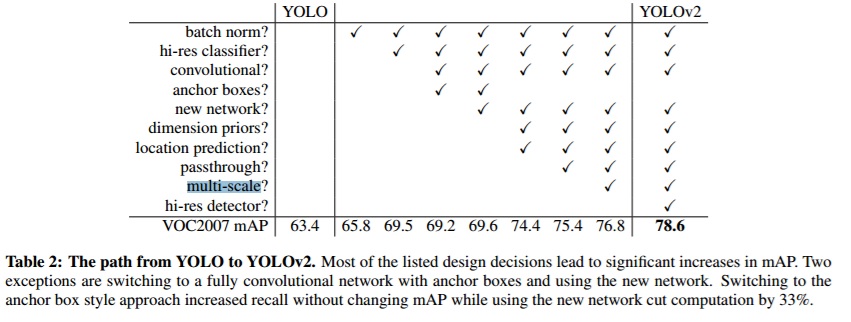
random=1 allows you to train with a more wide variety of object sizes (in absolute pixel values). On PascalVOC random=1 increases mAP +1.4%.
 AlexeyAB
on 13 Jul 2017
AlexeyAB
on 13 Jul 2017
@AlexeyAB thank you. I am closing this issue now.
benn94
on 13 Jul 2017
@AlexeyAB,
One more thing:
I don't know how to use the darknet19_448.conv.23. Am I supposed to get the weight file from it ?
benn94
on 13 Jul 2017
@benn94
https://github.com/AlexeyAB/darknet#how-to-train-to-detect-your-custom-objects
- Start training by using the command line:
darknet.exe detector train data/obj.data yolo-obj.cfg darknet19_448.conv.23
Or what do you mean?
AlexeyAB
on 13 Jul 2017
I wonder what is the different between convolutional weight darknet19_448.conv.23 and pre-trained weight darknet19_448.weights ? isn't the darknet19_448.conv.23 is for classification task? Please enlighten me.
benn94
on 14 Jul 2017
darknet19_448.conv.23 just has 23 first layers from the darknet19_448.weights
Look at: https://groups.google.com/d/msg/darknet/iwFcc3DDbX0/fneDr62HAAAJ
Yes, darknet19_448.weights is for classification task initially, but first convolutional layers are the same from classification and detection, and only last layers are different.
https://arxiv.org/pdf/1612.08242v1.pdf
For YOLOv2 we first fine tune the classification network at the full448×448resolution for 10 epochs on ImageNet. This gives the network time to adjust its filters to work better on higher resolution input. We then fine tune the resultingnetwork on detection. This high resolution classificationnetwork gives us an increase of almost 4% mAP.
Darknet-19 . We propose a new classification model tobe used as the base of YOLOv2.
AlexeyAB
on 14 Jul 2017
@AlexeyAB, I assume that if we use different image sizes (not square), we need to regenerate anchors even when image dimensions are multiple of 32? Or as long as image dimensions are multiples of 32, that is not really required?
 BAILOOL
on 23 Oct 2017
BAILOOL
on 23 Oct 2017
@BAILOOL Anchors depends on image aspect ratio and on network size.
Anchors in yolo-voc.cfg file calculated for images from VOC-dataset (500x375 or 375x500).
So if the aspect ratio of your images differs from the aspect ratio of the images from the VOC-dataset, then you need to change the anchors.
AlexeyAB
on 23 Oct 2017
@AlexeyAB so should we regenerate our own anchor box if we choose our network size to be weight = 1216, height = 352 on Kitti dataset ?
Is network size that same thing as input network size ?
 ilayoon
on 27 Nov 2017
ilayoon
on 27 Nov 2017
@ilayoon
- Yes, it is desirable to regenerate anchors.
- Or at least multiply anchors by the coefficients:
width * (1216/416),height * (352/416)
AlexeyAB
on 27 Nov 2017
@AlexeyAB thanks for your quick reply.
I would like to try both suggestion but how could i regenerate anchors ?
ilayoon
on 27 Nov 2017
@ilayoon
You can try to use gen_anchors.py python script: https://github.com/Jumabek/darknet_scripts
And ask how to use it here: https://github.com/Jumabek/darknet_scripts/issues
AlexeyAB
on 27 Nov 2017
Related issues
 Cipusha
·
3Comments
Cipusha
·
3Comments
 rezaabdullah
·
3Comments
rezaabdullah
·
3Comments
 Mididou
·
3Comments
Mididou
·
3Comments
 qianyunw
·
3Comments
qianyunw
·
3Comments
 bit-scientist
·
3Comments
bit-scientist
·
3Comments
Most helpful comment
@ilayoon
You can try to use
gen_anchors.pypython script: https://github.com/Jumabek/darknet_scriptsAnd ask how to use it here: https://github.com/Jumabek/darknet_scripts/issues