Darknet: can you please tell me the usage of function "tracking"?
Hi, can you please tell me the usage of function "tracking" in yolo_v2_class.cpp?
Thank you very much.
 RoseOnCollar
All 10 comments
Hi, just look at this loop: https://github.com/AlexeyAB/darknet/blob/d793fc2685a746b53e27c19bc1b12382104b3567/src/yolo_console_dll.cpp#L72
detector.nms = 0.02;    // comment it - if track_id is not required
for(cv::VideoCapture cap(filename); cap >> frame, cap.isOpened();) {
    std::vector<bbox_t> result_vec = detector.detect(frame, 0.2);
    result_vec = detector.tracking(result_vec);  // comment it - if track_id is not required

    draw_boxes(frame, result_vec, obj_names, 3);
    show_result(result_vec, obj_names);
}
I.e. just do result_vec = detector.tracking(result_vec); after std::vector<bbox_t> result_vec = detector.detect(frame, 0.2);
After this you can get track_id for each detected object, for example, result_vec[i].track_id. This value will be the same for each detected object on each frame of video, If the video and objects are moving smoothly. https://github.com/AlexeyAB/darknet/issues/49#issuecomment-290813368
Now, I didn't yet implement tracking that based on optical flow. May be I'll do this later, to track objects with speed ~300-500 fps, between more rarely detections by Yolo.
 AlexeyAB
on 21 May 2017
AlexeyAB
on 21 May 2017
Sorry I'm late. Thank you for answering my question and look forward to your more better works.( ^_^ )
RoseOnCollar
on 10 Jun 2017
@AlexeyAB Hi, I am sorry to trouble you, and i have two questions.
- I think that "absolute coordinates of centers of objects by using Yolo #9 " may not be good features to track while using optical flow, such as a person object. The centers of objects may be points of the cloth.
- If two walking person objects occurred occlusion, the occluded person will be labeled in a new number. How to solve this problem?
Looking forward to your reply. Thanks.
RoseOnCollar
on 11 Jun 2017
@RoseOnCollar Hi, strictly speaking, occlusion can not be solved 100%, never and in no way. It's like in illusionist tricks - there is not enough information to say what happens to objects while we do not see them.
Now LSTM added to Darknet-Yolo, but for now only on Linux, so that it can be used in the future to tracking multiple objects: https://github.com/pjreddie/darknet/pull/64
There is a Window-Size parameter
Size winSize;in optical-flow. I usually set 15x15 or 31x31: http://docs.opencv.org/2.4/modules/gpu/doc/video.html#gpu::PyrLKOpticalFlow
So not a single point is compared, but a whole area of points. The larger the window - the more the points of the object are captured, but the more likely the capture of background points. Yes, this is not the best way to track objects, but the fastest - on nVidia GeForce 1080 ~= 1000 FPS.Yes, there are some problems: occlusion, background points captured, ... More accurate way is to use Neural Network both for object-detection and for tracking too (RNN or LSTM). So even if object disappeared on some frames, it will be finded in new place with the same number as before the disappearance.
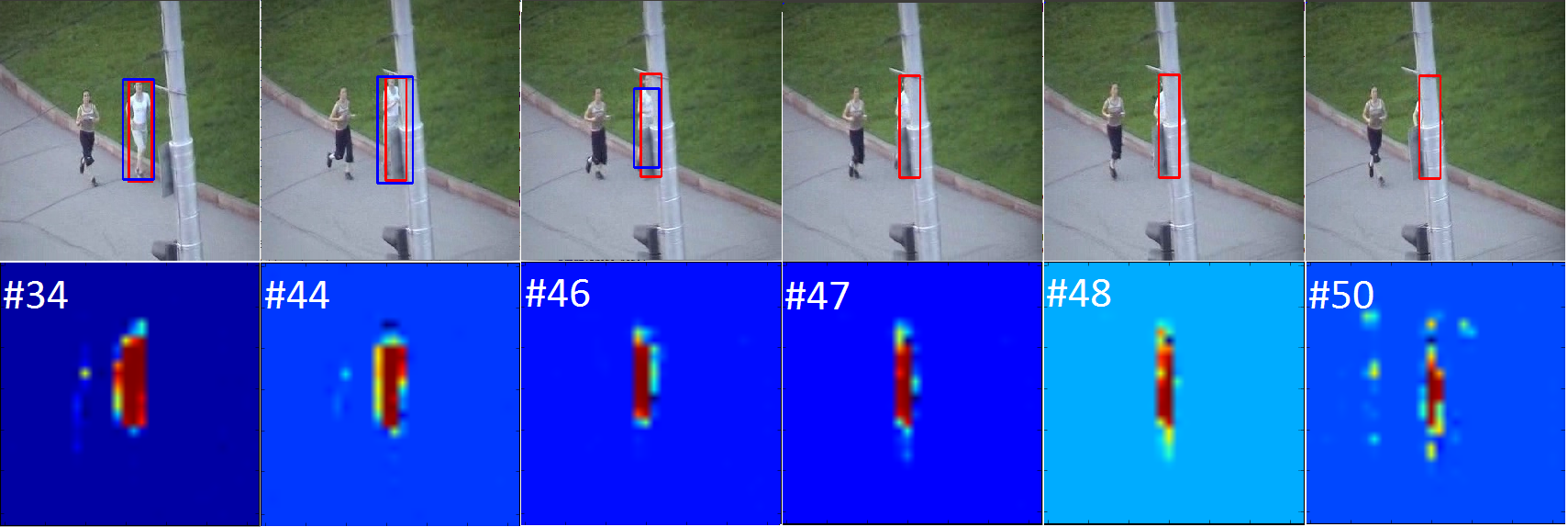
- There is LSTM-based ROLO - but it is very slow and can track only 1 object: https://github.com/Guanghan/ROLO based on: https://arxiv.org/abs/1607.05781
- Can be used RNN (Recurrent Neural Networks) or LSTM (Long short-term memory) for Multi-Target Tracking: https://arxiv.org/abs/1604.03635v2

ROLOs frames example:
AlexeyAB
on 11 Jun 2017
Thank you my friend, I will try on it.
And for the second suggestion, I want to share a paper to you, although I don't know whether it is useful to you or not. The paper is here: https://arxiv.org/abs/1705.06368
RoseOnCollar
on 14 Jun 2017
@AlexeyAB I'm sorry to disturb you again.
Do you think that using optical flow is useful to detect the object? For example, sometimes one object can not be detected by YOLO, but it can be tracked by optical flow. then we can consider that the object has also been detected? But the result of the tracking is uncontrollable, even sometimes is wrong. Like what you said, It's like in illusionist tricks.T_T
RoseOnCollar
on 19 Jun 2017
@RoseOnCollar Hi,
Main thought, that Yolo on middle-GPU can work with ~10 FPS, so the bounded box layout lags by 100 milliseconds - i.e. when the object moves, the bounded box lags behind a large number of pixels. But optical flow can works with speed ~1000 FPS. Object tracking by using optical flow, can track objects for each frame between two detections.
This is video, with detection by using SURF-keypoints 12 FPS and tracking by using Optical-flow 150 FPS: https://youtu.be/WL7sVjPShG8
- Red = SURF - detection (SURF)
- Green = SURF+OpticalFlow - tracking (Optical flow) after object detection by SURF
You can see that Red-box has lag, but Green-box hasn't it.
For example, on 100 FPS-video Yolo detects with 10 FPS (with 10-frames lag), and if object-1 detected with lag 10-frames (100ms and 50 pixels), then:
- tracking algorithm saves previous 10 frames
- put bounded box on the first of these 10 frames (on frame when Yolo-detection was started)
- very quickly asynchronously do tracking object by using optical flow on these 10 frames
- and then tracks object by using optical flow for each frame until the Yolo again detects the object, then go to step 1
AlexeyAB
on 19 Jun 2017
@AlexeyAB hi,
Thank you for sharing your thoughts! I have a question regardin YOLO outputs. Is there any way to easily extract features from the last conv layers, like heatmaps (I would like to feed them later into LSTM and other algorithms offline)?
 xitman47
on 3 Nov 2017
xitman47
on 3 Nov 2017
@xitman47 Hi, to save output of the last convolutional layer (with layer index = net.n - 2):
- If you compile Darknet with GPU, then you can add this code after this line: https://github.com/AlexeyAB/darknet/blob/a4e1dc907875d1a9aaf5800ab33558e9ff0ff649/src/network_kernels.cu#L54
if (i == net.n - 2) {
    printf("\n copy GPU->CPU and save to the file output_layer.bin \n");
    float *output_cpu = (float *)calloc(l.outputs, sizeof(float));
    cudaError_t status = cudaMemcpy(output_cpu, l.output_gpu, l.outputs * sizeof(float), cudaMemcpyDeviceToHost);
    FILE *fp = fopen("output_layer.bin", "wb");
    fwrite(output_cpu, l.outputs * sizeof(float), 1, fp);
    fclose(fp);
    free(output_cpu);
}
- If you compile Darknet without GPU, then you can add this code after this line: https://github.com/AlexeyAB/darknet/blob/a4e1dc907875d1a9aaf5800ab33558e9ff0ff649/src/network.c#L156
if (i == net.n - 2) {
    printf("\n save to the file output_layer.bin \n");
    FILE *fp = fopen("output_layer.bin", "wb");
    fwrite(l.output, l.outputs * sizeof(float), 1, fp);
    fclose(fp);
}
Or the same you can do with Light Yolo repository https://github.com/AlexeyAB/yolo2_light here you can much easier to understand everything that's happening:
If you compile Darknet with GPU and CUDNN, add the same lines after that line: https://github.com/AlexeyAB/yolo2_light/blob/19c158291aa39537afc4d314ac9fcb60bdb7c97f/src/yolov2_forward_network_gpu.cu#L144
If you compile Darknet without GPU, add the same lines after that line: https://github.com/AlexeyAB/yolo2_light/blob/19c158291aa39537afc4d314ac9fcb60bdb7c97f/src/yolov2_forward_network.c#L348
AlexeyAB
on 3 Nov 2017
@AlexeyAB Thank you, I will try this option. What I had in mind is to save predictions of last conv layers (not coordinates but numpy array of conv features) to feed it afterwards into new algorithms. But as far as I've understood YOLO's architecture works on full image, so heatmaps are produced for total image as well. But I guess it would be more usefull to take heatmaps for each of 'regions' instead (with predicted objects). So I guess the easiest way is to take coords of YOLO, make crops and then run Resnet on them to get image representations.
xitman47
on 3 Nov 2017
Related issues
 jasleen137
·
3Comments
jasleen137
·
3Comments
 PROGRAMMINGENGINEER-NIKI
·
3Comments
PROGRAMMINGENGINEER-NIKI
·
3Comments
 siddharth2395
·
3Comments
siddharth2395
·
3Comments
 Mididou
·
3Comments
Mididou
·
3Comments
 hemp110
·
3Comments
hemp110
·
3Comments