Darknet: Differntiating the detected objects ...
Hi,
Consider that we have a video stream that each frame may include no, one or several detection. for example pedestrian detection. How can we hold the information of each object detection till I don't want or the detection is destroyed?
For example consider we have an image of 10 detected pedestrian. all detected objects belong to one class as pedestrian class, but each person is different and I want to label them in the software as person1, person2 ... person10.
of course this list may be increased or decreased in each frame when new objects come in or old objects get out, but what I want is that each detected object hold its own label even if they belong to a same class.
How can I do this in the code?
 VanitarNordic
All 27 comments
@VanitarNordic Hi,
I added it in last commit: https://github.com/AlexeyAB/darknet/commit/3659d84f24ddc95102483cca430e01dc05568cbb
To use it - just re-compile yolo_cpp_dll.sln and yolo_console_dll.sln, start yolo_console_dll.exe and enter video-filename.avi (avi/mp4/mov/mjpeg) and see that objects are numerated.
To use it in your project - just use this line result_vec = detector.tracking(result_vec); after detection: https://github.com/AlexeyAB/darknet/blob/3659d84f24ddc95102483cca430e01dc05568cbb/src/yolo_console_dll.cpp#L72
 AlexeyAB
on 31 Mar 2017
AlexeyAB
on 31 Mar 2017
Oh my goodness, thank you man.
Just one question, if I want to test it without using the DLL, I mean in the way where we use the repository in general, by calling the Darknet.exe in the command line, then which part of the code should be changed? Should I download the last updated files?
VanitarNordic
on 31 Mar 2017
@VanitarNordic It is more harder, because my code on C++, but Darknet written on C, there are required many C<->C++ wrappers to do this without DLL & cpp-example.
AlexeyAB
on 31 Mar 2017
@AlexeyAB
Then no worries. This is good. it was just a question.
is it possible to test it on an image also and see the labeling on the detected objects?
VanitarNordic
on 31 Mar 2017
@VanitarNordic Yes, you can add result_vec = detector.tracking(result_vec); after this line: https://github.com/AlexeyAB/darknet/blob/3659d84f24ddc95102483cca430e01dc05568cbb/src/yolo_console_dll.cpp#L80

But on the video this is much more useful.
AlexeyAB
on 31 Mar 2017
@AlexeyAB
Thank you. We can assume this labeling system in these two scenarios:
1) each detected object holds a unique label till the software restarts. For example, you have used numbers to label objects here. by my definition, number 5 for example, will be used just once for an object.
this means by each new detection, the number will be increased, and even if an old object be detected again, it will hold a new number and naturally it would be bigger.
2) Numbers get updated in each frame and typically always start start from 1 and counts and get updated.
How can I implement each case? I think your code does the part 2.
VanitarNordic
on 1 Apr 2017
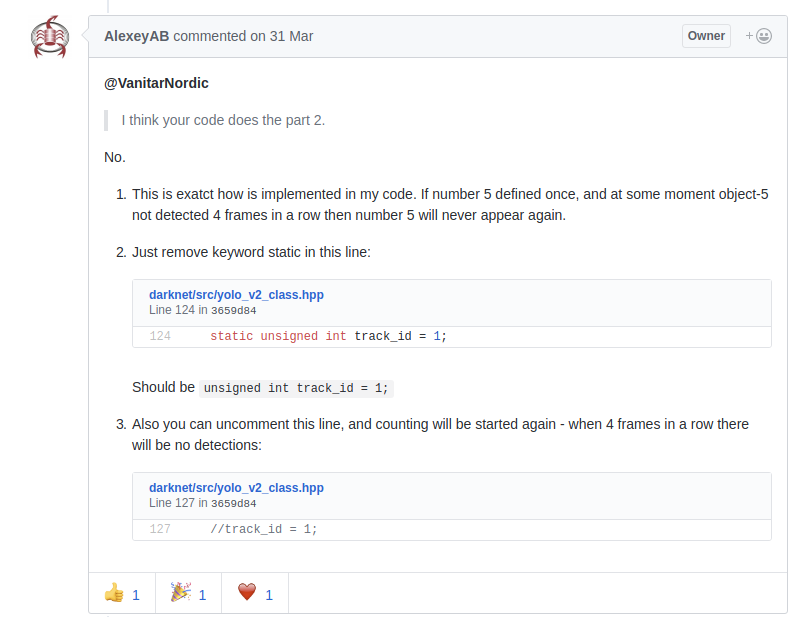
@VanitarNordic
I think your code does the part 2.
No.
This is exatct how is implemented in my code. If number 5 defined once, and at some moment object-5 not detected 4 frames in a row then number 5 will never appear again.
Just remove keyword static in this line: https://github.com/AlexeyAB/darknet/blob/3659d84f24ddc95102483cca430e01dc05568cbb/src/yolo_v2_class.hpp#L124
Should beunsigned int track_id = 1;Also you can uncomment this line, and counting will be started again - when 4 frames in a row there will be no detections: https://github.com/AlexeyAB/darknet/blob/3659d84f24ddc95102483cca430e01dc05568cbb/src/yolo_v2_class.hpp#L127
AlexeyAB
on 1 Apr 2017
if a present object get out in more than 4 frames, then in which case remaining objects labels will get updated?.
for example there are 5 apples in the area and one get removed. then labels re-start from 1 to 4. if it added again, then labels 5 will be added to the new apple
VanitarNordic
on 1 Apr 2017
@VanitarNordic
- By default (case-1 on my previous answer), if there were 5 apples, and 1 apple with number-1 was removed, then there are still 4 apples with numbers (2,3,4,5). And if then the removed apple number-1 after 4 frames added again, then it will have number-6.
I.e. if we can't say that two objects are the same object, then it will have different numbers.
In case-2 it will always begin to count from 1 for each frame.
In case-3 it will begin to count from 1 only when 4 frames there are no one of any objects.
AlexeyAB
on 1 Apr 2017
@AlexeyAB
Thank you. now my confusion cleared up.
VanitarNordic
on 1 Apr 2017
This is a off topic question, but anyway let me ask here instead of opening a new issue.
what do you suggest to make a segmentation project?. I think this is not possible with YOLO since it is a detector. I read a tutorial here: https://devblogs.nvidia.com/parallelforall/image-segmentation-using-digits-5/
Do you have a suggestion?
VanitarNordic
on 1 Apr 2017
@VanitarNordic
Yes, darknet hasn't Semantic Segmentation yet.
But in some of last commits added deconvolutional_kernels.o: https://github.com/pjreddie/darknet/commit/60e952ba694e3e0811db5868d70ad7ebfe676836#diff-b67911656ef5d18c4ae36cb6741b7965R53
It says that Semantic Segmentation will probably be implemented by using deconvolutional_layer: https://groups.google.com/forum/#!topic/darknet/Lpkup1Dh5-8
Now one of the best approach for Semantic Segmentation is ResNet (Residual Networks) + (remove down-sampling and increase dilation rates) with IoU class 80.6% on Cityscapes-Dataset: https://www.cityscapes-dataset.com/benchmarks/#scene-labeling-task
- Source code: https://github.com/TobyPDE/FRRN
- Video: https://www.youtube.com/watch?v=PNzQ4PNZSzc
AlexeyAB
on 1 Apr 2017
@AlexeyAB
To get the object ID tracking, as you mentioned, i have re-compile yolo_cpp_dll.sln and yolo_console_dll.sln
I then start yolo_console_dll.exe and entered the video filename (I tried different ways to specify file path: video.mp4, "C:\darknet-master\build\darknet\x64\data\video.mp4", data\video.mp4), but it tells me "file not found". Here is snipit:
.....
27 reorg / 2 26 x 26 x 64 -> 13 x 13 x 256
28 route 27 24
29 conv 1024 3 x 3 / 1 13 x 13 x1280 -> 13 x 13 x1024
30 conv 125 1 x 1 / 1 13 x 13 x1024 -> 13 x 13 x 125
31 detection
Loading weights from yolo-voc.weights...Done!
object names loaded
input image or video filename: exception: file not found
Any ideas there?
 codeguymartin
on 30 Aug 2017
codeguymartin
on 30 Aug 2017
@AlexeyAB
how can I get this done in your recent version of .hpp and .cpp files? The code has been changed. I want the count to start again every four frames.
Thanks
 mandeepubc
on 6 Oct 2017
mandeepubc
on 6 Oct 2017
@AlexeyAB
Hi, i am impressed with what you did can i do this with tensorflow. i have to add number to each object detected with tensorflow? and thank you
 khouloudbnj
on 29 Mar 2018
khouloudbnj
on 29 Mar 2018
hi after adding these lines
result_vec = detector.tracking(result_vec);
after this
std::vector
there is a compliation error if one does make
src/yolo_console_dll.cpp:452:47: error: ‘class Detector’ has no member named ‘tracking’
result_vec = detector.tracking(result_vec);
 buzdarbalooch
on 29 Nov 2018
buzdarbalooch
on 29 Nov 2018
Hello @AlexeyAB! Thank you very much for your excellent work and for the constant support to those who need help!
I have a question to ask you; I have successfully compiled the yolo_console_dll.cpp, but I have the following error when I try to execute it:
Loading weights from yolov3.weights ...
  seen 64
CUDA status Error: file: C: /darknet/src/convolutional_kernels.cu: cuda_convert_f32_to_f16 (): line: 138: build time: Dec 26 2019 - 17:31:13
CUDA Error: invalid device function
Apparently this error appears because my GPU does not support half-precision format.
By the way I am using an NVIDIA Quadro P1000.
Is there another way to use this code, especially the object tracking function, without using the half-precision format?
Thanks a lot in advance for your time!
 lorenzonluis
on 3 Jan 2020
lorenzonluis
on 3 Jan 2020
Use CUDNN_HALF=0
AlexeyAB
on 3 Jan 2020
@AlexeyAB! Sorry for the delay on my response!
I have rebuilt the program with CUDNN_HALF = 0 and now it is working; at least it's what I believe.
The only difference is that the yolo_console_dll.exe program is now the uselib_track.exe, is this correct?
I have run the following code on my trained neuronal net:
.\uselib_track.exe .\data\red_neuronal.names .\data\red_neuronal.cfg .\data\red_neuronal_last.weights .\data\Video.mp4
The program runs and shows the window with the detections.
Is it possible to use live camera tracking?
Thank you very much for your help!
lorenzonluis
on 6 Jan 2020
@lorenzonluis
The only difference is that the yolo_console_dll.exe program is now the uselib_track.exe, is this correct?
Yes. This is the same.
Is it possible to use live camera tracking?
Yes.
.\uselib_track.exe .\data\red_neuronal.names .\data\red_neuronal.cfg .\data\red_neuronal_last.weights web_camera
or
.\uselib_track.exe .\data\red_neuronal.names .\data\red_neuronal.cfg .\data\red_neuronal_last.weights zed_camera
or
.\uselib_track.exe .\data\red_neuronal.names .\data\red_neuronal.cfg .\data\red_neuronal_last.weights rtsp://login:[email protected]:554
or
...
AlexeyAB
on 6 Jan 2020
@AlexeyAB, Its me again!
Finally the yoloconsole-counter works; so its tracking and counting the objects of each class that cross a certain line!
The only problem I´m having is, that sometimes when crossing the line the counter adds multiple objects and not only one.
I think that maybe is because of the nms. I think that the yolo console is keeping track of the multiple detections of each objects despite the fact that only shows one bbox.
I´ve tried changing the threshold of nms in the detector class (float nms = .4;) but it keeps doing the same.
what do you think?
how can i be able to count only one bbox of the crossing object?
Thank you!
lorenzonluis
on 22 Jan 2020
Can you show video of example?
AlexeyAB
on 22 Jan 2020
of course!
Sometimes it counts once but sometimes twice.
hope the quality is good enough.
lorenzonluis
on 22 Jan 2020
- try to set 20 instead of 5
and try to set 80 instead of 40 https://github.com/AlexeyAB/darknet/blob/56cd545267cd7829bccd1d0d6cf95fcfbaf5cf4e/src/yolo_console_dll.cpp#L535-L536
try to decrease nms
detector.nms = 0.2;- try to check your counting algorithm
AlexeyAB
on 22 Jan 2020
Also do you use true at the end of this function? https://github.com/AlexeyAB/darknet/blob/56cd545267cd7829bccd1d0d6cf95fcfbaf5cf4e/src/yolo_console_dll.cpp#L465
AlexeyAB
on 22 Jan 2020
Hello @AlexeyAB!
Thanks for your suggestions.
Also do you use true at the end of this function?
Yes; Im using true at the end. It´s ok?
try to set 20 instead of 5
and try to set 80 instead of 40
try to decrease nms detector.nms = 0.2;
I've tested, and it "seems" to work better; or at least the double counting are less frequent but still happening.
try to check your counting algorithm
About this, I've checked again but found nothing extrange... in fact the algorithm is counting in only one direction and with double threshold. So an object can only be counted as ok if first has been in the bottom of the frame, then in the middle and then in the top. Once counted (and if keeps the same track_id) it cannot be counted again even if its go down to the bottom and top again. (see the colours of the boxes in the video)
lorenzonluis
on 23 Jan 2020
@AlexeyAB! uselib_track it´s working good now and counting right!
I´ve made all the tests in a laptop with Win 10 and Nvidia quadro.
Now i´ve purchased an Nvidia Jetson Nano (Ubuntu 18.4 LTS, CUDA 10, CUnn 7.5, OpenCV 4.1.1) and I tried to do the same, saddly i cannot make it work.
I was able to compile and run your original code without any modifications, I get around 23/24 FPS Capture but 0 FPS detection and no detections at all.
(with the code i´ve modified is even worse, I get acore dumped)
do you have any thougts or idea of whats going on?
have you tried making it work on a Jetson Nano?
Thanks a lot!
lorenzonluis
on 2 Mar 2020
Related issues
 off99555
·
3Comments
off99555
·
3Comments
 kebundsc
·
3Comments
kebundsc
·
3Comments
 HilmiK
·
3Comments
HilmiK
·
3Comments
 jasleen137
·
3Comments
jasleen137
·
3Comments
 siddharth2395
·
3Comments
siddharth2395
·
3Comments
Most helpful comment
@VanitarNordic Hi,
I added it in last commit: https://github.com/AlexeyAB/darknet/commit/3659d84f24ddc95102483cca430e01dc05568cbb
To use it - just re-compile
yolo_cpp_dll.slnandyolo_console_dll.sln, startyolo_console_dll.exeand entervideo-filename.avi(avi/mp4/mov/mjpeg) and see that objects are numerated.To use it in your project - just use this line
result_vec = detector.tracking(result_vec);after detection: https://github.com/AlexeyAB/darknet/blob/3659d84f24ddc95102483cca430e01dc05568cbb/src/yolo_console_dll.cpp#L72