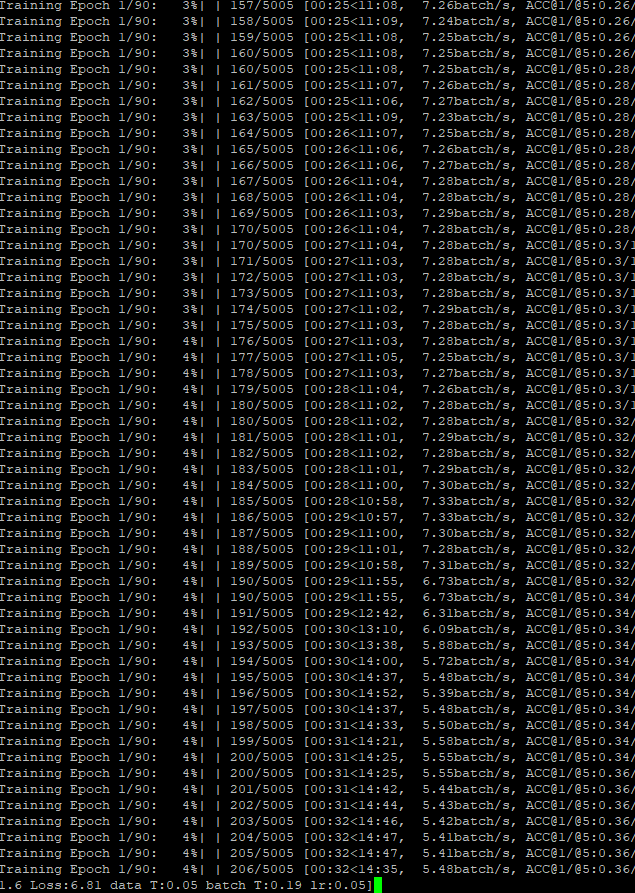
I use the script in here with python -m torch.distributed.launch --nproc_per_node 4 main.py /DIR.../ --arch resnet18 --batch-size 256 --fp16 using a DGX-1 (4 Tesla V100 of it) from a GPU cluster. The training was at full speed but suddenly slowdown (it also happened for only using 2 GPUs):
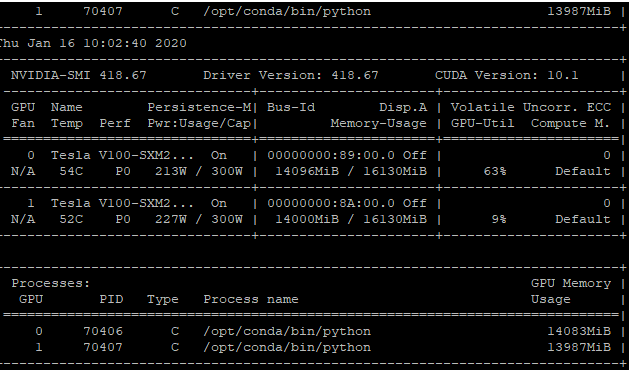
The slowndown is indicated by the GPU utilization (flutruating severely) as follows:
I used docker image from NGC Pytorch v19.10.
This is almost like the previous case, which was casued by insufficient memory or the dataset located in an HDD.
I also tried the same thing in another workstation with 4 2080Ti GPUs wth a Intel® Xeon® W-2295. It worked perfectly without any slowndown (the GPU uitilizations were at 99%).
What might cause this slowndown? The DGX-1 should have enough memory as free -m indicated a lot remaining.
 ZHUANGHP
All 5 comments
Hi,
Maybe your data is not yet loaded into disc cache. When you end 1st epoch has the performance returns to the previous value? Can you check if your training occupies the IO like in the post you ave mentioned?
Even if you have enough memory to cache the data still it needs to fill the cache first and it is as fast as the disk IO speed (for SSD it is quite fast, for the network storage it maybe not that fast).
 JanuszL
on 17 Jan 2020
JanuszL
on 17 Jan 2020
@JanuszL Thank you for the response. I have been trying a few ways to determine the cause. I have tried to move the dataset to another SSD, it worked in the same manner. I think the data loading might not be the only issue. Since the DGX-1 is an 8-GPU workstation, I applied for only 4 of them. It could be the case that other users are directing the resources away, yet the DALI seems to need much more CPU resources than the original dataloader. Doing some more verification now.
ZHUANGHP
on 17 Jan 2020
Hi,
Maybe your data is not yet loaded into disc cache. When you end 1st epoch has the performance returns to the previous value? Can you check if your training occupies the IO like in the post you ave mentioned?
Even if you have enough memory to cache the data still it needs to fill the cache first and it is as fast as the disk IO speed (for SSD it is quite fast, for the network storage it maybe not that fast).
Update: I have tried some more tests and I found the casuse. It is not the IO speed problem so I did not check it.
There are two casuses actually. The first one is the location to store the dataset. Although I though that the dataset was in an SSD, it was not entirely correct. I moved the dataset to a local SSD. Alter that, there was a longer time before the slow-down happened. Guess the location is one of the causes.
The other one is the user conflict. Since I was conducting 4-GPU job on the DGX-1 (8-GPU machine), it looked that other users occupied some of the resources. It is likely that there was some sort of recource conflict among users. This conclusion is drawn because I tried to run an 8-GPU job on the worstation and the problem vanished as no other users are involved. I suspect that the other users ran the training with platform like Tensorflow (I heard that it would try to harvest as much resources as possible)?
In summary, the slow-down is most likely caused by both the dataset location and user conflict. I will reopen this if onething more pops out.
ZHUANGHP
on 18 Jan 2020
Does it have effect using "python -m torch.distributed.launch --nproc_per_node 4" .I don't see anywhere which can be distributed such as "DistributedDataParallel(model)" . So does it seep up by using command "python -m torch.distributed.launch --nproc_per_node 4" rather than "python"
 wuzhi19931128
on 28 Feb 2020
wuzhi19931128
on 28 Feb 2020
Does it have effect using "python -m torch.distributed.launch --nproc_per_node 4" .I don't see anywhere which can be distributed such as "DistributedDataParallel(model)" . So does it seep up by using command "python -m torch.distributed.launch --nproc_per_node 4" rather than "python"
I think it would be better to ask on the PyTorch forum.
JanuszL
on 28 Feb 2020
Related issues
 Doom9234
·
3Comments
Doom9234
·
3Comments
 ShoufaChen
·
4Comments
ShoufaChen
·
4Comments
 bamfpga
·
3Comments
bamfpga
·
3Comments
 jxmelody
·
6Comments
jxmelody
·
6Comments
 dhkim0225
·
4Comments
dhkim0225
·
4Comments
Most helpful comment
Update: I have tried some more tests and I found the casuse. It is not the IO speed problem so I did not check it.
There are two casuses actually. The first one is the location to store the dataset. Although I though that the dataset was in an SSD, it was not entirely correct. I moved the dataset to a local SSD. Alter that, there was a longer time before the slow-down happened. Guess the location is one of the causes.
The other one is the user conflict. Since I was conducting 4-GPU job on the DGX-1 (8-GPU machine), it looked that other users occupied some of the resources. It is likely that there was some sort of recource conflict among users. This conclusion is drawn because I tried to run an 8-GPU job on the worstation and the problem vanished as no other users are involved. I suspect that the other users ran the training with platform like Tensorflow (I heard that it would try to harvest as much resources as possible)?
In summary, the slow-down is most likely caused by both the dataset location and user conflict. I will reopen this if onething more pops out.