Dagger: Hilt - injecting ViewModel via navGraphViewModels issue
Hello,
I had an issue with restoring state of injected viewmodel via navGraphViewModels.
I saw the recommended way for injectig viewmodels with the Jetpack navigation library (https://github.com/google/dagger/issues/1935), 2, however after process death ViewModel is not restored correctly on the second screen of navGraph.
I created demo project which demostrates the issue. We have a nested navigation graph R.id.nested which consists of 2 fragments. Those 2 fragments shares MainViewModel and MainViewModel2 which are completely similar and contains LiveData<String>.
The only difference is that first ViewModel initialized with fragment's defaultViewModelProviderFactory as recommended with Hilt, while second is initialized without passing custom factory, so uses backStackEntry's defaultViewModelProviderFactory (will not work when Hilt is used, but to demosntrate the problem).
```kotlin
private val viewModel by navGraphViewModels
defaultViewModelProviderFactory
}
private val viewModel2 by navGraphViewModels<MainViewModel2>(R.id.nested)
```
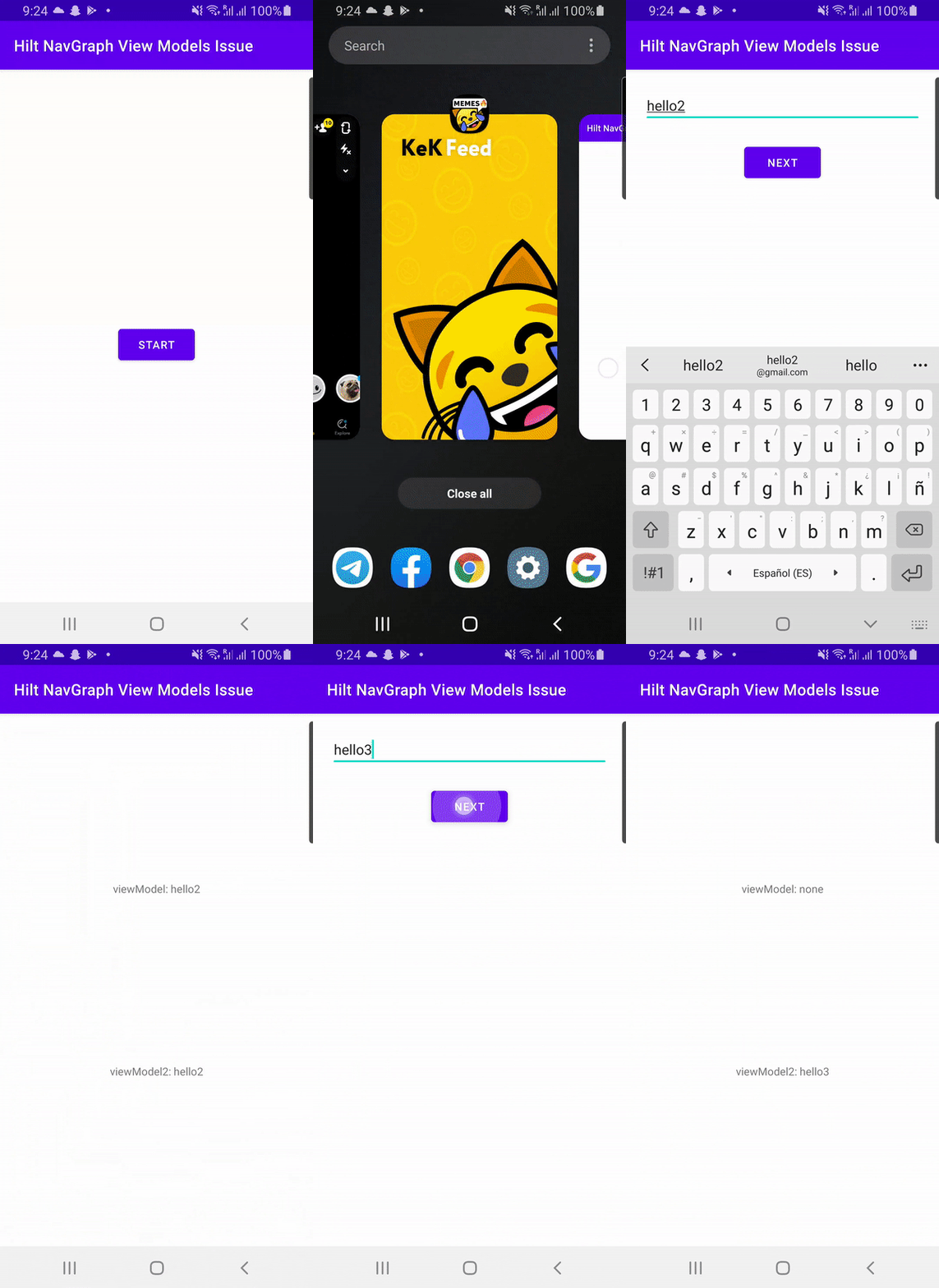
First fragment in nested graph sets message to both viewmodels and then opens Second fragment.
With Don't keep activities enabled, putting app to background and back, triggers app process death and restore.
After process restore, MainViewModel doesn't have the value from First fragment and shows the default one, while MainViewModel2 is restored correctly and displays proper message.
- Enter message on FirstFragment and open SecondFragment.
On SecondFragment both viewmodels have correct values. - Background app with
Don't keep activitiesto trigger process death and come back.
On SecondFragment first viewmodel doesn't have restored value, second viewmodel has as expected. - Press back to return on FirstFragment and open SecondFragment again
On SecondFragment both viewmodels have correct values. - Background app with
Don't keep activitiesto trigger process death and come back.
On SecondFragment both viewmodels contains correct value, even if you modify value on FirstFragment. - Press back to return on FirstFragment, Background app with
Don't keep activitiesand open SecondFragment.
On SecondFragment both viewmodels have correct values. - Background app with
Don't keep activitiesto trigger process death and come back.
On SecondFragment first viewmodel doesn't have restored value, second viewmodel has as expected.
 silentnuke
All 4 comments
Thanks for the repro case and detailed write up. Just to clarify, you're running into this issue even when not using Hilt, right? The reason this is related to Hilt is that https://github.com/google/dagger/issues/1935 recommends passing in the defaultViewModelProviderFactory to navGraphViewModels and this causes the issue?
 Chang-Eric
on 27 Oct 2020
Chang-Eric
on 27 Oct 2020
@Chang-Eric yes, this issue reproduces without Hilt when passing fragment's defaultViewModelProviderFactory to navGraphViewModels.
The reason this is related to Hilt is that with Hilt there is no way to use navGraphViewModels without passing fragment's defaultViewModelProviderFactory and this is recommened way in the docs. Without Hilt backStackEntry's defaultViewModelProviderFactory is used by default which doesn't have that issue.
silentnuke
on 27 Oct 2020
The root cause of the issue is that the defaultViewModelProviderFactory from an activity or fragment uses the activity itself as the SavedStateRegistryOwner and that is different from the ViewModelStoreOwner used by the NavBackStack. It seems these two should be the same, which is exactly what is going on with the HiltViewModelFactory too, it uses the activity or fragment as SavedStateRegistryOwner which is different from the ViewModelStoreOwner that is used by the ViewModelProvider by theNavBackStack.
We are investigating a solution but sadly I don't have a workaround for now. We might either expose a builder / factory for HiltViewModelFactory (which is odd) or we might work with AndroidX itself to make it so that these two owners are in sync.
 danysantiago
on 6 Nov 2020
danysantiago
on 6 Nov 2020
For now, in my sample, what I tried doing is:
add an accessor entrypoint for classes that need to be accessed to build a viewmodel
create ViewModel using the accessors to get the dependencies
And the ugliest part:
- try to find an component in the hierarchy from which the accessor can be obtained. Due to how
activityRetainedComponentManagerseems inaccessible apart from reflection, the code is in fact using reflection.
Not nice, but state restoration seems to work on my second screen now as well. It's unfortunate that I had not noticed earlier, considering that apparently the views restoring their own state has bamboozled me. :frowning:
 Zhuinden
on 1 Dec 2020
Zhuinden
on 1 Dec 2020
Related issues
 JakeWharton
·
46Comments
JakeWharton
·
46Comments
 droidrcc
·
43Comments
droidrcc
·
43Comments
 mnayef95
·
20Comments
mnayef95
·
20Comments
 ronshapiro
·
52Comments
ronshapiro
·
52Comments
 chrisjenx
·
70Comments
chrisjenx
·
70Comments