I'm giving this a try here, because I feel like there's potentially a bug somewhere in D3 but I'm not 100% sure and not getting any satisfactory answers on StackOverflow (http://stackoverflow.com/questions/31243959/why-doesnt-click-event-always-fire). This is a verbatim paste of my SO question though I'm happy to go through and reformat if need be to try and better fit it into an issue.
The Problem
I've got a bit of a strange problem handling browser events. Unfortunately this sits in quite a large application, and because I'm completely lost on what the cause is I'm struggling to find a small reproduceable example so I'm going to provide as much hopefully useful information as I can.
So my problem is that click events don't seem to fire reliably for certain DOM Elements. I have two different sets of elements Filled circles and White circles. You can see in the screenshot below _1002_ and _1003_ are white circles, while _Suppliers_ is a filled circle.
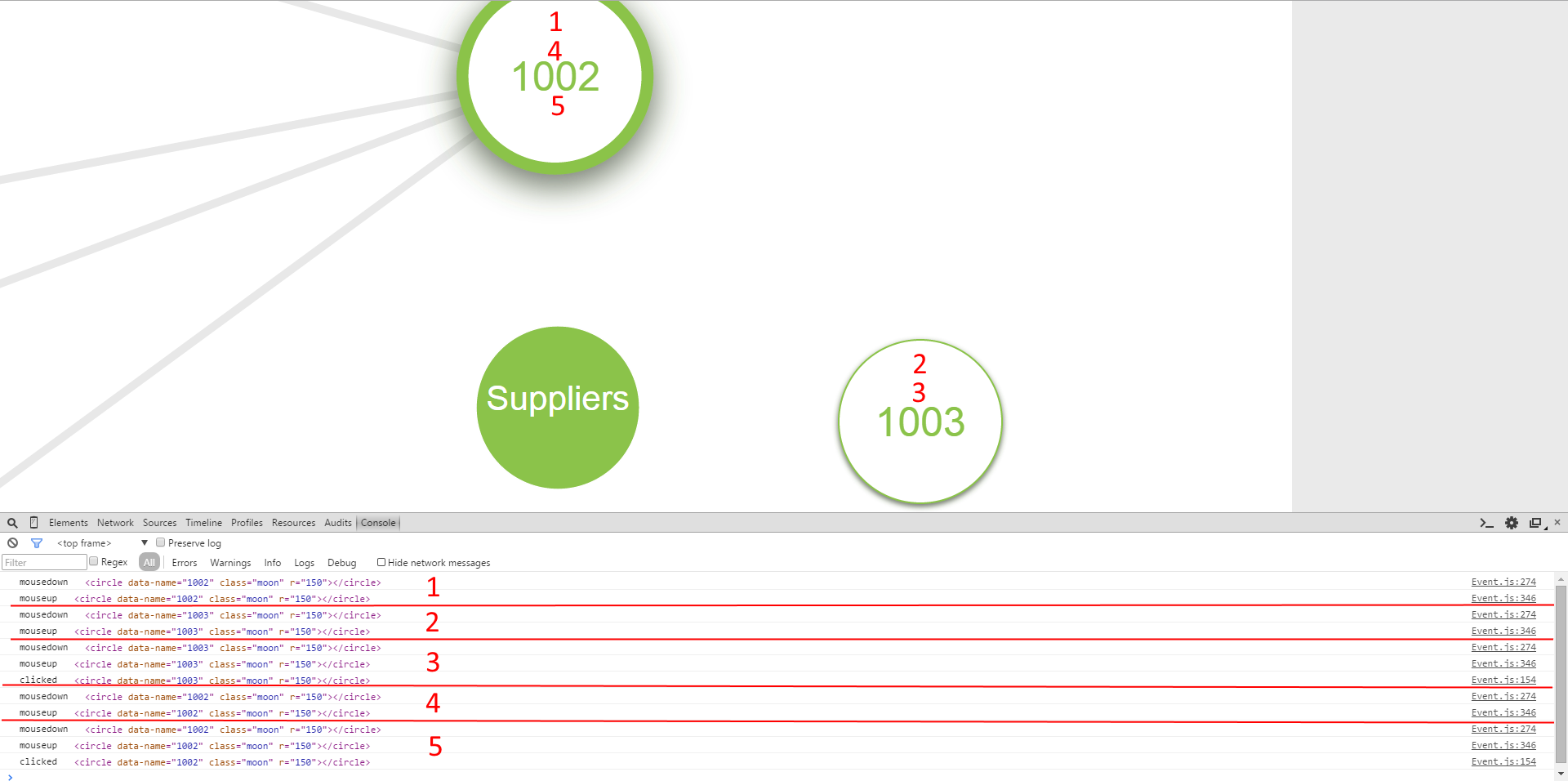
Now this problem only occurs for the white circles which I don't understand. The screenshot below shows what happens when I click the circles. The order of clicks is shown via the red numbers, and the logging associated with them. Essentially what you see is:
- mousedown
- mouseup
- sometimes a click
The issue is a bit sporadic. I had managed to track down a realiable reproduction but after a few refreshes of the browser it's now much harder to reproduce. If I alternate click on _1002_ and _1003_ then I keep getting mousedown and mouseup events but never a click. If I click on one of them a second time then I do get a click event. If I keep clicking on the same one (not shown here) only every other click fires the click event.
If I repeat the same process with a filled circle like _Suppliers_ then it works fine and click is fired every single time.
How the Circles are created
So the circles (aka Planets in my code) have been created as a modular component. There for the data is looped through and an instance for each is created
data.enter()
    .append("g")
    .attr("class", function (d) { return d.promoted ? "collection moon-group" : "collection planet-group"; })
    .call(drag)
    .attr("transform", function (d) {
        var scale = d.size / 150;
        return "translate(" + [d.x, d.y] + ") scale(" + [scale] + ")";
    })
    .each(function (d) {

        // Create a new planet for each item
        d.planet = new d3.landscape.Planet()
                              .data(d, function () { return d.id; })
                              .append(this, d);
    });
This doesn't tell you all that much, underneath a Force Directed graph is being used to calculate positions. The code within the Planet.append() function is as follows:
d3.landscape.Planet.prototype.append = function (target) {
    var self = this;

    // Store the target for later
    self.__container = target;
    self.__events = new custom.d3.Events("planet")
                                    .on("click", function (d) { self.__setSelection(d, !d.selected); })
                                    .on("dblclick", function (d) { self.__setFocus(d, !d.focused); self.__setSelection(d, d.focused); });

    // Add the circles
    var circles = d3.select(target)
                    .append("circle")
                    .attr("data-name", function (d) { return d.name; })
                    .attr("class", function(d) { return d.promoted ? "moon" : "planet"; })
                    .attr("r", function () { return self.__animate ? 0 : self.__planetSize; })
                    .call(self.__events);
Here we can see the circles being appended (note each Planet is actually just a single circle). The custom.d3.Events is constructed and called for the circle that has just been added to the DOM. This code is used for both the filled and the white circles, the only difference is a slight variation in the classes. The DOM produced for each looks like:
Filled
<g class="collection planet-group" transform="translate(683.080338895066,497.948470463691) scale(0.6666666666666666,0.6666666666666666)">
  <circle data-name="Suppliers" class="planet" r="150"></circle>
  <text class="title" dy=".35em" style="font-size: 63.1578947368421px;">Suppliers</text>
</g>
White
<g class="collection moon-group" transform="translate(679.5720546510213,92.00957926233855) scale(0.6666666666666666,0.6666666666666666)">
  <circle data-name="1002" class="moon" r="150"></circle>
  <text class="title" dy=".35em" style="font-size: 75px;">1002</text>
</g>
What does custom.d3.events do?
The idea behind this is to provide a richer event system than you get by default. For example allowing double-clicks (that don't trigger single clicks) and long clicks etc.
When events is called with the circle container is executes the following, setting up some raw events using D3. These aren't the same ones that have been hooked up to in the Planet.append() function, because the events object exposes it's own custom dispatch. These are the events however that I'm using for debugging/logging;
custom.d3.Events = function () {

   var dispatch = d3.dispatch("click", "dblclick", "longclick", "mousedown", "mouseup", "mouseenter", "mouseleave", "mousemove", "drag");

   var events = function(g) {
       container = g;

       // Register the raw events required
       g.on("mousedown", mousedown)
        .on("mouseenter", mouseenter)
        .on("mouseleave", mouseleave)
        .on("click", clicked)
        .on("contextmenu", contextMenu)
        .on("dblclick", doubleClicked);

       return events;
   };

   // Return the bound events
   return d3.rebind(events, dispatch, "on");
}
So in here, I hook up to a few events. Looking at them in reverse order:
click
The click function is set to simply log the value that we're dealing with
 function clicked(d, i) {
    console.log("clicked", d3.event.srcElement);
    // don't really care what comes after
 }
mouseup
The mouseup function essentially logs, and clear up some global window objects, that will be discussed next.
 function mouseup(d, i) {
    console.log("mouseup", d3.event.srcElement);
    dispose_window_events();
 }
mousedown
The mousedown function is a little more complex and I'll include the entirety of it. It does a number of things:
- Logs the mousedown to console
- Sets up window events (wires up mousemove/mouseup on the window object) so mouseup can be fired even if the mouse is no longer within the circle that triggered mousedown
- Finds the mouse position and calculates some thresholds
- Sets up a timer to trigger a long click
- Fires the mousedown dispatch that lives on the custom.d3.event object
```
function mousedown(d, i) {
console.log("mousedown", d3.event.srcElement);
 var context = this;
 dragging = true;
 mouseDown = true;

 // Wire up events on the window
 setup_window_events();

 // Record the initial position of the mouse down
 windowStartPosition = getWindowPosition();
 position = getPosition();

 // If two clicks happened far apart (but possibly quickly) then suppress the double click behaviour
 if (windowStartPosition && windowPosition) {
     var distance = mood.math.distanceBetween(windowPosition.x, windowPosition.y, windowStartPosition.x, windowStartPosition.y);
     supressDoubleClick = distance > moveThreshold;
 }
 windowPosition = windowStartPosition;

 // Set up the long press timer only if it has been subscribed to - because
 // we don't want to suppress normal clicks otherwise.
 if (events.on("longclick")) {
     longTimer = setTimeout(function () {
         longTimer = null;
         supressClick = true;
         dragging = false;
         dispatch.longclick.call(context, d, i, position);
     }, longClickTimeout);
 }

 // Trigger a mouse down event
 dispatch.mousedown.call(context, d, i);
 if(debug) { console.log(name + ": mousedown"); }
}
```
Update 1
I should add that I have experienced this in Chrome, IE11 and Firefox (although this seems to be the most reliable of the browsers).
Unfortunately after some refresh and code change/revert I've struggled getting the reliable reproduction. What I have noticed however which is odd is that the following sequence can produce different results:
- F5 Refresh the Browser
- Click on
1002
Sometimes this triggeres mousedown, mouseup and then click. Othertimes it misses off the click. It seems quite strange that this issue can occur sporadically between two different loads of the same page.
I should also add that I've tried the following:
- Caused
mousedownto fail and verify thatclickstill fires, to ensure a sporadic error inmousedowncould not be causing the problem. I can confirm thatclickwill fire event if there is an error inmousedown. - Tried to check for timing issues. I did this by inserting a long blocking loop in
mousedownand can confirm that themouseupandclickevents will fire after a considerable delay. So the events do look to be executing sequentially as you'd expect.
Update 2
A quick update after @CoolBlue's comment is that adding a namespace to my event handlers doesn't seem to make any difference. The following still experiences the problem sporadically:
var events = function(g) {
    container = g;

    // Register the raw events required
    g.on("mousedown.test", mousedown)
     .on("mouseenter.test", mouseenter)
     .on("mouseleave.test", mouseleave)
     .on("click.test", clicked)
     .on("contextmenu.test", contextMenu)
     .on("dblclick.test", doubleClicked);

    return events;
};
Also the css is something that I've not mentioned yet. The css should be similar between the two different types. The complete set is shown below, in particular the point-events are set to none just for the label in the middle of the circle. I've taken care to avoid clicking on that for some of my tests though and it doesn't seem to make much difference as far as I can tell.
/* Mixins */
/* Comment here */
.collection .planet {
  fill: #8bc34a;
  stroke: #ffffff;
  stroke-width: 2px;
  stroke-dasharray: 0;
  transition: stroke-width 0.25s;
  -webkit-transition: stroke-width 0.25s;
}
.collection .title {
  fill: #ffffff;
  text-anchor: middle;
  pointer-events: none;
  -webkit-touch-callout: none;
  -webkit-user-select: none;
  -moz-user-select: none;
  -ms-user-select: none;
  user-select: none;
  font-weight: normal;
}
.collection.related .planet {
  stroke-width: 10px;
}
.collection.focused .planet {
  stroke-width: 22px;
}
.collection.selected .planet {
  stroke-width: 22px;
}

.moon {
  fill: #ffffff;
  stroke: #8bc34a;
  stroke-width: 1px;
}
.moon-container .moon {
  transition: stroke-width 1s;
  -webkit-transition: stroke-width 1s;
}
.moon-container .moon:hover circle {
  stroke-width: 3px;
}
.moon-container text {
  fill: #8bc34a;
  text-anchor: middle;
}
.collection.moon-group .title {
  fill: #8bc34a;
  text-anchor: middle;
  pointer-events: none;
  font-weight: normal;
}
.collection.moon-group .moon {
  stroke-width: 3px;
  transition: stroke-width 0.25s;
  -webkit-transition: stroke-width 0.25s;
}
.collection.moon-group.related .moon {
  stroke-width: 10px;
}
.collection.moon-group.focused .moon {
  stroke-width: 22px;
}
.collection.moon-group.selected .moon {
  stroke-width: 22px;
}
.moon:hover {
  stroke-width: 3px;
}
Update 3
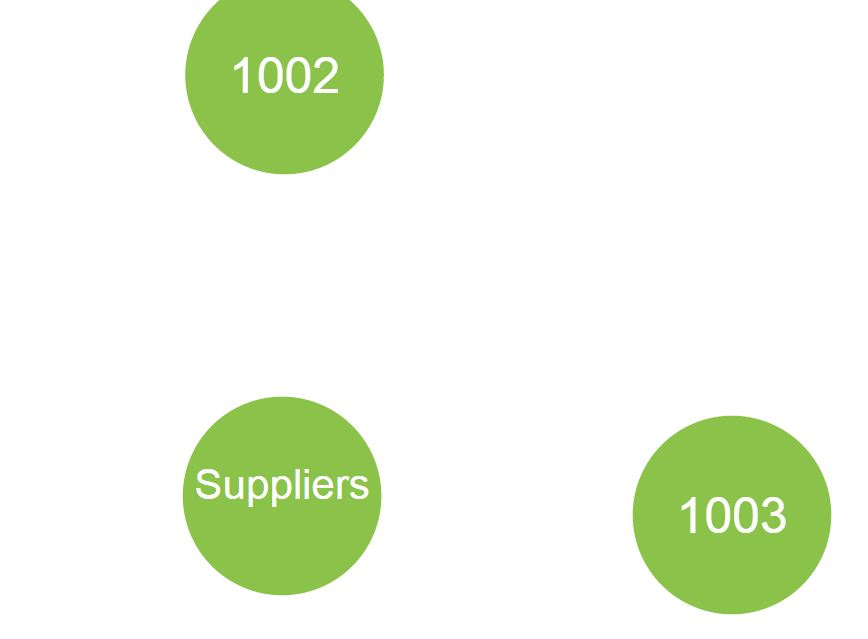
So I've tried ruling different things out. One is to change the CSS such that the white circles _1002_ and _1003_ now use the same class and therefore same CSS as _Suppliers_ which is the one that worked. You can see the image and CSS below as proof:
<g class="collection planet-group" transform="translate(1132.9999823040162,517.9999865702812) scale(0.6666666666666666,0.6666666666666666)">
   <circle data-name="1003" class="planet" r="150"></circle>
   <text class="title" dy=".35em" style="font-size: 75px;">1003</text>
</g>
I also decided to modify the custom.d3.event code as this is the most complex bit of eventing. I stripped it right back down to simply just logging:
var events = function(g) {
    container = g;

    // Register the raw events required
    g.on("mousedown.test", function (d) { console.log("mousedown.test"); })
     .on("click.test", function (d) { console.log("click.test"); });

    return events;
};
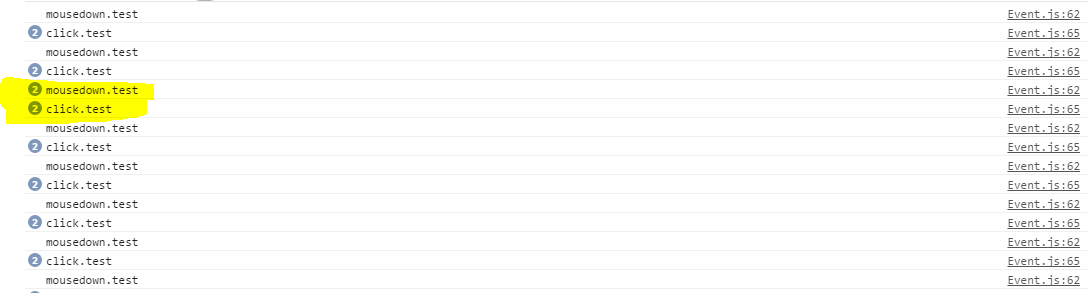
Now it seems that this still didn't solve the problem. Below is a trace (now I'm not sure why I get two click.test events fired each time - appreciate if anyone can explain it... but for now taking that as the norm). What you can see is that on the ocassion highlighted, the click.test did not get logged, I had to click again - hence the double mousedown.test before the click was registered.
Update 4
So after a suggestion from @CoolBlue I tried looking into the d3.behavior.drag that I've got set up. I've tried removing the wireup of the drag behaviour and I can't see any issues after doing so - which could indicate a problem in there. This is designed to allow the circles to be dragged within a force directed graph. So I've added some logging in the drag so I can keep an eye on whats going on:
var drag = d3.behavior.drag()
             .on("dragstart", function () { console.log("dragstart"); self.__dragstart(); })
             .on("drag", function (d, x, y) { console.log("drag", d3.event.sourceEvent.x, d3.event.sourceEvent.y); self.__drag(d); })
             .on("dragend", function (d) { console.log("dragend"); self.__dragend(d); });
I was also pointed to the d3 code base for the drag event which has a suppressClick flag in there. So I modified this slightly to see if this was suppressing the click that I was expecting.
return function (suppressClick) {
     console.log("supressClick = ", suppressClick);
     w.on(name, null);
     ...
}
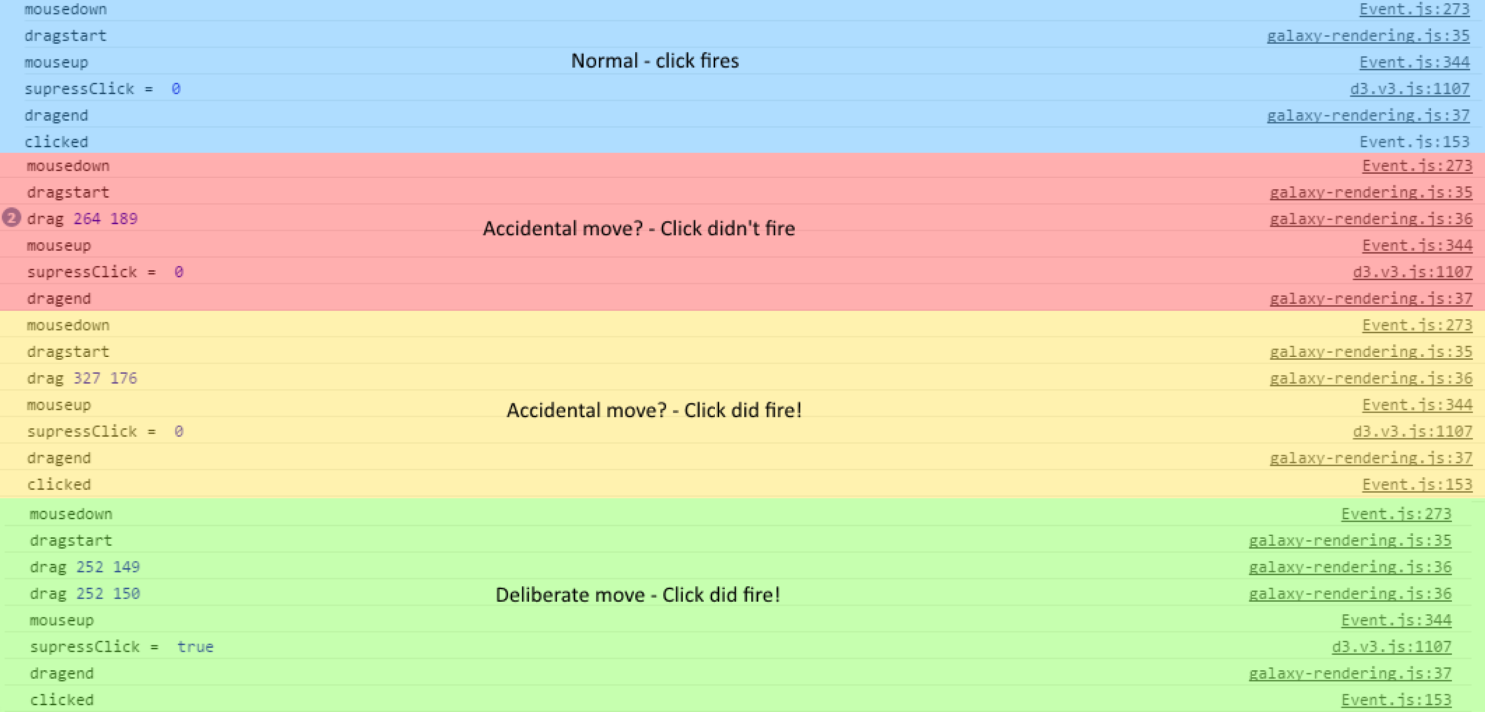
The results of this were a bit strange. I've merged all the logging together to illustrate 4 different examples:
- Blue: The click fired correctly, I noted that
suppressClickwas false. - Red: The click didn't fire, it looks like I'd accidentally triggered a move but
suppressClickwas still false. - Yellow: The click did fire,
suppressClickwas still false but there was an accidental move. I don't know why this differs from the previous red one. - Green: I deliberately moved slightly when clicking, this set
suppressClickto true and the click didn't fire.
Update 5
So looking in depth at the D3 code a bit more, I really can't explain the inconsistencies that I see in the behavior that I detailed in update 4. I just tried something different on the off-chance to see if it did what I expected. Basically I'm forcing D3 to never suppress the click. So in the drag event
return function (suppressClick) {
    console.log("supressClick = ", suppressClick);
    suppressClick = false;
    w.on(name, null);
    ...
}
After doing this I still managed to get a fail, which raises questions as to whether it really is the suppressClick flag that is causing it. This might also explain the inconsistencies in the console via update #4. I also tried upping the setTimeout(off, 0) in there and this didn't prevent _all_ of the clicks from firing like I'd expect.
So I believe this suggests maybe the suppressClick isn't actually the problem. Here's a console log as proof (and I also had a colleague double check to ensure that I'm not missing anything here):

Update 6
I've found another bit of code that may well be relevant to this problem (but I'm not 100% sure). Where I hook up to the d3.behavior.drag I use the following:
 var drag = d3.behavior.drag()
             .on("dragstart", function () { self.__dragstart(); })
             .on("drag", function (d) { self.__drag(d); })
             .on("dragend", function (d) { self.__dragend(d); });
So I've just been looking into the self.__dragstart() function and noticed a d3.event.sourceEvent.stopPropagation();. There isn't much more in these functions (generally just starting/stopping the force directed graph and updating positions of lines).
I'm wondering if this could be influencing the click behavior. If I take this stopPropagation out then my whole surface begins to pan, which isn't desirable so that's probably not the answer, but could be another avenue to investigate.
Update 7
One possible glaring emissions that I forgot to add to the original question. The visualization also supports zooming/panning.
 self.__zoom = d3.behavior
                        .zoom()
                        .scaleExtent([minZoom, maxZoom])
                        .on("zoom", function () { self.__zoomed(d3.event.translate, d3.event.scale); });
Now to implement this there is actually a large rectangle over the top of everything. So my top level svg actually looks like:
<svg class="galaxy">
   <g width="1080" height="1795">
      <rect class="zoom" width="1080" height="1795" style="fill: none; pointer-events: all;"></rect>
   <g class="galaxy-background" width="1080" height="1795" transform="translate(-4,21)scale(1)"></g>
   <g class="galaxy-main" width="1080" height="1795" transform="translate(-4,21)scale(1)">
   ... all the circles are within here
   </g>
</svg>
I remembered this when I turned off the d3.event.sourceEvent.stopPropagation(); in the callback for the drag event on d3.behaviour.drag. This stopped any click events getting through to my circles which confused me somewhat, then I remembered the large rectangle when inspecting the DOM. I'm not quite sure why re-enabling the propagation prevents the click at the moment.
 IPWright83
All 4 comments
I've been digging into this issue for my own purposes. Click events only propagating some of the time, and doing so differently on different browsers (where Firefox is the most reliable, but still not correct.)
I see that you closed the issue. Was there a resolution?
I'm using D3 v4 - I don't know if that is making the problem worse.
In particular, click events work correctly for four or five seconds after my graph is shown, and then no more. I don't have any timers in my code that do anything, so I think it's something in D3 that's turning off the click propagation.
 robbiesmith
on 24 Aug 2016
robbiesmith
on 24 Aug 2016
I ended up closing the thread as I had no responses and thought it might be specific to some of my own implementation.
I did ask a question on stackoverflow as mentioned which has a few responses but I was never able to reliably identify the cause.
IPWright83
on 24 Aug 2016
@robbiesmith I've actually managed to work out what the problem was today, and produced a reproduction. It's due to objects in the SVG being moved to the front (by moving them in the DOM).
What's interesting is the behaviour is inconsistent between touch and mouse, so I've re-opened this issue. I'll put some more detail in shortly and see if I can post up a smaller reproduction than I currently have. I'm not sure if this is related to your issue or not though.
IPWright83
on 8 Sep 2016
I’m closing this issue because I don’t think there’s anything I can do to help here. Moving elements to the front by re-appending them to the DOM may prevent the browser from interpreting a sequence of mouse events (mousedown, mouseup) as a click gesture and dispatching a subsequent click event. Typically a mousedown and mouseup is only considered a click gesture if both events are received by the same element, and for whatever reason, the mouseup is considered a _different_ element if you re-appended it to the DOM during the gesture. That’s the native browser behavior, and D3 is not a compatibility layer: it’s merely provides a facility for listening to the browser’s native events.
I see that you’re using Stack Overflow tag d3.js to ask for help, which is good. I further recommend isolating the issue and reducing your code as much as possible when asking for help: the less code you post, the easier it is for someone to debug, and the more likely you are to get a helpful response.
If you have a question about D3’s behavior and want to discuss it with other users, also consider the d3-js Google Group or joining the d3-js Slack.
Thank you! 🤗
 mbostock
on 8 Sep 2016
mbostock
on 8 Sep 2016
Related issues
mbostock
·
6Comments
 mackstann
·
4Comments
mackstann
·
4Comments
 AndrewRayCode
·
5Comments
AndrewRayCode
·
5Comments
 k-i-m
·
5Comments
k-i-m
·
5Comments
 doraeimo
·
3Comments
doraeimo
·
3Comments
Most helpful comment
@robbiesmith I've actually managed to work out what the problem was today, and produced a reproduction. It's due to objects in the SVG being moved to the front (by moving them in the DOM).
What's interesting is the behaviour is inconsistent between touch and mouse, so I've re-opened this issue. I'll put some more detail in shortly and see if I can post up a smaller reproduction than I currently have. I'm not sure if this is related to your issue or not though.