Cypress: Option to keep the Command Log sections opened or closed (collapsed) by default
Current behavior:
Long story short; I use Cypress at work and performance is scarce (probably since we are using VDIs), but the tests will run around four times faster when I collapse all subsections in the Command Log.
During headless runs it's not even possible to interact with the Command Log, so a test suite with ten files that usually takes around 30 minutes will instead take a few hours.
Desired behavior:
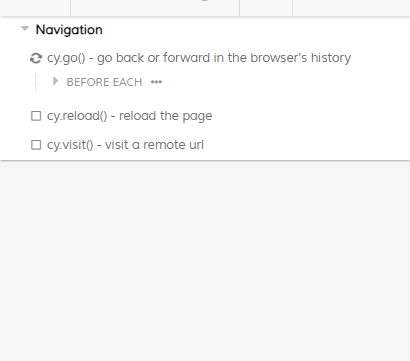
I want a new option in cypress.json (something like keepCommandLogSectionsClosed but a bit shorter...) that, when set to true, keeps the Command Log subsections collapsed by default during test runs.
Behavior when disabled (default) | Behavior when activated
--- | ---
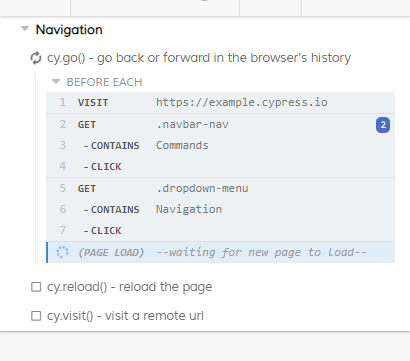 |
| 
I might add that any errors that occurs will still be visible:
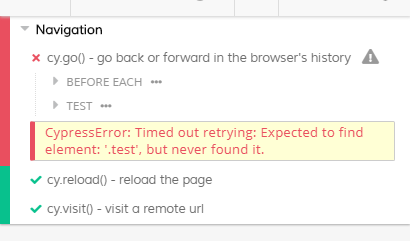
Test code to reproduce
N/A
Versions
3.8.3
 Regnander
All 8 comments
The behavior today is that the Command is collapsed by default and then expands if the the test meets one of the following criteria in our code:
https://github.com/cypress-io/cypress/blob/develop/packages/reporter/src/test/test.tsx#L135:L135
And yes, the contents of the test do not render unless opened as noted here in our code: https://github.com/cypress-io/cypress/blob/develop/packages/reporter/src/test/test.tsx#L108:L108
So, I imagine there could be a way to pass an option to expand the criteria of https://github.com/cypress-io/cypress/blob/develop/packages/reporter/src/test/test.tsx#L135:L135 to also not open the test when the user has set to 'close all commands'.
The question of this implementation will be 'where to set this global setting?'
 jennifer-shehane
on 4 Feb 2020
jennifer-shehane
on 4 Feb 2020
The question of this implementation will be 'where to set this global setting?'
What are the options and can I contribute to this issue in some way?
Regnander
on 19 Feb 2020
@Regnander We have not decided on how the implementation of this feature would be.
jennifer-shehane
on 20 Feb 2020
@jennifer-shehane I see the Command Log expanded by default locally, in CI environments, and in Cypress Recordings.
In our case, test runtime decreases by at least 25% when the Command Log is collapsed, which is pretty significant at scale.
Can you recommend any method of forcing the Command Log to hide unless there is an error?
 toddpi314
on 22 Jul 2020
toddpi314
on 22 Jul 2020
Hello @jennifer-shehane , we are currently facing the same issue.
We are testing a quite complex application including the backend where a test might run for about 15 minutes.We are using the cucumber plugin, thus 15 minutes are one feature with multiple scenarios which appears as one test in Cypress.
Having the command log expanded give us quite a performance hit after some time that it even introduces flakiness (or heavily empathizes it). For example text input seem to take more than twice as long than with a collapsed command log.
Having a way to keep it collapsed and have it expanded only in cases of failures would provide a way to resolve our issue.
(That said, not having the performance penalty would be even better).
Thanks a lot for creating Cypress!
 jp7677
on 1 Sep 2020
jp7677
on 1 Sep 2020
The performance issue are fixed with version 5.2, thus this feature request is no longer that relevant for our use cases. Thanks a lot for version 5.2!
jp7677
on 16 Sep 2020
this feature request is no longer that relevant for our use cases
I don't concur. To compare the results, I ran a test in two versions and while I get a HUGE performance boost in 5.2.0 when the log is closed, there is really no difference when I leave it open.
||4.7.0|5.2.0|Diff after upgrading
|-|-|-|-|
|Log closed|114.37 sec|56.46 sec|-57.91 sec (-49%)|
|Log open|167.08 sec|169.25 sec|+2.17 sec (+1%)|
Edit: I misunderstood jp's comment. My bad.
Regnander
on 23 Sep 2020
There is a new option to hide the Command Log altogether during cypress run and cypress open. While this is not exactly what is being asked for in this issue, I'm mentioning it in case someone finds it useful.
We hope this to be used as a tool to troubleshoot performance issues and not a permanent solution - as we are working on other solutions to improve the rendering performance of the Command Log. See https://on.cypress.io/troubleshooting#Disable-the-Command-Log
CYPRESS_NO_COMMAND_LOG=1 cypress run
Related issues
 egucciar
·
3Comments
egucciar
·
3Comments
 scottcrowe
·
3Comments
scottcrowe
·
3Comments
 zbigniewkalinowski
·
3Comments
zbigniewkalinowski
·
3Comments
 stormherz
·
3Comments
stormherz
·
3Comments
 simonhaenisch
·
3Comments
simonhaenisch
·
3Comments
Most helpful comment
There is a new option to hide the Command Log altogether during
cypress runandcypress open. While this is not exactly what is being asked for in this issue, I'm mentioning it in case someone finds it useful.We hope this to be used as a tool to troubleshoot performance issues and not a permanent solution - as we are working on other solutions to improve the rendering performance of the Command Log. See https://on.cypress.io/troubleshooting#Disable-the-Command-Log