Cypress: cy.type(force: true) doesn't type characters for readonly inputs
Hello i have found one bug in newest version cypress (3.8.1). In cypress 3.4.1 can type readonly input with option {force: true} but in new version stop working.
It doesn't throw exception but don't fill the input.
 polom01
All 3 comments
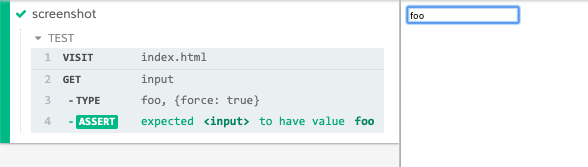
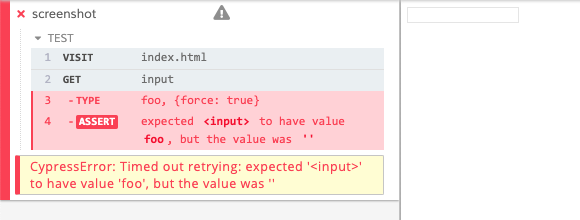
This is a regression in Cypress 3.5.0
index.html
<html>
<body>
<input readonly />
</body>
</html>
spec.js
it('types in readonly', () => {
  cy.visit("index.html")
  cy.get('input').type('foo', {force: true})
    .should('have.value', 'foo')
})
3.4.1
3.5.0
Code
It seems the check for whether we should type does properly run if force !== true here, so the error does not throw if it is readonly with force: true. https://github.com/cypress-io/cypress/blob/develop/packages/driver/src/cy/actionability.js#L328:L328
The problem though is that the actual typing is not occurring on the input.
We did not have a test for this although we should have here: https://github.com/cypress-io/cypress/blob/develop/packages/driver/test/cypress/integration/commands/actions/type_spec.js#L224:L224
Workaround
Downgrade to Cypress 3.4.1.
 jennifer-shehane
on 8 Jan 2020
jennifer-shehane
on 8 Jan 2020
The code for this is done in cypress-io/cypress#6217, but has yet to be released.
We'll update this issue and reference the changelog when it's released.
![cypress-bot[bot] picture](https://avatars3.githubusercontent.com/u/8908513?v=4&s=40) cypress-bot[bot]
on 23 Jan 2020
cypress-bot[bot]
on 23 Jan 2020
Released in 3.8.3.
This comment thread has been locked. If you are still experiencing this issue after upgrading to
Cypress v3.8.3, please open a new issue.
cypress-bot[bot]
on 24 Jan 2020
Related issues
 egucciar
·
3Comments
jennifer-shehane
·
3Comments
egucciar
·
3Comments
jennifer-shehane
·
3Comments
 EirikBirkeland
·
3Comments
EirikBirkeland
·
3Comments
 verheyenkoen
·
3Comments
verheyenkoen
·
3Comments
 igorpavlov
·
3Comments
igorpavlov
·
3Comments
Most helpful comment
This is a regression in Cypress 3.5.0
index.htmlspec.js3.4.1
3.5.0
Code
It seems the check for whether we should type does properly run if
force !== truehere, so the error does not throw if it is readonly with force: true. https://github.com/cypress-io/cypress/blob/develop/packages/driver/src/cy/actionability.js#L328:L328The problem though is that the actual typing is not occurring on the input.
We did not have a test for this although we should have here: https://github.com/cypress-io/cypress/blob/develop/packages/driver/test/cypress/integration/commands/actions/type_spec.js#L224:L224
Workaround
Downgrade to Cypress 3.4.1.