Cypress: 3.5.0-3.6.1 regression screenshot on element can be out of bounds
Current behavior:
We take a screenshot of an element:
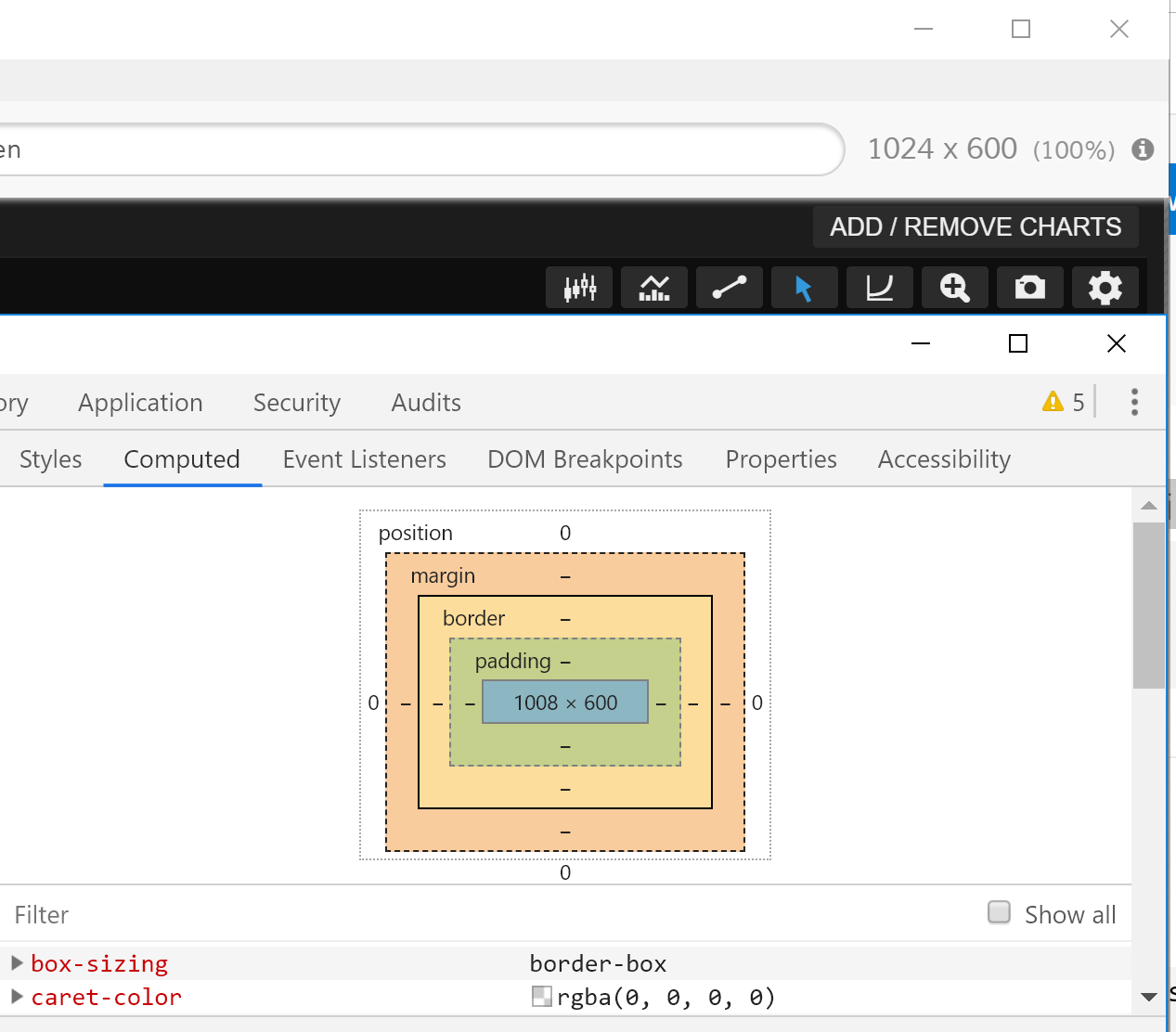
which is clearly within bounds but we get the following error from cypress:
RangeError [ERR_OUT_OF_RANGE] [ERR_OUT_OF_RANGE]: The value of "offset" is out of range. It must be >= 0 and <= 7423996. Received -6368
at boundsError (internal/buffer.js:58:9)
at Buffer.readUInt32BE (internal/buffer.js:205:5)
at Jimp.<anonymous> (d:\work\1\s\node_modules\.azure_pipeline_cypress_cache\3.6.1\Cypress\resources\app\packages\server\node_modules\@jimp\plugin-crop\dist\index.js:46:37)
at scan (d:\work\1\s\node_modules\.azure_pipeline_cypress_cache\3.6.1\Cypress\resources\app\packages\server\node_modules\@jimp\utils\dist\index.js:46:9)
at Jimp.scanQuiet (d:\work\1\s\node_modules\.azure_pipeline_cypress_cache\3.6.1\Cypress\resources\app\packages\server\node_modules\@jimp\core\dist\index.js:1308:32)
at Jimp.cropQuiet (d:\work\1\s\node_modules\.azure_pipeline_cypress_cache\3.6.1\Cypress\resources\app\packages\server\node_modules\@jimp\plugin-crop\dist\index.js:45:12)
at Jimp.(anonymous function) [as crop] (d:\work\1\s\node_modules\.azure_pipeline_cypress_cache\3.6.1\Cypress\resources\app\packages\server\node_modules\@jimp\core\dist\index.js:1222:23)
at crop (d:\work\1\s\node_modules\.azure_pipeline_cypress_cache\3.6.1\Cypress\resources\app\packages\server\lib\screenshots.js:145:26)
at d:\work\1\s\node_modules\.azure_pipeline_cypress_cache\3.6.1\Cypress\resources\app\packages\server\lib\screenshots.js:362:19
at tryCatcher (d:\work\1\s\node_modules\.azure_pipeline_cypress_cache\3.6.1\Cypress\resources\app\packages\server\node_modules\bluebird\js\release\util.js:16:23)
at Promise._settlePromiseFromHandler (d:\work\1\s\node_modules\.azure_pipeline_cypress_cache\3.6.1\Cypress\resources\app\packages\server\node_modules\bluebird\js\release\promise.js:547:31)
at Promise._settlePromise (d:\work\1\s\node_modules\.azure_pipeline_cypress_cache\3.6.1\Cypress\resources\app\packages\server\node_modules\bluebird\js\release\promise.js:604:18)
at Promise._settlePromise0 (d:\work\1\s\node_modules\.azure_pipeline_cypress_cache\3.6.1\Cypress\resources\app\packages\server\node_modules\bluebird\js\release\promise.js:649:10)
at Promise._settlePromises (d:\work\1\s\node_modules\.azure_pipeline_cypress_cache\3.6.1\Cypress\resources\app\packages\server\node_modules\bluebird\js\release\promise.js:729:18)
at _drainQueueStep (d:\work\1\s\node_modules\.azure_pipeline_cypress_cache\3.6.1\Cypress\resources\app\packages\server\node_modules\bluebird\js\release\async.js:93:12)
at _drainQueue (d:\work\1\s\node_modules\.azure_pipeline_cypress_cache\3.6.1\Cypress\resources\app\packages\server\node_modules\bluebird\js\release\async.js:86:9)
at Async._drainQueues (d:\work\1\s\node_modules\.azure_pipeline_cypress_cache\3.6.1\Cypress\resources\app\packages\server\node_modules\bluebird\js\release\async.js:102:5)
at Immediate.Async.drainQueues [as _onImmediate] (d:\work\1\s\node_modules\.azure_pipeline_cypress_cache\3.6.1\Cypress\resources\app\packages\server\node_modules\bluebird\js\release\async.js:15:14)
at processImmediate (internal/timers.js:443:21)
so somehow, cypress thinks the element begins at -6368.
Steps to reproduce: (app code and test code)
I can try and work on a small repro case, but I wanted to check first to see if there are any other reports (cannot find myself in github issues) or you have an idea of what to check?
Also, I'm not particularly bothered by this issue as I will just change the screenshots to be full page in this case - they are only shaving off a few pixels.
Versions
3.6.1, windows 10
 lukeapage
All 18 comments
Actually I see the offset is not pixel but buffer related, so the pixels could be off by a very small amount
lukeapage
on 12 Nov 2019
logs:
2019-11-12T14:31:42.169Z cypress:server:socket automation:request take:screenshot { titles: [ 'src/modules/multiChart/integration/integration', 'basic behaviour', 'should change instrument breadcrumb text on replacing instrument' ], testId: 'r4', capture: 'viewport', clip: { x: 8, y: -1.3333333730697632, width: 1008, height: 600 }, viewport: { width: 1591, height: 865 }, scaled: false, blackout: [], startTime: '2019-11-12T14:31:42.161Z', current: 1, total: 1 }
2019-11-12T14:31:42.170Z cypress:server:screenshot (s13) capturing screenshot { titles: [ 'src/modules/multiChart/integration/integration', 'basic behaviour', 'should change instrument breadcrumb text on replacing instrument' ], testId: 'r4', capture: 'viewport', clip: { x: 8, y: -1.3333333730697632, width: 1008, height: 600 }, viewport: { width: 1591, height: 865 }, scaled: false, blackout: [], startTime: '2019-11-12T14:31:42.161Z', current: 1, total: 1, specName: 'modules\\multiChart\\integration\\integration.spec.js' }
2019-11-12T14:31:42.170Z cypress:server:screenshot (s13) capture and check { tries: 1, totalDuration: 0 }
2019-11-12T14:31:42.170Z cypress:server:browsers:electron debugger: sending Page.captureScreenshot with params undefined
2019-11-12T14:31:42.873Z cypress:server:events got request for event: get:project:status, { id: '92begq', path: 'C:\\git\\SaxoTrader' }
2019-11-12T14:31:42.873Z cypress:server:project get project status for 92begq C:\git\SaxoTrader
2019-11-12T14:31:42.873Z cypress:server:file get values from C:\Users\lukp\AppData\Roaming\Cypress\cy\production\cache
2019-11-12T14:31:42.873Z cypress:server:file attempt to get lock on C:\Users\lukp\AppData\Roaming\Cypress\cy\production\cache
2019-11-12T14:31:42.874Z cypress:server:browsers:electron debugger: received response to Page.captureScreenshot: { data: 'iVBORw0KGgoAAAANSUhEUgAADfwAAAebCAYAAABIaYUMAAAAAXNSR0IArs4c6QAAIABJREFUeJzs3Xt01NW9///XTGYmwyTkSkgI [truncated]' }
2019-11-12T14:31:42.874Z cypress:server:screenshot (s13) received screenshot data from automation layer data:image/png;base64,iVBORw0KGgoAAAANSUhEUgAADfwAAAebCAYAAABIaYUMAAAAAXNSR0IArs4c6QAAIABJREFUeJzs3X
2019-11-12T14:31:43.247Z cypress:server:screenshot (s13) read buffer to image 3580 x 1947
2019-11-12T14:31:43.248Z cypress:server:screenshot (s13) helper pixels
{ topLeft: { r: 28, g: 28, b: 28, a: 255, isNotWhite: true },
topLeftRight: { r: 28, g: 28, b: 28, a: 255, isWhite: false },
topLeftDown: { r: 28, g: 28, b: 28, a: 255, isWhite: false },
bottomLeft: { r: 0, g: 0, b: 0, a: 255, isWhite: false },
topRight: { r: 0, g: 0, b: 0, a: 255, isWhite: false },
bottomRight: { r: 0, g: 0, b: 0, a: 255, isBlack: true } }
2019-11-12T14:31:43.248Z cypress:server:screenshot (s13) pixelConditionFn { pixelRatio: 2.250157133878064, subject: 'app', hasPixels: false, expectedPixels: false }
2019-11-12T14:31:43.248Z cypress:server:screenshot (s13) no previous image to compare
2019-11-12T14:31:43.248Z cypress:server:screenshot (s13) resolving with image { tries: 1, totalDuration: 0 }
2019-11-12T14:31:43.248Z cypress:server:screenshot (s13) pixel ratio is 2.250157133878064
2019-11-12T14:31:43.248Z cypress:server:screenshot (s13) multi-part 1/1
2019-11-12T14:31:43.248Z cypress:server:screenshot (s13) dimensions before are { x: 8, y: -1.3333333730697632, width: 1008, height: 600 }
2019-11-12T14:31:43.248Z cypress:server:screenshot (s13) dimensions for cropping are { x: 18.00125707102451, y: -3.0002096012506296, width: 2268.1583909490882, height: 1350.0942803268383 }
2019-11-12T14:31:43.248Z cypress:server:screenshot (s13) crop: from 18.00125707102451, -3.0002096012506296
2019-11-12T14:31:43.248Z cypress:server:screenshot (s13) to 2268.1583909490882 x 1350.0942803268383
So the y on the crop are wrong, and inspecting the page I cannot see where that weird value has come from.
lukeapage
on 12 Nov 2019
The value returned by chrome getClientRects has this negative value (but all the offsets on offset parents are 0 - maybe its a chrome bug?). I think that since this function can return values outside the viewport, that cypress should clip it to the viewport.
lukeapage
on 13 Nov 2019
Feel free to close this if you dont think its worthwhile.
lukeapage
on 13 Nov 2019
having the same problem.. any workarounds here? thanks
it happens only via cypress run, does not happen with cypress open..
 MacGyver27
on 22 Nov 2019
MacGyver27
on 22 Nov 2019
Please comment providing a completely reproducible example that we can run on our machines, otherwise we can't begin working on this. I wouldn't wait for other people verifying as it may be a very edge case that no one has encountered.
Also:
- Regression is mentioned - please explain evidence of believing this is a regression and what happens in previous versions vs 3.5.0
- Some mention of this being a 'Chrome' bug, what is the result of running this in Electron or other versions of Chrome.
 jennifer-shehane
on 27 Nov 2019
jennifer-shehane
on 27 Nov 2019
Also have this issue.
Not sure if it is a regression as I started to use it in version 3.7.0.
Also not able to reproduce it with simple example.
From what I see - view size is set to 1280x960, but when screenshot is taken during cypress run in headless mode - result screenshot of whole page (cy.screenshot()) is 1280x720.
We are using react grid in our project, so it adopts elements on the screen after view is resized. During screenshot view size is changed, react grid got no time to adopt layout, so target element is out of screen.
1280x960 - at original size there is no scroll.
After jump to 1280x720 - react grid is not recalculated, so scroll appears.
 drumslave-git
on 3 Dec 2019
drumslave-git
on 3 Dec 2019
I get:
RangeError: The value of "offset" is out of range. It must be >= 0 and <= 17855996. Received -80
When I just add this to the viewport example (examples/viewport.spec.js):
cy.viewport('macbook-15')
cy.get('.banner').first().screenshot('banner', { padding: 10 })
Using Cypress 3.8.0
 wimdeblauwe
on 21 Dec 2019
wimdeblauwe
on 21 Dec 2019
@wimdeblauwe @drumslave-git @MacGyver27 @lukeapage
Unfortunately we have to close this issue as there is not enough information to reproduce the problem. This does not mean that your issue is not happening - it just means that we do not have a path to move forward.
Please comment in this issue with a reproducible example (we need an application to visit (HTML) and test code that we can run locally to reproduce) and we will reopen the issue. 🙏
jennifer-shehane
on 23 Dec 2019
Hi @jennifer-shehane.
My app is extremely big and complex. So I tried to create simple example as close as possible.
Not able to reproduce error, but from my point of view issue is there.
git clone https://github.com/drumslave-git/react-grid-echarts-cypress
yarn install
yarn start
The issue is:
In cypress.json view size is set to 1280x960. But when screenshots are made via
cypress run -s cypress/integration/screenshot.spec.js
View is reduced to 1280x720.
You can see this in difference between screenshots made during cypress open spec run, and cypress run.
Example is built based on react-grid-layout + react-sizeme, so heavily depends on view size.
Version of cypress: 3.8.0
Maybe it is more related to #2102
Implementation of this fix https://github.com/cypress-io/cypress/issues/2102#issuecomment-444897766 does fix my error with screenshot, so for sure 2102 and this one are related.
drumslave-git
on 23 Dec 2019
@drumslave-git Yes, your issue is because when run in headless mode we set XVFB to render at 1280x720, this is the size of the screen, so a screenshot cannot be taken larger than the actual screen.
jennifer-shehane
on 31 Dec 2019
I'm getting this on my project on only tests that call cy.viewport('iphone-6') before taking a screenshot. Also I do not believe this is a Chrome issue but an issue with Cypress itself as I'm getting the same error on Firefox with Cypress 4.0.1.
 jacobbuck
on 11 Feb 2020
jacobbuck
on 11 Feb 2020
Hi @jennifer-shehane I am getting an element out of bounds exception with some element.
cypress 4.0.2
cypress-plugin-snapshots 1.2.9
cypress-visual-regression 1.0.5
@jennifer-shehane can I DM you my test with the failing line?
 RangeError: The value of "offset" is out of range. It must be >= 0 and <= 4382396. Received -3312
  RangeError [ERR_OUT_OF_RANGE] [ERR_OUT_OF_RANGE]: The value of "offset" is out of range. It must be >= 0 and <= 4382396. Received -3312
      at boundsError (internal/buffer.js:72:9)
      at Buffer.readUInt32BE (internal/buffer.js:295:5)
      at Jimp.<anonymous> (/Users/artisingh/Library/Caches/Cypress/4.0.2/Cypress.app/Contents/Resources/app/packages/server/node_modules/@jimp/plugin-crop/dist/index.js:45:37)
 artipsingh
on 21 Feb 2020
artipsingh
on 21 Feb 2020
I ran into the same issue today. I'd like to know how to solve it or get around it. Thanks all.
 jfhector
on 14 Jun 2020
jfhector
on 14 Jun 2020
I ran into the same issue today. I'd like to know how to solve it or get around it. Thanks all.
Hi. Currently I'm using kinda hack in plugin before:browser:launch
if (browser.name === 'electron') {
  launchOptions.preferences.width = viewport.viewportWidth;
  launchOptions.preferences.height = viewport.viewportHeight;
}
This issue is closed because no one provided a reproducible example of the issue that we can run ourselves.
If you're experiencing a bug similar to this in Cypress, please open a new issue with a fully reproducible example that we can run. There may be a specific edge case with the issue that we need more detail to fix.
jennifer-shehane
on 15 Jun 2020
@jennifer-shehane
this is intermitting issue, tests fail on random test cases.
my test case is simple - take a screenshot of a div#abc, I have 13 tests like that.
it happens on both mobile and desktop view port sizes.
this renders cypress testing useless.
 jannakha
on 18 Jun 2020
jannakha
on 18 Jun 2020
Related issues
 rbung
·
3Comments
jennifer-shehane
·
3Comments
rbung
·
3Comments
jennifer-shehane
·
3Comments
 Francismb
·
3Comments
Francismb
·
3Comments
 brian-mann
·
3Comments
brian-mann
·
3Comments
 stormherz
·
3Comments
stormherz
·
3Comments
Most helpful comment
Hi @jennifer-shehane I am getting an element out of bounds exception with some element.
cypress 4.0.2
cypress-plugin-snapshots 1.2.9
cypress-visual-regression 1.0.5
@jennifer-shehane can I DM you my test with the failing line?