Cypress: Cypress Fails suddenly fails on Travis CI
Current behavior:
One day ago, Travis CI started to fail running my Cypress tests.
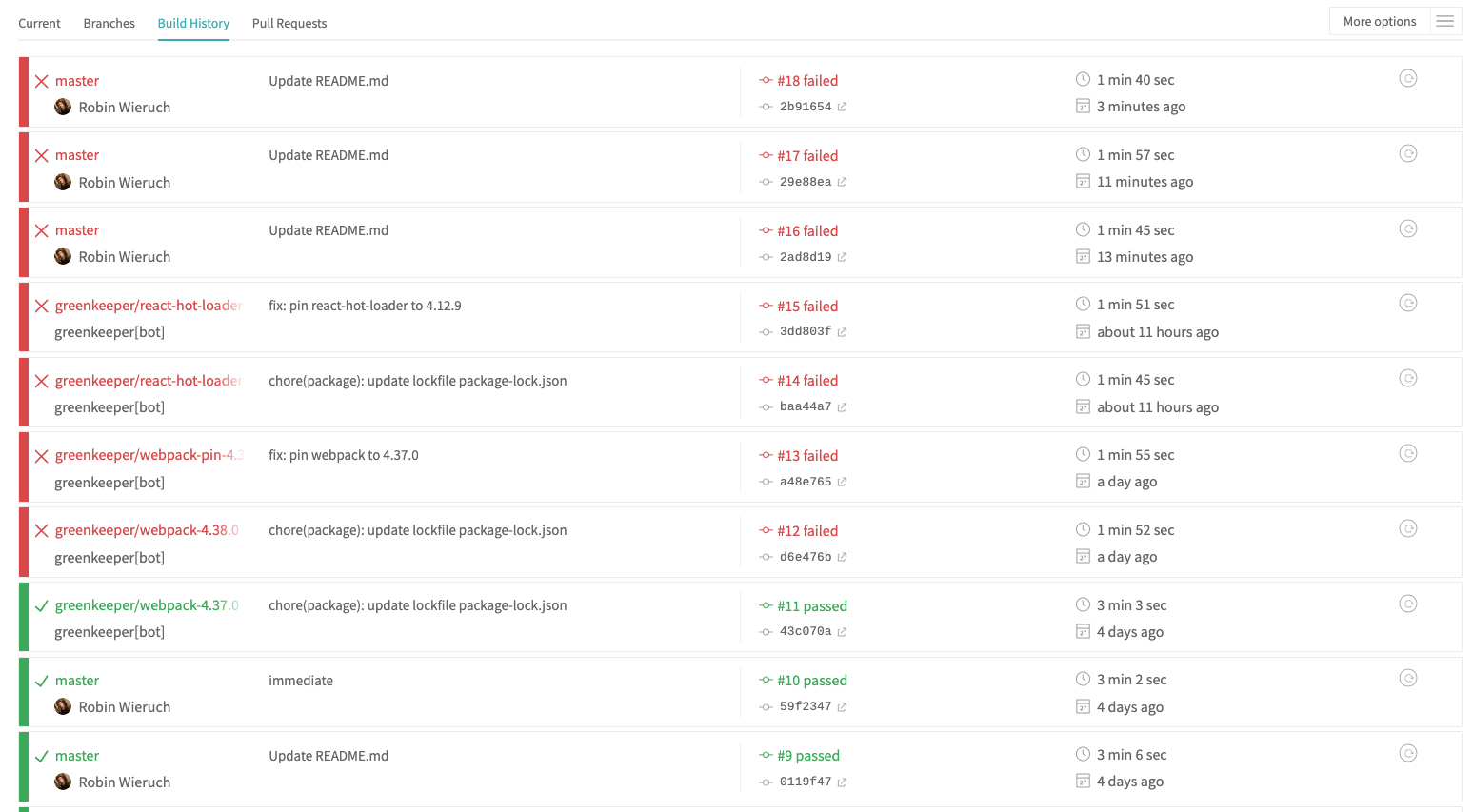
As you can see, only the README.md has changed with some markdown, but no implementation details or library updates (except for the Greenkeeper attempts to update libraries) are in the build history.
The stack trace on Travis CI:
> [email protected] cypress /home/travis/build/the-road-to-learn-react/react-testing-jest-enzyme
> cypress run
It looks like this is your first time using Cypress: 3.4.0
[16:55:58]  Verifying Cypress can run /home/travis/.cache/Cypress/3.4.0/Cypress [started]
[16:55:58]  Verifying Cypress can run /home/travis/.cache/Cypress/3.4.0/Cypress [failed]
Cypress failed to start.
This is usually caused by a missing library or dependency.
The error below should indicate which dependency is missing.
https://on.cypress.io/required-dependencies
If you are using Docker, we provide containers with all required dependencies installed.
----------
/home/travis/.cache/Cypress/3.4.0/Cypress/Cypress: error while loading shared libraries: libgconf-2.so.4: cannot open shared object file: No such file or directory
----------
Platform: linux (Ubuntu Linux - 16.04)
Cypress Version: 3.4.0
npm ERR! code ELIFECYCLE
npm ERR! errno 1
npm ERR! [email protected] cypress: `cypress run`
npm ERR! Exit status 1
npm ERR!
npm ERR! Failed at the [email protected] cypress script.
npm ERR! This is probably not a problem with npm. There is likely additional logging output above.
npm ERR! A complete log of this run can be found in:
npm ERR!     /home/travis/.npm/_logs/2019-07-27T16_55_58_592Z-debug.log
Error: Command failed: /bin/sh -c npm run cypress
    at makeError (/home/travis/build/the-road-to-learn-react/react-testing-jest-enzyme/node_modules/start-server-and-test/node_modules/execa/index.js:174:9)
    at /home/travis/build/the-road-to-learn-react/react-testing-jest-enzyme/node_modules/start-server-and-test/node_modules/execa/index.js:278:16
    at processTicksAndRejections (internal/process/task_queues.js:85:5) {
  code: 1,
  stdout: null,
  stderr: null,
  failed: true,
  signal: null,
  cmd: '/bin/sh -c npm run cypress',
  timedOut: false,
  killed: false
}
npm ERR! code ELIFECYCLE
npm ERR! errno 1
npm ERR! [email protected] test:cypress: `start-server-and-test start http://localhost:8080 cypress`
npm ERR! Exit status 1
npm ERR!
npm ERR! Failed at the [email protected] test:cypress script.
npm ERR! This is probably not a problem with npm. There is likely additional logging output above.
npm ERR! A complete log of this run can be found in:
npm ERR!     /home/travis/.npm/_logs/2019-07-27T16_55_58_656Z-debug.log
The command "npm run test -- --coverage && npm run test:cypress" exited with 1.
I have "cypress": "^3.4.0", as devDependencies and my test script looks like the following:
  "scripts": {
    "start": "webpack-dev-server --config ./webpack.config.js --mode development",
    "test": "jest --config ./jest.config.json",
    "test:watch": "npm run test -- --watch",
    "test:cypress": "start-server-and-test start http://localhost:8080 cypress",
    "cypress": "cypress run",
    "coveralls": "cat ./coverage/lcov.info | node node_modules/.bin/coveralls"
  },
Desired behavior:
Running Cypress Tests on Travis CI.
Steps to reproduce: (app code and test code)
Failing GitHub repository. The last commits haven't changed any libraries or source code.
Versions
Cypress 3.4.0
 rwieruch
All 2 comments
Travis CI has changed its underlying OS image, causing this problem. Luckily it is simple to fix, see https://docs.cypress.io/guides/guides/continuous-integration.html#Travis
 bahmutov
on 27 Jul 2019
bahmutov
on 27 Jul 2019
Works! Thank you for being super quick on this @bahmutov For anyone else stumbling into this, its these lines which help: https://github.com/cypress-io/cypress-documentation/commit/953d5ad08bed5465d81ced8be054de0f97c612fc#diff-85400a3450f4b1809d1434145ad25b7d
rwieruch
on 27 Jul 2019
Related issues
 igorpavlov
·
3Comments
igorpavlov
·
3Comments
 EirikBirkeland
·
3Comments
EirikBirkeland
·
3Comments
 Francismb
·
3Comments
Francismb
·
3Comments
 carloscheddar
·
3Comments
carloscheddar
·
3Comments
 simonhaenisch
·
3Comments
simonhaenisch
·
3Comments
Most helpful comment
Works! Thank you for being super quick on this @bahmutov For anyone else stumbling into this, its these lines which help: https://github.com/cypress-io/cypress-documentation/commit/953d5ad08bed5465d81ced8be054de0f97c612fc#diff-85400a3450f4b1809d1434145ad25b7d