Cypress: Getting Error: Script error. (:0) - How to resolve?
Current behavior:
Cypress test run fails on Chrome in before() with a cryptic error message:
Error: Script error. (:0)
Because this error occurred during a 'before all' hook we are skipping the remaining tests in the current suite: 'Pets - Feed item'
Please see this screenshot:

Desired behavior:
A detailed error message should appear and should include clear instructions on how to resolve the problem.
Steps to reproduce: (app code and test code)
I've not been able to reproduce based on cypress-test-tiny repo so I've created a private repo containing a full test suite. I've sent emailed instructions on how to access it to [email protected].
To reproduce using said repo, please:
- Clone to Ubuntu.
- Run
npx cypress open. - Run this spec file:
sanity/pets/feed_item.spec.js
Versions
Cypress v3.4.0
Ubuntu 16.04 LTS
Chrome 75
 urig
urig
All 17 comments
This is an error thrown from Mocha when there is an exception thrown within some async code.
We haven't gotten an email yet, but will be on the lookout for the suspect code.
 jennifer-shehane
on 15 Jul 2019
jennifer-shehane
on 15 Jul 2019
@jennifer-shehane added you as a collaborator. Thanks for your help.
urig
on 15 Jul 2019
Reproducible example:
it('errors', () => {
  cy.visit('https://www.yad2.co.il/pets/all')
})
After adding listeners into mocha where this error is being thrown, I tracked it down to this uncaught error that is being thrown from the yad2 application code. And indeed it sometimes does correctly throw the error in the Test Runner as it should in Cypress (kind of - it should indicate here that this comes from your application)
Uncaught ReferenceError: dataLayer is not defined
The uncaught error should have been clearly thrown instead of resorting to the Mocha (:0) error. So, this is definitely a mishandling of the uncaught error on our side.
jennifer-shehane
on 16 Jul 2019
Thanks for letting me know @jennifer-shehane . We're looking into the ReferenceError from our side as well.
urig
on 16 Jul 2019
Hi @jennifer-shehane. Is there an ETA for when this might be fixed?
Also - having a hard time finding the underlying error coming from our code. Can you share how you were able to "add listeners to mocha"? Tx!
 urig-develeap
on 21 Jul 2019
urig-develeap
on 21 Jul 2019
Having the same issue but i managed to find a workaround, in my case at least.
Try setting "chromeWebSecurity": false in cypress.json.
Before disabling web security i was getting Error: Script error. (:0), after disabling it cypress was logging the correct error.
 sebike88
on 22 Jul 2019
sebike88
on 22 Jul 2019
@sebike88 thanks for the workaround. It sort of worked. I think the difference is that now I can see the underlying error coming from app code.
urig
on 22 Jul 2019
@urig Yes, the situation here is not that an error is displaying, but that the application's underlying error and the error stack are not being properly shown - and leading to a deadend with this :0 error.
There is an error that is being thrown in your application nonetheless.
If I run the same code as above in the Electron browser, I'm getting an 'uncaught error' being properly thrown. I'm not sure what's different.
When turning off chromeWebSecurity I see an Illegal Invocation error being throw from the Facebook Pixel js.
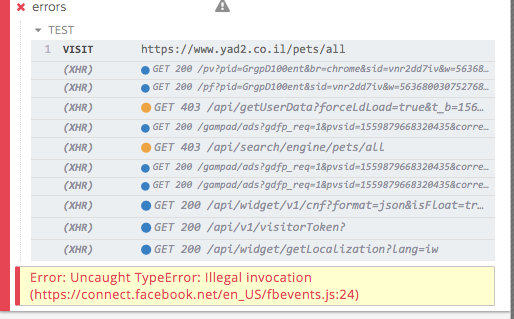
jennifer-shehane
on 23 Jul 2019
Hi @jennifer-shehane and thanks.
I recognize that an error in the application is at the root of the issue and, using the chromeWebSecurity: false workaround, I think we've been able to find out where this error is coming from. Several people on our side are working on fixing the error (it likely comes from a rather complex Google Tag Manager system we have embedded)
At the same time, the other side of the issue is that Cypress should not break the spec file like this.
From our end users' perspective the JS error is transparent and does not negatively affect UX. So having Cypress crash about half of a sanity E2E tests in this scenario does not make for a good testing experience.
In short - Is there a time line for changing this behavior in Cypress?
Thanks,
urig
urig-develeap
on 23 Jul 2019
@urig Cypress's current implementation is to fail on uncaught exceptions, as we don't see this as an optimal workflow for an application. In these cases, we offer the option to opt out of failing on these uncaught exceptions with a listener. https://on.cypress.io/catalog-of-events#Uncaught-Exceptions
Unfortunately, this listener doesn't trigger when uncaught errors are thrown from 3rd party code, which has caused some frustration for users. We do intend to fix this - https://github.com/cypress-io/cypress/issues/987
I'll bring up this issue with our engineering team and see what we can do. Currently, these issues are not in our current sprint to be fixed.
jennifer-shehane
on 23 Jul 2019
@jennifer-shehane thank you for providing clarity on the status of this issue and on the status of issue https://github.com/cypress-io/cypress/issues/987 - much appreciated.
Please count me as +1 on priority for #987. In my case 3rd party code blocks embedded in the application code are an integral part of the business domain. These do occasionally fail due to human error and having these failures as showstoppers on our end to end test suite is counter-productive.
I'd very much appreciate it if a rough estimate for fixing this can be determined.
Thanks, urig
urig-develeap
on 23 Jul 2019
I ran into another situation of this error today while trying to test something else.
it('should work', () => {
  cy.visit('https://www.theguardian.com/uk')
})
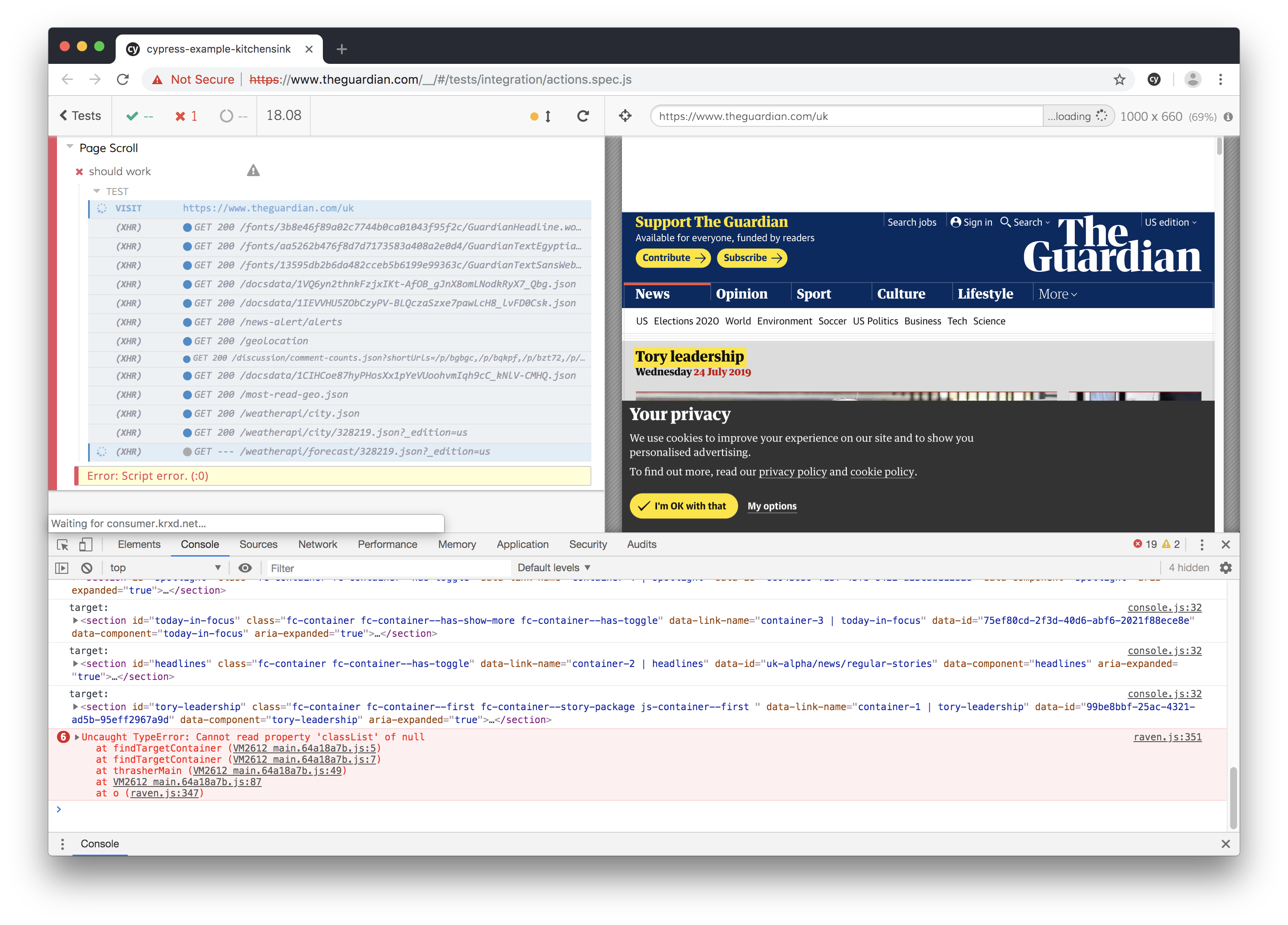
jennifer-shehane
on 24 Jul 2019
Hi @jennifer-shehane. If I wanted to fix this myself, where in the Cypress code would I start looking? Tx.
urig-develeap
on 4 Aug 2019
I have started looking at an example of this in https://github.com/cypress-io/3rd-party-error - and I don't think we can fix this in general, since this is the same multiple domain issue, but maybe there are some things we could do in the future to add cross-origin flags to 3rd party scripts
 bahmutov
on 15 Aug 2019
bahmutov
on 15 Aug 2019
The best workaround to see the source of error right now on the Guardian website for example is:
- Look at the current error - keep DevTools open while the test is running

- Set in
cypress.json
{
  "chromeWebSecurity": false
}
Then rerun the test with DevTools open again and it should see better errors

- Notice that the scripts throwing hundreds of errors come from domain
assets.guim.co.ukso add it to the blacklists incypress.json
{
  "chromeWebSecurity": false,
  "blacklistHosts": "assets.guim.co.uk"
}
- This might reveal _more_ errors coming from other locations.

- Add the new source of errors to
cypress.json
{
  "chromeWebSecurity": false,
  "blacklistHosts": ["assets.guim.co.uk", "interactive.guim.co.uk"]
}
and finally the site loads

bahmutov
on 15 Aug 2019
Thanks for the update @bahmutov and for the workaround debugging algorithm.
urig
on 15 Aug 2019
https://docs.cypress.io/api/events/catalog-of-events.html#To-catch-a-single-uncaught-exception
This is the solution which I am considering correct.
I just ignored errors and left TODO to find and fix the cause.
also used "chromeWebSecurity": false
 weplay-devservices
on 1 Apr 2020
weplay-devservices
on 1 Apr 2020
Related issues
 carloscheddar
·
3Comments
carloscheddar
·
3Comments
 verheyenkoen
·
3Comments
verheyenkoen
·
3Comments
 brian-mann
·
3Comments
brian-mann
·
3Comments
 SecondFlight
·
3Comments
SecondFlight
·
3Comments
 rbung
·
3Comments
rbung
·
3Comments
Most helpful comment
Having the same issue but i managed to find a workaround, in my case at least.
Try setting
"chromeWebSecurity": falseincypress.json.Before disabling web security i was getting
Error: Script error. (:0), after disabling it cypress was logging the correct error.