Cypress: How do I deal with multiple select on the page
On this page, I have 3 select classes. I want to enter the value for first select class(builidng Id) and the second (floorid) and third(calendar date). How can I do that?
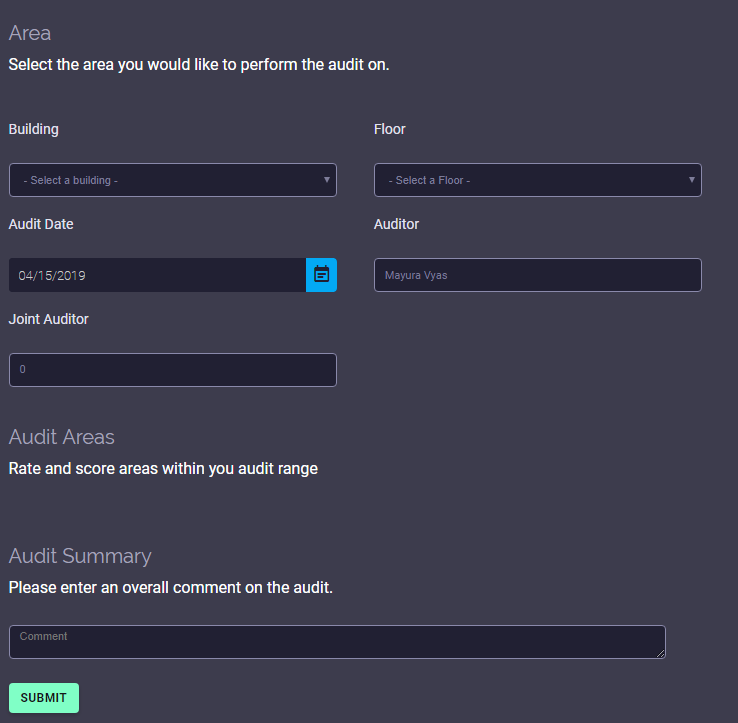
cy.get('select').select('1').should ('have.value', '10056')
 mv7789
All 14 comments
I get this error :CypressError: cy.select() can only be called on a single
mv7789
on 16 Apr 2019
You can replace 'select' key for your element id, like this:
cy.get('floorid').select('1').should ('have.value', '10056')
https://docs.cypress.io/api/commands/select.html#Usage
or using the eq method, which enables you to get the desire index:
https://docs.cypress.io/api/commands/eq.html
cy.get('select').eq(0).select('1').should ('have.value', '10056')
 mateosilguero
on 16 Apr 2019
mateosilguero
on 16 Apr 2019
@mateosilguero : I tried below line for building Id but got this error:
cy.get('buildingId').select('1').should('have.value', '10056')
name = buildingId

and if i try this way:
cy.get('select').contains(name='buildingId').select('1').should ('have.value', '10056')
get below error:
CypressError: Timed out retrying: Expected to find content: 'buildingId' within the element: [
mv7789
on 16 Apr 2019
The first error means you haven't a select element with id="buildingId".
make sure to declare the element this way:
<select id="buildingId">
...rest of code
</select>
@mateosilguero : this one does not work. Building is the drop down field with values. I want to select any value from Building drop down. Here is the html for building.
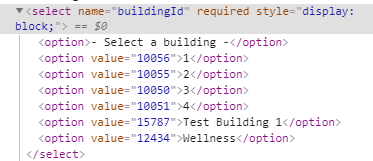
mv7789
on 16 Apr 2019
If I use this code:
let id = "buildingId"
cy.get('buildingId').select('1').should('have.value', '10056')
I get this error: CypressError: Timed out retrying: Expected to find element: 'buildingId', but never found it. Not able to understand how can I select this dropdown option
mv7789
on 16 Apr 2019
your element select, does not have the atributte id. add the attribute on your element, like this:
<select name="buildingId" id="buildingId">
    <option></option>
    ...
</select>
Or use another identifier, like:
cy.get("select[name='buildingId']").select('1').should('have.value', '10056')
mateosilguero
on 16 Apr 2019
@mateosilguero : cool it worked... thanks a lot :)
mv7789
on 16 Apr 2019
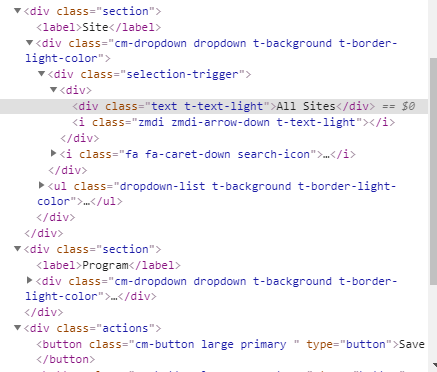
@mateosilguero : I want to select the value from the dropdown but this one is without select class. I tried all possible combinations but does not work.
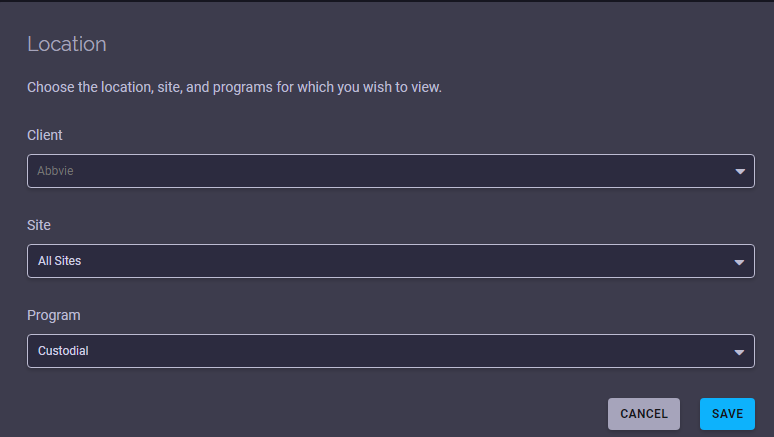
First select client value from the dropdown and based on that select site value and program.
Client is:
cy.get('.cm-dropdown > .dropdown').click().contains('ul li > span','Zoetis').click({multiple:true})
cy.get('.selection-trigger').click().contains('ul li > span','Elk Grove').click({multiple:true})
I get below error message:
Timed out retrying: Expected to find content: 'Zoetis' within the element:
mv7789
on 17 Apr 2019
Could you share some code ? I need to see the structure of your elements to elaborate the query
mateosilguero
on 18 Apr 2019
Issues in our GitHub repo are reserved for potential bugs or feature requests, so I will be closing this issue. Comments are still allowed, so you can continue debugging if you like.
We recommend questions relating to how to use Cypress be asked in our community chat. Also try searching our existing GitHub issues, reading through our documentation, or searching Stack Overflow for relevant answers.
 jennifer-shehane
on 18 Apr 2019
jennifer-shehane
on 18 Apr 2019
@mateosilguero : here the one for client:
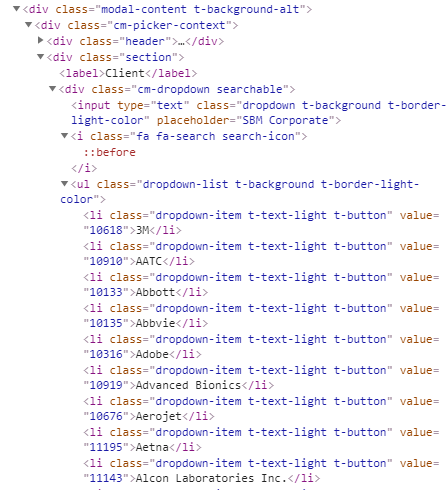
mv7789
on 19 Apr 2019
@mateosilguero : this one is for site:
mv7789
on 19 Apr 2019
cy.get("select[name='UserID']").select('LName, FName')
 mpdhanyamenon
on 1 Jun 2020
mpdhanyamenon
on 1 Jun 2020
Related issues
 brian-mann
·
3Comments
brian-mann
·
3Comments
 stormherz
·
3Comments
jennifer-shehane
·
3Comments
stormherz
·
3Comments
jennifer-shehane
·
3Comments
 egucciar
·
3Comments
egucciar
·
3Comments
 verheyenkoen
·
3Comments
verheyenkoen
·
3Comments
Most helpful comment
You can replace 'select' key for your element id, like this:
cy.get('floorid').select('1').should ('have.value', '10056')https://docs.cypress.io/api/commands/select.html#Usage
or using the eq method, which enables you to get the desire index:
https://docs.cypress.io/api/commands/eq.html
cy.get('select').eq(0).select('1').should ('have.value', '10056')