Cypress: Cypress docker gitlab example failing in test stage
Current behavior:
I'm trying to add Cypress to the pipeline on Gitlab using this example cypress-example-docker-gitlab. When it goes to the cypress-e2e or cypress-e2e-chrome job it fails.
The error message says: ERROR: No files to upload

Desired behavior:
It should run the job correctly.
Steps to reproduce: (app code and test code)
# .gitlab-ci.yml
# I'm using yarn

stages:
  - build
  - test

variables:
  npm_config_cache: /builds/vctormb/testing-cypress/.npm
  CYPRESS_CACHE_FOLDER: /builds/vctormb/testing-cypress/cache/Cypress

cache:
  key: ${CI_COMMIT_REF_SLUG}
  paths:
    - ~/.cache

install:
  image: cypress/base:10
  stage: build

  script:
    - yarn install --frozen-lockfile
    - $(yarn bin)/cypress verify

cypress-e2e:
  image: cypress/base:10
  stage: test
  script:
    - $(yarn bin)/cypress run
  artifacts:
    expire_in: 1 week
    when: always
    paths:
      - cypress/screenshots
      - cypress/videos

cypress-e2e-chrome:
  image: cypress/browsers:chrome67
  stage: test
  script:
    - $(yarn bin)/cypress run --browser chrome
  artifacts:
    expire_in: 1 week
    when: always
    paths:
      - cypress/screenshots
      - cypress/videos
Versions
"cypress": "3.2.0"
 vctormb
All 11 comments
Try not using chrome browser option - because video generation only is possible when using the built in Electron browser
Sent from my iPhone
On Apr 7, 2019, at 15:35, Victor Martins notifications@github.com wrote:
Current behavior:
I'm trying to add Cypress to the pipeline on Gitlab using this example cypress-example-docker-gitlab. When it goes to the cypress-e2e or cypress-e2e-chrome job it fails.
The error message says: ERROR: No files to upload
Desired behavior:
It should run the job correctly.
Steps to reproduce: (app code and test code)
.gitlab-ci.yml
I'm using yarn
stages:
- build
- test
variables:
npm_config_cache: /builds/cypress-io/cypress-example-docker-gitlab/.npm
CYPRESS_CACHE_FOLDER: /builds/cypress-io/cypress-example-docker-gitlab/cache/Cypresscache:
key: ${CI_COMMIT_REF_SLUG}
paths:
- ~/.cacheinstall:
image: cypress/base:10
stage: buildscript:
- yarn install --frozen-lockfile
- $(yarn bin)/cypress verifycypress-e2e:
image: cypress/base:10
stage: test
script:
- $(yarn bin)/cypress run
artifacts:
expire_in: 1 week
when: always
paths:
- cypress/screenshots
- cypress/videoscypress-e2e-chrome:
image: cypress/browsers:chrome67
stage: test
script:
- $(yarn bin)/cypress run --browser chrome
artifacts:
expire_in: 1 week
when: always
paths:
- cypress/screenshots
- cypress/videos
Versions"cypress": "3.2.0"
—
You are receiving this because you are subscribed to this thread.
Reply to this email directly, view it on GitHub, or mute the thread.
 bahmutov
on 7 Apr 2019
bahmutov
on 7 Apr 2019
@bahmutov I deleted the cypress-e2e-chrome job and I still see the same error. Don't know what to do.
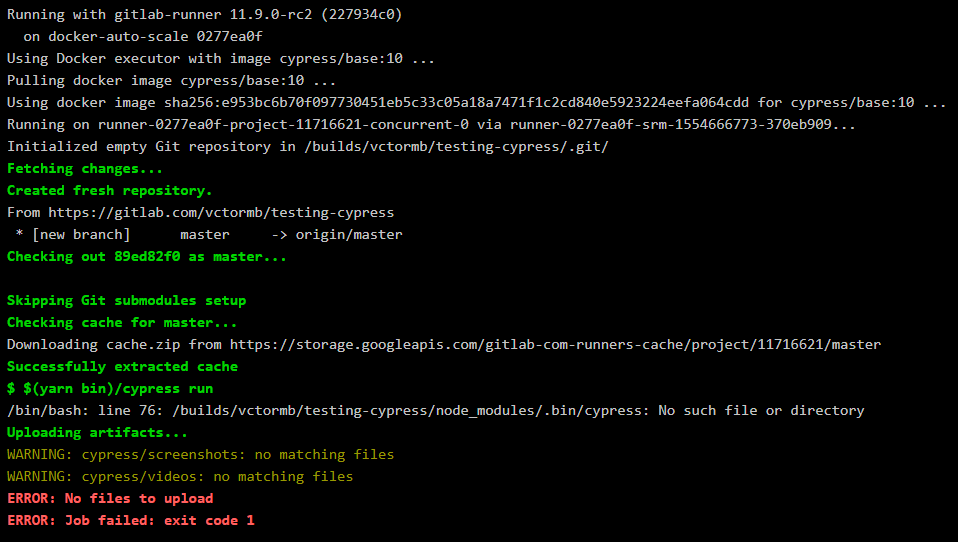
vctormb
on 7 Apr 2019
What's the result of the install job (especially the output of $(yarn bin)/cypress verify)? It seems it can't find the cypress binary at all.
 MarS919
on 9 Apr 2019
MarS919
on 9 Apr 2019
I noticed that when the build stage finishes and it goes to the test stage the node_modules doesn't exist. So if I put yarn install in the test stage it will work. Any tips?
cypress-e2e:
  image: cypress/base:10
  stage: test
  script:
    - yarn install
    - $(yarn bin)/cypress run
We have the same problem.
I've tried the example from the Cypress docs.
Here is an output from the install job:
Running with gitlab-runner 11.9.0-rc2 (227934c0)
  on docker-auto-scale ed2dce3a
Using Docker executor with image cypress/base:10.15.3 ...
Pulling docker image cypress/base:10.15.3 ...
Using docker image sha256:db9a7020e198ebdad23618e3d9a084762ba4ad791c0a4bf353935d45251dbca5 for cypress/base:10.15.3 ...
Running on runner-ed2dce3a-project-11858546-concurrent-0 via runner-ed2dce3a-srm-1555314706-5f89258d...
Initialized empty Git repository in /builds/MatejBransky/cypress-example-docker-gitlab/.git/
Fetching changes...
Created fresh repository.
From https://gitlab.com/MatejBransky/cypress-example-docker-gitlab
 * [new branch]      master     -> origin/master
Checking out 0edadcbd as master...

Skipping Git submodules setup
Checking cache for master...
Downloading cache.zip from https://storage.googleapis.com/gitlab-com-runners-cache/project/11858546/master
Successfully extracted cache
$ npm ci
npm WARN prepare removing existing node_modules/ before installation

> [email protected] postinstall /builds/MatejBransky/cypress-example-docker-gitlab/node_modules/cypress
> node index.js --exec install

Note: Overriding Cypress cache directory to: /builds/cypress-io/cypress-example-docker-gitlab/cache/Cypress

      Previous installs of Cypress may not be found.

Installing Cypress (version: 3.1.0)

[07:54:03]  Downloading Cypress     [started]
[07:54:05]  Downloading Cypress     [completed]
[07:54:05]  Unzipping Cypress       [started]
[07:54:48]  Unzipping Cypress       [completed]
[07:54:48]  Finishing Installation  [started]
[07:54:48]  Finishing Installation  [completed]

You can now open Cypress by running: node_modules/.bin/cypress open

https://on.cypress.io/installing-cypress

added 197 packages in 51.317s
$ $(npm bin)/cypress verify
It looks like this is your first time using Cypress: 3.1.0

[07:54:54]  Verifying Cypress can run /builds/cypress-io/cypress-example-docker-gitlab/cache/Cypress/3.1.0/Cypress [started]
[07:54:55]  Verifying Cypress can run /builds/cypress-io/cypress-example-docker-gitlab/cache/Cypress/3.1.0/Cypress [completed]
Creating cache master...
WARNING: .npm: no matching files
WARNING: cache/Cypress: no matching files
node_modules: found 10124 matching files
Uploading cache.zip to https://storage.googleapis.com/gitlab-com-runners-cache/project/11858546/master
Created cache
Job succeeded
And here is an output from the cypress-e2e job:
Running with gitlab-runner 11.9.0-rc2 (227934c0)
  on docker-auto-scale 72989761
Using Docker executor with image cypress/base:10.15.3 ...
Pulling docker image cypress/base:10.15.3 ...
Using docker image sha256:db9a7020e198ebdad23618e3d9a084762ba4ad791c0a4bf353935d45251dbca5 for cypress/base:10.15.3 ...
Running on runner-72989761-project-11858546-concurrent-0 via runner-72989761-srm-1555314836-4f5e98af...
Initialized empty Git repository in /builds/MatejBransky/cypress-example-docker-gitlab/.git/
Fetching changes...
Created fresh repository.
From https://gitlab.com/MatejBransky/cypress-example-docker-gitlab
 * [new branch]      master     -> origin/master
Checking out 0edadcbd as master...

Skipping Git submodules setup
Checking cache for master...
Downloading cache.zip from https://storage.googleapis.com/gitlab-com-runners-cache/project/11858546/master
Successfully extracted cache
$ $(npm bin)/cypress run
The cypress npm package is installed, but the Cypress binary is missing.

We expected the binary to be installed here: /builds/cypress-io/cypress-example-docker-gitlab/cache/Cypress/3.1.0/Cypress/Cypress

Reasons it may be missing:

- You're caching 'node_modules' but are not caching this path: /root/.cache/Cypress
- You ran 'npm install' at an earlier build step but did not persist: /root/.cache/Cypress

Properly caching the binary will fix this error and avoid downloading and unzipping Cypress.

Alternatively, you can run 'cypress install' to download the binary again.

https://on.cypress.io/not-installed-ci-error
----------

Platform: linux (Debian - 9.8)
Cypress Version: 3.1.0
Uploading artifacts...
WARNING: cypress/screenshots: no matching files
WARNING: cypress/videos: no matching files
ERROR: No files to upload
ERROR: Job failed: exit code 1
 MatejBransky
on 15 Apr 2019
MatejBransky
on 15 Apr 2019
We used to have this issue as well. The problem is getting the cypress binary to cache correctly with yarn since yarn doesn't actually install the cypress binary. Our pipeline which works looks like so
image: cypress/base:10
  variables:
    CYPRESS_CACHE_FOLDER: /builds/project/repo/cache/Cypress
  cache:
    key: ${CI_COMMIT_REF_SLUG}
    paths:
      - .npm
      - cache/Cypress
      - node_modules
  before_script:
    - npm install && npm ci
    - $(npm bin)/cypress verify
I would recommend trying npm instead of yarn for any cypress stuff just because it typically works better. .Currently we just have a docker image with the cypress binary pre-installed which allows your pipelines to run much quicker. That's a possible work around if the above doesn't work
 ryan-snyder
on 15 Apr 2019
ryan-snyder
on 15 Apr 2019
@bahmutov Could you, please, try to start GitLab CI in your example? I've only fork your example and it doesn't work. What am I missing? Is it possible that something had changed from the last check?
MatejBransky
on 17 Apr 2019
Before I look at cypress-example-docker-gitlab we also have GitLab CI working against the kitchensink repo, find it here https://github.com/cypress-io/cypress-example-kitchensink#ci-status
bahmutov
on 19 Apr 2019
I have just pushed a new commit to GitLab example and verified that the GitLab CI pipeline runs successfully. I invite you to compare the output from each test job https://gitlab.com/cypress-io/cypress-example-docker-gitlab/pipelines/57598484 with your own output to find the problem.
Also take a look at our caching doc for reference http://on.cypress.io/caching
bahmutov
on 19 Apr 2019
@bahmutov In this example kitchensink gitlab we have the electron jobs and I noticed that the command npm run e2e:record uses the flag -- --parallel --group electrons. Do I need to use the parallel process and the electron jobs if I'm not recording my tests?
If I'm not recording my tests should I use only cypress run command?
vctormb
on 2 May 2019
@vctormb yes, we are using --record to send test results to our dashboard, if you are not a subscriber, just use cypress run (and run a single job)
bahmutov
on 2 May 2019
Related issues
 jennifer-shehane
·
3Comments
jennifer-shehane
·
3Comments
 igorpavlov
·
3Comments
igorpavlov
·
3Comments
 szabyg
·
3Comments
szabyg
·
3Comments
 brian-mann
·
3Comments
brian-mann
·
3Comments
brian-mann
·
3Comments
brian-mann
·
3Comments
Most helpful comment
@vctormb yes, we are using
--recordto send test results to our dashboard, if you are not a subscriber, just usecypress run(and run a single job)