Cypress: Running test cases in parallel sometimes runs files multiple times
Current behavior:
We are running multiple test cases on Gitlab CI. We have 15 machines for our test cases.
Sometimes cypress seems to start different files multiple files. Usually I have 17 specs in the first group:

When running the exact same pipeline, suddenly much more specs are found:


When I then make changes to the configuration, e.g. use less machines, the right amount of specs is found again:

Desired behavior:
No matter how many machines run the same specs at the same time, the amount of specs found should not differ from one run to the other.
Steps to reproduce: (app code and test code)
I'm running my specs on GitLab with the following pipeline:
.job_template: &appJob
  stage: app_test
  image: rep/e2e-runner:master
  tags:
    - e2e
  script:
    - cypress run --spec "$(find ./cypress/integration/2_CI_Tests/1_App/1_1_General/ -type f | tr '\n' ',' | sed 's/,$//')" --record --key ${CYPRESS_KEY} --browser electron --parallel --ci-build-id $CI_PIPELINE_ID --group General_app
  artifacts:
    expire_in: 3 days
    paths:
    - cypress/screenshots
    - cypress/videos
  allow_failure: true

test:2_App_1:
  <<: *appJob

test:2_App_2:
  <<: *appJob

test:2_App_3:
  <<: *appJob

test:2_App_4:
  <<: *appJob

test:2_App_5:
  <<: *appJob

test:2_App_6:
  <<: *appJob

test:2_App_7:
  <<: *appJob

test:2_App_8:
  <<: *appJob

test:2_App_9:
  <<: *appJob

test:2_App_10:
  <<: *appJob

test:2_App_11:
  <<: *appJob

test:2_App_12:
  <<: *appJob
Versions
- This was first seen on v. 3.1.5
- This issue didn't occur for us with the exact same setup on any previous version.
 testquantilope
All 8 comments
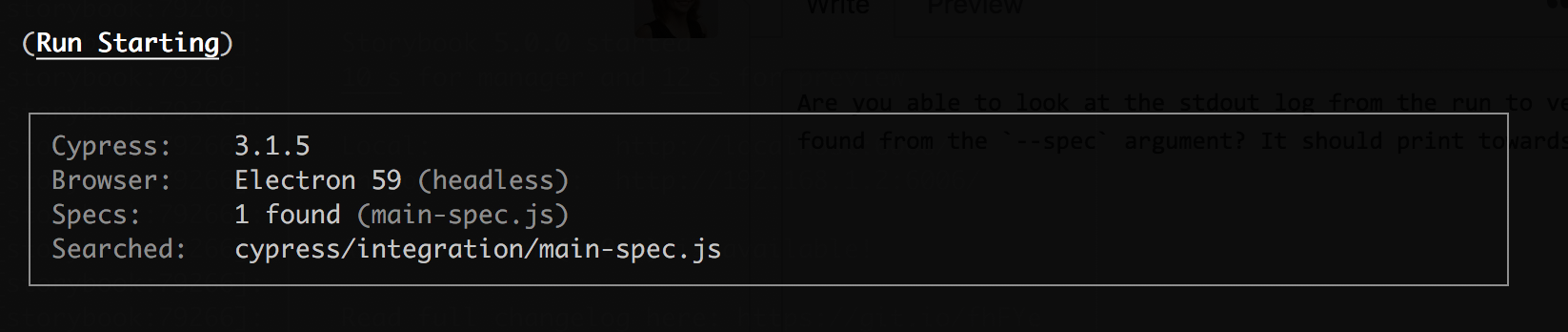
Are you able to look at the stdout log from the run with 51 specs to verify what specs are running/being found from the --spec argument and also what Cypress searched for? It should print towards the beginning of the log. It should look something like this:
 jennifer-shehane
on 18 Mar 2019
jennifer-shehane
on 18 Mar 2019
Hi @jennifer-shehane
Unfortunately I can't find back that exact pipeline, but I have a more recent example here:
15 servers ran 32 specs at the same time. All 15 logs start exactly like this:
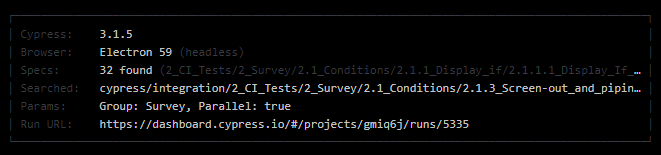
Cypress ran though 96 specs on 15 machines:

testquantilope
on 19 Mar 2019
@amirrustam can you look at this - to me this seems like the build number bug that puts 2 separate runs together into one occasionally
 bahmutov
on 19 Mar 2019
bahmutov
on 19 Mar 2019
I think this issue only occurs if I have run a group with the same name in the previous run. If I change the group name every run, this issue doesn't seem to be occuring.
testquantilope
on 28 Mar 2019
@amirrustam @bahmutov The stage is still needs information. Is there any information I can still provide?
This issue keeps happening for us and really slows down our testing, since the same tests running in parallel fail.
testquantilope
on 9 Apr 2019
We've reproduced this locally and are aware of the bug. It's due to running multiple groups - there is an edge case where the first group get's created (and prevents additional groups from being duplicated) - but when additional new named groups are added the the specs are additionally inserted incorrectly.
We've seen this happen with our own spec files. We'll have a patch out this week for sure - and I'll keep the issue updated. It's nothing with the test runner - it's behind the scenes on our servers.
 brian-mann
on 9 Apr 2019
brian-mann
on 9 Apr 2019
This is going out today. We have a fix in staging. Will update issue when finished.
brian-mann
on 23 Apr 2019
This fix was released yesterday and should be resolved. @testquantilope Can you verify everything is working on your end now?
jennifer-shehane
on 24 Apr 2019
Related issues
 szabyg
·
3Comments
szabyg
·
3Comments
 carloscheddar
·
3Comments
jennifer-shehane
·
3Comments
brian-mann
·
3Comments
carloscheddar
·
3Comments
jennifer-shehane
·
3Comments
brian-mann
·
3Comments
 igorpavlov
·
3Comments
igorpavlov
·
3Comments
Most helpful comment
We've reproduced this locally and are aware of the bug. It's due to running multiple groups - there is an edge case where the first group get's created (and prevents additional groups from being duplicated) - but when additional new named groups are added the the specs are additionally inserted incorrectly.
We've seen this happen with our own spec files. We'll have a patch out this week for sure - and I'll keep the issue updated. It's nothing with the test runner - it's behind the scenes on our servers.