Cypress: Multiple `Array.forEach` assertions inside the `then()/should()` do not work unless using `Cypress._.each`
I am trying to assert multiple things on the response of an API request, but I found a weird behavior where multiple assertions using the Array.forEach method causes anything apart from the first assertion to fail with the yielded object becoming undefined, whereas if I put those assertions outside the forEach they work fine.
When switching from the Array.forEach to Cypress._.each everything works fine and all assertions are working.
Current behavior:
After the execution of the first Array.forEach, the yielded object becomes undefined.
The first test from the test shown in the steps to reproduce section fails with the following error:
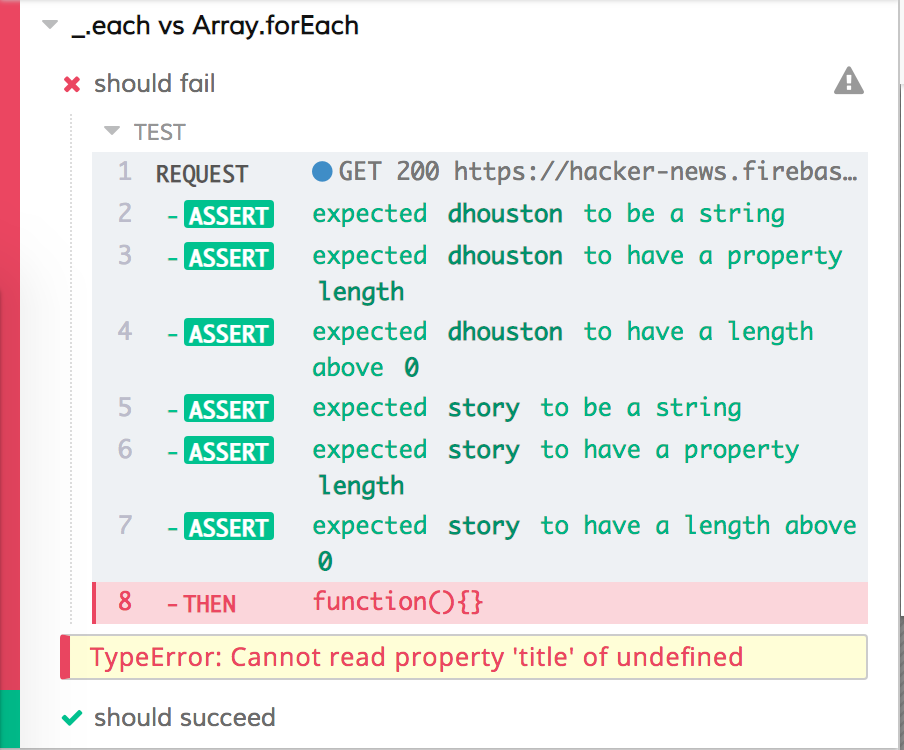
Desired behavior:
Both tests should succeed.
Steps to reproduce: (app code and test code)
This can be reproduced with the following test.
describe('_.each vs Array.forEach', () => {
  it('should fail', () => {
    cy.request('https://hacker-news.firebaseio.com/v0/item/8863.json?print=pretty')
      .then(response => {
        ['by', 'type'].forEach(k =>
        expect(response.body[k]).to.be.a('string').and.have.length.greaterThan(0))
        ['title'].forEach(k =>
        expect(response.body[k]).to.be.a('string').and.have.length.greaterThan(0))
    })
  })

  it('should succeed', () => {
    cy.request('https://hacker-news.firebaseio.com/v0/item/8863.json?print=pretty')
      .then(response => {
        Cypress._.each(['by', 'type'], k =>
        expect(response.body[k]).to.be.a('string').and.have.length.greaterThan(0))
        Cypress._.each(['title'], k =>
        expect(response.body[k]).to.be.a('string').and.have.length.greaterThan(0))
    })
  })
})
Versions
Cypress: 3.1.5
Browser: Electron 59 / Chrome 71
 lambrospetrou
All 4 comments
I see you've been able to get this to successfully work with Cypress._.each, why not use that?
Also, when making multiple assertions within a callback function, you will want to use a .should() instead of a .then(). https://glebbahmutov.com/blog/cypress-should-callback/
 jennifer-shehane
on 8 Feb 2019
jennifer-shehane
on 8 Feb 2019
I see you've been able to get this to successfully work with
Cypress._.each, why not use that?
Well, my main concern is _what's the difference between the two_?
I spent couple of hours figuring out why the standard forEach does not work and going through almost the whole documentation without understanding why it fails. It was just by luck that I thought about trying the _.each. I doubt it's something that makes a lot of sense for one of them to work and not the other which is definitely going to cause wasted hours for many other users as well.
It's like having to think that a for-loop would work but not a while-loop :)
Also, when making multiple assertions within a callback function, you will want to use a
.should()instead of a.then(). https://glebbahmutov.com/blog/cypress-should-callback/
I also tried the .should() version but I get exactly the same result. And in this case, since the assertions are on a normal JS object, either they fail or they don't from one retry, I don't really care retrying the assertions since they will always fail.
BTW thanks for the amazing work so far with Cypress!
lambrospetrou
on 8 Feb 2019
There is no difference - the forEach is spurious. The real problem is that you're using array bracket notation after an expression without using a semicolon.
This is a javascript thing and would happen regardless of you using Cypress or not.
At runtime javascript is evaluating your expression as this...
['by', 'type'].forEach(k =>expect(response.body[k]).to.be.a('string').and.have.length.greaterThan(0))['title'].forEach(k =>expect(response.body[k]).to.be.a('string').and.have.length.greaterThan(0))
Do you see the problem? It's saying cannot read property title of undefined because you're accessing the previous expression using property interpolation (like its a dynamic property on an object, or like we do for array notation) which attempts to tunnel into undefined.
If you put a semicolon before the second array, or after the first expression, it would work. This is one of the only times that semicolons are actually required in JS, and if you were using a linter you'd see the linter immediately yell at you because they detect these scenarios.
// works
;[...].forEach(...)
[...]
or
// also works
[...].forEach(...);
[...]
It's works in the second example because you're not starting a statement with array bracket notation.
JS is not whitespace sensitive and therefore it makes no difference whether there are spaces or not when using brackets.
 brian-mann
on 14 Feb 2019
brian-mann
on 14 Feb 2019
Oh wow, I haven't hit this kind of issue for couple of years :)
Thanks a lot for the detailed response.
lambrospetrou
on 14 Feb 2019
Related issues
 szabyg
·
3Comments
szabyg
·
3Comments
 igorpavlov
·
3Comments
igorpavlov
·
3Comments
 scottcrowe
·
3Comments
scottcrowe
·
3Comments
 weskor
·
3Comments
weskor
·
3Comments
 tahayk
·
3Comments
tahayk
·
3Comments
Most helpful comment
There is no difference - the
forEachis spurious. The real problem is that you're using array bracket notation after an expression without using a semicolon.This is a javascript thing and would happen regardless of you using Cypress or not.
At runtime javascript is evaluating your expression as this...
Do you see the problem? It's saying cannot read property
titleof undefined because you're accessing the previous expression using property interpolation (like its a dynamic property on an object, or like we do for array notation) which attempts to tunnel intoundefined.If you put a semicolon before the second array, or after the first expression, it would work. This is one of the only times that semicolons are actually required in JS, and if you were using a linter you'd see the linter immediately yell at you because they detect these scenarios.
or
It's works in the second example because you're not starting a statement with array bracket notation.
JS is not whitespace sensitive and therefore it makes no difference whether there are spaces or not when using brackets.