Cypress: Ability to add tag to run to display in 'Runs' list in Dashboard UI
Current behavior:
Dashboard UI does not show environment

Desired behavior:
Hi,
Is there an option to add environment to the dashboard UI?
So for example if we run sanity tests (or any e2e) for the same project on different environments we have no way to know where did the test ran.
for example screen shot above, test num 100 can run on production, text 101 can run on qa etc...
It would be great to see the env straight on dashboard without entering the test and figuring out where it ran.
Versions
cypress: v3.1.0
os: CentOS 7.3.1611
browser: Electron 59.0.3071.115
 ArieLevs
All 12 comments
Hey @ArieLevs check out our new Grouping feature. We've found it helpful in our own tests to specify env the tests ran within, so --group staging and --group dev, etc. This will have all the tests displayed in the same run with labels associating each group.
Let me know if this helps with what you're looking for.
 jennifer-shehane
on 4 Oct 2018
jennifer-shehane
on 4 Oct 2018
Hi @jennifer-shehane, thanks for the update,
I've ran cypress as cypress run --group arieTest --record --key **** (hard coded --group arieTest so all of our CI tests will use this parameter).
I cat see string arieTest only inside a specific test run view (under Specs) just as shown in the image below Grouping-to-label-parallelization
this way it still forces me to enter the specific test and scroll down to specs, is there any change to bring the environment up front similar to message, run time, etc?
ArieLevs
on 7 Oct 2018
We haven't had this feature request before, so there hasn't been any previous discussion on this.
The list of runs would need to display any/all groups within each run.
jennifer-shehane
on 9 Oct 2018
+1
 LiranBri
on 16 Oct 2018
LiranBri
on 16 Oct 2018
Hi @jennifer-shehane, this feature will be valuable for us as we normally run cypress tests in multiple environments (development CI, alpha, and production) and need to easily distinguish this from the birds-eye view instead of the actual test run.
 lirantal
on 16 Oct 2018
lirantal
on 16 Oct 2018
Even just simple tagging/labeling of tests runs, that can be passed in to the CLI and displayed in the Dashboard UI, would be great.
 avnersorek
on 24 Dec 2018
avnersorek
on 24 Dec 2018
i concur with adding tagging of test runs in the birds eye view (/runs). displaying the value here from the --group flag would be awesome.
the Message displays there but in our case it isnt very helpful b/c the Message seems to be the comments from whatever the last commit was to that branch (we are running through azure)
 amrwahdan3
on 13 May 2019
amrwahdan3
on 13 May 2019
I think as step 1 that might be enough is to display the group name(s) in the run list. Right now we do not show --group name in the list of runs, one can kind of guess that there are 2 groups in the middle run in the image below, but you cannot be sure.
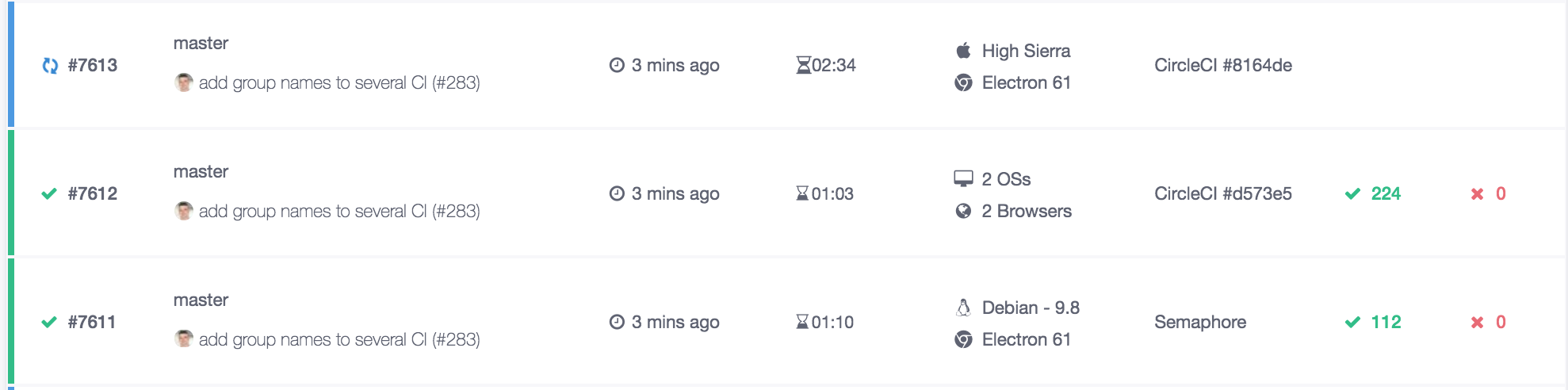
Only by opening the run details and collapsing the individual specs one can see the group names

Proposal:
If the run has 1 group, show the group name in the list of runs. If there are multiple groups, concatenate and show their name, but put a text limit.
Something like this (I have replaced time ago column with group name column)

This could be done quickly, since we already have this data in the database, plus the Test Runner has the --group flag feature.
 bahmutov
on 7 Aug 2019
bahmutov
on 7 Aug 2019
Our plan moving forward is to support 'tags' that can be passed into cypress run via a --tag2 flag.
We would then display those tags in the 'Runs' UI of the Dashboard, allowing filtering by tag.
Some examples of how we think this may be used - also examples with --group flag, to distinguish how you may use groups and tags together.
All of these would have the --record flag.
cypress run --tag develop
cypress run --tag staging
cypress run --tag production
cypress run --tag nightly
cypress run --tag hourly
cypress run --group desktop --tag staging
cypress run --group mobile --tag staging
Adds both tags 'staging, prod'
cypress run --group desktop --tag staging
cypress run --group mobile --tag prod
cypress run --group web-es --tag production
cypress run --group web-en --tag production
cypress run --group desktop-uk --tag develop,nightly
cypress run --group desktop-de --tag develop,nightly
Allows spaces within tag
cypress run --group desktop-uk --tag "mobile es"
New Runs list design

Test Runner tasks:
- [x] Capture
--tagfrom CLI - [x] Capture
tagsfrom Module API
Dashboard tasks:
- [x] Display 'tag' per run
- [x] Allow filtering by 'run'
- [ ] Display all tags used per project. Allow setting tag 'colors.
Docs tasks:
- [ ] Document
--tagflag. - [ ] Document `tags' in Module API
- [ ] Document why you would want to use tags (where??)
- [ ] Document tags in the Dashboard 'runs'
jennifer-shehane
on 9 Sep 2019
Document why you would want to use tags (where??)
As for where to document this, perhaps alongside the docs on the --group and --parallel flags, because --tags is another way to organize and group tests together by type.
 ZoroQualityAutomata
on 16 Sep 2019
ZoroQualityAutomata
on 16 Sep 2019
The code for this is done in cypress-io/cypress#5164, but has yet to be released.
We'll update this issue and reference the changelog when it's released.
![cypress-bot[bot] picture](https://avatars3.githubusercontent.com/u/8908513?v=4&s=40) cypress-bot[bot]
on 5 Dec 2019
cypress-bot[bot]
on 5 Dec 2019
Released in 3.8.0.
cypress-bot[bot]
on 13 Dec 2019
Related issues
 stormherz
·
3Comments
stormherz
·
3Comments
 scottcrowe
·
3Comments
scottcrowe
·
3Comments
 zbigniewkalinowski
·
3Comments
zbigniewkalinowski
·
3Comments
 szabyg
·
3Comments
szabyg
·
3Comments
 simonhaenisch
·
3Comments
simonhaenisch
·
3Comments
Most helpful comment
Our plan moving forward is to support 'tags' that can be passed into
cypress runvia a--tag2flag.We would then display those tags in the 'Runs' UI of the Dashboard, allowing filtering by tag.
Some examples of how we think this may be used - also examples with
--groupflag, to distinguish how you may use groups and tags together.All of these would have the
--recordflag.Adds both tags 'staging, prod'
Allows spaces within tag
New Runs list design
Test Runner tasks:
--tagfrom CLItagsfrom Module APIDashboard tasks:
Docs tasks:
--tagflag.