Is this a Feature or Bug?
Feature
Is there any plan to support teamcity ci?
 zhex900
All 18 comments
Is something not working on TeamCity CI right out of the box?
 bahmutov
on 24 Aug 2018
bahmutov
on 24 Aug 2018
I am not sure how to configure team city to run
parallel Cypress tests. Is it possible for you to recommend some
documentations on this topic?
On Fri, 24 Aug 2018 at 10:19 pm, Gleb Bahmutov notifications@github.com
wrote:
Is something not working on TeamCity CI right out of the box?
—
You are receiving this because you authored the thread.
Reply to this email directly, view it on GitHub
https://github.com/cypress-io/cypress/issues/2394#issuecomment-415742403,
or mute the thread
https://github.com/notifications/unsubscribe-auth/AFIalboNnby88oqJ5aYCnVh9xGxvmrniks5uT-9ggaJpZM4WK5lu
.
zhex900
on 24 Aug 2018
seems this question is relevant here:
https://teamcity-support.jetbrains.com/hc/en-us/community/posts/360000167824-Is-it-possible-to-set-up-a-build-chain-to-run-parallel-and-on-the-same-agent
On Fri, Aug 24, 2018 at 9:52 AM Jake He notifications@github.com wrote:
I am not sure how to configure team city to run
parallel Cypress tests. Is it possible for you to recommend some
documentations on this topic?On Fri, 24 Aug 2018 at 10:19 pm, Gleb Bahmutov notifications@github.com
wrote:Is something not working on TeamCity CI right out of the box?
—
You are receiving this because you authored the thread.
Reply to this email directly, view it on GitHub
<
https://github.com/cypress-io/cypress/issues/2394#issuecomment-415742403>,
or mute the thread
<
https://github.com/notifications/unsubscribe-auth/AFIalboNnby88oqJ5aYCnVh9xGxvmrniks5uT-9ggaJpZM4WK5lu.
—
You are receiving this because you commented.
Reply to this email directly, view it on GitHub
https://github.com/cypress-io/cypress/issues/2394#issuecomment-415765063,
or mute the thread
https://github.com/notifications/unsubscribe-auth/ACHApsFBTS9kAJKXljGnP5NQSPlQGhTIks5uUAUQgaJpZM4WK5lu
.
--
Dr. Gleb Bahmutov, PhD
Schedule video chat / phone call / meeting with me via
https://calendly.com/bahmutov
gleb.[email protected] @bahmutov https://twitter.com/@bahmutov
https://glebbahmutov.com/ https://glebbahmutov.com/blog
https://github.com/bahmutov
bahmutov
on 24 Aug 2018
Hi @bahmutov, any plans of supporting TeamCity with Cypress Dashboard?
The current ci_provider.coffee doesn't support TeamCity.
Fileds, like CI, Branch, etc are missing as described in the attached screenshot

Thanks
 itaykotler-fundbox
on 2 Oct 2018
itaykotler-fundbox
on 2 Oct 2018
yeah, I need to add at least the commit environment variables, seems it does not have the default git information, thus the branch, etc is missing. Can I ask you @itaykotler-fundbox to paste environment variables during a run? Because the docs at https://confluence.jetbrains.com/display/TCD18/Predefined+Build+Parameters are just awful in my opinion. I have no idea how to grab branch or commit from the environment variables for example.
If you get me a list of all environment variables during a run (with anything private stripped out), I could see how to update our ci_provider.coffee and support TeamCity. TeamCity is not open source so I could just run it myself
bahmutov
on 2 Oct 2018
Sure, here is a list from Environment variables
env.BROWSER=chrome
env.BUILD_NUMBER=281 - itaykotler-fundbox
env.BUILD_VCS_NUMBER=21418de38fd18ace72c419e9a65fee5614437430
env.BUILD_VCS_NUMBER_Cypress_GitGithubComFundboxFrontendUsingROKey1=21418de38fd18ace72c419e9a65fee5614437430
env.DOCKER_WORKERS=15
env.FAIL_FAST=true
env.HEADED=false
env.HOME=/home/fundbox
env.JAVA_HOME=/usr/lib/jvm/java-8-oracle
env.JDK_18=/usr/lib/jvm/java-8-oracle
env.JDK_18_x64=/usr/lib/jvm/java-8-oracle
env.JDK_HOME=/usr/lib/jvm/java-8-oracle
env.JRE_HOME=/usr/lib/jvm/java-8-oracle
env.LANG=en_US.UTF-8
env.MAX_RETRIES=3
env.OLDPWD=/opt/buildAgent/bin
env.PARALLEL=true
env.PATH=/usr/local/sbin:/usr/local/bin:/usr/sbin:/usr/bin:/sbin:/bin
env.PWD=/opt/buildAgent/bin
env.RECORD_DASHBOARD=true
env.RUNTIME_ENV=staging
env.SHOW_DEBUG=false
env.SPECIFIC_SPECS=
env.TEAMCITY_BUILD_PROPERTIES_FILE=/opt/buildAgent/temp/buildTmp/teamcity.build4246405676669343134.properties
env.TEAMCITY_BUILDCONF_NAME=Cypress Run for Itay
env.TEAMCITY_CAPTURE_ENV="/usr/lib/jvm/java-8-openjdk-amd64/jre/bin/java" -jar "/opt/buildAgent/plugins/environment-fetcher/bin/env-fetcher.jar"
env.TEAMCITY_GIT_PATH=/usr/bin/git
env.TEAMCITY_PROJECT_NAME=Cypress
env.TEAMCITY_VERSION=2017.2.4 (build 51228)
env.TEMP=/opt/buildAgent/temp/buildTmp
env.TEST_GROUP=cms
env.TMP=/opt/buildAgent/temp/buildTmp
env.TMPDIR=/opt/buildAgent/temp/buildTmp
env.VIDEO_RECORDING=true
The list below are env vars created during each run:
env.BROWSER
env.DOCKER_WORKERS
env.FAIL_FAST
env.HEADED
env.MAX_RETRIES
env.PARALLEL
env.RECORD_DASHBOARD
env.RUNTIME_ENV
env.SHOW_DEBUG
env.SPECIFIC_SPECS>
env.TEST_GROUP
env.VIDEO_RECORDING
thank you @itaykotler-fundbox
ok, so there is only SHA I think under BUILD_VCS_NUMBER I think, but no branch, commit message, or author. I under if there is git why it does not find it.
So we get the Git information here: https://github.com/cypress-io/cypress/blob/797673d7d0b6087d96a6470bfbfc8847d4681245/packages/server/lib/modes/record.coffee#L424 using module @cypress/commit-info https://github.com/cypress-io/commit-info
Could you call this module as one of the commands in your pipeline, please? I want to see if it actually finds the right Git information. You should be able to simply call via Node CLI text
$ node -e "require('@cypress/commit-info').commitInfo().then(console.log)"
It should print an object with branch, author, etc.
bahmutov
on 2 Oct 2018
@bahmutov, I run it and it does print the correct data
{ branch: 'cypress-dashboard-fix',
  message: 'logs\n',
  email: '[email protected]',
  author: 'Itay Kotler',
  sha: '31055de9d2cad9bd4a87ef64b9afa7f6232b0c1f',
  remote: '[email protected]:Fundbox/frontend.git' }
thank you @itaykotler-fundbox so we are getting the right info, and let me see - are you using Cypress 3.1.0? Oh I see from the screenshot yes.
bahmutov
on 2 Oct 2018
@itaykotler-fundbox this is very weird, here is what I have done - I ran Cypress 3.1.0 on a tiny project with environment variables that you have copied (and my record key)
my additional variables to show debug log
DEBUG=cypress:server:api
DEBUG_DEPTH=10
plus your variables
BROWSER=chrome
BUILD_NUMBER=281 - itaykotler-fundbox
BUILD_VCS_NUMBER=21418de38fd18ace72c419e9a65fee5614437430
BUILD_VCS_NUMBER_Cypress_GitGithubComFundboxFrontendUsingROKey1=21418de38fd18ace72c419e9a65fee5614437430
DOCKER_WORKERS=15
FAIL_FAST=true
HEADED=false
JAVA_HOME=/usr/lib/jvm/java-8-oracle
JDK_18=/usr/lib/jvm/java-8-oracle
JDK_18_x64=/usr/lib/jvm/java-8-oracle
JDK_HOME=/usr/lib/jvm/java-8-oracle
JRE_HOME=/usr/lib/jvm/java-8-oracle
LANG=en_US.UTF-8
MAX_RETRIES=3
OLDPWD=/opt/buildAgent/bin
PARALLEL=true
RUNTIME_ENV=staging
SHOW_DEBUG=false
SPECIFIC_SPECS=
TEAMCITY_BUILD_PROPERTIES_FILE=/opt/buildAgent/temp/buildTmp/teamcity.build4246405676669343134.properties
TEAMCITY_BUILDCONF_NAME=Cypress Run for Itay
TEAMCITY_CAPTURE_ENV="/usr/lib/jvm/java-8-openjdk-amd64/jre/bin/java" -jar "/opt/buildAgent/plugins/environment-fetcher/bin/env-fetcher.jar"
TEAMCITY_GIT_PATH=/usr/bin/git
TEAMCITY_PROJECT_NAME=Cypress
TEAMCITY_VERSION=2017.2.4 (build 51228)
TEMP=/opt/buildAgent/temp/buildTmp
TEST_GROUP=cms
if you set the following environment variables before running Cypress with recording, it will show at the start the arguments (it will also show recordKey too by the way, so don't copy it)
DEBUG=cypress:server:api
DEBUG_DEPTH=10
Here is the output I see immediately at first
cypress:server:api request to url: POST https://api.cypress.io/runs with params: { body: { ci: { params: null, provider: 'teamcity' }, specs: [ 'cypress/integration/examples/actions.spec.js' ], commit: { sha: '2b1aca37251a7ec382ed7273c405e7e712fdd7f2', branch: 'master', authorName: 'Gleb Bahmutov', authorEmail: '[email protected]', message: 'add project id\n', remoteOrigin: '', defaultBranch: null },
So I can see git information and provider "teamcity", and the recording goes to the dashboard and you can see it here: https://dashboard.cypress.io/#/projects/grc3qm/runs/5/specs
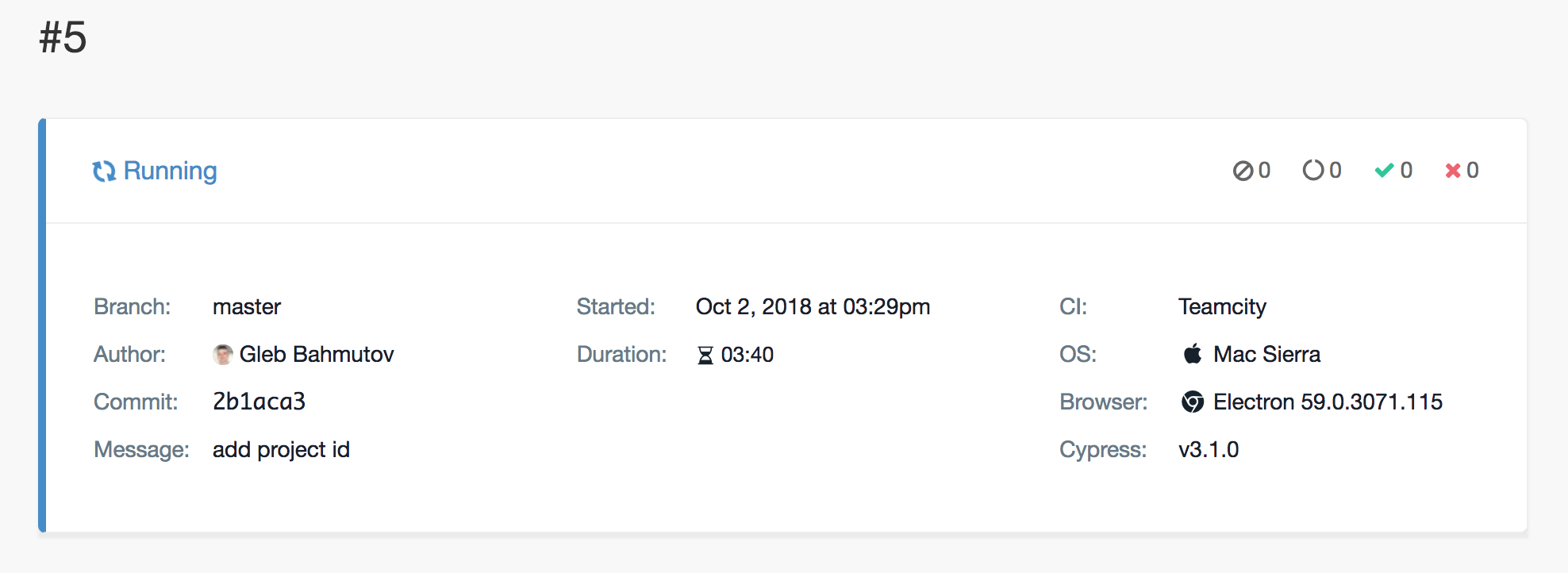
so it should be able to send Git information to the dashboard, let's see the output from the first cypress:server:api request to url: POST https://api.cypress.io/runs from your test run
bahmutov
on 2 Oct 2018
@bahmutov, No luck 😞
I need to explain our basic architecture, we run each job in an agent that runs a Python script. The script parallelizes our tests using Python threads. Each thread runs a docker container.
I'm passing all TeamCity's env variables to the docker. This is a print of process.env
{
   _: "/usr/local/bin/python3.6",
  BROWSER: "chrome",
  BUILD_NUMBER: "321 - itaykotler-fundbox",
  BUILD_VCS_NUMBER_Cypress_GitGithubComFundboxFrontendUsingROKey1: "961709686d046ac6b9f996031396b24bbf4577e9",
  BUILD_VCS_NUMBER: "961709686d046ac6b9f996031396b24bbf4577e9",
  DBUS_SESSION_BUS_ADDRESS: "/dev/null",
  DOCKER_WORKERS: "15",
  FAIL_FAST: "true",
  HEADED: "false",
  HOME: "/root"
  HOSTNAME: "7fe0709b6112",
  JAVA_HOME: "/usr/lib/jvm/java-8-oracle",
  JDK_18_x64: "/usr/lib/jvm/java-8-oracle",
  JDK_18: "/usr/lib/jvm/java-8-oracle",
  JDK_HOME: "/usr/lib/jvm/java-8-oracle",
  JRE_HOME: "/usr/lib/jvm/java-8-oracle",
  LANG: "en_US.UTF-8",
  MAX_RETRIES: "3",
  NODE_VERSION: "8.10.0",
  npm_config_loglevel: "warn",
  npm_config_unsafe_perm: "true",
  PARALLEL: "true",
  PATH: "/usr/local/sbin:/usr/local/bin:/usr/sbin:/usr/bin:/sbin:/bin",
  PWD: "/opt/buildAgent/work/adbc44085809d6d1",
  RECORD_DASHBOARD: "true",
  RUNTIME_ENV: "staging",
  SHLVL: "1",
  SHOW_DEBUG: "true",
  SPECIFIC_SPECS: "",
  TEAMCITY_BUILD_PROPERTIES_FILE: "/opt/buildAgent/temp/buildTmp/teamcity.build3054144607441924261.properties",
  TEAMCITY_BUILDCONF_NAME: "Cypress Run for Itay",
  TEAMCITY_CAPTURE_ENV: "\"/usr/lib/jvm/java-8-openjdk-amd64/jre/bin/java\" -jar \"/opt/buildAgent/plugins/environment-fetcher/bin/env-fetcher.jar\"",
  TEAMCITY_GIT_PATH: "/usr/bin/git",
  TEAMCITY_PROCESS_FLOW_ID: "3301048779447",
  TEAMCITY_PROCESS_PARENT_FLOW_ID: "",
  TEAMCITY_PROJECT_NAME: "Cypress",
  TEAMCITY_VERSION: "2017.2.4 (build 51228)",
  TERM: "xterm",
  TEST_GROUP: "cms",
  VIDEO_RECORDING: "true",
  YARN_VERSION: "1.5.1",
}
Here is the out put from
DEBUG=cypress:server:api
DEBUG_DEPTH=10
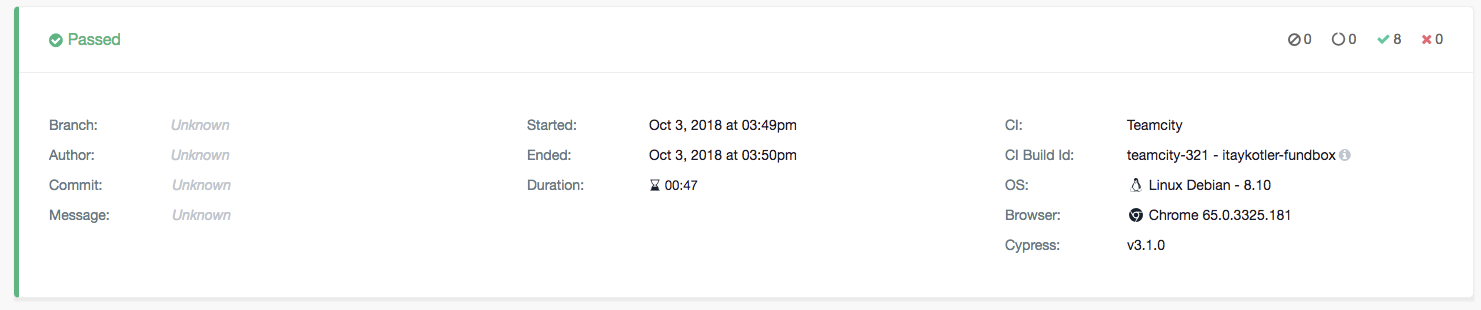
cypress:server:api request to url: POST https://api.cypress.io/runs with params: { body: { ci: { params: null, provider: 'teamcity' }, specs: [ 'cypress/integration/cms/register-with-different-landing-pages.sanity.js' ], commit: { sha: '', branch: '', authorName: '', authorEmail: '', message: '', remoteOrigin: '', defaultBranch: null },
I get only CI and CI Build Id in the dashboard
itaykotler-fundbox
on 3 Oct 2018
ok, so then the git commit is missing because the docker containers running each job are losing git information! And CI is reflecting the provider correctly. Can I ask why don't you parallelize specs via --record --parallel?
bahmutov
on 3 Oct 2018
I am using parallel
This is my cypress.js runner file that runs in each docker container.
const cypress = require("cypress");
const process = require("process");
const _ = require("lodash");
const crypto = require("crypto");

// Set environments variables
const runtimeEnv = process.env.RUNTIME_ENV;
const showDebug = process.env.SHOW_DEBUG === "true";
const testGroup = process.env.TEST_GROUP;
const record = process.env.RECORD_DASHBOARD === "true";
const video = process.env.VIDEO_RECORDING === "true";
const browser = process.env.BROWSER || "electron";
const headed = process.env.HEADED === "true";
const failFast = process.env.FAIL_FAST === "true";
const buildNumber = process.env.BUILD_NUMBER;
const parallel = process.env.PARALLEL === "true";
const maxRetries = process.env.MAX_RETRIES || 3;
let specificSpecs = process.env.SPECIFIC_SPECS;
console.log(JSON.stringify(process.env));
const testFilters = ["all", "None", "none", "", false, undefined];

// Exit if no environment was given
if (!runtimeEnv) {
  console.log("RUNTIME_ENV must be set!");
  process.exit(1);
}

// Set debug modes
if (showDebug) {
  process.env.DEBUG = "cypress:*";
  process.env.DEBUG_DEPTH = 10;
}

// Set paths
const integrationFolder = "cypress/integration";

// id unique to the machine
const uniqueId = crypto.randomBytes(3).toString("hex");

let totalFailuresIncludingRetries = 0;

function getSpecsToRun() {
  if (!testFilters.includes(specificSpecs)) {
    if (!specificSpecs.includes(integrationFolder)) {
      return `${integrationFolder}/${specificSpecs}`;
    }
    return specificSpecs;
  }
  if (testGroup === "sanity") {
    return `${integrationFolder}/**/*sanity*`;
  }
  if (!testFilters.includes(testGroup)) {
    return `${integrationFolder}/${testGroup}/**/*`;
  }
  return `${integrationFolder}/**/*`;
}

function setTestGroup() {
  if (!testFilters.includes(specificSpecs)) {
    return "specific specs";
  } else if (!testFilters.includes(testGroup)) {
    return testGroup;
  }
  else {
    return "All";
  }
}

function setCypressConfig(specFile, parallel) {
  const basicConfig = {
    spec: specFile,
    reporter: "teamcity",
    reporterOptions: {
      configFile: "cypress.json",
    },
    browser,
    headed,
    config: {
      trashAssetsBeforeRuns: false,
      integrationFolder,
      video,
    },
    env: {
      RUNTIME_ENV: runtimeEnv,
      FAIL_FAST: failFast,
    },
  };
  if (record) {
    basicConfig.record = record;
    basicConfig.key = "*******";
    if (parallel) {
      basicConfig.parallel = parallel;
      basicConfig.group = setTestGroup(testGroup);
      basicConfig.ciBuildId = buildNumber;
    } else {
      basicConfig.parallel = false;
      basicConfig.group = false;
      basicConfig.ciBuildId = false;
    }
  }
  return basicConfig;
}

const specsToRun = getSpecsToRun();
const DEFAULT_CONFIG = setCypressConfig(specsToRun, parallel);

const run = (num, spec, retryGroup) => {
  num += 1;
  const config = Object.assign(_.cloneDeep(DEFAULT_CONFIG));
  config.env.numRuns = num;

  if (spec) config.spec = spec;
  if (retryGroup) config.group = retryGroup;

  return cypress.run(config)
    .then((results) => {
      if (results.failures > 0) {
        process.exit(1);
      }
      if (results.totalFailed) {
        totalFailuresIncludingRetries += results.totalFailed;

        // rerun again with only the failed tests
        const specs = _(results.runs).filter("stats.failures").map("spec.relative").value();

        console.log(`Run #${num} failed.`);

        // if this is the 3rd total run (2nd retry)
        // and we've still got failures then just exit
        if (num >= maxRetries) {
          console.log(`Ran a total MAX retries of '${maxRetries}' times but still have failures. Exiting...`);
          return process.exit(totalFailuresIncludingRetries);
        }

        console.log(`Retrying '${specs.length}' specs...`);
        console.log(specs);

        // If we're using parallelization, set a new group name
        let retryGroupName;
        if (DEFAULT_CONFIG.group) {
          retryGroupName = `${DEFAULT_CONFIG.group}: retry #${num}  (${specs.length} spec${specs.length === 1 ? "" : "s"} on ${uniqueId})`;
        }

        // kick off a new suite run
        return run(num, specs, retryGroupName);
      }
    })
    .catch((err) => {
      console.error(err);
      process.exit(1);
    });
};

run(0);
record and parallel are set to true...
itaykotler-fundbox
on 3 Oct 2018
so @itaykotler-fundbox I am not sure what we can do - if your Docker container used to run Cypress does not have the .git folder to allow git ... commands to find commit information, then we cannot grab it from Cypress, right?
bahmutov
on 4 Oct 2018
I'll try passing git variables to the docker and let you if I succeeded.
Thanks
itaykotler-fundbox
on 4 Oct 2018
@itaykotler-fundbox I think if we implement https://github.com/cypress-io/commit-info/issues/43 then it would work for problems like yours where you would just need to set environment variables yourself and Cypress then would get values.
bahmutov
on 5 Oct 2018
Hey @itaykotler-fundbox, were you successful in getting your environment variables into the Dashboard?
@bahmutov Is there any more action required for this issue?
 jennifer-shehane
on 30 Jan 2019
jennifer-shehane
on 30 Jan 2019
Hey @jennifer-shehane, we are currently using HTML reports and not the dashboard.
I believe that when eventually we'll use the Dashboard, it would be easy to pass the environment variables.
Thanks
itaykotler-fundbox
on 30 Jan 2019
Related issues
jennifer-shehane
·
3Comments
 egucciar
·
3Comments
egucciar
·
3Comments
 brian-mann
·
3Comments
brian-mann
·
3Comments
 stormherz
·
3Comments
stormherz
·
3Comments
 szabyg
·
3Comments
szabyg
·
3Comments