Cypress: Creating route alias using post processed fixture data (Blob) is not returning that data
Current behavior:
My Angular 5 app makes an HTTP GET request to a remote server which returns an image as a Blob. My existing Cypress specs using the remote server correctly verify the response data is received.
I'd like to stub out the call to the remote server and wrote this spec that loads a JPEG file from disk using a fixture (which returns a dataURI) and then I convert that to a Blob and supply it to cy.route (using the same route minimatch expression that is matched in my non-stubbed request).
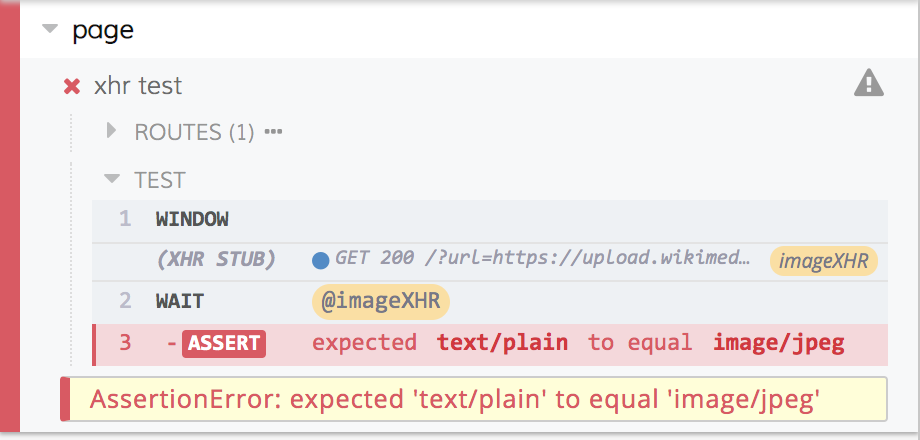
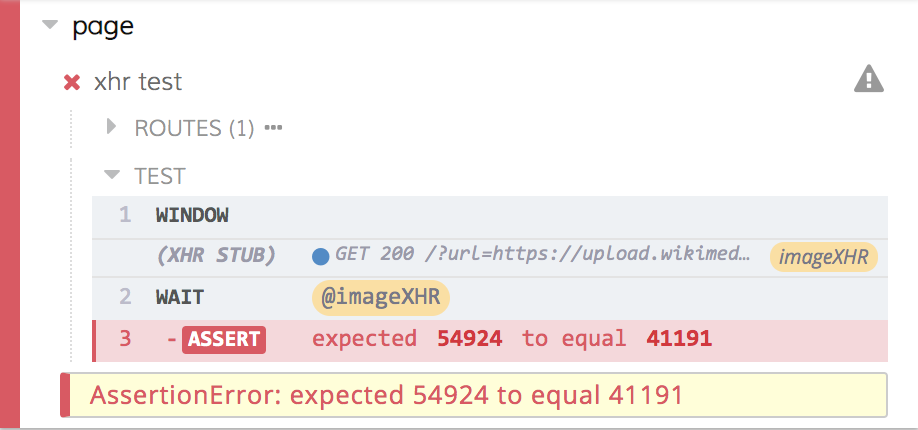
in the cypress command log the XHR Stub is being hit and it is returning a Blob of size 2 of type application/json instead of my actual Blob. The cy.wait for the alias also prints Blob size2 application/json to the console.
Here's my spec:
// spec
describe('Test using fixture to supply image as a Blob', function () {
  before(() => {
    cy.server();
    cy.fixture('images/map.jpeg').then(dataURI => {
      console.log(dataURI);
       return Cypress.Blob.base64StringToBlob(dataURI, "image/jpeg").then((blob) => {
        console.log(blob);
        return cy.route('https://images.mydomain.com/**', blob).as('imageXHR');
      })
    });
  })
  it('test that causes app to call '@imageXHR'), function() {
    ...
  })
});
The console.log statements print what you'd expect - the first is a long data URI and the second is
a Blob {size: 41191, type: "image/jpeg"}.

I'm not sure what syntax I have wrong or if there is a bug.
Desired behavior:
The post processed fixture data is supplied to the XHR request.
Steps to reproduce:
I'm happy to work on a reproduction if it would help!
Versions
Cypress 3.0.1, OSX
 saschwarz
All 11 comments
Have you tried just passing the fixture reference directly as opposed to trying to convert it to a Blob ?
Pinging @bahmutov as this has to do with the network layer which we're current in the middel of a rewrite. Good scenario to account for if its not possible to get working with our current model.
Yes @saschwarz please put together a tiny reproducible repo so we have the minimum to test and understand your situation.
 brian-mann
on 15 Jun 2018
brian-mann
on 15 Jun 2018
I'd tried these other permutations too:
cy.fixture('images/map.jpeg').as('map').then(blob => {
// NOT VALID - the "blob" is actually a dataURI...
console.log(blob);
const copy = new Blob([blob.slice()], {type: 'image/jpeg'} );
cy.route('https://images.mydomain.com/**', copy).as('imageXHR');
});
cy.fixture('images/map.jpeg').as('map');
cy.route('https://images.mydomain.com/**', '@map').as('imageXHR');
cy.route('https://images.mydomain.com/**', 'fx:images/map.jpeg').as('imageXHR');
@brian-mann I've created a test: https://github.com/saschwarz/cypress-test-tiny
It has the three variations I've tried for stubbing my jpeg file as a Blob with mime type image/jpeg.
Let me know if there is anything else I can do.
saschwarz
on 17 Jun 2018
I have the exact same problem, [email protected], no matter what I try, nothing other than using 'fx:data.json' as the last arg to cy.route() works.
Especially frustrating is this snippet logs my data, but the route always returns no response:
cy.fixture('data.json').as('data');
cy.get('@data').then(d => {
// Logs data to the console
console.log({ d });
cy.route('GET', '/some/url/**', d);
});
Edit:
There seems to be some asynchronous race condition happening, I only have issues if my json data set is rather large. I pared it down to only a few items in an array, and it works normally.
Is there a method or something to make sure it waits until the json data is loaded?
 matt328
on 9 Nov 2018
matt328
on 9 Nov 2018
Just stumbled on this issue, here's a workaround.
@saschwarz Thanks for the test repo! This is definitely a bug, but as a workaround I was able to modify your variant1 as follows and the test now passes, yielding a fixture-sourced image blob:
cy.fixture('images/map.jpeg').then(dataURI => {
return Cypress.Blob.base64StringToBlob(dataURI, "image/jpeg").then(
(blob) => {
expect(blob.size).to.be.equal(41191);
expect(blob.type).to.equal('image/jpeg');
return cy.route({
url: 'https://images.agilitycoursemaster.com/**',
method: 'GET',
response: '',
onResponse: xhr => {
xhr.response.body = blob;
}
}).as('imageXHR');
})
});
The important bit is this:
onResponse: xhr => {
xhr.response.body = blob;
}
It's a hack, but it should unblock you.
@brian-mann Cypress is great, thanks!
 amcgee
on 17 Jan 2019
amcgee
on 17 Jan 2019
 jennifer-shehane
on 25 Apr 2019
jennifer-shehane
on 25 Apr 2019
@jennifer-shehane may I ask if this bug is still on the roadmap or has it been solved?
I tried above workaround of @amcgee but I am unfortunately still unable to mock an Http Get request with a blob result, at least in an Angular project.
If interested I can provide the following dummy sample repo:
git clone https://github.com/peterpeterparker/cypress-mock-blob
cd cypress-mock-blob
npm i
npm run cypress
select test "mock-get-blob.js" to run and observe the console. instead of a mocked Http answer, I get a 0 length text/plain answer
Thx in advance for the feedback

 peterpeterparker
on 1 Jul 2020
peterpeterparker
on 1 Jul 2020
I'm having the same identical issue of @peterpeterparker
 lucax88x
on 10 Sep 2020
lucax88x
on 10 Sep 2020
On 5.3.0 I have the same identical issue of @peterpeterparker. But I rewrite to
return cy.route({
            url,
            method: 'GET',
            response: 'fx:image.png,binary', // where image.png my file in fixtures folder
            headers: {
                'content-type': 'application/octet-stream',
            },
        })
and now it's working
 Airatiki
on 19 Oct 2020
Airatiki
on 19 Oct 2020
@Airatiki your suggestion worked for me as well. Thanks.
 ClaudiaStefan
on 21 Oct 2020
ClaudiaStefan
on 21 Oct 2020
The example above by @Airatiki should be in the documentation 😅 👏
 mpavel
on 5 Nov 2020
mpavel
on 5 Nov 2020
Related issues
 verheyenkoen
·
3Comments
verheyenkoen
·
3Comments
 stormherz
·
3Comments
stormherz
·
3Comments
 Francismb
·
3Comments
brian-mann
·
3Comments
jennifer-shehane
·
3Comments
Francismb
·
3Comments
brian-mann
·
3Comments
jennifer-shehane
·
3Comments
Most helpful comment
On 5.3.0 I have the same identical issue of @peterpeterparker. But I rewrite to
and now it's working