Cypress: cy.route doesn't match http calls to .js resources
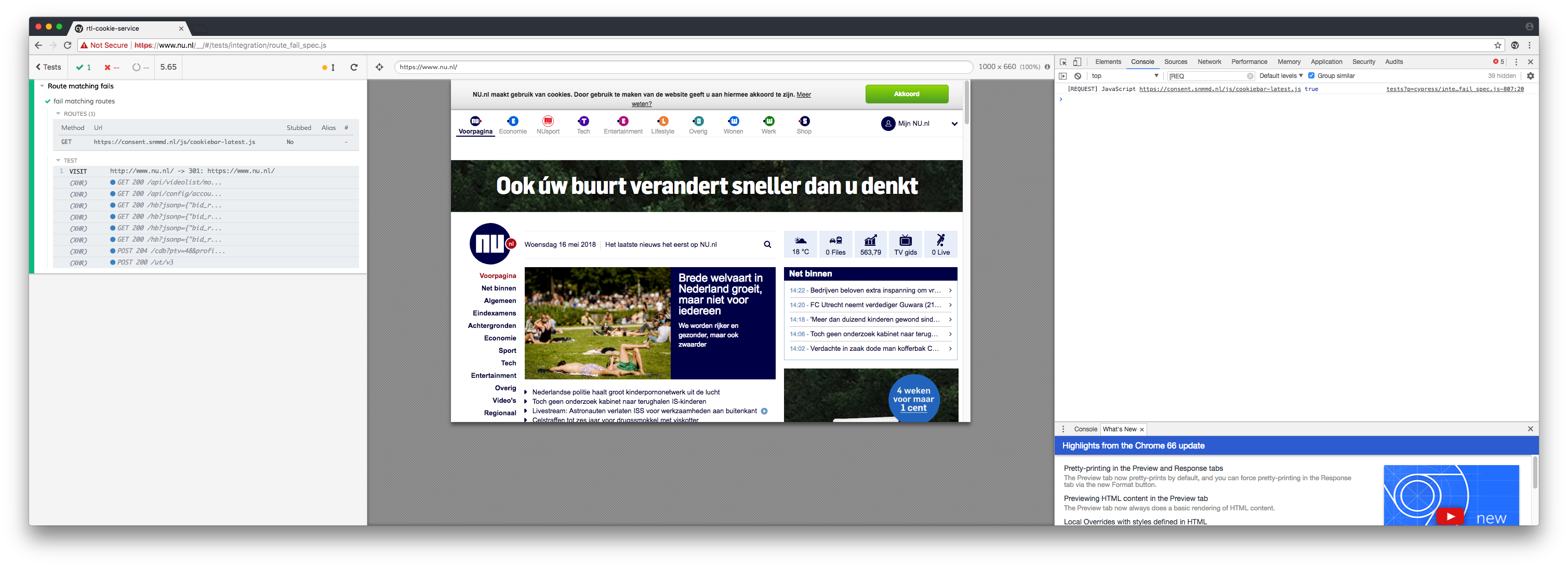
Current behavior:

(Notice how # is - because cypress doesn't think the route is matched)
Interestingly the response handler is still called and the log appears in the console.
Desired behavior:
I'd like the route to match and be able to replace the contents of the resource I'm trying to hijack.
Steps to reproduce:
describe('Route matching fails', function () {
    it('fail matching routes', function () {
        cy.server()
        cy.route({
            method: 'GET',
            url: 'https://consent.snmmd.nl/js/cookiebar-latest.js',
            response: (req) => {
                console.log('[REQUEST] JavaScript');
            }
        })
        cy.visit('http://www.nu.nl')
    })
})
Versions
Cypress 2.1.0
macOS 10.12.6
Node 10.0.0
 pixeleet
All 6 comments
The documentation is not clear about this, because when you're looking at https://docs.cypress.io/guides/guides/network-requests.html#Requests, the link to configuration https://docs.cypress.io/guides/references/configuration.html when in fact it should lead to: https://docs.cypress.io/api/commands/server.html#Options => Change the default whitelisting.
pixeleet
on 16 May 2018
Revised code.
Route should match, but counter is still not set in Cypress, even though now I see some XHR requests, I'm not seeing the one I'm looking for. Is this intended or a bug?
/* global cy, Cypress, assert */
describe('Route matching fails', function () {
it('fail matching routes', function () {
cy.server({
whitelist: (xhr) => {
// specify your own function that should return
// truthy if you want this xhr to be ignored,
// not logged, and not stubbed.
console.log('[wHITELIST]', xhr.url)
return false
}
})
cy.route({
method: 'GET',
url: 'https://consent.snmmd.nl/js/cookiebar-latest.js',
response: (req) => {
console.log('[REQUEST] JavaScript', req.url, Cypress.minimatch('https://consent.snmmd.nl/js/cookiebar-latest.js', 'https://consent.snmmd.nl/js/cookiebar-latest.js'));
}
})
cy.visit('http://www.nu.nl')
})
})
@pixeleet were you able to get the whitelist function to work? I'm trying to do something similar but always only see the XHR request that are by default.
 mledom
on 27 Aug 2018
mledom
on 27 Aug 2018
I'm reporting the same as @mledom. I only see the XHR requests that are on by default.
v 3.1.0
 jeremyrader
on 1 Nov 2018
jeremyrader
on 1 Nov 2018
I looked into this issue a bit because I was unsure if this was a bug or intended behavior as well.
The requests you are wanting to track in the Command Log are JavaScript resources loading, not XHR requests. Cypress currently only logs XHR requests within the Command Log, although we have intentions to track more in the future.
They will not be logged no matter what you define in the whitelist function for cy.server(), because this has not been coded in Cypress.
We realized this is not made clear enough in the documentation, and apologize for the confusion. We have plans to update the docs to make it clearer that Cypress only tracks XHR requests.
I will leave this issue opened as a requested feature.
 jennifer-shehane
on 8 Jan 2019
jennifer-shehane
on 8 Jan 2019
Have been thinking about this some. I thought maybe some people would find it useful to hook into the onLoad event and edit the <head> directly, maybe edit the JS resources here.
cy.visit('https://example.cypress.io', {
  onBeforeLoad: (contentWindow) => {
    // contentWindow is the remote page's window object
    contentWindow.document.head
    // I can change the <head> however I want here
    // including <script> src or content
  },
})
Related issues
 egucciar
·
3Comments
egucciar
·
3Comments
 dkreft
·
3Comments
dkreft
·
3Comments
 szabyg
·
3Comments
szabyg
·
3Comments
 Francismb
·
3Comments
Francismb
·
3Comments
 brian-mann
·
3Comments
brian-mann
·
3Comments
Most helpful comment
Have been thinking about this some. I thought maybe some people would find it useful to hook into the
onLoadevent and edit the<head>directly, maybe edit the JS resources here.