Cypress: windows 7 console tekst is unreadable cause of special chars
- Operating System: Windows 7
- Cypress Version: 1.4.1
Is this a Feature or Bug?
BUG
Current behavior:
i see lots of weird characters when running "cypress run"
in example:
←[90m (←[4m←[1mTests Starting←[22←[24m)←39m
Desired behavior:
have normal text (the way it was in older versions) like:
(Tests Starting)

 BasieP
All 20 comments
Can you try using PowerShell? Windows and special characters in the terminal has been endless rabbit hole for us :(
 bahmutov
on 3 Jan 2018
bahmutov
on 3 Jan 2018
Those characters are coming from Mocha which tell the terminal how to display colors. We may be incorrectly determining that the command prompt can display colors...
 brian-mann
on 3 Jan 2018
brian-mann
on 3 Jan 2018
@BasieP I noticed you said:
have normal text (the way it was in older versions)
Are you implying this broke since a recent update to Cypress v 1.4.1? What version was this previously working in? This would be helpful info.
 jennifer-shehane
on 3 Jan 2018
jennifer-shehane
on 3 Jan 2018
In 1.4.1 we actually fixed issues with Windows not displaying colors but we might have broken the way it runs on the command prompt. We tested in PowerShell.
brian-mann
on 3 Jan 2018
The logic is here: https://github.com/cypress-io/cypress/blob/develop/cli/lib/exec/spawn.js#L71
It forces color output as long as the current running process says it supports colors...
brian-mann
on 3 Jan 2018
Sorry i should indeed mention what version did work correctly.
I was using 1.0.3 before and there everything worked fine.
Sorry the gab is so big ;-)
by the way:
as you can see in the screenshot DOES my console (normal windows 7 cmd.exe) have color support.
It more looks like the way to use colors on the cmd.exe is different then the one now being used
BasieP
on 3 Jan 2018
I am experiencing the same issues with CMDER, but CMDER is just ConEmu which actually should provide full color support.
Windows 10
Cmder - 161206
Cypress - 1.4.1
 dobromir-hristov
on 8 Jan 2018
dobromir-hristov
on 8 Jan 2018
It looks broken in powershell (and cmd) too for me on Windows 10, Cypress 1.4.1:

Though it does seem to be just the tick symbol.
 wijwoj
on 16 Jan 2018
wijwoj
on 16 Jan 2018
I would truly love this one to get fixed - as I keep having to make excuses to the senior devs I'm pushing to use Cypress
"Honestly guys  definitely means these tests are passing".
wijwoj
on 31 Jan 2018
I'm also experiencing this issue in cmd. It's much better in PowerShell, but most of my developers use cmd. Would love to see it fixed soon.
Windows 7
Cypress 1.4.2
 jthannah
on 6 Feb 2018
jthannah
on 6 Feb 2018
I did a little bit of digging this one and found that if I switch my cmd window to codepage 65001 (run command chcp 65001) the tick char appears correctly.
The character for the tick does display correctly in the default code page though so something is messing up the character in the process of getting it to the windows console.
I believe this electron issue might be related https://github.com/electron/electron/issues/5761
wijwoj
on 9 Mar 2018
Released in 3.0.0.
brian-mann
on 30 May 2018
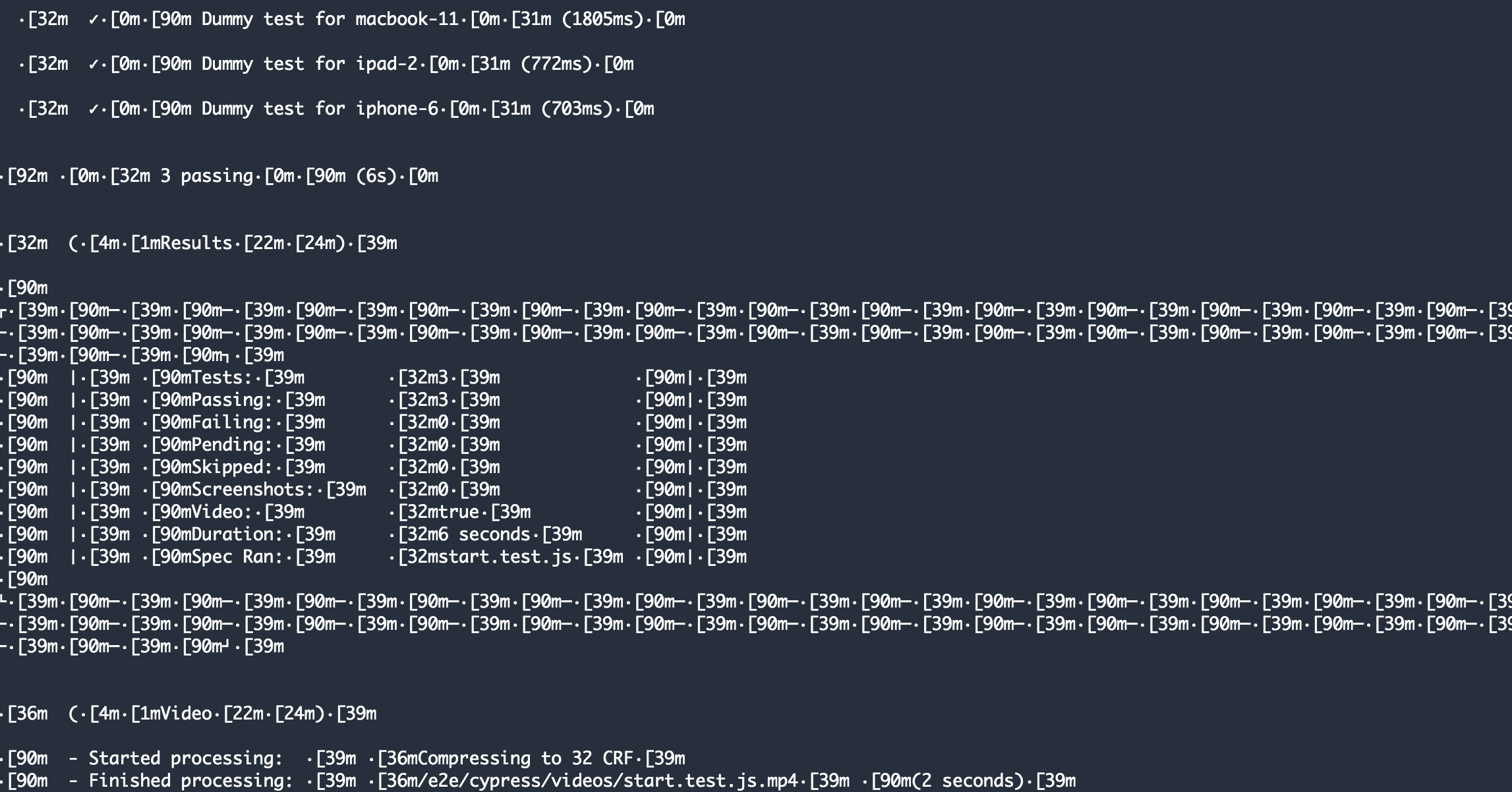
@jennifer-shehane @brian-mann This issue still happens for me when running cypress./included:3.2.0 docker image inside a docker container (CI). The output is messed up because of colors.
This is when I'm using AWS Codepipeline (Ubuntu machine). I believe there was a NO_COLORS flag but that doesn't seem to be working when running the cypress/included image to run the tests (Especially since it's running the container within a container). Any suggestions or fixes that I may have missed?
Command:
docker run -i -v $PWD:/e2e -w /e2e cypress/included:3.2.0 $@
Removed the -t flag because it gave 'input device is not a tty error'
Log: Works fine but makes the output unreadable.
 devsh4
on 18 Jul 2019
devsh4
on 18 Jul 2019
@devsh4 I have 2 questions
- how does it look with
cypress/included:3.4.0image? - can you set the environment variable
TERM=xtermwhen running the container?
bahmutov
on 18 Jul 2019
@bahmutov Yes I tried passing the env variable like this: -e "TERM=xterm-256color" when running the container but it didn't work.
Currently trying the 3.4.0 image and if that doesn't work will add 'TERM=xterm' variable to it and let you know. Fingers crossed.
devsh4
on 18 Jul 2019
@bahmutov Updating to the newer base image didn't work. Trying adding the -env variable now.
FYI, I am running the container via the ./cy-run.sh script as mentioned in the examples. The buildspec file basically calls an npm command which runs this file. Not sure if this would make any difference.
NPM command:
"ci-test": "cd folderName & bash ./cy-run.sh; cd -"
devsh4
on 18 Jul 2019
@devsh4 I will eventually set up AWS Codepipeline build for our kitchensink example, hopefully we will see the problem ourselves and will provide the answer then
bahmutov
on 18 Jul 2019
@bahmutov Sure, thanks for the quick turnaround!
Just one question - I know the issue is around running a container (cypress) within an existing container. Do you think it's because of the docker command (below) or the way I'm executing the shell script (mentioned above) ?
docker run -i -e "TERM=xterm" -v $PWD:/e2e -w /e2e cypress/included:3.4.0 $@
devsh4
on 18 Jul 2019
I don't know, the command seems fine, it is same as I used in
https://www.cypress.io/blog/2019/05/02/run-cypress-with-a-single-docker-command/
On Thu, Jul 18, 2019 at 12:30 PM Dev notifications@github.com wrote:
@bahmutov https://github.com/bahmutov Sure, thanks for the quick
turnaround!Just one question - I know the issue is around running a container
(cypress) within an existing container. Do you think it's because of the
docker command (below) or the way I'm executing the shell script (mentioned
above) ?docker run -i -e "TERM=xterm" -v $PWD:/e2e -w /e2e cypress/included:3.4.0
$@—
You are receiving this because you were mentioned.
Reply to this email directly, view it on GitHub
https://github.com/cypress-io/cypress/issues/1143?email_source=notifications&email_token=AAQ4BJXSRE5YZYYUZIQAJN3QACLBPA5CNFSM4EKF3R52YY3PNVWWK3TUL52HS4DFVREXG43VMVBW63LNMVXHJKTDN5WW2ZLOORPWSZGOD2JBMKA#issuecomment-512890408,
or mute the thread
https://github.com/notifications/unsubscribe-auth/AAQ4BJWMEA27KJGYB6X547TQACLBPANCNFSM4EKF3R5Q
.
--
Dr. Gleb Bahmutov, PhD
Schedule video chat / phone call / meeting with me via
https://calendly.com/bahmutov
gleb.[email protected] @bahmutov https://twitter.com/@bahmutov
https://glebbahmutov.com/ https://glebbahmutov.com/blog
https://github.com/bahmutov
bahmutov
on 18 Jul 2019
@bahmutov Thanks! Will be tracking this thread to see if there any workarounds.
Also, I believe we can disable the colored output by passing NO_COLORS=1 flag to the cypress run command. Do you have an idea how to pass that arg when running the cypress docker image because I tried and couldn't get it working.
devsh4
on 18 Jul 2019
Related issues
jennifer-shehane
·
3Comments
 simonhaenisch
·
3Comments
simonhaenisch
·
3Comments
 dkreft
·
3Comments
dkreft
·
3Comments
 szabyg
·
3Comments
szabyg
·
3Comments
 scottcrowe
·
3Comments
scottcrowe
·
3Comments