Test code:
I have lots of entry and I want to check only some of these entries exists in combobox.
for this purpose, I created a variable containing these some of entries.
var listTags = ['Analysis', 'Definition', 'Compliance']

cy.get('.select2-results div').each(($div, i) => {
  expect($div).contains(listTags[i])
})
the combobox is actually containing these entries: a, b, Analaysis, Definition, Compliance
if the combobox contained the entries Analysis, Definition, Compliance the code above wouldnt fail. However the combobox may contains a lot entries and I want to check if only some of these entries exists. I can do that using "should" writing the certain entries manually but isn't there a way to do that using a variable and in each loop? (like above)
 kemalbayar
All 13 comments
the code above is wrong.
the following code is right.
var listTags = ['Analysis', 'Definition', 'Compliance']
cy.get('.select2-results div').each(($div, i) => {
expect($div).to.contain(listTags[i])
})
I am not sure - is this a question, or a bug report? Is the code working? Seems to be correct, no?
 bahmutov
on 26 Dec 2017
bahmutov
on 26 Dec 2017
@kemalbayar It sounds like you want to conditionally test certain situations. We have a doc on this here: https://on.cypress.io/conditional-testing that may help you find a solution.
 jennifer-shehane
on 26 Dec 2017
jennifer-shehane
on 26 Dec 2017
@bahmutov @jennifer-shehane thanks for your answers.
I think that there may be a simple solution (a method/command) to do that.
the following code will fail because the divs contains more entry than listTags.
Actually. what it should be done is comparing 'listTags' variable to div, not comparing div to 'listTags'
var listTags = ['Analysis', 'Definition', 'Compliance']
cy.get('.select2-results div').each(($div, i) => {
expect($div).to.contain(listTags[i])
})
there is way in accordance with the above description?
kemalbayar
on 27 Dec 2017
by the way, although im reading the link https://docs.cypress.io/guides/core-concepts/conditional-testing.html# im looking forward to your answers
kemalbayar
on 27 Dec 2017
the disadvantages of above commands are
1- element sequence of the listTags variable must be same as div
for example if the divs contains the following entries (in order)
Definition
Analysis
Compliance
in this case above command will not be successful because listTags variable isnt the same sequence as div
2- the number of divs must be same or fewer than the element number of listTags variable
Is there a solution that does not have the above disadvantages?
kemalbayar
on 28 Dec 2017
I don't see it. Kemal can you make a tiny public repo with the index HTML with the select and the cypress test that you want to work? Then we can resolve it without guessing what works and what does not for you.
Sent from my iPhone
On Dec 28, 2017, at 08:04, Kemal notifications@github.com wrote:
the disadvantages of above commands are
1- element sequence of the listTags variable must be same as div
for example if the divs contains the following entries (in order)
Definition
Analysis
Compliance
in this case above command will not be successful because listTags variable isnt the same sequence as div
2- the number of divs must be same or fewer than the element number of listTags variableIs there a solution that does not have the above disadvantages?
—
You are receiving this because you were mentioned.
Reply to this email directly, view it on GitHub, or mute the thread.
bahmutov
on 28 Dec 2017
@kemalbayar this appears to be a programming issue on your end and not something related to Cypress. We can't answer implementation questions like this without companies being on a support contract with us. If we did this all day then we'd never have time to work on Cypress. To answer your question you are simply comparing arrays and need to inverse the relationship.
var listTags = ['Analysis', 'Definition', 'Compliance']

cy.get('.select2-results div').then(($divs) => {
  Cypress._.each(listTags, (tag) => {
    expect($divs).to.contain(tag)
  })
})
 brian-mann
on 28 Dec 2017
brian-mann
on 28 Dec 2017
Yes, you should be able to compare the list against the entire array so that order is not important. You can also do:
cy.get('.select2-results div').each(($div, i, $divs) => {
  expect($divs).to.contain(listTags[i])
})
Thanks.
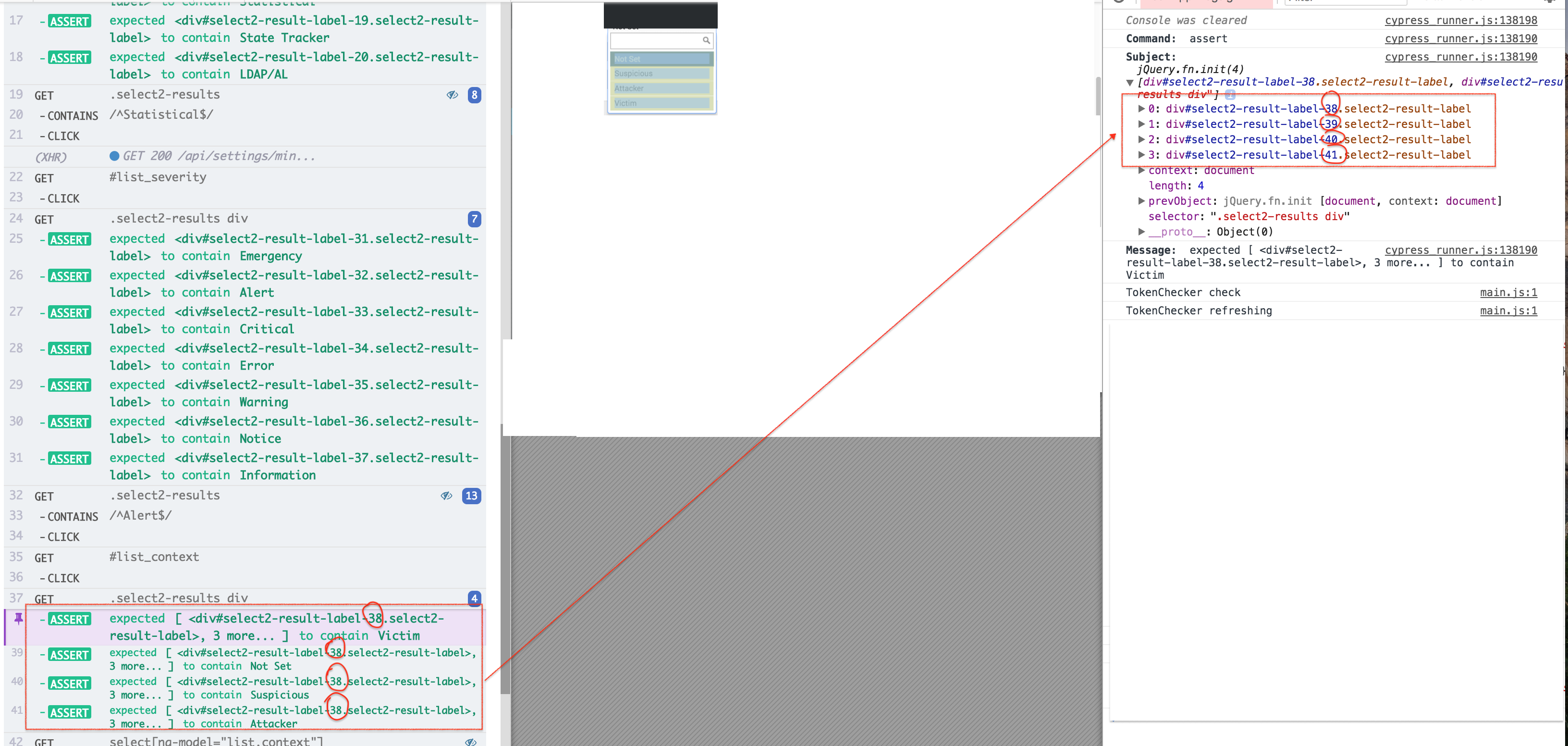
I would like to indicate a situation. I dont have an idea about it. Can you please look at attached file?
kemalbayar
on 29 Dec 2017
if the situation isnt a bug, no problem
kemalbayar
on 29 Dec 2017
in addition to this, can you see that image too ?

kemalbayar
on 29 Dec 2017
@kemalbayar The log is displaying the array truncated just to save space. So, instead of [<div#38>, <div#39>, <div#40>, <div#41>] it displays [<div#38>, 3 more...]
jennifer-shehane
on 29 Dec 2017
Related issues
 igorpavlov
·
3Comments
igorpavlov
·
3Comments
 szabyg
·
3Comments
szabyg
·
3Comments
 zbigniewkalinowski
·
3Comments
zbigniewkalinowski
·
3Comments
 Francismb
·
3Comments
brian-mann
·
3Comments
Francismb
·
3Comments
brian-mann
·
3Comments
Most helpful comment
@kemalbayar this appears to be a programming issue on your end and not something related to Cypress. We can't answer implementation questions like this without companies being on a support contract with us. If we did this all day then we'd never have time to work on Cypress. To answer your question you are simply comparing arrays and need to inverse the relationship.