Cypress: support folder doesn't support TypeScript
I converted .js files in cypress/support folder to .ts files and the Cypress app no longer found them. Converting back to JS the app found them again. I tried digging through the source code to see if it is a configuration option, but I couldn't find anything. The current workaround is to just have the JS file with a .d.ts file separately for the command types. Cypress understands TypeScript files in cypress/integration just fine. If I make the index file a JS file and imported files TS files, it gives an error "cannon file modules".
- Operating System: OSX
- Cypress Version: 1.4
- Browser Version: Chrome 62
Is this a Feature or Bug?
Bug?
Current behavior:
TypeScript files aren't recognized in cypress/support
Desired behavior:
Support files written in TypeScript are recognized
How to reproduce:
Change a support file to a *.ts file and restart Cypress. When I do this the file is not picked up by Cypress anymore.
Cypress team solution
See example project with working TS support and spec files https://github.com/bahmutov/cypress-support
- point Cypress at the TypeScript support file from
cypress.jsonconfig
{
  "supportFile": "cypress/support/index.ts"
}
- install TypeScript and @bahmutov/add-typescript-to-cypress - this will configure transpiling
.tsfiles during testing - when adding custom commands, add them to the
cyglobal interface. TypeScript compiler is smart enough to merge your definitions with thecytype fromnode_modules/cypressmodule. For example
/**
 * Goes to google site
 */
function google() {
  return cy.visit('https://google.com');
}

Cypress.Commands.add('google', google);

declare namespace Cypress {
  interface Chainable<Subject> {
    google: typeof google;
  }
}
The only thing TypeScript cannot do - if one of your custom commands calls _another_ custom command, then tsc does not understand that the new command will be there. In other words this does not work and requires casting cy as any to work
function foo() {} // first custom command to be added
function bar() {
  cy.foo() // error: cy does not have method "foo" :(
}

Cypress.Commands.add('foo', foo);
Cypress.Commands.add('bar', bar);

declare namespace Cypress {
  interface Chainable<Subject> {
    foo: typeof foo;
    bar: typeof bar;
  }
}
In that case I suggest extracting custom foo command into plain function and not attaching it to the cy interface.
 NicholasBoll
All 16 comments
I looked more into plugins for TypeScript support. Using the example for webpack + TypeScript works just fine. I'm not sure why Cypress is fine with integration files written in TS but not in support.
I'm not sure if first-class TypeScript support is a priority at the moment, but using the plugin system does allow me to customize easily. The plugins are a reasonable good workaround with just a bit of configuration (more flexible to support other languages as well).
If the Cypress team agrees, I'm good to close this.
NicholasBoll
on 21 Dec 2017
Plugins should transpile support files correctly. A few releases ago I actually found that it didn't do this correctly and thought I fixed it, but I didn't add an explicit test around it. I more or less found the code path that didn't do it correctly and removed it, assuming that it would work.
This is something we want to properly support for sure.
 brian-mann
on 21 Dec 2017
brian-mann
on 21 Dec 2017
I think I will just make a separate test project with typescript, something like cypress-test-typescript that will we use to make sure new releases of Cypress do not break TS specs, TS support files and pass the TS linter.
 bahmutov
on 22 Dec 2017
bahmutov
on 22 Dec 2017
We have TypeScript in our recipes - we just need to make the support/index.js files in those be TS. You don't need to create another repo.
brian-mann
on 22 Dec 2017
Separate test repo for TypeScript could be nice - it could run linting as well, something we don't do in recipes at all
bahmutov
on 22 Dec 2017
I got this to work by adding the following in the cypress.json:
"supportFile": "cypress/support/index.ts"
Working example (work in progress to get serenity-js to work with cypress) can be found here:
https://gitlab.com/Baasie/cypress-serenity/tree/master
 Baasie
on 28 Dec 2017
Baasie
on 28 Dec 2017
Yes I believe the problem here is that we require the support file by its default name index - and if its using a .ts extension and that extension has not been registered in node's require hook, then it would not work.
Doing exactly as you suggested would fix this, as then Cypress would require this file directly using the path you provided to the file.
brian-mann
on 28 Dec 2017
Does this suppose to work now? When I add
"supportFile": "cypress/support/index.ts"
If I simply try to import a file it will Cypress will complain it doesn't find it. (I assume it looks files with the .js extensions.) When import the file via import './form-helpers.utils.ts'; I got a parse error at the first Typescript specific code block:
Module parse failed: Unexpected token (9:9)
So it seems Cypress found the file but haven't compiled it but tried to run it directly instead.
 NoNameProvided
on 3 Apr 2018
NoNameProvided
on 3 Apr 2018
This doesn't appear to be working still, I'm evaluating Cypress right now for our project, using 3.0.2 and cypress/support/index.ts is never built.
If I explicitly set supportFile to use index.ts then I get an error like this:
SyntaxError: 'import' and 'export' may appear only with 'sourceType: module' (17:0) while parsing <...>\cypress\support\index.ts while parsing file: <...>\cypress\support\index.ts
I even tried to point to commands.ts instead and got syntax errors around the TypeScript types. So I don't think support files are compiled.
 Ventajou
on 17 Jul 2018
Ventajou
on 17 Jul 2018
The same logic that transpiles your spec code is the same logic that transpile your support code. It's all the same subsystem. As long as your spec code is workingly correctly then your support spec file will also be working correctly.
We need a reproducible repo if this isn't the case. I've personally seen this working in typescript on other users projects but don't have a project for reference at the moment.
brian-mann
on 17 Jul 2018
@brian-mann I just put together a repo where this happens for me: https://github.com/Ventajou/cypress-support hopefully that can help you figure out what's wrong. Let me know if there's anything else I can help with.
I spent most of my week evaluating Cypress for our project and I really like it so far. Sorting out this issue would make my life that much easier.
Ventajou
on 20 Jul 2018
@Ventajou I have fixed your example, see pull request https://github.com/Ventajou/cypress-support/pull/1
- point support file at typescript file
- add typescript compiler (!) and transpile config for Cypress (by using https://github.com/bahmutov/add-typescript-to-cypress)
- remove stray libraries included in
tsconfig.json

VSCode IntelliSense is working for custom commands
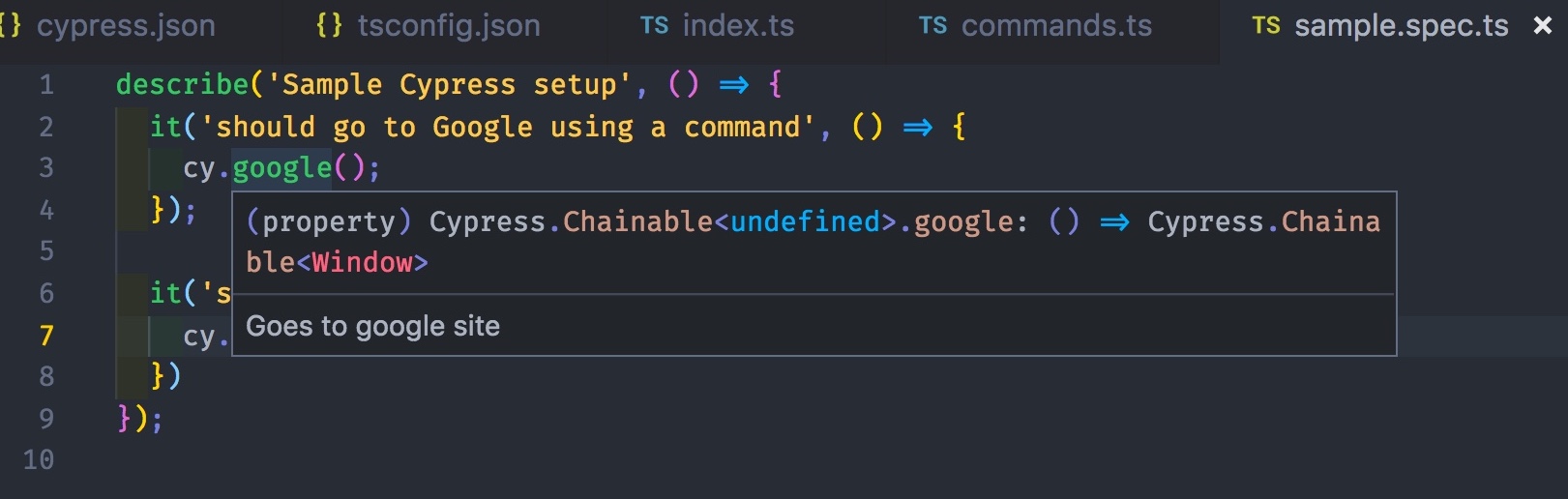
bahmutov
on 26 Jul 2018
See "Cypress team solution in the original issue.
bahmutov
on 26 Jul 2018
Hey @bahmutov, is there anything that should be updated within our official TypeScript doc?
 jennifer-shehane
on 30 Jul 2018
jennifer-shehane
on 30 Jul 2018
I followed this guide but get this error:
Module build failed: Error: You may be using an old version of webpack; please check you're using at least version 4
$ ./node_modules/.bin/webpack --version
4.29.1
 pixelass
on 6 Feb 2019
pixelass
on 6 Feb 2019
@Ventajou I have fixed your example, see pull request Ventajou/cypress-support#1
- point support file at typescript file
- add typescript compiler (!) and transpile config for Cypress (by using bahmutov/add-typescript-to-cypress)
- remove stray libraries included in
tsconfig.json
VSCode IntelliSense is working for custom commands
Be careful. I've been testing this solution on latter versions of these dependencies:
cypress (3.3.1)
typescript (3.2.1), and
@bahmutov/add-typescript-to-cypress (2.1.1)
I was getting an error until I updated with the following (instructions from typescript-to-cypress repo)
npm install --save-dev @babel/core @babel/preset-env babel-loader webpack
 omerose
on 5 Jun 2019
omerose
on 5 Jun 2019
Related issues
jennifer-shehane
·
3Comments
 dkreft
·
3Comments
dkreft
·
3Comments
 carloscheddar
·
3Comments
brian-mann
·
3Comments
carloscheddar
·
3Comments
brian-mann
·
3Comments
 EirikBirkeland
·
3Comments
EirikBirkeland
·
3Comments
Most helpful comment
@Ventajou I have fixed your example, see pull request https://github.com/Ventajou/cypress-support/pull/1
tsconfig.jsonVSCode IntelliSense is working for custom commands