if a url already has a re-direct on load, would it confilict with cupress loading it iwth its own redirect?
for ex i see that cypress loads the url with its own redirect as https://foo-bar.com/__/#/tests/__all
if the url itself is a https://foo-bar/c52/v1712.1050/0/login?redirect=true
i’m facing issues where my page re-directs and cypress redirects are messing up
i get this https://foo-bar/__/
and followed by an error Whoops, there is no test to run. Choose a test to run from the desktop application.
any help on the above, thanks in advance
 vasikarla
All 31 comments
I'm not sure I'm following what you're saying - and there are no known issues with redirects in Cypress. Can you create a reduced reproducible example?
What it sounds like is that your website is employing security restrictions that prevent Cypress from working. If that is the case you'll need to disable them.
We've talked about this in many different issues: here's a better explanation https://github.com/cypress-io/cypress/issues/392#issuecomment-274987217
 brian-mann
on 1 Dec 2017
brian-mann
on 1 Dec 2017
Thanks for your prompt response, could you kindly try to launch http://qbo.intuit.com/ and see if you are able to launch this please.
@brian-mann
describe('The Home Page', function() {
it('successfully loads', function() {
cy.visit('https://qbo.intuit.com');
})
it('Sample', function(){
    cy.url()
    .should('include', 'intuit')
})
})
vasikarla
on 1 Dec 2017
Oh without even visiting that link I am certain that intuit has these security restrictions in place. You'll need to disable those to use Cypress.
Most of our users use Cypress in development so they control the code. If you're in QA and without access to the code, there's not much you can do. It may be possible to log in programatically and reach areas without these restrictions, but it depends on the app and how its coded.
There is likely a tiny amount of code - maybe 1-3 lines causing this that needs to be removed, or conditionally used.
Can you access a development or staging version without these?
brian-mann
on 1 Dec 2017
even my dev and staging has same issues...
vasikarla
on 1 Dec 2017
If that loads the same code then naturally it will have the same issue.
I took a look at the page's HTML and found this.
This is what is causing it. As I mentioned its a tiny amount of code:
<script TYPE='text/javascript'>
            if(window.top !== window.self) {
                window.top.location.href = window.self.location.href;
            }
        </script>
Here is a simple hack / workaround to fix this...
    cy.visit('https://qbo.intuit.com', {
      onBeforeLoad: (win) => {
        Object.defineProperty(win, 'self', {
          get: () => {
            return window.top
          }
        })
      }
    });
If this script is on pages inside of the login then you'll need to do this instead...
    Cypress.on('window:before:load', (win) => {
      Object.defineProperty(win, 'self', {
        get: () => {
          return window.top
        }
      })
    })
You can read about this event here: https://docs.cypress.io/api/events/catalog-of-events.html
brian-mann
on 1 Dec 2017
As I mentioned, you really should just disable these security checks in dev and staging. There is no reason to include them. It's just making test automation more difficult.
brian-mann
on 1 Dec 2017
Perfect @brian-mann
👍 🖖
vasikarla
on 1 Dec 2017
one last Q, the above doesnt work for "https://vasikarla.slack.com/"
is there anything new to be done there?
@brian-mann
vasikarla
on 1 Dec 2017
I am sure Slack implements either the same or slightly different security mechanisms. Cypress is not a general automation tool. You should only use it to test apps you control.
Since you control those apps disabling the security mechanisms that defeat Cypress is simple.
brian-mann
on 1 Dec 2017
Could you just help me unblock slack's stuff please, appreciate your help and this would be the last request :) @brian-mann
vasikarla
on 1 Dec 2017
Can you give me a use case / reason? We can't provide implementation support for companies unless they are on a support contract (our team is way too small). We're interested in fixing bugs and understanding how people are using Cypress, but we really can't write code for you.
If you don't mind sharing the intention here and providing us a better understanding that would be helpful.
brian-mann
on 1 Dec 2017
I'm helping a buddy who's piloting Cypress vs WebdriverIO @ slack. I got webdriverIO working but unable to get cyperss to do a comparison. I'm doing all this with good intentions. If i can get over the login part i can take care from there...
vasikarla
on 1 Dec 2017
Just on a quick look, when I first visited, I would see a screen within the Cypress iframe that was just a link to "Go to Slack.com", looks like this may be the code that's part of the problem?
if(self!==top)window.document.write("\u003Cstyle>body * {display:none !important;}\u003C\/style>\u003Ca href=\"#\" onclick="+
"\"top.location.href=window.location.href\" style=\"display:block !important;padding:10px\">Go to Slack.com\u003C\/a>");
 jennifer-shehane
on 1 Dec 2017
jennifer-shehane
on 1 Dec 2017
yeh, i'm stuck there too :( @jennifer-shehane
vasikarla
on 1 Dec 2017
That code looks exactly like the intuit site. Same fix should apply to slack as well.
brian-mann
on 1 Dec 2017
i tried and it ended up on the Go to Slack, will dig deeper. You guys are super helpful and really awesome, im so looking forward to switching to cypress ASAP.
vasikarla
on 1 Dec 2017
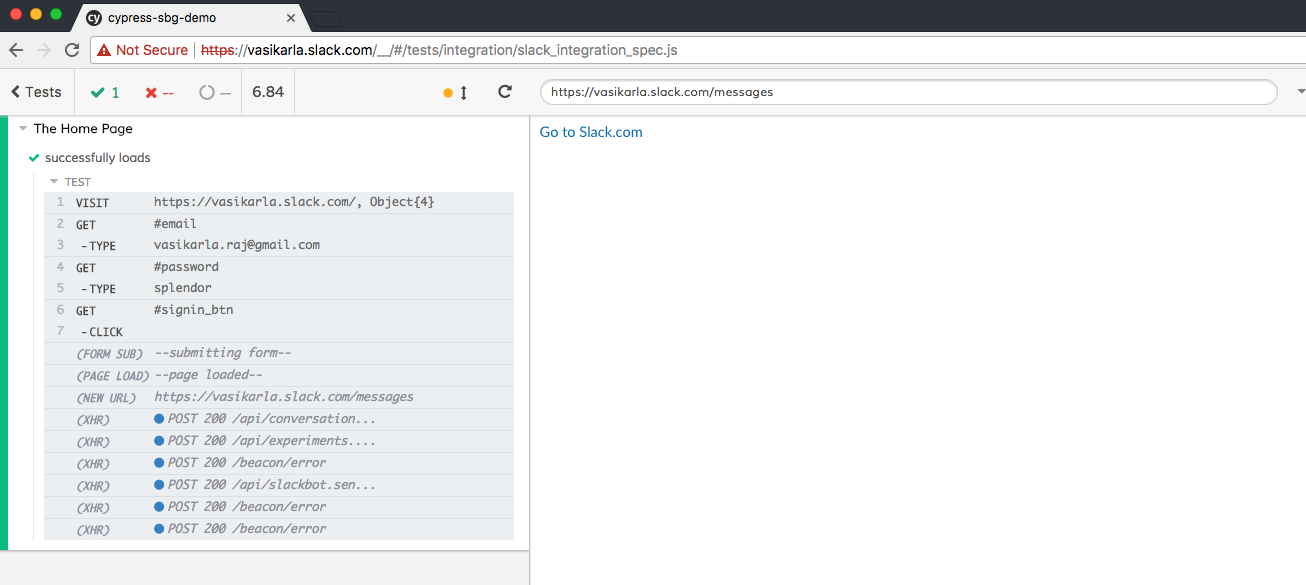
some progress...

vasikarla
on 1 Dec 2017
That is Cypress doing its job and catching uncaught exceptions thrown from your app.
You can turn them off here (or just fix the app code)
https://docs.cypress.io/api/events/catalog-of-events.html#Uncaught-Exceptions
brian-mann
on 1 Dec 2017
Sweet!!
vasikarla
on 1 Dec 2017
i can talk to the team about this now,
vasikarla
on 1 Dec 2017
Yeah, you'll need to add this second part Brian mentioned so that on the apps redirect after login, the window hack gets reset again.
    Cypress.on('window:before:load', (win) => {
      Object.defineProperty(win, 'self', {
        get: () => {
          return window.top
        }
      })
    })
That is actually all you'll need above. You can get rid of it from the visit. As long as you add that event binding to a support file (so it applies globally everywhere) it will run on each page transition
brian-mann
on 1 Dec 2017
Can't thank you guys enough for the help/support !!
vasikarla
on 1 Dec 2017
Also recommend reading up on logging in strategies. Don't use your UI to log in once you've tested that it works (once).
Use an alternative strategy like cy.request and it will run your tests many times faster.
https://docs.cypress.io/guides/getting-started/testing-your-app.html#Logging-In
brian-mann
on 1 Dec 2017
I never came across someone who has thought-thru the end-to-end automation so differently. I'm super excited and impressed with the approach/docs and your roadmap. Excited to switchover and do my share of pass the message on....
vasikarla
on 1 Dec 2017
Some updates to frame-busting changes we're making can be read here: #886
jennifer-shehane
on 12 Feb 2018
Released in 2.0.0.
brian-mann
on 16 Feb 2018
Hi,
Do we have any workaround for below clickjacking script
function frameEvaluate() {
    if (window != top) {
          escapeFrames(baseUrlTarget);
    }
}
I tried the snippet, but no luck.
 deepuec
on 13 Feb 2019
deepuec
on 13 Feb 2019
Hey @deepuec, if you're having a framebusting issue, please open a new issue. We'd love to include the workaround in a new release.
Although I do see we have a workaround for this instance here: https://github.com/cypress-io/cypress/blob/develop/packages/driver/test/cypress/fixtures/security.html#L20 so as long as you have not set modifyObstructiveCode to false, your application should not have an issue with loading in the iframe in Cypress due to this code.
jennifer-shehane
on 20 Feb 2019
I am working with a login scenario which needs to click on the login button entering a 2FA code and this is getting stopped with this error. This is very surprising because with selenium it works fine. Why cypress is doing differently?

 BiswajitNanda
on 25 Nov 2020
BiswajitNanda
on 25 Nov 2020
Related issues
 Francismb
·
3Comments
Francismb
·
3Comments
 tahayk
·
3Comments
brian-mann
·
3Comments
brian-mann
·
3Comments
tahayk
·
3Comments
brian-mann
·
3Comments
brian-mann
·
3Comments
 EirikBirkeland
·
3Comments
EirikBirkeland
·
3Comments
Most helpful comment
Also recommend reading up on logging in strategies. Don't use your UI to log in once you've tested that it works (once).
Use an alternative strategy like
cy.requestand it will run your tests many times faster.https://docs.cypress.io/guides/getting-started/testing-your-app.html#Logging-In