Cypress: start testing not from begining
- Operating System:
- Cypress Version: 1.2
- Browser Version:
Is this a Feature or Bug?
feature request
Desired behavior:
while you are working on a web page for testing and when you want to try your code, you run the test (testing starts from the begining) and then when you start to write additional lines of code and run the test again, Cypress starts the testing from the begining. is there way to have Cypress started from where it last left? so that you dont have to be started the testing from the beginning every code changes.
 kemalbayar
All 12 comments
I haven't tried this but I believe you can do this right now!
Simply pop open your dev tools console and start writing code. Really, it should be that simple.
Just write any ol' cy.whatever() command and it should just run and you should see the new commands in the command log. We purposely built Cypress with this in mind. Even if a test has ended and passed, we don't reset the internal state so that you can manually use your app and also manually issue new cy commands.
Try it - and if it works we'll close this issue.
 brian-mann
on 1 Dec 2017
brian-mann
on 1 Dec 2017
I believe what @kemalbayar is asking for is referring to the watching and live reload of the tests in the GUI.
So, after running a spec file, the tests run - I then make 1 change the test # 4 in the list of tests - I only want test # 4 to rerun in my list of tests in the GUI. Currently all of the tests rerun on that 1 change.
Yes, you can always put an .only on a test, but it's one more step in their workflow I suppose.
I've seen Jest have this exact behavior, but I'm failing to find what this is called exactly in Jest.
 jennifer-shehane
on 1 Dec 2017
jennifer-shehane
on 1 Dec 2017
What if we added a button to the GUI for each test that says "Run Only" which when clicked would go into the spec file and would put it.only on that particular test?
 bahmutov
on 1 Dec 2017
bahmutov
on 1 Dec 2017
@bahmutov We used to have this exact feature a few years ago. 🙈
I believe some of the reason we removed this is the difficulty of knowing from the GUI which it in the spec file to place the .only on.
jennifer-shehane
on 1 Dec 2017
Ohhh I believe but I have a lot of luck with locating tests from runnable instance in my snapshot projects
Sent from my iPhone
On Dec 1, 2017, at 10:00, Jennifer Shehane notifications@github.com wrote:
@bahmutov We used to have this exact feature a few years ago. 🙈
I believe some of the reason we removed this is the difficulty of knowing from the GUI which it in the spec file to place the .only on.
—
You are receiving this because you were mentioned.
Reply to this email directly, view it on GitHub, or mute the thread.
bahmutov
on 1 Dec 2017
In Jest's case this is not what it does. What it actually does is when you modify the SOURCE files, it only runs the tests applicable to those. It does this because it has a full dependency tree and can always know how all of the affected source files are being used / imported into the test files.
Cypress obviously can't do this since there is no dependency tree.
Also there is a new open issue describing the grep/only from the GUI. It's probably feasible to do again by utilizing the url.
brian-mann
on 1 Dec 2017
@brian-mann is your initial advice about running cy commands in the dev tools console still valid? I haven't been able to get this to work.
 stuartcrobinson
on 8 Aug 2018
stuartcrobinson
on 8 Aug 2018
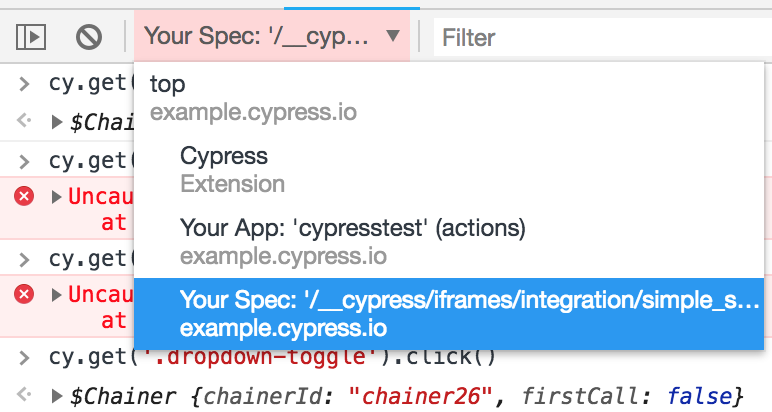
@stuartcrobinson You may need to make sure you are in the right context in dev tools: https://developers.google.com/web/tools/chrome-devtools/console/#execution-context
jennifer-shehane
on 9 Aug 2018
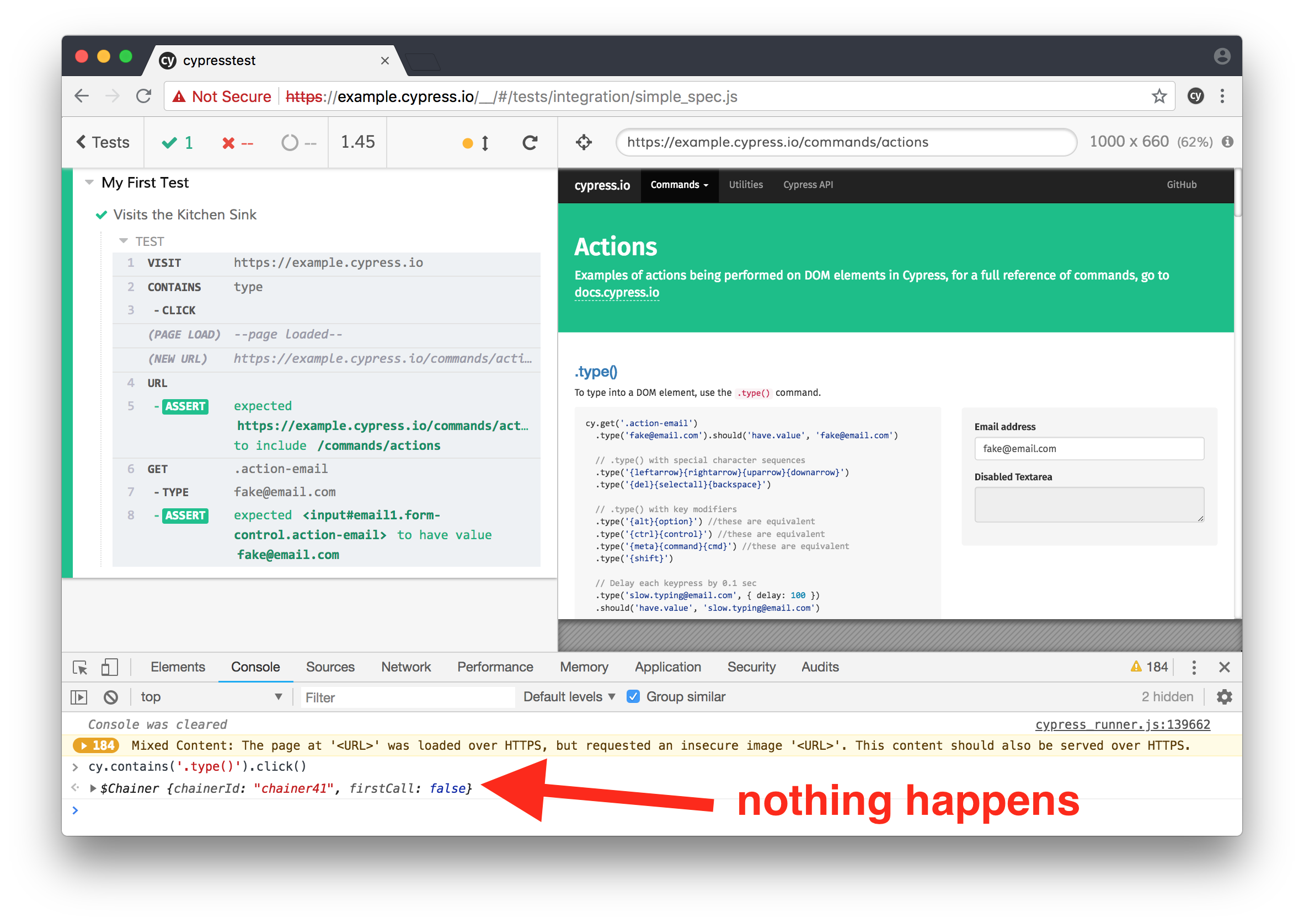
@jennifer-shehane Can you tell what I'm doing wrong here? I'd like to be able to fire a click() from the developer console (or any REPL environment). I tried all available console contexts (shown below) to no avail.
I'm not able to use any cy commands outside of this cypresstest tab.
I'm using Cypress Version 3.0.2 (3.0.2) and Chrome Version 67.0.3396.99.
stuartcrobinson
on 9 Aug 2018
@stuartcrobinson This does not work because Cypress works by enqueueing the commands and running them during the test - since the test is over, it will not run.
To get this to work, try adding a debugger at the end of your tests - then you can type the commands you want to enqueue. Then press play on the debugger and they will play.
jennifer-shehane
on 9 Aug 2018
@jennifer-shehane thanks for the above. However, I'm still looking for a way to interactively run commands, rather than adding a debugger and running a bunch of commands interactively only once like you suggested.
Where should we look to find the enqueueing part of the codebase to manually enqueue new commands? Or is there a way to make sure the test does not end?
 jiangts
on 11 Jul 2019
jiangts
on 11 Jul 2019
@jiangts You may be wanting to use the undocumented cy.now() command - which basically behaves as a Promise and does not enqueue.
Method signature is:
cy.now(commandName, args)
So, for cy.get('button') it would be:
cy.now('get', 'button')
Related issues
 EirikBirkeland
·
3Comments
jennifer-shehane
·
3Comments
EirikBirkeland
·
3Comments
jennifer-shehane
·
3Comments
 rbung
·
3Comments
rbung
·
3Comments
 carloscheddar
·
3Comments
carloscheddar
·
3Comments
 verheyenkoen
·
3Comments
verheyenkoen
·
3Comments