Cypress-cucumber-preprocessor: Ability to not run test that aren't tagged
I am on the cypress-cucumber-preprocessor 1.11.0
I should have the ability to exclude tests that are not tagged.
When I run cypress run -e TAGS='@focus' it goes through each feature file and does not detect any tests at all
When I run cypress run TAGS='@focus' it will go through each feature file but some of the scenarios do not have @focus on them and it will run them anyways however if it gets to a feature file with @focus on the scenarios it will only run those tests
I have tried @ignore and @test and it will run these scenarios anyways
 Skelyos
All 23 comments
Yes, this is a known limitation as per:
https://github.com/TheBrainFamily/cypress-cucumber-preprocessor/pull/100#issuecomment-432104807
we are happy to take a PR. :) otherwise we might work on this at some point.
We recommend doing focus using the browser workflow. What's the reasoning behind using @focus in the headless mode?
 lgandecki
on 11 Apr 2019
lgandecki
on 11 Apr 2019
Wanted to tag tests and distinguish between @smoke and @regression
Skelyos
on 11 Apr 2019
I see.. so if you have @smoke tag in one feature file and @regression in a different one.. and you run with TAGS=@smoke , then both feature files run?
lgandecki
on 11 Apr 2019
When I ran cypress run TAGS='@focus' it will get to that feature file with the scenario tagged with @focus, run the single scenario & then for every other feature file it will run all the scenarios regardless of tag
Skelyos
on 11 Apr 2019
Focus is a special keyword though. you said you wanted to use @smoke and @regression
lgandecki
on 11 Apr 2019
Does the same thing when I run cypress run TAGS='@regression'
Skelyos
on 11 Apr 2019
I am having the same problem
 anilkoithara
on 23 Apr 2019
anilkoithara
on 23 Apr 2019
Hey we're seeing this issue too. If we run cypress run --env TAGS='@critical' it instead runs all tags.
I've got all tags either specified as @sanity or @critical.
 JamboBuenna
on 23 Apr 2019
JamboBuenna
on 23 Apr 2019
Ran
cypress run --env TAGS='@james' --spec 'cypress/integration/**/dashboardSanity.feature'
against
`Feature: Dashboard - this includes smoke tests for dashboard tab
Preconditon - User is logged-in
@james
Scenario: C16307
Given I am on dashboard
Then I should see Now cast
@sanity
Scenario: C16308
Given I am on dashboard
Then I should see Weather Charts
@sanity
Scenario: C16309
Given I am on dashboard
Then I should see Leaf Canopy Wetness
@sanity
Scenario: C16310
Given I am on dashboard
Then I should see Soil Moisture & Topsoil Temperature
@sanity
Scenario: C16313
When I click distributor logo
Then I should see dashboard
`
1 Spec found 0 tests run
Ran
cypress run --spec 'cypress/integration/**/dashboardSanity.feature
1 Spec found 5 tests run
So it's not picking up my usage of tags when specifying them
Expected
1 Spec found 1 test run
Actual
1 Spec found 0 tests run
JamboBuenna
on 23 Apr 2019
When I Ran - cypress run --env TAGS='@sanity' its not running any tests. Tried with following :
- tags to single scenario
- tags to multiple scenario
- tag to a feature
- tag across multiple specs
It doesn't run any test for any case.
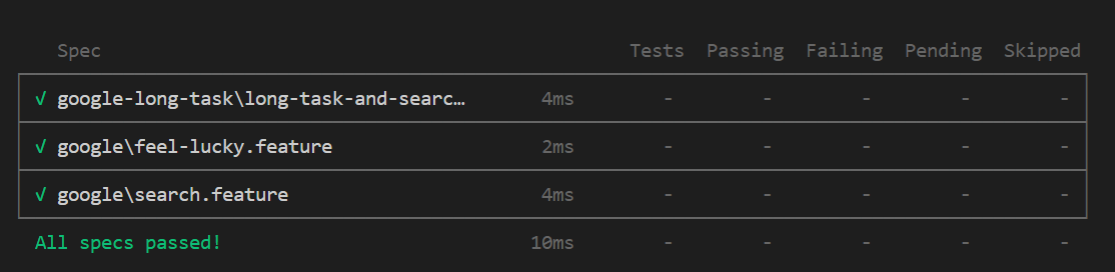
 RMoroney
on 24 Apr 2019
RMoroney
on 24 Apr 2019
I have the same experience, I think you need to remove the single quotes from the @sanity tag and run, like this cypress run --env TAGS=@sanity
anilkoithara
on 24 Apr 2019
Thanks @anilkoithara :)
RMoroney
on 24 Apr 2019
@anilkoithara @lgandecki any idea how to handle expression for tags like --env TAGS='@regression and @critical' it doesn't work with or without single quotes
RMoroney
on 24 Apr 2019
@lucetius @sawasawasawa can you guys take a look and answer @RMoroney ? It might be that this doesn't work properly, if the quotation marks don't get ignored, there would be no way to set expressions.
lgandecki
on 13 May 2019
@anilkoithara @RMoroney you guys are on windows, is that correct?
can you see whether the examples in this repo works correctly for you - https://github.com/TheBrainFamily/cypress-cucumber-example ?
@JamboBuenna can you clone and play around with https://github.com/TheBrainFamily/cypress-cucumber-example to verify whether it works correctly for you there? I'm not sure how to understand the problem you describe. to be honest. Btw I don't think you can use " --spec 'cypress/integration/**/dashboardSanity.feature'" - so maybe that's messing up the results as well.
lgandecki
on 18 May 2019
I have this same issue at work, I'm using Ubuntu 18.04 (bionic) with node v8.12.0, when I run cypress open -e TAGS=@functional it runs test labeled scenarios/features with only @acceptance can't find why.
 juliomatcom
on 4 Jun 2019
juliomatcom
on 4 Jun 2019
@juliomatcom could you try to reproduce a failing example on https://github.com/TheBrainFamily/cypress-cucumber-example?
 sawasawasawa
on 4 Jun 2019
sawasawasawa
on 4 Jun 2019
Hey @sawasawasawa, I just tried and play with the cypress-cucumber-example, tests works perfect, still have the problem in my main project tough. Will post any update here. Thank you.
juliomatcom
on 5 Jun 2019
So, I found the problem in my project, cypress import all the steps file always, doesn't matter the tags you passed in, so we were declaring constants in one step file that required one environment var for a special feature, so that makes our tests fail even when filtering that particular feature. We fix it by just moving the constants inside the definition of the step function.
Hope it helps others. Thanks.
edit: make it more clear
juliomatcom
on 5 Jun 2019
Thanks for the update @juliomatcom 🙇
sawasawasawa
on 5 Jun 2019
@lgandecki I tried but expression for tags like--env TAGS='@regression and @critical' doesn't work. When we assign one tag at feature level and another at test scenario level and try a expression with that it doesn't work -
Example :
@regression @planning
Feature: addAnApplication
Background:
Given I am on Planning Page
@high
Scenario: C23010 - Verify 'Add an Application' button is present on Planning page for application
Then I should see Add an Application
and if I do --env TAGS=@regression and @high It doesn't work but if I put all tags at test Scenario level it works.
Example :
Feature: addAnApplication
Background:
Given I am on Planning Page
@high @regression @planning
Scenario: C23010 - Verify 'Add an Application' button is present on Planning page for application
Then I should see Add an Application`
Now, this --env TAGS=@regression and @high works :)
RMoroney
on 5 Jun 2019
@RMoroney you're right, we are missing tag inheritance here. Thanks for pointing that out :) We'll keep you posted on the update here.
sawasawasawa
on 5 Jun 2019
I'm closing this one and seems like the tag inheritance is solved and the problem mentioned by @juliomatcom was solved as well.
If you still have problems please create a new issue and tag me and @sawasawasawa there.
lgandecki
on 25 Sep 2019
Related issues
 roschaefer
·
5Comments
roschaefer
·
5Comments
 claudiunicolaa
·
4Comments
claudiunicolaa
·
4Comments
 flowt-au
·
3Comments
flowt-au
·
3Comments
 Sjain01
·
5Comments
Sjain01
·
5Comments
 johnknoop
·
3Comments
johnknoop
·
3Comments
Most helpful comment
I have the same experience, I think you need to remove the single quotes from the @sanity tag and run, like this cypress run --env TAGS=@sanity