Cypress-cucumber-preprocessor: Scenario outlines not pulling variable from examples
In a test scenario I have written, I am trying to pull a variable from the examples table and have it in the test name, however it seems to not parse the variable from the feature file. In my case, I have a field called name that I am trying to use. I have tried it both as <name> and "<name>".


Is this expected behaviour or a bug?
 breeny
All 16 comments
I’ve never seen this work like that for the names of the scenarios. Could you verify the bevior with pure cucumberjs? It should be very easy - you have the feature file already, and your step definitions are almost copy paste (capitalize Given/when/then in the cucumberjs version and import them)
 lgandecki
on 30 Apr 2018
lgandecki
on 30 Apr 2018
I think @breeny means something like this syntax: https://github.com/cucumber/cucumber/wiki/Scenario-Outlines
 7etrahedral
on 23 May 2018
7etrahedral
on 23 May 2018
@7etrahedral looks like he wants to use the variable in the Scenario Outline: line, of which I don't seen an example in your link :-)
I hope that what's in the link works, we do have some tests for it : https://github.com/TheBrainFamily/cypress-cucumber-preprocessor/blob/master/cypress/integration/ScenarioOutline.feature
Edited: sorry, I confused myself, our test actually seem to be doing exactly what he asks for.. Not sure what's the difference here.
Is it about the display in the report? That could be improved I think
lgandecki
on 23 May 2018
ah, I see..
mybad..
in that case, I also never see that kind of syntax before, since it should be create another scenario.
Thanks @lgandecki
7etrahedral
on 23 May 2018
@breeny could you take a look at that feature file I pointed to above, and tell me if what you are talking about is the wrong display in the report or a missing functionality?
lgandecki
on 14 Jul 2018
@lgandecki - I also face this same issue as reported by breeny, is there any solution for it.
The issue is with displaying the values used within examples on Scenario outline.
Scenario Outline: Successful sign in on <devicename>
Examples:
  | devicename|
  | macbook-15  |
  | ipad-2  |
  | iphone-6+  |
Output:

I took a look at the feature file you pointed in your above post and I am using the same syntax as mentioned there but its not working.
 Sjain01
on 8 Aug 2018
Sjain01
on 8 Aug 2018
would be great to have this reflect the value being used, if you could point out where that might be fixed I could do a PR
i guess it's here:
https://github.com/TheBrainFamily/cypress-cucumber-preprocessor/blob/master/createTestFromScenario.js#L24
 novascreen
on 13 Sep 2018
novascreen
on 13 Sep 2018
This should work by now as #137 was merged.
At least my usecase at https://github.com/holgergp/cypressioCucumberExample works now with this change.
Could you try it with version 1.11.0 of the preprocessor?
 holgergp
on 1 Mar 2019
holgergp
on 1 Mar 2019
I'll assume this is fixed and close. If the problem still persists please comment here and tag me or create a new issue. Thanks!
lgandecki
on 25 Sep 2019
Hey guys,
I am not sure if this should actually be fixed by now, but I just encountered the same issue:
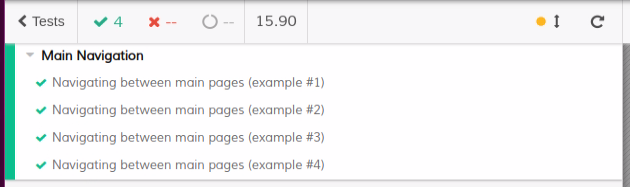
 DanielStoica85
on 27 Nov 2019
DanielStoica85
on 27 Nov 2019
could you show us your .feature file?
lgandecki
on 27 Nov 2019
Yes.
Feature: Main Navigation

  As a logged in user
  I want to navigate between pages by using the main menu

  Background: Login
    Given I am logged in

  Scenario Outline: Navigating between main pages
    When I click on "<icon>" icon from main navigation
    Then I should get redirected to "<page>" Page

    Examples:
      | icon                  | page        |
      | svg.fa-sitemap        | /assets/map |
      | svg.fa-tachometer-alt | /dashboard  |
      | svg.fa-analytics      | /alerts     |
      | svg.fa-cogs           | /settings   |
I'll have look at it later.
It worked for me in this repo: https://github.com/holgergp/cypressioCucumberExample (features in german language though :( )
I'll check if there has been a regression. Which versions of cypress and the cucumber-preprocessor are you using?
holgergp
on 28 Nov 2019
I bumped versions in my example at https://github.com/holgergp/cypressioCucumberExample. Variable pulling seems to work there (https://travis-ci.org/holgergp/cypressioCucumberExample/builds/618177079).
Please check this feature: https://github.com/holgergp/cypressioCucumberExample/blob/master/cypress/integration/beans.feature
Maybe you are using an older version of the preprocessor?
holgergp
on 28 Nov 2019
I don't think that's the case. Cypress version is 3.6.0 and preprocessor version is 1.16.2
DanielStoica85
on 28 Nov 2019
Maybe then I just don't get the erroneous output you provided. Sorry for that.
Which outputs are you expecting?
As the tests pass I assume that the variables get substituted correctly in the test steps.
The OP wanted to see an example variable substituted in each scenario outline run (as a part of the scenario outline). In your feature file I don't see a variable substitution in the scenario outline definition.
Does this work as expected?
Scenario Outline: Navigating between main pages to <page>
holgergp
on 29 Nov 2019
Related issues
 aleccool213
·
5Comments
aleccool213
·
5Comments
 roschaefer
·
5Comments
roschaefer
·
5Comments
 EmmanuelDemey
·
5Comments
EmmanuelDemey
·
5Comments
 johnknoop
·
3Comments
johnknoop
·
3Comments
 fypnlp
·
7Comments
fypnlp
·
7Comments
Most helpful comment
@lgandecki - I also face this same issue as reported by breeny, is there any solution for it.
The issue is with displaying the values used within examples on Scenario outline.
Scenario Outline: Successful sign in on <devicename>Examples: | devicename| | macbook-15 | | ipad-2 | | iphone-6+ |Output:

I took a look at the feature file you pointed in your above post and I am using the same syntax as mentioned there but its not working.