Cylc-flow: cylc-gui - tasks momentarily out of sequence
Since upgrading from 7.8.0 to 7.8.6, I'm noticing a new visual oddity with our GUI when running a rather large suite. For 2-10 seconds the tasks in a family will appear out of sequence:

Then the sequence restores itself:
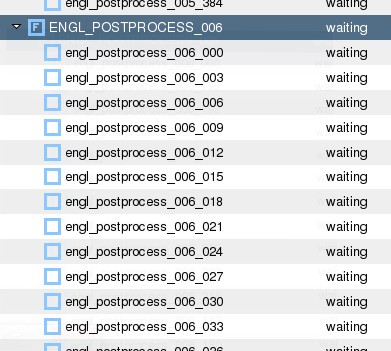
It is not a major problem, but it is quite distracting and can lead to confusion when it changes. It's almost as though an underlying object converts from a Dict to an OrderedDict, and because our suite is so stupidly large, we catch it in the act.
Thanks for your time and hard work!
Glenn
 GlennCreighton
All 38 comments
Hi @GlennCreighton I worked on some issues trying to fix sorting in the tree view for Cylc 7's GUI.
I might have caused this bug. I used only simpler suites, so I didn't notice this issue.
Will try with a larger suite to reproduce it. I have a slight idea of where it could be fixed in the code.
Thanks!
Bruno
 kinow
on 17 Jul 2020
kinow
on 17 Jul 2020
Hi @kinow I appreciate the quick response. Hope your idea pans out, and if so I might snatch your change pre-release and let you know how it worked!
Thanks!
Glenn
GlennCreighton
on 17 Jul 2020
Perfect! Should be a small patch to apply (fingers-crossed)
kinow
on 17 Jul 2020
@GlennCreighton would you be able to provide an example suite to reproduce it? I tried with
#!Jinja2
[cylc]
    UTC mode = True
{% set PARAMS = range(1,11) %}
[scheduling]
    initial cycle point = 20130808T00
    [[dependencies]]
        [[[R1]]]
            graph = "pre => post"
        [[[T00]]]
            graph = """
{% for P in PARAMS %}
      pre => model_p{{P}} => post
      {% if P == 5 %}
          model_p{{P}} => check
      {% endif %}
{% endfor %}    """
[runtime]
{% for P in PARAMS %}
    [[model_p{{P}}]]
        script = echo "my parameter value is {{P}}"; sleep 10
    {% if P == 1 %}
        # special case...
        script = echo "first parameter!"; sleep 10
    {% endif %}
{% endfor %}
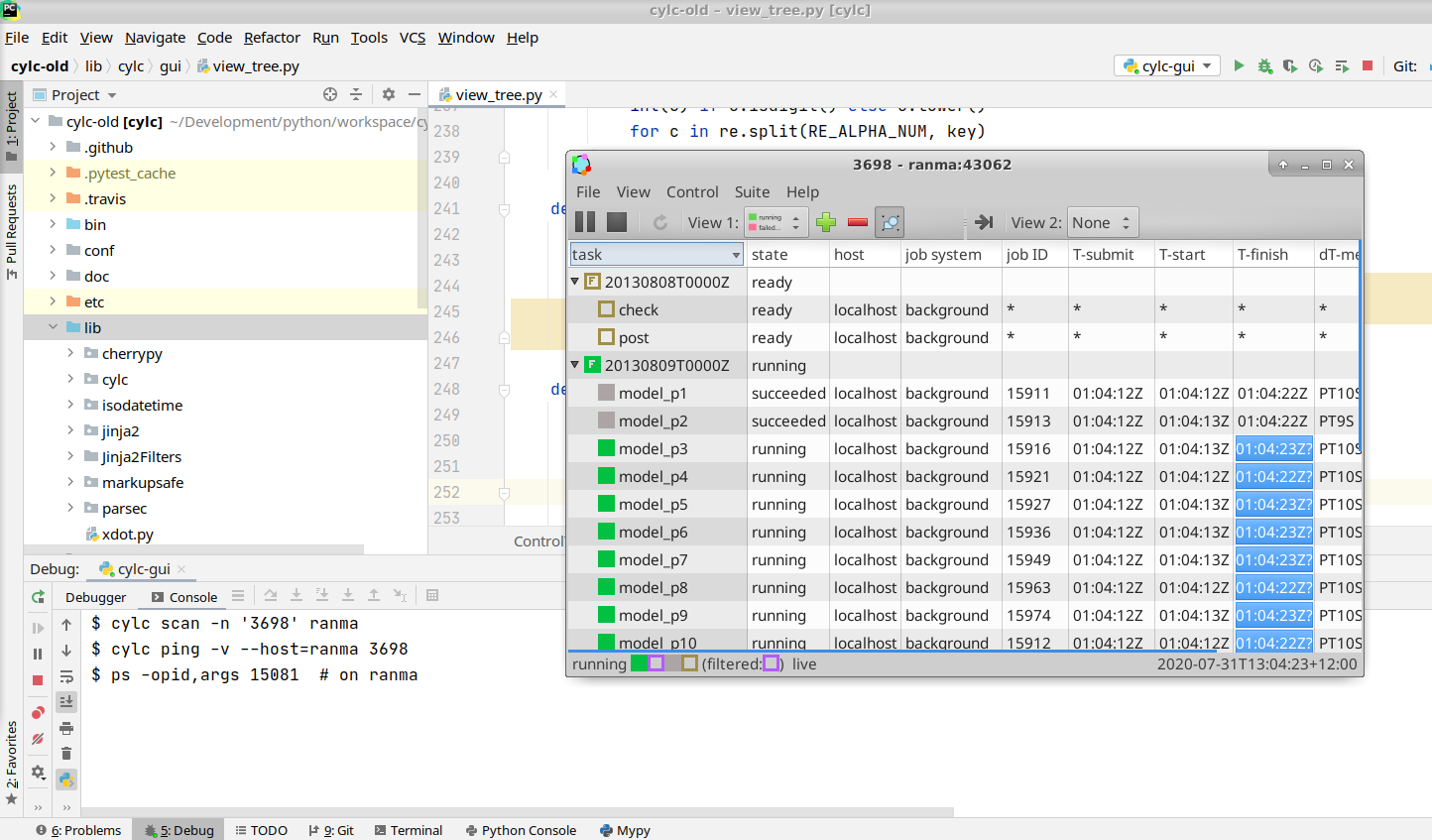
(I assume your tree is sorted by task name?)
My plan was to set a break point in a few places of the code, and then I thought that would leave the tree entries not sorted, until I released the breakpoint.
If that happened, then I would just need to move the code that sorts tasks before it's rendered. But alas I couldn't reproduce it.
Thanks
Bruno
kinow
on 31 Jul 2020
Try with more tasks? We have a family with 21 model tasks, and 21 post families, each with 96 post subtasks each (so over 2000 tasks in the suite, I know it's stupid, but our post jobs kick off as outputs become available). The post families were the noticeably problematic ones. My tree is sorted by task name, to my knowledge, I think that's the default.
So in summary, to mostly duplicate our setup, try putting model_p{p} under a MODEL family, and then make post_p{p}_n{n}, where n is something like 96, fall under POST_P{p} families.
Something like this (untested, I don't think it matters what the graph looks like or what the jobs actually do, I think it is just the shear number of tasks.)
#!Jinja2
[cylc]
    UTC mode = True
{% set PARAMS = range(0,21) %}
{% set NPOST = range(0,96) %}
[scheduling]
    initial cycle point = 20130808T00
    [[dependencies]]
        [[[T00]]]
            graph = """
{% for P in PARAMS %}
      pre => model_p{{P}} => POST_P{{P}}
      {% if P == 5 %}
          model_p{{P}} => check
      {% endif %}
{% endfor %}
"""
[runtime]
    [[MODEL]]
{% for P in PARAMS %}
    [[model_p{{P}}]]
        inherit = MODEL
        script = echo "my parameter value is {{P}}"; sleep 10
    {% if P == 1 %}
        # special case...
        script = echo "first parameter!"; sleep 10
    {% endif %}
    [[POST_P{{P}}]]
    {% for N in NPOST %}
        [[post_p{{P}}_{{N}}]]
            inherit = POST_P{{P}}
            script = echo "param1 {{P}} param2 {{N}}"; sleep 10
    {% endfor %}
{% endfor %}
Also note that in my suite I first zero pad the parameters. Not sure if that matters.
GlennCreighton
on 31 Jul 2020
Thanks @GlennCreighton ! Will give it a try with more tasks. I initially tried with a range (1, 201), but it was taking so long for my GUI to render. I had a few containers building and running in the background, so will stop everything and try again next week.
kinow
on 31 Jul 2020
It is actually fairly normal for us to have very laggy GUI rendering (e.g. click > button on group, wait 3 seconds for it to point V, notice order is weird, 3 seconds later order is fine). I think lag might actually be ideal for capturing this phenomenon.
GlennCreighton
on 31 Jul 2020
@GlennCreighton from your description the mis-sorting is temporary, so I wonder (laggy GUI) if this is a symptom of your system being horribly overloaded rather than a bug in the UI - you might be seeing the list of tasks for a while in the pre-sorted state. If that is the case (and I suspect it is, although we'd need to confirm it) the only short term fix might be a serious upgrade of the VM that you're running the GUI on, because a suite of over 2000 tasks per cycle is really pushing it for the old GUI, which has to process and render everything (i.e. all tasks) on every update.
The good news is, Cylc 8 should fix this properly: the new web UI will receive event-driven incremental (not global) updates, and it will not need to display all the tasks in a cycle either - far from it in fact: just the current active tasks and optionally n=1 or 2 (say) graph edges out from them. (But the bad news is it'll be a while yet before that is available, so the aforementioned VM upgrade is probably the recommendation for the moment!).
(On the other hand, if the sorting issue appeared only after a recent version upgrade, that might be fixable independently of overloading/lagginess problems)
 hjoliver
on 3 Aug 2020
hjoliver
on 3 Aug 2020
@hjoliver, I don't doubt that we're pushing the limits of the GUI with our 2000 task suite, however the reason I brought it up here is because it is only like this since the upgrade from 7.8.0 to 7.8.6. Before, the order rendered correctly every time, even when there was lag expanding a group. So I am hoping this is an independent issue, as you mentioned parenthetically.
GlennCreighton
on 3 Aug 2020
Roger that, I'll see if I can reproduce the problem...
hjoliver
on 3 Aug 2020
@GlennCreighton - your example suite above has 2039 tasks per cycle:
$ cylc list glenn | wc -l
2039
It is very active (short jobs, and lots of families with members that launch all at once), so to try it on my laptop VM, I added queue limiting to avoid the sheer number of concurrent jobs from crippling my box, e.g.:
[scheduling]
   [[queues]]
      [[[default]]]
           limit = 5
Having done that, even with 2039 tasks/cycle the GUI performs perfectly well for me (not laggy at all) unless I expand all families at once (hopefully you're not doing that, with so many tasks?) But either way, I have not seen the sorting problem. Maybe I need to cripple my VM to see it...
hjoliver
on 4 Aug 2020
Thanks @GlennCreighton ! Will give it a try with more tasks. I initially tried with a range (1, 201), but it was taking so long for my GUI to render. I had a few containers building .and running in the background, so will stop everything and try again next week.
@kinow - that's surprising (see my comment above: 2039 tasks and the GUI worked fine for me). Did you have a single 1D parameter (so only ~201 tasks) or 2D like @GlennCreighton 's example (so ~2000 tasks).
hjoliver
on 4 Aug 2020
Thanks @GlennCreighton ! Will give it a try with more tasks. I initially tried with a range (1, 201), but it was taking so long for my GUI to render. I had a few containers building .and running in the background, so will stop everything and try again next week.
@kinow - that's surprising (see my comment above: 2039 tasks and the GUI worked fine for me). Did you have a single 1D parameter (so only ~201 tasks) or 2D like @GlennCreighton 's example (so ~2000 tasks).
It was a single 1D param. I believe I got that suite example from the Cylc documentation, somewhere around how to use Jinja I think.
kinow
on 4 Aug 2020
@GlennCreighton - nope I have failed to reproduce the problem with your dummy suite example. I guess the next question is, do you see it with your example (as opposed to with your real suite as shown in the initial description above)? If testing, bear in mind the potential for large numbers of quick-running local dummy tasks to bring your VM to its knees...
hjoliver
on 4 Aug 2020
@hjoliver @kinow - I will have to give it a tomorrow. Did you use that exact example or did you have to modify it to get it to work? Thanks again for the testing.
GlennCreighton
on 4 Aug 2020
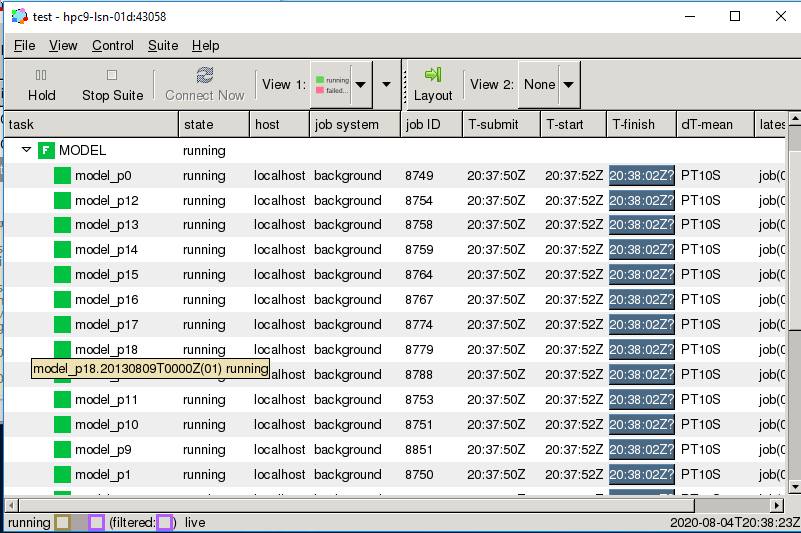
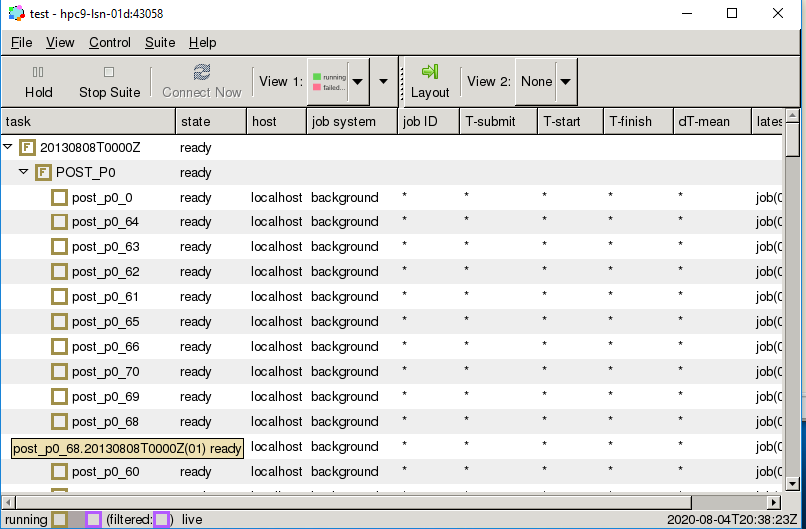
Hmm...I wonder what is going on.
GlennCreighton
on 4 Aug 2020
@hjoliver @kinow - I will have to give it a tomorrow. Did you use that exact example or did you have to modify it to get it to work? Thanks again for the testing.
I did use your exact example (with some missing triple-quotes added - I also edited your listing above to fix that) plus with-and-without queue limiting as described above.
In your new screenshots, did you do anything special to make the bad sorting happen, or do you see it every time you open a family group? And, does it still get sorted correctly again after a few seconds?
hjoliver
on 5 Aug 2020
I just ran your example again on a different host, at 7.8.6, All the local jobs are killing the host (everything is laggy, especially the browser I'm trying to type this sentence into) but I still have not seen the sorting issue.
hjoliver
on 5 Aug 2020
BTW we discussed this at our project meeting yesterday: no one else has reported the sorting problem (which is not to say that it doesn't exist!); UK MO runs similarly huge suites without dire GUI lag problems (although it can be a bit laggy); note that local suite daemon, other suite daemons, and local task jobs (potentially from multiple suites), plus event handlers and xtriggers, will all contribute to load if running on the same host as the GUI - if so, you may need to upgrade the VM and/or use a pool of VMs for load balancing. Network issues could also cause GUI responsive issues in huge active suites (if the suite daemon and UI aren't on the same host) because quite a lot of data gets transferred in the global status updates.
hjoliver
on 5 Aug 2020
Thank you for gathering all that info. I am running on a physical HPC login node with, I believe, more than enough cores to handle load balancing, but perhaps this sample suite isn't the best example as it submits all jobs to background, which could very well overwhelm the node. I am going to try to run this sample suite on an HPC with a newer Python install to see if I see the same issue. But before I do, I'm going to confirm that this issue goes away when running with 7.8.0 on the dev box I've been using.
GlennCreighton
on 5 Aug 2020
Okay, I have confirmed that the issue does not present itself with 7.8.0 on the same system it is presenting itself with 7.8.6 (though due to the nature of the suite, it does bring the system to its knees fairly quickly without the queue limit, yikes!). So I think we can rule out system performance issues as the cause. I have also confirmed that I do NOT see the issue on the HPC with an up-to-date python 2.7 stack (which is a relief). The problematic system runs with Python 2.6, fwiw. Did @kinow's change to improve graphing rely on a library that it did not previously depend upon, by any chance? I'm just wondering if this is somehow an artifact of an external Python-related defect that has since been fixed. Unfortunately, I have no way of testing this theory easily.
GlennCreighton
on 5 Aug 2020
I have just looked up @kinow 's change, which was to sort integer cycle points numerically. There are 5 small commits:
- https://github.com/cylc/cylc-flow/commit/dad6de8b72182525f096e22893fff7e5e8688d65
- https://github.com/cylc/cylc-flow/commit/5c1fac5e88e571465214cea26d0bb9f60d431add
- https://github.com/cylc/cylc-flow/commit/b75301299f47a56c5524b56fd17610854c731b08
- https://github.com/cylc/cylc-flow/commit/30e92a30716a4e12f828c730ee5cf3b629f104ab
- https://github.com/cylc/cylc-flow/commit/9b2d7aa0c88628d4fb641a9b88eb63d5ec64059d
Interestingly this does implement a sorting method with a fallback if any None values show up, which could cause different order to appear temporarily. But it should only affect cycle point ordering (i.e. the top level in the treeview) I think, not tasks within each point. Also I don't see anything in there that looks like it would be sensitive to Python version.
hjoliver
on 5 Aug 2020
(@kinow is currently on leave for a few days, BTW)
hjoliver
on 5 Aug 2020
However that is the only change in the GUI tree view code between 7.8.6 and 7.8.0, which does seem suspicious.
cylc-7.8.x $ git checkout 7.8.6
cylc-7.8.x $ git diff -U0 7.8.0 lib/cylc/gui/view_tree.py
diff --git a/lib/cylc/gui/view_tree.py b/lib/cylc/gui/view_tree.py
index f60f9ceb7..cf665a4f8 100644
--- a/lib/cylc/gui/view_tree.py
+++ b/lib/cylc/gui/view_tree.py
@@ -4 +4 @@
-# Copyright (C) 2008-2018 NIWA & British Crown (Met Office) & Contributors.
+# Copyright (C) NIWA & British Crown (Met Office) & Contributors.
@@ -19,0 +20 @@ import gtk
+import re
@@ -27,0 +29,3 @@ from cylc.task_id import TaskID
+RE_ALPHA_NUM = re.compile('([0-9]+)')
+
+
@@ -106,0 +111 @@ class ControlTree(object):
+        self.tmodelsort.set_default_sort_func(self.default_sort_column)
@@ -229,0 +235,13 @@ class ControlTree(object):
+    def _nat_alpha_num_key(self, key):
+        return [
+            int(c) if c.isdigit() else c.lower()
+            for c in re.split(RE_ALPHA_NUM, key)
+        ]
+
+    def _nat_cmp(self, left, right):
+        if left is None or right is None:
+            return cmp(left, right)
+        return cmp(
+            self._nat_alpha_num_key(left),
+            self._nat_alpha_num_key(right))
+
@@ -237,2 +255,2 @@ class ControlTree(object):
-                return cmp(point_string2, point_string1)
-            return cmp(point_string1, point_string2)
+                return self._nat_cmp(point_string2, point_string1)
+            return self._nat_cmp(point_string1, point_string2)
@@ -246 +264,8 @@ class ControlTree(object):
-        return cmp(prop1, prop2)
+        return self._nat_cmp(prop1, prop2)
+
+    def default_sort_column(self, model, iter1, iter2):
+        point_string1 = model.get_value(iter1, 0)
+        point_string2 = model.get_value(iter2, 0)
+        if point_string1 is None or point_string2 is None:
+            return cmp(point_string1, point_string2)
+        return self._nat_cmp(point_string1, point_string2)
Yes, this is definitely the problem, swapping it out with the old one fixes things
GlennCreighton
on 6 Aug 2020
Well that's progress :+1:
hjoliver
on 6 Aug 2020
I wonder if the Python built-in cmp function behaves differently (for the args we pass to it) between Python 2.6 and 2.7 (since you said you don't see the problem at 2.7?). Unfortunately I can't easily get access to Python 2.6 anymore (esp. not with PyGTK for the GUI).
hjoliver
on 6 Aug 2020
I might have figured it out, I want to check that it works with py2.7 box as well
GlennCreighton
on 6 Aug 2020
So, I am able to get good results if I comment out line 111:
self.tmodelsort.set_default_sort_func(self.default_sort_column)
Or if I go into set_default_sort_func and change the index to 1.
267,268c267,268
<         point_string1 = model.get_value(iter1, 0)
<         point_string2 = model.get_value(iter2, 0)
---
>         point_string1 = model.get_value(iter1, 1)
>         point_string2 = model.get_value(iter2, 1)
Don't ask me why that is necessary, but this now seems to do what it was intending to do... Before when I printed out point_string1 and point_string2 it just said the dates over and over again, e.g:
point_string1 20130809T0000Z
point_string2 20130809T0000Z
point_string1 20130809T0000Z
point_string2 20130809T0000Z
point_string1 20130809T0000Z
point_string2 20130809T0000Z
....
On the problematic system (which maybe had too old a version of gtk?), if the suite were held, the order would be stuck in the incorrect state. When I released the suite, or nudged it, it would then correct itself.
With the change above, the default point_string1 and point_string2 fields now seem to be going through every group and item, e.g.
point_string1 20130809T0000Z
point_string2 20130810T0000Z
point_string1 POST_P0
point_string2 POST_P1
point_string1 MODEL
point_string2 POST_P0
point_string1 POST_P3
...
So it is almost like the scope of the default sorter was thought to be applied only to the cycle points in column 0, but really the default sorter applies to the sorting of all fields. I don't know if that makes sense. It just seems like somehow the other columns were getting default sorted using column 0 (cycle points) as their sorter. Does this make any sense?
This did work on my updated system as well. Let me know if it works for you.
GlennCreighton
on 6 Aug 2020
Still lurking in this thread :-) @GlennCreighton it makes sense to me, and sounds like a good candidate for a pull request (if you are interested in submitting one).
During review we would just need to check the docs for that function, to confirm the column used, and test in our local system to confirm it keeps the previous behaviour.
But I think you may have found the right solution! :tada: :trophy:
kinow
on 6 Aug 2020
I've never done a pull request before. If it is not terribly time-consuming, I can try to do one. Would be nice to give back.
GlennCreighton
on 6 Aug 2020
To make a pull request: fork cylc/cylc-flow on GitHub, clone your fork locally, create a new branch (off of the 7.8.x branch, not master!) and check it out, commit your changes to the new branch, push it to your fork ... the github UI will then notice your new branch and ask if you want to make a pull request to the main cylc-flow repo. The only tricky bit then is: change the base branch to 7.8.x in the github create-pull-request UI, not master, since this only applies to the old cylc-7 system.
(Not sure I understand what's going on with the fix yet - like why is only broken in Python 2.6, not 2.7 - but I guess if you make a PR we can try to understand the code better).
hjoliver
on 6 Aug 2020
I have done my best to make the pull request correctly. I edited CONTRIBUTING.md using the Edit button and it said my changes were "Proposed." I assume that is what I was supposed to do there. Let me know if testing on your end is okay and if there is anything else I can do to help.
You mention making a PR and the Pull Request mentions tagging it as a PR, but not sure how that's done.
GlennCreighton
on 6 Aug 2020
"PR" is just short for "Pull Request" (if that's what you mean?) - no tagging needed.
I edited CONTRIBUTING.md using the Edit button and it said my changes were "Proposed."
As I commented on the PR, I'm not sure what happened to that (or where you did it - maybe on master on your own fork, or something?) ... but typically we modify CONTRIBUTING.md just like any other file - i.e. do it in your local cylc clone, commit the change to the PR branch, and push it up to your fork on GitHub (whereupon it shows up on the official PR at Cylc central).
hjoliver
on 6 Aug 2020
Closed by #3759
hjoliver
on 14 Aug 2020
Sorry to bring this up as it is my own solution I am doubting, but I'm noticing that the default sorting behavior, though no longer out of order, is now in natural order (which I find slightly ugly), which I think is what this is supposed to be, but it seems to no longer follow what is described here: https://cylc.github.io/doc/built-sphinx-single/index.html#sort-by-definition-order
In other words, the default view is supposed to be in definition order UNTIL the user clicks to sort. Only then should it sort alphabetically. However with this new fix, the definition order never occurs, even with the default: sort by definition order = True
Thus, the solution fixes one bug, but exposes another.
It turns out, we just need to honor the "sort by definition order" boolean BEFORE setting the default sort order. I have made the fix and tested it and am very pleased to see that the three sorting modes (alpha, reverse alpha, and definition) all function as expected now. I will upload the changeset here if it is not too late.
GlennCreighton
on 3 Sep 2020
Sounds good to me @GlennCreighton . We haven't released a version with the change, so no harm done I think :) Thanks!
kinow
on 3 Sep 2020
Okay @kinow, let me know if that checks out with you. I tested setting "sort by definition order = False" in gcylc.rc and it natural sorts by default as you would expect, and set to True the definition order is preserved until the user clicks the sort button. Thanks!
GlennCreighton
on 3 Sep 2020
Related issues
kinow
·
4Comments
 sadielbartholomew
·
5Comments
kinow
·
3Comments
kinow
·
4Comments
sadielbartholomew
·
5Comments
kinow
·
3Comments
kinow
·
4Comments
 dpmatthews
·
3Comments
dpmatthews
·
3Comments