Cylc-flow: Our use of colorama messes with pudb
I use Pudb for debugging Cylc. (Why? because it is frickin' awesome :boom: ... it's a proper full-featured debugger with no need to use a mouse for anything).
https://pypi.org/project/pudb/
Release version(s) and/or repository branch(es) affected?
Current master, on Centos 7, in Gnome-terminal.
Steps to reproduce the bug
$ pip install pudb- Somewhere in Cylc code:
import pudb; pudb.set_trace() cylc run --no-detach my-suite
Expected behavior
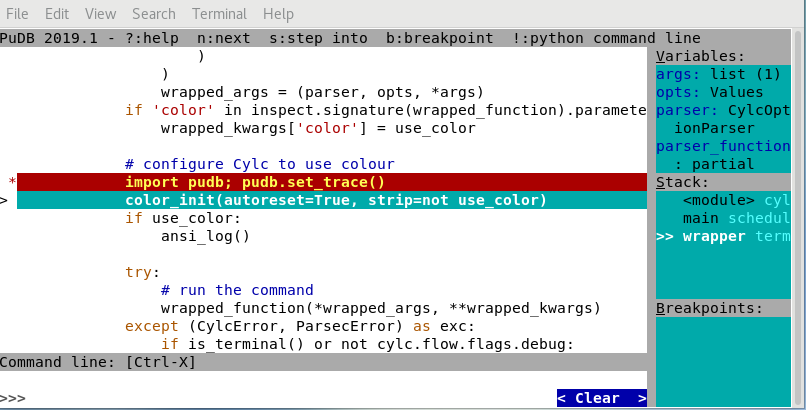
Actual behavior
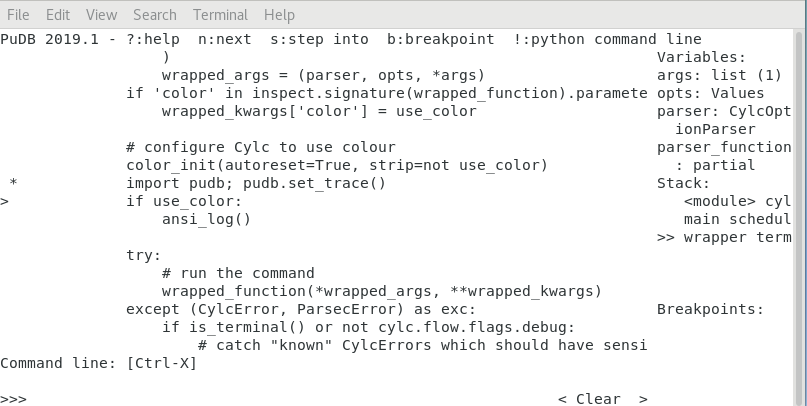
Additional context
(Note I've started pudb before and after colorama init in cylc/flow/terminal.py, in the above screenshots).
(Use of cylc run --color=never does not help)
Interestingly, using default colorama init (no args) works fine (doesn't break pudb) and colouring (of DEBUG log lines in this case) still works fine in the terminal output.
@oliver-sanders - can you comment on the need for autoreset=True and strip=not use_color as colorama initialization args?
Pull requests welcome!
This is an Open Source project - please consider contributing a bug fix
yourself (please read CONTRIBUTING.md before starting any work though).
 hjoliver
All 10 comments
Not sure if related, but I also have one unit test that fails due to - I suspect - colors in the output when the test is executed from the IDE #3233
 kinow
on 7 Aug 2019
kinow
on 7 Aug 2019
can you comment on the need for autoreset=True and strip=not use_color as colorama initialization args?
autoreset:
- Resets the terminal colour after each print statement so you don't have to manually set it.
strip:
- Strips all ANSI control characters from output (which is what's causing problems here).
- This is the switch which allows us to turn colour on/off.
- In the code you just do
print("<red>foo</red>"), if colour is enabled it shows in red, else black.
However, I'm confused by this as you haven't turned colour off so strip should be set to False.
- Does
cylcoutput appear in colour for you by default? - What happens if you try the
cylc runcommand with--color=always?
Interestingly, using default colorama init (no args) works fine (doesn't break pudb)
Yep, however this will disable the --color=never option.
Colorama provides a reinit (and also deinit) method which is useful for situations like this where the "colour context" changes.
As a workaround could you try changing your breakpoint line to this:
import colorama; import pubd; colorama.reinit(strip=False, autoreset=False); pubd.set_trace()
Might be informative.
 oliver-sanders
on 7 Aug 2019
oliver-sanders
on 7 Aug 2019
Bit of context pubd has implemented their own ANSI colour code system so this is an interaction of their system and colorama.
https://github.com/inducer/pudb/blob/master/pudb/theme.py#L1027
oliver-sanders
on 7 Aug 2019
Does cylc output appear in colour for you by default?
Yes
What happens if you try the cylc run command with --color=always?
Same as the default (i.e., colourful)
hjoliver
on 7 Aug 2019
Bit of context
pubdhas implemented their own ANSI colour code system so this is an interaction of their system and colorama.
Yes I expected that I might have to use cylc run --color=never for pudb. That does disable color in the terminal, but pudb is still messed up. Which doesn't seem to make any sense.
hjoliver
on 7 Aug 2019
This seems to be the right approach:
import colorama; colorama.deinit(); import pudb; pudb.set_trace(); colorama.reinit()
I have a simple solution which wraps the pudb.set_trace call with colorama.deinit/colorama.reinit.
It's a targeted hack but a reliable one. Reasonable approach?
oliver-sanders
on 7 Aug 2019
Thanks @oliver-sanders - that works :+1:.
?Is your "targeted hack" more wizardly than this (which is not all wizardly):
# cylc_pudb.py
import pudb
import colorama

def set_trace():
    colorama.deinit()
    pudb.set_trace()
    colorama.reinit()
Then elsewhere: import cylc_pudb; cylc_pudb.set_trace()
hjoliver
on 7 Aug 2019
Is your "targeted hack" more wizardly than this
Not really, but I would patch pubd itself:
def colour_safe(function):
    """Suspends colorama for the duration of a function."""
    def wrapper(*args, **kwargs):
        color_deinit()
        function(*args, **kwargs)
        color_reinit()
    return wrapper


def patch_pudb():
    try:
        import pudb.debugger
    except ModuleNotFoundError:
        pass
    else:
        pudb.debugger.Debugger.set_step = colour_safe(
            pudb.debugger.Debugger.set_step
        )


patch_pubd()
Closing; solutions found :+1:
hjoliver
on 8 Aug 2019
Related issues
hjoliver
·
5Comments
 dwsutherland
·
3Comments
kinow
·
4Comments
kinow
·
4Comments
kinow
·
3Comments
dwsutherland
·
3Comments
kinow
·
4Comments
kinow
·
4Comments
kinow
·
3Comments