Cylc-flow: cylc > 7.5.0 cherrypy server.socket_host problems
Hi,
I had setted up a dummy rose suite for testing the rose GUI task updates. You can have a look at the job setup on the atlassian git server.
After testing all available cylc versions upto 7.7.2, I noted that the automatic state change of cylc tasks is not happening on rose GUI (v2017.10.0) when cylc >7.5.0 is used (cylc 7.4.0 & 7.5.0 are fine) with job scheduler (PBS 13.0).
I have to manually click on "poll" option of task to :
- update the current state(cylc >7.5.0) of task on rose GUI.
- run dependent jobs
What could be done to fix this issue with latest version of cylc?
Note that
batch system = background
works fine with the latest version, seems only job scheduler based jobs are getting affected (we have PBS Pro).
Here are the content of $HOME/cylc-run directory (batch system = pbs) for your reference -
7.4.0
7.5.0
7.6.0
7.7.0
I have uploaded some screenshots which i took while running rose GUI with various cylc versions.
Please let me know if i can provide you with more information on this issue,
Awaiting your replies.
 puneet336
All 33 comments
Cylc works perfectly okay with PBS Pro 13 at my site so I'm sure your problem is likely a communication issue between your PBS-managed nodes and the host where your suite process runs. (I don't think it has anything to do with Rose, however.)
Do you mind running a suite with single task going to your PBS-managed system and show us the suite log and the job.out and job.err? Is it showing issues with cylc message?
 matthewrmshin
on 8 Oct 2018
matthewrmshin
on 8 Oct 2018
Agreed @puneet336 - check your job.err files on the job host, you should see error messages associated with failure to send job status messages back to the cylc server. You need to ensure that the cylc ports are not blocked, and that the Python libraries needed by cylc's HTTPS communications layer are installed (see User Guide).
 hjoliver
on 8 Oct 2018
hjoliver
on 8 Oct 2018
@matthewrmshin , @hjoliver thanks for the reply.
@matthewrmshin ok, i will run an experiment with single task & will share details details soon. I am not suspecting rose either as by changing cylc version - the "behaviour" of suite changes.
@hjoliver
Job files for various cylc versions are at -
As cylc 7.4.0 - 7.5.0 are working fine , so not sure on the additional requirements (python package/ports) for cylc 7.6.0 - 7.7.0 (will check User Guide)
Error messages show that that https is being use for cylc 7.6.0 & 7.7.0.
puneet336
on 9 Oct 2018
Perhaps you were using plain HTTP at cylc-7.4 and 7.5? In which case, maybe openssl etc. (see user guide) are not installed on the job hosts?
hjoliver
on 9 Oct 2018
... ok, your job.err shows a communication problem..
hjoliver
on 9 Oct 2018
@matthewrmshin
Ran rose suite with 1 task using cylc 7.7.0 + rose 2017, setup is here
content of $HOME/cylc-run directory is here
- error file
- output file
- terminal log after running rose suite-run
puneet336
on 9 Oct 2018
Perhaps you were using plain HTTP at cylc-7.4 and 7.5? In which case, maybe openssl etc. (see user guide) are not installed on the job hosts?
@hjoliver
After setting up a global.rc under $HOME/.cylc having communication method = http.
Still got same error with cylc 7.7.0, whereas cylc v7.5.0 worked fine with same global.rc.
Note that
base port = 43007
Just in case i was unclear: With Manual click of poll option (see "IMG3") rose GUI updates the job state correctly. Not sure about the actual implementation but if openssh was an issue , the manual polling should have failed - same way as auto polling is behaving.
Please let me know if i can run few tests / provide more information on this issue.
There is a software which requires newer version of cylc, hence i am trying to get this to work.
puneet336
on 9 Oct 2018
in global.rc after setting an interval, the state changes are getting updated automatically on ROSE GUI (tested with v7.7.0)
retrieve job logs retry delays =
submission polling intervals = PT5S
execution polling intervals = PT5S
Though i can still see error messages in job.err -
2018-10-09T13:21:54+05:30 WARNING - Message send failed, try 1 of 7: Cannot connect: http://elogin03:43104/put_messages: HTTPConnectionPool(host='elogin03', port=43104): Max retries exceeded with url: /put_messages (Caused by NewConnectionError('
: Failed to establish a new connection: [Errno 111] Connection refused',))
puneet336
on 9 Oct 2018
Hi @puneet336 Definitely communication issue. Can you try running the suite on --debug mode to see if it gives us more clues on what the communication issue may be?
(Suggest that you leave Rose out of this - as it has nothing to do with Rose. Run your simple suite by putting the suite.rc under something like ~/cylc-run/whatever/suite.rc, then invoke cylc run --debug whatever. Also, the suite log is the one under ~/cylc-run/whatever/log/suite/log, not the output on your terminal.)
matthewrmshin
on 9 Oct 2018
You should check with your local system admin to ensure that jobs running on MOM nodes are able to talk back to the host running your suites ("elogin03"? and others?) via port 43001-43100 (or whatever is in your local gloabl.rc setting) in HTTP.
matthewrmshin
on 9 Oct 2018
@matthewrmshin ,
- I will try the debug option and share observations.
- I can look at a port range (say 43000 to 53000) to check on port issue(via nmap?).
Bu i believe that if older versions are able to communicate, so newer versions should not experience the port closed issue.
Also, as thebase port = 43007it seems cylc can pick up any port > 43007.
Is there a way to provide a "specific port number" in global.rc , so that rose suite runs / communicates over that port.
puneet336
on 9 Oct 2018
If you do not set [communication]maximum number of ports in your global.rc, then it should default to 100. So in your case, it will be 43007 to 43106.
This Stack Overflow thread describes some causes of connection refused error:
https://stackoverflow.com/questions/2333400/what-can-be-the-reasons-of-connection-refused-errors
Do you get a different hostname for the suite host in older versions of cylc-7.X? Start up the suite with cylc run whatever --hold. Run grep CYLC_SUITE_HOST ~/cylc-run/whatever/.service/contact. Do you get the same output between the version that work in your environment and the version that does not work in your environment?
matthewrmshin
on 9 Oct 2018
@puneet336 - as an aside, polling to get task state is entirely different than normal task messaging. Polling goes via SSH from the suite host to the job host. Task messaging goes via HTTPS (and requires openssl, not ssh) from the job host to the suite host.
hjoliver
on 9 Oct 2018
thanks @hjoliver
@matthewrmshin
I temporarily changed global.rc to following in order to ensure that port 60000 is used for communication/
[communication]
    base port = 60000
    options =
    method = http
    proxies on = False
    maximum number of ports = 1
then i ensured that the communication occurs with same set of nodes. So cylc jobs mentioned in this comment were running on/using elogin03 ---- mom2 pair.
$HOME/cylc-run's content with aforementioned setup is as follows -
7.7.0 --debug
7.5.0 without --debug
As per system admin, there is no restriction on the ports. Also, as port 60000 was successfully used by cylc7.5.0 for communication between elogin03 & mom2 , where as 7.7.0 failed to do so between same pair of nodes - this somewhat seems to confirm the sysadmin's statement. But if you have some programs/test cases , i can also run those.
Though, the contact file of 7.5.0 and 7.7.0 appear similar ,can see some additional variables like -CYLC_SSH_USE_LOGIN_SHELL, hope these are okay.
For sake of completeness , i tried running another cylc job having 4 dependent tasks using debug flag. cylc-run content for the job can be found here
Are there major updates in the task messaging implementation for cylc>7.5.0?. I can create a simple (flask based) web server on elogin03 and will use the "request" python module in client code on mom node to communicate with server. - will this be useful to confirm status of open port?
Also, the version of cylc's prerequisite softwares can be an issue? (cylc validateworks fine though - i have requests v2.18.4 )
puneet336
on 9 Oct 2018
Are there major updates in the task messaging implementation for cylc>7.5.0?
See #2430 #2455 #2582 etc. However, I cannot see why they are responsible for the issues reported here.
I can create a simple (flask based) web server on elogin03 and will use the "request" python module in client code on mom node to communicate with server. - will this be useful to confirm status of open port?
Yes. Please try this to see what happens.
I have requests v2.18.4.
Your version of requests should be OK.
matthewrmshin
on 9 Oct 2018
Used 60000 port with http, here is the server side stuff :
skhurana@elogin03:~/FLASK> ls
client.py  hello.py  hello.pyc
skhurana@elogin03:~/FLASK> cat hello.py
from flask import Flask
app = Flask(__name__)

@app.route("/test")
def hello():
    return "Hello World!"

if __name__ == "__main__":
    app.run()
skhurana@elogin03:~/FLASK> date
Tue Oct  9 23:38:40 IST 2018
skhurana@elogin03:~/FLASK> flask run --host=0.0.0.0 --port=60000
 * Serving Flask app "hello.py"
 * Environment: production
   WARNING: Do not use the development server in a production environment.
   Use a production WSGI server instead.
 * Debug mode: off
 * Running on http://0.0.0.0:60000/ (Press CTRL+C to quit)
xx.xx.xx.xx - - [09/Oct/2018 23:39:52] "GET /test HTTP/1.1" 200 -
xx.xx.xx.xx - - [09/Oct/2018 23:40:03] "GET /test HTTP/1.1" 200 -
^Cskhurana@elogin03:~/FLASK>
Here is the client side stuff (mom node),
skhurana@mom2:~/FLASK> ls
client.py  hello.py  hello.pyc
skhurana@mom2:~/FLASK> cat client.py
import requests
r = requests.get('http://elogin03:60000/test')
print "Message from Server:",r.text
skhurana@mom2:~/FLASK> date
Tue Oct  9 23:39:29 IST 2018
skhurana@mom2:~/FLASK> python client.py
Message from Server: Hello World!
skhurana@mom2:~/FLASK> python client.py
Message from Server: Hello World!
mom2 is able to communicate with elogin03.
puneet336
on 9 Oct 2018
@puneet336 - this is a difficult one for us to debug without access to your system. It seems you have good Python skills, so maybe you can run cylc message (the Python script that tries to send the job status message back) via a debugger to see what's going on? For a running suite called "cheese" that contains a task "toast.2018" (where 2018 is the cycle point) with job submit number 01, invoke the command like this (on the job host): cylc message -- cheese 2018/foo/01 (it will load the suite host and port from the suite contact file on disk, and try to send the message to the suite daemon).
hjoliver
on 10 Oct 2018
@hjoliver thanks,
initially, I am currently trying to this suite with working version of cylc (7.5.0) in order to get a grip on the cylc message command.
suite name - tut04.basic.pbs_dependency_multi_rose
task graph - graph = "initialize => work1 & work2 => cleanup"
In the suite which i am using , i run following command on mom node (job host?) in order to send message for "initialize" task . I have increased sleep time duration to ensure that this task is running when i run cylc message. So with
cylc message -- tut04.basic.pbs_dependency_multi_rose initialize
i get following error -
skhurana@mom4:~/cylc-run/tut04.basic.pbs_dependency_multi_rose> cylc message -- tut4.basic.pbs_dependency_multi_rose work1 'Hello from mom4'
2018-10-10T12:15:01+05:30 NORMAL - tut4.basic.pbs_dependency_multi_rose
2018-10-10T12:15:01+05:30 NORMAL - work1
2018-10-10T12:15:01+05:30 NORMAL - Hello from mom4
ERROR: task messaging failure.
NoneType object has no attribute startswith
could you please help me with correct cylc message syntax in this context?
UPDATE1: with help of ${CYLC_SUITE_NAME} ${CYLC_TASK_JOB} i was able to get parameters for cylc tasks.
tut04.basic.pbs_dependency_multi_rose 1/initialize/01
tut04.basic.pbs_dependency_multi_rose 1/work1/01
tut04.basic.pbs_dependency_multi_rose 1/work2/01
tut04.basic.pbs_dependency_multi_rose 1/cleanup/01
Tried using SUITE NAME & TASK_JOB, still i am getting
ERROR: task messaging failure.
NoneType object has no attribute startswith
error screenshot is attached herewith. Am i missing out on something here (tried omitting quotes , same issue!)?
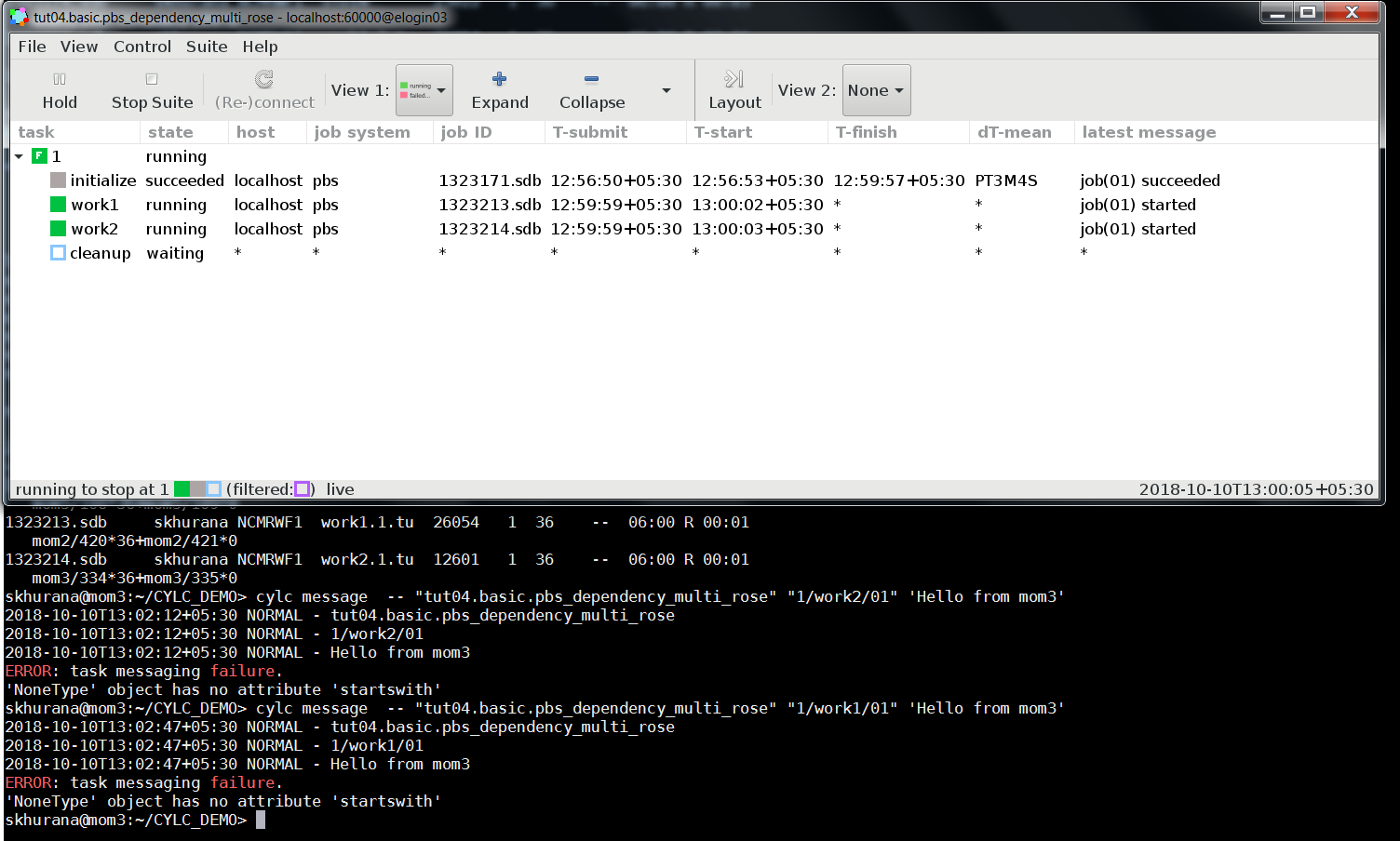
Tried using cylc ping
skhurana@mom3:~/CYLC_DEMO> cylc  ping  tut04.basic.pbs_dependency_multi_rose 1/work2/01
Invalid task ID: 1/work2/01
it also reports invalid task id.
UPDATE2:
suspecting eloginXX --- momXX connectivity, I tried setting up cylc job between elogin02 & elogin03 using background method with[[[remote]]], This also fails to update the job state.
#[meta]
#    title = "The cylc Hello World! suite"
[scheduling]
    [[dependencies]]
        graph = "initialize => work1 & work2 => cleanup"
[runtime]
    [[initialize]]
        script = "echo '==init==';date;echo Hello;sleep 4m;  /bin/hostname"
        [[[job]]]
                batch system = background
        [[[remote]]]
                host=elogin02
    [[work1]]
        script = "echo '==work1==';date;sleep 4m; /bin/hostname"
        [[[job]]]
                batch system = background
        [[[remote]]]
                host=elogin02
    [[work2]]
        script = "echo '==work2==';date;sleep 4m;  /bin/hostname"
        [[[job]]]
                batch system = background
    [[cleanup]]
        script = "echo '==cleanup==';date;sleep 4m;  /bin/hostname"
        [[[job]]]
                batch system = background
also , with aforementioned setup i ran rose suite-run from elogin03. cylc run works from elogin03
skhurana@elogin03:~> cylc message -- tut04.basic.pbs_dependency_multi_rose 1/initialize/01 'hello from elogin03'
whereas from elogin02, it fails
skhurana@elogin02:~> cylc message -- tut04.basic.pbs_dependency_multi_rose 1/initialize/01 'hello from elogin02'
2018-10-10T14:21:19+05:30 INFO - hello from elogin02
2018-10-10T14:21:20+05:30 WARNING - Message send failed, try 1 of 7: Cannot connect: http://elogin03:60000/put_messages: HTTPConnectionPool(host='elogin03', port=60000): Max retries exceeded with url: /put_messages (Caused by NewConnectionError('<urllib3.connection.HTTPConnection object at 0x7ff34d1fd310>: Failed to establish a new connection: [Errno 111] Connection refused',))
   retry in 5.0 seconds, timeout is 30.0
....
puneet336
on 10 Oct 2018
@puneet336 Add a --debug, i.e. cylc message --debug -- ... and see if it reports a traceback. You may want to hack around lib/cylc/network/httpclient.py (look for the put_messages method) to see if you can find more clues.
matthewrmshin
on 10 Oct 2018
@matthewrmshin seems --debug was introduced after cylc v7.5.0, will try your suggestions with v7.7.0.
puneet336
on 10 Oct 2018
(Yes. Before that, I think you may be able to switch on debug mode by doing export CYLC_DEBUG=True in the environment before launching the command.)
matthewrmshin
on 10 Oct 2018
@matthewrmshin ,
Here is how i managed to reproduce the issue:
the elogin03 has two ip addresses, say - xx.xx.xx.xx & yy.yy.yy.yy. When cylc job is launched, the ss command on elogin03 reports following while cylc is running-
Netid  State      Recv-Q Send-Q Local Address:Port               Peer Address:Port
tcp    LISTEN     0      5      xx.xx.xx.xx:60000                 *:*                   users:(("python",pid=25638,fd=14))
tcp    LISTEN     0      5         *:43053                          *:*                   users:(("python",pid=26718,fd=13))
I ran the flask app (hello.py) on xx.xx.xx.xx interface instead of 0.0.0.0 as -
skhurana@elogin03:~/FLASK> flask run --host=xx.xx.xx.xx --port=60000
now, the client code's (client.py) error message looked familiar :)
skhurana@elogin02:~/FLASK/OLD> python client.py
Traceback (most recent call last):
  File "client.py", line 2, in <module>
    r = requests.get('http://elogin03:60000/test')
  File /home/apps/SiteSoftwares/gnu/PYTHONPACKAGES/2.7.9/ucs4/gnu/4.8.5/REQUESTS/2.18.4/lib/python2.7/site-packages/requests-2.18.4-py2.7.egg/requests/api.py, line 72, in get
    return request('get', url, params=params, **kwargs)
  File "/home/apps/SiteSoftwares/gnu/PYTHONPACKAGES/2.7.9/ucs4/gnu/4.8.5/REQUESTS/2.18.4/lib/python2.7/site-packages/requests-2.18.4-py2.7.egg/requests/api.py", line 58, in request
    return session.request(method=method, url=url, **kwargs)
  File "/home/apps/SiteSoftwares/gnu/PYTHONPACKAGES/2.7.9/ucs4/gnu/4.8.5/REQUESTS/2.18.4/lib/python2.7/site-packages/requests-2.18.4-py2.7.egg/requests/sessions.py", line 508, in request
    resp = self.send(prep, **send_kwargs)
  File "/home/apps/SiteSoftwares/gnu/PYTHONPACKAGES/2.7.9/ucs4/gnu/4.8.5/REQUESTS/2.18.4/lib/python2.7/site-packages/requests-2.18.4-py2.7.egg/requests/sessions.py", line 618, in send
    r = adapter.send(request, **kwargs)
  File "/home/apps/SiteSoftwares/gnu/PYTHONPACKAGES/2.7.9/ucs4/gnu/4.8.5/REQUESTS/2.18.4/lib/python2.7/site-packages/requests-2.18.4-py2.7.egg/requests/adapters.py", line 508, in send
    raise ConnectionError(e, request=request)
requests.exceptions.ConnectionError: HTTPConnectionPool(host='elogin03', port=60000): Max retries exceeded with url: /test (Caused by NewConnectionError('<urllib3.connection.HTTPConnection object at 0x7f632029f410>: Failed to establish a new connection: [Errno 111] Connection refused',))
The temporary fix:
in lib/cylc/network/httpserver.py, around line#136
#        cherrypy.config["server.socket_host"] = get_host()
        cherrypy.config["server.socket_host"] = "0.0.0.0"
With this edit, the task states in rose GUI is now getting updated automatically (tested with pbs + remote background jobs)
Could you please suggest a better solution?
puneet336
on 10 Oct 2018
@puneet336 - I guess the different behavior at your site, compared to others who don't have this problem, might be down to local network configuration (what does get_host() return, and why doesn't it work at your site?). My level of networking wizardry is unfortunately not high! If you have (or can get) any insight into this yourself, perhaps we can come up with a solution that works equally everywhere...
hjoliver
on 11 Oct 2018
My level of networking wizardry is unfortunately not high!
Ditto.
matthewrmshin
on 11 Oct 2018
Ditto the above as well. But if I had to investigate this problem, I would either have a look by myself at the route table and default gateways (you can google that for you operating system, or try route -n and ip route show table all.), or explain the problem to a network engineer familiar with the network topology.
Explaining that it works for 0.0.0.0, but not for the result of get_host() (which you can get debugging in Python perhaps, or look at the setting you are using), might be enough to give the network engineer some place to start investigating it.
Hope that helps
Bruno
 kinow
on 11 Oct 2018
kinow
on 11 Oct 2018
thanks @kinow for suggestions,
@hjoliver @matthewrmshin @kinow , i am able sense lots of humbleness in your previous replies :smiley:
The last time i checked, i can recall that
in 7.7.0 the get_host returned - "elogin03" (i am sure elogin03 gets resolved to xx.xx.xx.xx), whereas,
in 7.5.0 (no httpserver.py had to follow "server.socket_host" trail) it seems 0.0.0.0 is hardcoded.
The 0.0.0.0 & yy.yy.yy.yy adresses work & so far there are no complaints from users at my site :relaxed:
We can close this issue for now.
I hope upcoming cylc version allows user to "have a say" in the choice of network interface/ip address using config files/switches (just a wish :smiley: )
Though, I am in touch with site network engineers to check if there is something amiss with the networking on xx.xx.xx.xx. Once i have more updates on this issue i will definitely share.
puneet336
on 12 Oct 2018
Note: The change from 0.0.0.0 to get_host was part of #2373 to fix Codacy's rant. See https://github.com/cylc/cylc/pull/2373#discussion_r175458148 - I did not think that it would give us so much issue afterwards. :cry:
matthewrmshin
on 12 Oct 2018
All - we could certainly make that network setting configurable, but it would be good to know definitively what the default should be, what the alternatives (and their consequences) are, and what we should recommend in the documentation...
hjoliver
on 13 Oct 2018
(Issue name changed to reflect what the problem turned out to be.)
hjoliver
on 13 Oct 2018
thanks @hjoliver ,
agree with codacy, openstack is a holy website for network security folks,
and if a vunerability is listed they have to act.
puneet336
on 15 Oct 2018
Note: The setting is (sort-of) configurable via [suite host self-identification] in global.rc - if you are able to hard-wire the suite host's name or IP address. (This does not work if the global.rc is deployed on a file system shared amongst multiple suite hosts.)
matthewrmshin
on 15 Oct 2018
@puneet336 - if you are still out there - if you have worked around this, I think we can close this issue as wont-fix. Cylc-8 will not use Cherrpy at all and we haven't had reports of others hitting this problem so I'd prefer not to put time into it at this point.
hjoliver
on 7 Mar 2019
i've moved onto a different project - which doesn't require rose suite/cylc.
though, i'll definitely check cylc-8, closing this issue .
puneet336
on 8 Mar 2019
Related issues
kinow
·
4Comments
kinow
·
4Comments
hjoliver
·
5Comments
kinow
·
4Comments
 oliver-sanders
·
4Comments
oliver-sanders
·
4Comments
Most helpful comment
Ditto the above as well. But if I had to investigate this problem, I would either have a look by myself at the route table and default gateways (you can google that for you operating system, or try
route -nandip route show table all.), or explain the problem to a network engineer familiar with the network topology.Explaining that it works for
0.0.0.0, but not for the result ofget_host()(which you can get debugging in Python perhaps, or look at the setting you are using), might be enough to give the network engineer some place to start investigating it.Hope that helps
Bruno