Cxbx-reloaded: Textures show all-black incorrectly (seems video card dependent?)
Currently, there are multiple reports of incorrect textures, being rendered as all-black, either the entire screen (like in issue #300 and #312) or partially (like in issue #271).
This behaviour shows in JSRF, Turok, and maybe others. (By the way : this has not always been the case - Turok for example did show completely rendered graphics some time ago.)
For this issue,
- try to find a small, fast to debug test-case that shows the same behavior
- failing that, try to do a bisect with Turok to find a breaking change (if any)
- in any case, analyze what the software is doing wrong in the current code
- see if it's related to the host's video card
- add checks on the validity of render targets (based on texture format)
- log the output
- try to add fallback paths in a nice, generic way
- if this fixes anything : test for regressions and submit a Pull Request
- report all findings in this issue
 PatrickvL
All 17 comments
it has nothing to with gpu or cpu its api issuses
 nickolesjones
on 15 Apr 2017
nickolesjones
on 15 Apr 2017
@nickolesjones actually I have noticed that the emulator favors Nvidia GPUs. I'll put a PC together with old parts and see again, but Nvidia always seems to do better
 BenNottelling
on 16 Apr 2017
BenNottelling
on 16 Apr 2017
@BenNottelling I'm thinking it might be an issue with AMD cards, because Intel also works better than AMD (and I'm guessing just as well as Nvidia.)
 escape209
on 16 Apr 2017
escape209
on 16 Apr 2017
well i tested with a tun of different build types "amd with intel" " intel
with nvidia " amd with nvidia" "amd with amd" intelhd with intel" mostly
because broken vertex buffer code line that isnt quite right i need to
implement dx9 to find the broken code line cause debugging with dx8 is
almost impossible cause it doesn't read out right on newer oses and mostly
wont boot or detect right
On Sun, Apr 16, 2017 at 3:55 AM, Adam Diffin notifications@github.com
wrote:
@BenNottelling https://github.com/BenNottelling I'm thinking it might
be an issue with AMD cards, because Intel also works better than AMD (and
I'm guessing just as well as Nvidia.)—
You are receiving this because you were mentioned.
Reply to this email directly, view it on GitHub
https://github.com/Cxbx-Reloaded/Cxbx-Reloaded/issues/355#issuecomment-294343391,
or mute the thread
https://github.com/notifications/unsubscribe-auth/ANY7uaka1hatqBzSiOQjIhCo338y3s-Zks5rweWEgaJpZM4M5r29
.
nickolesjones
on 19 Apr 2017
so no its not video card dependent its a broken vertex buffer and sharder
issue cause the shadow are not displaying right impling that thats a shader
issue and the vertex issue are the people being displayed incorrectly and
incorrect items
On Tue, Apr 18, 2017 at 10:26 PM, [email protected] <
[email protected]> wrote:
well i tested with a tun of different build types "amd with intel" " intel
with nvidia " amd with nvidia" "amd with amd" intelhd with intel" mostly
because broken vertex buffer code line that isnt quite right i need to
implement dx9 to find the broken code line cause debugging with dx8 is
almost impossible cause it doesn't read out right on newer oses and mostly
wont boot or detect rightOn Sun, Apr 16, 2017 at 3:55 AM, Adam Diffin notifications@github.com
wrote:@BenNottelling https://github.com/BenNottelling I'm thinking it might
be an issue with AMD cards, because Intel also works better than AMD (and
I'm guessing just as well as Nvidia.)—
You are receiving this because you were mentioned.
Reply to this email directly, view it on GitHub
https://github.com/Cxbx-Reloaded/Cxbx-Reloaded/issues/355#issuecomment-294343391,
or mute the thread
https://github.com/notifications/unsubscribe-auth/ANY7uaka1hatqBzSiOQjIhCo338y3s-Zks5rweWEgaJpZM4M5r29
.
nickolesjones
on 19 Apr 2017
mostly api issues right now with dx8 though some of dx9 code is the same
only a few addresses in the code need to change to make different
refreances to idirectddevices8 to idirectddevices9 and so on mostly dx9
shortens the code of what dx8 was
On Tue, Apr 18, 2017 at 10:30 PM, [email protected] <
[email protected]> wrote:
so no its not video card dependent its a broken vertex buffer and sharder
issue cause the shadow are not displaying right impling that thats a shader
issue and the vertex issue are the people being displayed incorrectly and
incorrect itemsOn Tue, Apr 18, 2017 at 10:26 PM, [email protected] <
[email protected]> wrote:well i tested with a tun of different build types "amd with intel" "
intel with nvidia " amd with nvidia" "amd with amd" intelhd with intel"
mostly because broken vertex buffer code line that isnt quite right i need
to implement dx9 to find the broken code line cause debugging with dx8 is
almost impossible cause it doesn't read out right on newer oses and mostly
wont boot or detect rightOn Sun, Apr 16, 2017 at 3:55 AM, Adam Diffin notifications@github.com
wrote:@BenNottelling https://github.com/BenNottelling I'm thinking it might
be an issue with AMD cards, because Intel also works better than AMD (and
I'm guessing just as well as Nvidia.)—
You are receiving this because you were mentioned.
Reply to this email directly, view it on GitHub
https://github.com/Cxbx-Reloaded/Cxbx-Reloaded/issues/355#issuecomment-294343391,
or mute the thread
https://github.com/notifications/unsubscribe-auth/ANY7uaka1hatqBzSiOQjIhCo338y3s-Zks5rweWEgaJpZM4M5r29
.
nickolesjones
on 19 Apr 2017
Here is how looks Dashboard 4920 on bd29526e (Mar 2 2018) with AMD GPU (5830 1GB GDDR5)
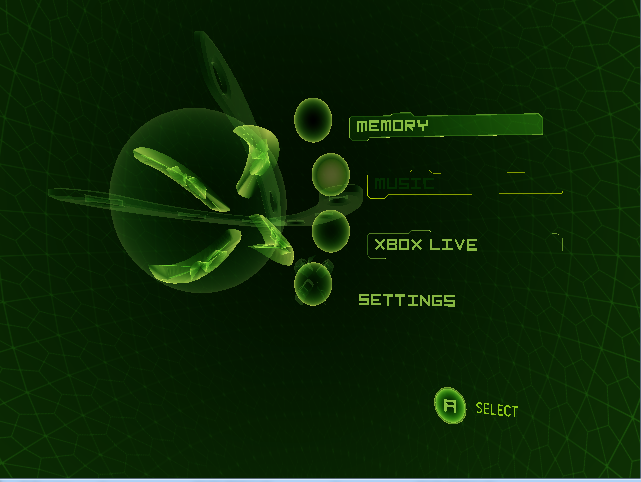
And here is on NVIDIA 220GT:
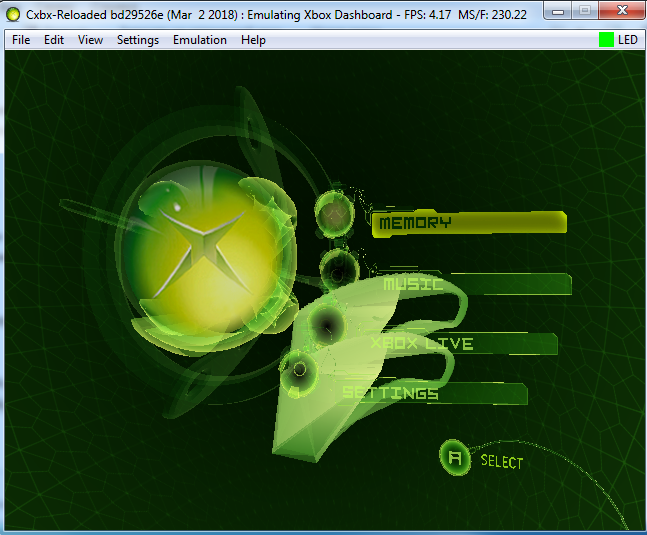
Earlier there is was solution - using wined3d. Now its not working- wined3d just crashing.
 gandalfthewhite19890404
on 4 Mar 2018
gandalfthewhite19890404
on 4 Mar 2018
I tested dashboard on e2395e6a-trace on original d3d8 and with wined3d 2.19. With wined3d there is no graphic issues (only bit slower), retail d3d8 has issue like on screenshots.
Here is two debug logs with AMD 5830:
- Original d3d8 from cxbx_r
KrnlDebug_Retail.zip - d3d8 from WineD3D 2.19
KrnlDebug_W3D.zip
gandalfthewhite19890404
on 16 Apr 2018
I think its related too:
https://github.com/Cxbx-Reloaded/Cxbx-Reloaded/issues/1540
Maybe better to copy content of 1540 here and just close 1540, and track progress here. Its common thing for ATI/AMD and some of Intel GPUs.
gandalfthewhite19890404
on 30 Jan 2019
Please do
PatrickvL
on 30 Jan 2019
I've put all the d3d dll files from wined3d in cxbx folder. Now vcop3 run and I can see graphics but the game is absolutly unplayable is too slow. Win7 64 bit old xeon 3ghz ati hd7970
 xbrunox76
on 30 Jan 2019
xbrunox76
on 30 Jan 2019
WineD3D and other wrappers - not a solution! Its just hide a problem,
gandalfthewhite19890404
on 30 Jan 2019
In my opinion, we should create a list of affecting titles in the OP post just like #1263 did.
 RadWolfie
on 30 Jan 2019
RadWolfie
on 30 Jan 2019
This issue could be reworked and used for that, just rename it and reorganize a first comment.
gandalfthewhite19890404
on 30 Jan 2019
@RadWolfie The list would be very long because the third of the games are blocked with this black screens.
I do not know how to scale up for such lists. May be on the future website;) Or create a new problem #1554 with a comment restriction. and that one or more people are working on these fixes. Once it is FIXED an update of the game written in the comments of the problem #1554. knowing that the space used for everyone to offer their tests would be #1263 (time to confirm)
 AzurikRiseOfPerathia
on 17 Feb 2019
AzurikRiseOfPerathia
on 17 Feb 2019
In any case it would be almost obligatory to start taking an interest in this subject because the work starts to be insane, if we still wind it could make things worse.
AzurikRiseOfPerathia
on 17 Feb 2019
Hi all I've tested the last version of cxbx now Vcop3 run well on my ATI hd7970 too.
but the emulation on my i7 is very slow....
xbrunox76
on 9 Jul 2019
Related issues
 chrisderwahre
·
4Comments
gandalfthewhite19890404
·
4Comments
PatrickvL
·
4Comments
PatrickvL
·
4Comments
PatrickvL
·
3Comments
chrisderwahre
·
4Comments
gandalfthewhite19890404
·
4Comments
PatrickvL
·
4Comments
PatrickvL
·
4Comments
PatrickvL
·
3Comments